
Password correct. Please wait...
Disable the chat with .custom-disable-chat
WP Plugin Comparisonby neo-wp.com


WP Plugin Wp Smushit
Comparison & Alternatives
The 11 best alternatives to the WordPress plugin Wp Smushit by WPMU DEV - Your All-in-One WordPress Platform
- neo Optimize - neo WP Media Image Plugins
- Ewww Image Optimizer - Shane Bishop
- Webp Converter For Media - Mateusz Gbiorczyk
- Shortpixel Image Optimiser - ShortPixel
- Imagify - WP Media
- Wp Optimize - David Anderson / Team Updraft
- Image Optimization - Elementor
- Optimole Wp - Optimole
- Robin Image Optimizer - Themeisle
- Tiny Compress Images - TinyPNG
- Optimus - KeyCDN
WordPress Plugin Best List
Comparison & Ranking
Number #
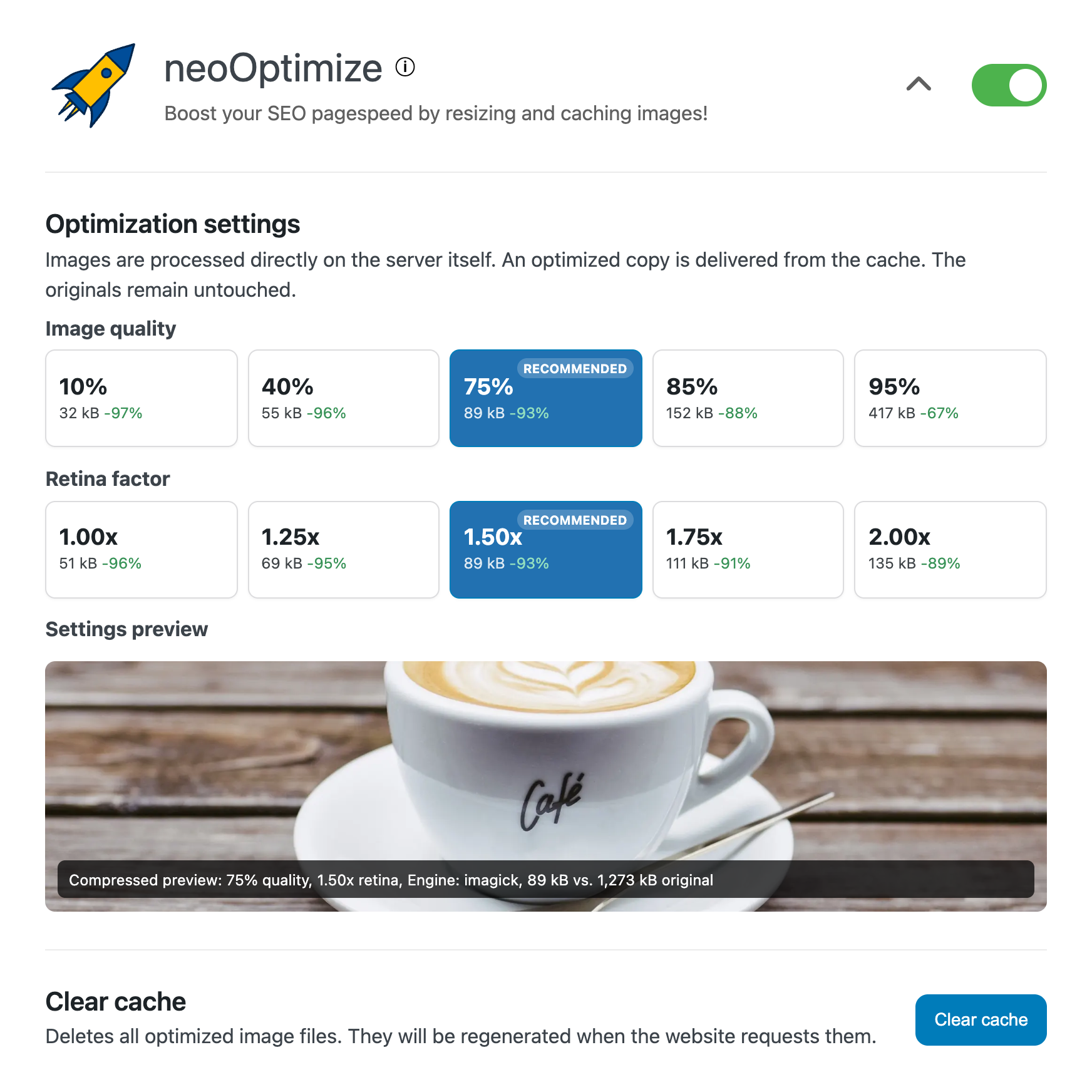
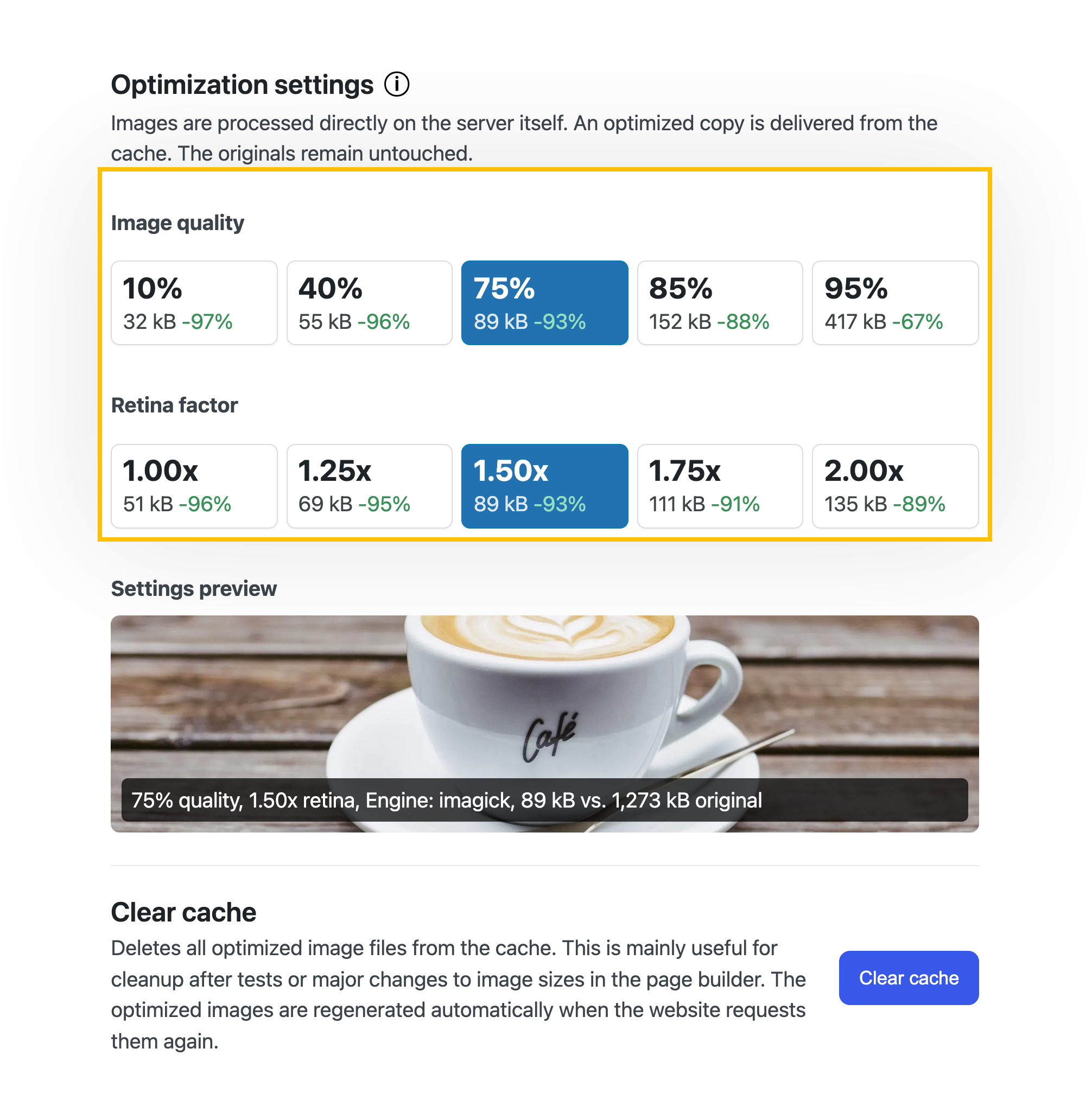
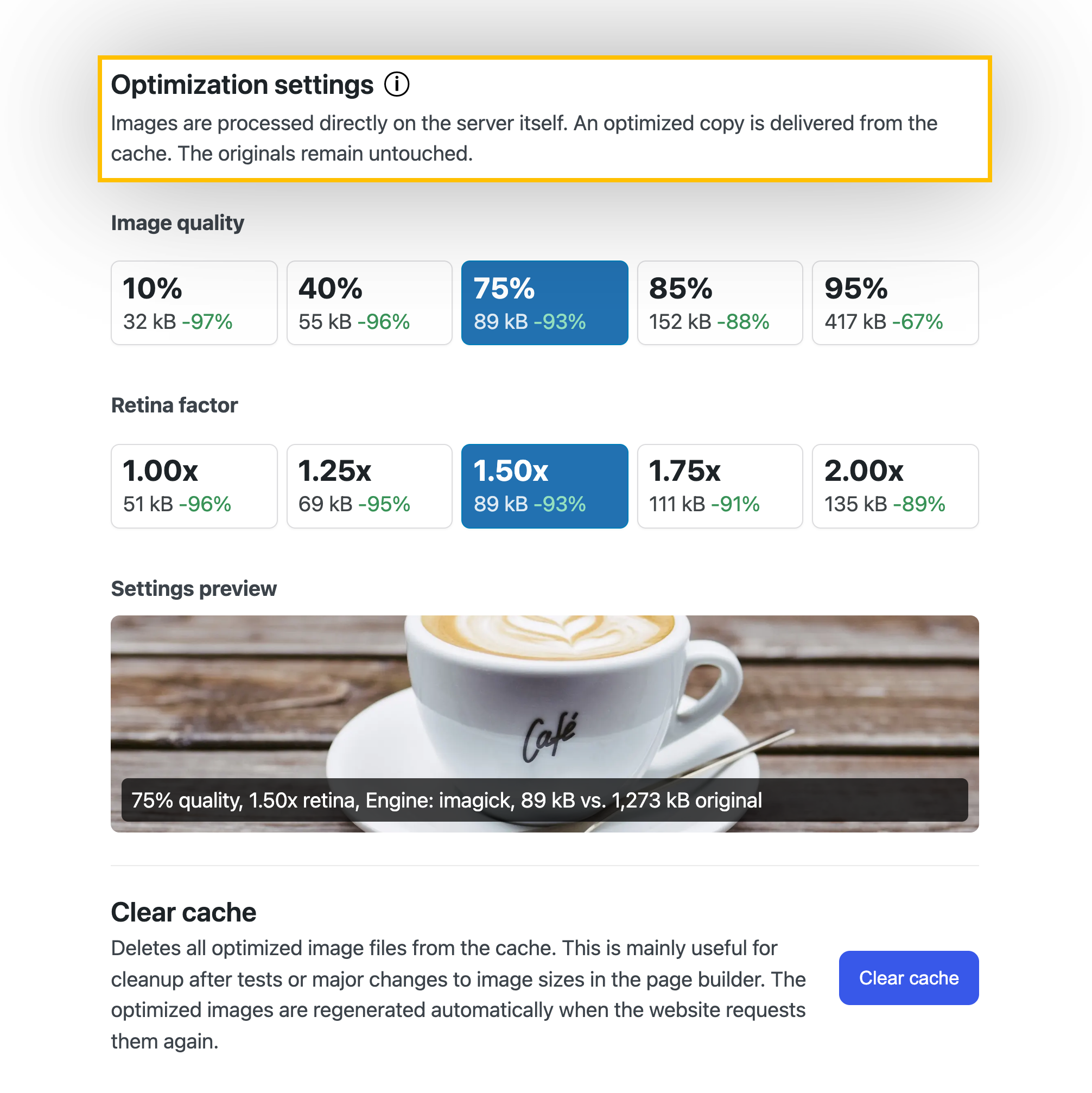
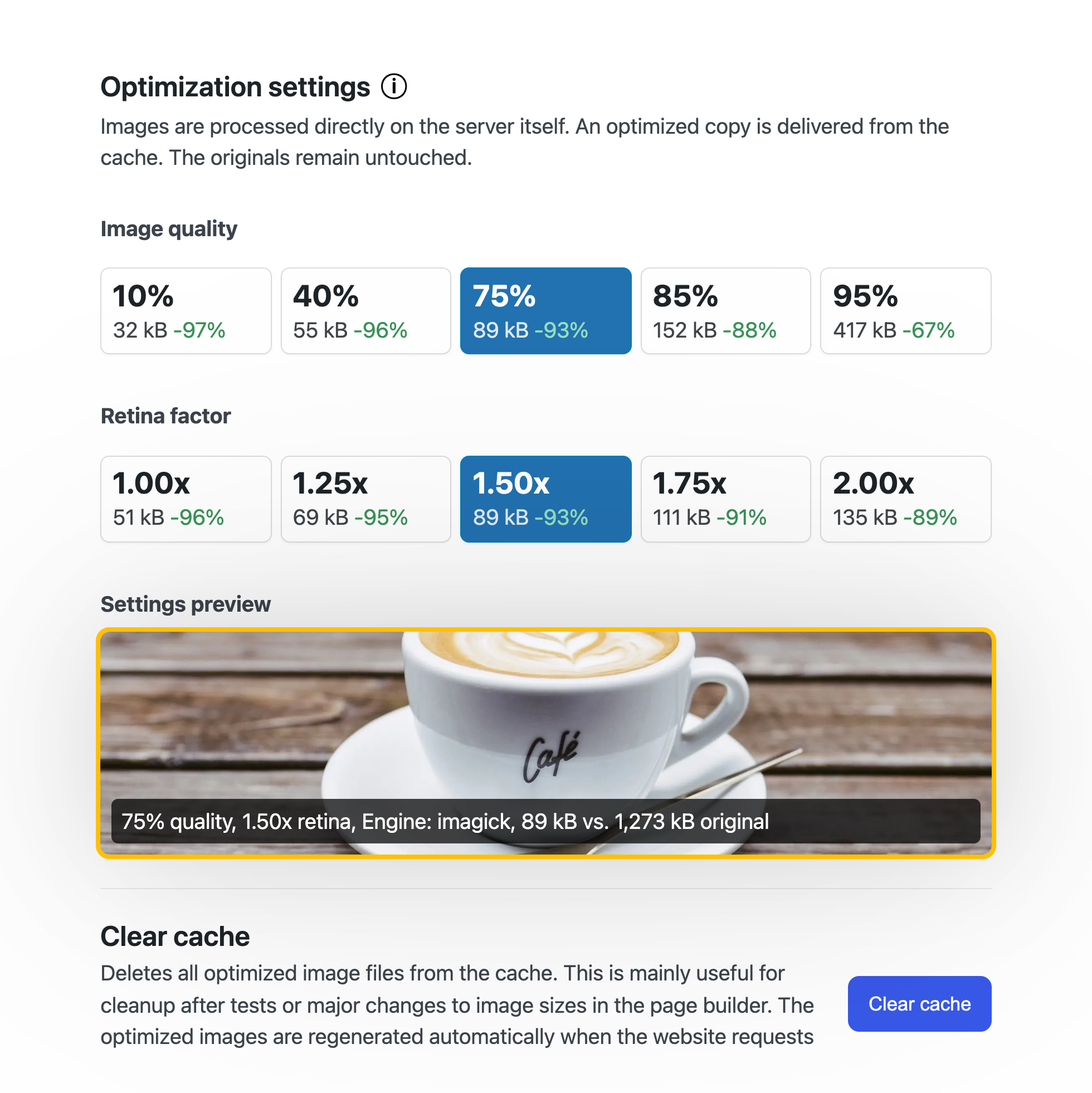
neo Optimize - resize and cache images - the original stays untouched
The WordPress plugin neo Optimize from neo WP Media Image Plugins was released on 2026-08-13 and is part of the new neoWP plugin series. The plugin uses the capabilities of modern web development, reflected in its performance and intuitive design. Reviews indicate that since its release the plugin has delighted users with well-chosen and cleverly implemented features. Particularly noteworthy is the solid coding. A look at the source code confirms that a company with experienced software developers stands behind the plugin.
“The plugins in the neo package are very well coordinated and solve all common image problems in WordPress.”
Features - Powerful tools cleverly implemented
- Maximize your images' SEO ranking
- Original images and database remain untouched
- Resizing on your own server
- Free AVIF and WebP support for delivered images
- Optimization of neo Draw SVG graphics
- Image scaling based on display size in the frontend
- Adjustable retina factor and image engine (Pro)
- Minimize raster graphics in SVG files (Pro)
- SEO-friendly, automatically generated alt texts based on SVG text contents (Pro)
“Great what you can do with neo Rename. The Pro version takes it even further.”
Technical details - Modern implementation with high compatibility
The plugin neo Optimize is available for free for download in the current version 26.8.25. It requires at least WordPress version 6.2 and PHP version 8.0 or higher. The plugin was tested up to the current version 7.1 by the beta tester group. The developers released the last update in 2026-08. The continuous updating and expansion of the plugin reflects the commitment to further development.
“It is convenient to get all media plugins from a single developer. The complete neo universe runs performant, reliable and stable.”
Quality and support - Fast and helpful assistance
Support for neo Optimize receives predominantly positive feedback, mainly due to fast response times and effective problem solving. Many users report that the developers provide dedicated and helpful support for both the free and Pro versions. The neo WP team is directly reachable via the developers' site by chat, email and contact form. In addition, the official support forum is available for further assistance.
“The developers respond quickly, personally and are very helpful.”
Conclusion - Very high-quality WordPress plugin package
The plugin neo Optimize lives up to its slogan “Optimize your image SEO by serving images at the resolution they are displayed in the browser.” in every way. Even in the free version the entire neo plugin series offers a comprehensive solution for the typical needs of media management in WordPress. For anyone already using neo Optimize, it’s worth taking a look at the other plugins from neo WP.
Show more
Detailed plugin information
Plugin slug: neo-optimize
Plugin name: neoOptimize
Plugin title: neo Optimize - Bilder resizen und cachen - das Original bleibt unberührt
Plugin keywords: #optimize #optimizer #resize #compress #cache
Plugin version: 26.8.25
Last updated: 2026-08
Release date: 2026-08-13
Required WP version: 6.2
Required PHP version: 8.0
Tested with WP version: 7.1
Active installations: 30+
Average rating: 5.0
Number of reviews: 1
Number of support requests: 1 (in the last 2 months)
Number of Resolved Support Requests: 1 (in the last 2 months)
Plugin author: neo WP Media Image Plugins
Developer homepage: https://neo-wp.com/?plugin-slug=neo-optimize&edition=wporg&ref=entry-file
WP developer profile page: https://profiles.wordpress.org/neoplugins/
Support URL in the WordPress Plugin Directory: https://wordpress.org/support/plugin/neo-optimize/
Developer support URL: https://wordpress.org/support/plugin/neo-optimize/#fallback-commercial-support-url
WP Plugin Directory: https://wordpress.org/plugins/neo-optimize/
0.0
/ 10
#optimize #optimizer #resize #compress #cache
Number #
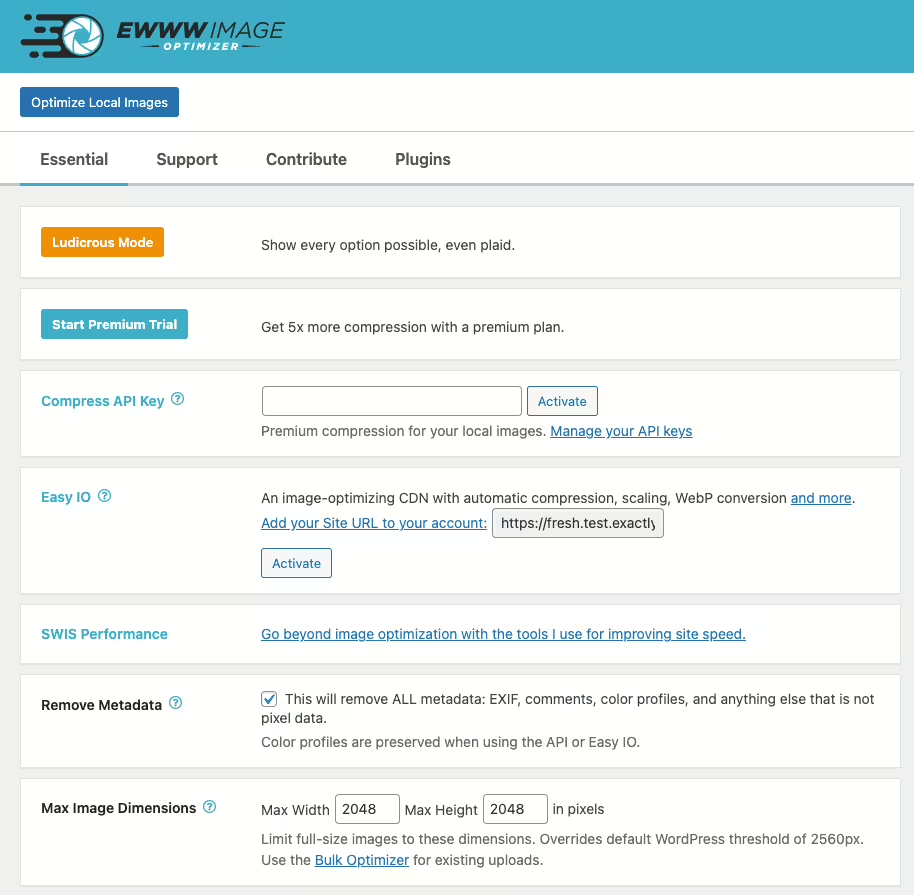
EWWW Image Optimizer - overview of its features
EWWW Image Optimizer is a WordPress plugin from Exactly WWW, that improves site performance through image optimization and has over 1 000 000+ active installations.
"Optimizes all current and newly added images like magic."
Features - Wide range of image optimization tools
- Server-side image optimization - Full control without external servers.
- Bulk optimization - Optimize all images on a website in one step.
- WebP conversion - Faster load times and reduced storage usage.
- Automatic image optimization - For new images (Pro).
- Pixel-perfect optimization - Precise control over image quality.
- CDN support - Integration with various CDNs.
- Commercial license - Free and accessible to everyone.
Technical details - Entry points for developers
EWWW Image Optimizer uses server-side WordPress installations with support from WP-CLI to handle large image volumes. Using GD, ImageMagick, and other tools enables precise compression settings. WebP can be converted with the GD library, and storing metadata in databases increases traceability.
Quality and support - High image quality and reliable service
The plugin preserves high image quality even after compression. Support is free via WordPress.org, with fast email support through the official website. Users praise the personal support especially for the Pro version, despite occasional wait times.
"Excellent support and quick solutions despite complex issues."
Conclusion - Strengths and room for improvement
The EWWW Image Optimizer provides effective image optimization on WordPress with server-side processing and WebP conversion. Free use and broad compatibility make it appealing. The community is mostly satisfied despite security warnings and isolated criticisms. Continuous improvements are being made, which makes EWWW Image Optimizer one of the best plugins in its field.
Show more
Detailed plugin information
Plugin slug: ewww-image-optimizer
Plugin name: Ewww Image Optimizer
Plugin title: EWWW Image Optimizer
Plugin keywords: #compress #convert #lazy load #resize #webp
Plugin version: 8.7.6
Last updated: 2026-08
Release date: 2012-06-07
Required WP version: 6.8
Required PHP version: 7.4
Tested with WP version: 7.1
Active installations: 1 000 000+
Average rating: 4.8
Number of reviews: 1 838
Number of support requests: 6 (in the last 2 months)
Number of support requests resolved: 5 (in the last 2 months)
Plugin author: Shane Bishop
Developer homepage: https://wordpress.org/plugins/ewww-image-optimizer/
WP developer profile page: https://profiles.wordpress.org/nosilver4u/
Support URL in the WordPress Plugin Directory: https://wordpress.org/support/plugin/ewww-image-optimizer/
Developer support URL: https://ewww.io/
WP Plugin Directory: https://wordpress.org/plugins/ewww-image-optimizer/
0.0
/ 10
#compress #convert #lazy load #resize #webp
Number #
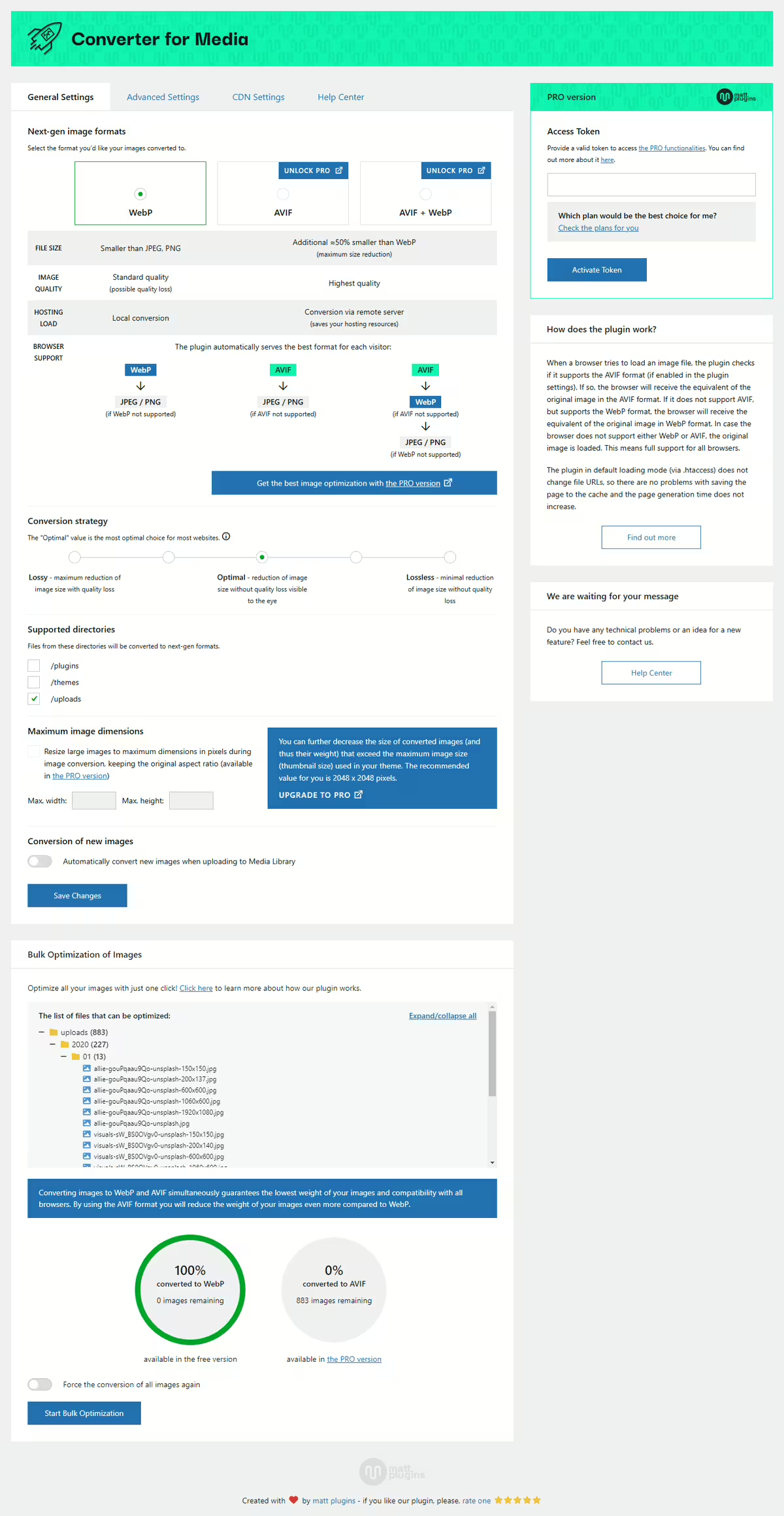
Introduction - Revolutionary Image Optimization for WordPress
Webp Converter For Media by matt plugins - Optimize images by convert WebP & AVIF revolutionizes image optimization with an impressive number of active users. It converts images to WebP and AVIF, significantly reduces file size and improves website performance without quality loss. With its fully automatic optimization it supports most modern browsers and is highly rated in the WordPress Plugin Directory.
"The plugin delivers what has been promised to us since WordPress 6.0: a proper way to replace JPEG and PNG with WebP images to make our websites faster."
Features - Comprehensive and Efficient Image Conversion
- Image Optimization - Automatic conversion to WebP.
- AVIF Support - (Pro) Even better compression.
- Support for additional directories (Pro) Optimization beyond that.
- Original image safety remain untouched.
- No redirects Direct image delivery.
- No trace left Complete removal of traces.
- Access to advanced features (Pro) For better performance.
Technical details - lean architecture for versatile use
Webp Converter For Media uses custom PHP routines for image conversion, avoids integration issues with caching solutions and offers an alternative via PHP loading path. Supports directory image optimization and can be extended via shortcodes and APIs.
System requirements are PHP 7.4, WordPress 4.9, tested up to 5.8, latest version 6.6.5. Updated in 2026-08 for maximum compatibility.
Quality and support - high efficiency and exemplary support
The plugin provides excellent compression without visible quality loss which improves load times and user experience. Support is described as fast and effective with praise for the dedicated assistance via Support Forum and Developer Page. Individual users mention areas for improvement on specific issues.
"The team's support is outstanding and really fast. Thanks, Mateusz, for your great work."
Conclusion - efficient and popular solution for image optimization
The Webp Converter For Media plugin by Mateusz Gbiorczyk effectively optimizes images and is highly regarded by users. It impresses with comprehensive features though there is room for improvement in communicating Pro features. Despite that it remains a preferred choice among WordPress users due to flexibility and performance improvements.
Show more
Detailed plugin information
Plugin slug: webp-converter-for-media
Plugin name: Webp Converter For Media
Plugin title: Converter for Media – Optimize images | Convert WebP & AVIF
Plugin-Keywords: #compress images #convert webp #image optimization #optimize images #webp
Plugin version: 6.6.5
Last updated: 2026-08
Release date: 2019-06-16
Required WP version: 4.9
Required PHP version: 7.4
Tested with WP version: 7.1
Active installations: 500 000+
Average rating: 4.9
Number of reviews: 1 097
Number of support requests: 6 (in the last 2 months)
Number of resolved support requests: 6 (in the last 2 months)
Plugin author: Mateusz Gbiorczyk
Developer homepage: https://mattplugins.com/products/webp-converter-for-media-pro
WP developer profile page: https://profiles.wordpress.org/mateuszgbiorczyk/
Support URL in the WordPress Plugin Directory: https://wordpress.org/support/plugin/webp-converter-for-media/
Developer support URL: https://wordpress.org/support/plugin/webp-converter-for-media/#fallback-commercial-support-url
WP Plugin Directory: https://wordpress.org/plugins/webp-converter-for-media/
0.0
/ 10
#compress images #convert webp #image optimization #optimize images #webp
Number #
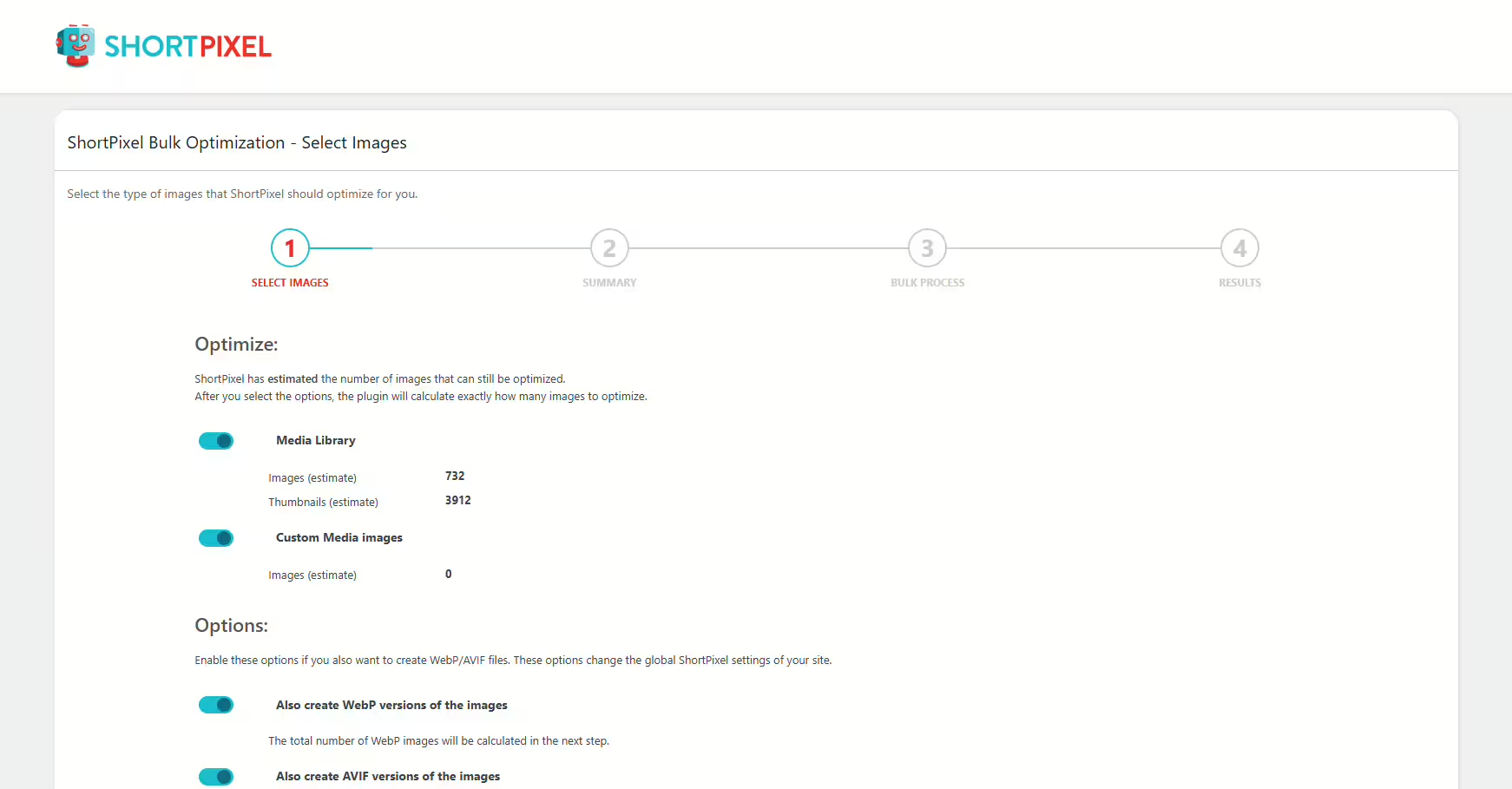
ShortPixel Image Optimizer - Versatile image optimization for WordPress
ShortPixel Image Optimizer is a WordPress plugin by ShortPixel, that boosts website speed by optimizing images and PDFs. Supports modern formats for better SEO and user experiences. Over 300 000+ installations and rated on average 4.5/5 in the WordPress Plugin Directory, based on 819 reviews.
"ShortPixel really sped up my website and significantly improved the results in GTmetrix and PageSpeed Insights."
Features - Various image optimization options
- Automatic conversion to WebP and AVIF - Improved performance and SEO.
- 100 free credits per month - Optimize images for free up to a limit.
- Compression of common formats - JPG, PNG, GIF, PDF.
- Backup of original images - Local backup with restore option.
- Bulk optimization (Pro) - Optimize all images with one click.
- Smart Cropping (Pro) - AI-assisted thumbnails.
- Integration with Cloudflare (Pro) - Automatic synchronization.
"With the Pro version of ShortPixel I was able to take my image optimization to a new level, and the integration with Cloudflare is a real bonus."
Technical details - Instructions and requirements
Meets advanced needs through actions and filter hooks, such as do_action( 'shortpixel_image_optimised', $post_id );. Min. PHP 7.4, WordPress version 4.8.0 required. Supports multisite installations for multiple websites. Regular updates provide security and compatibility.
"The ability to create different API keys for each installation is a big advantage."
Quality and support - Performance and user experiences
ShortPixel impresses with efficiency and WebP/AVIF integration. Support is praised for quick problem resolution. Some critical voices mention quality loss and technical difficulties. Adjustable compression levels are appreciated.
"I was amazed by the results this plugin delivers. Other optimization plugins do not reach ShortPixel's level."
Conclusion - A neutral overview of pros and cons
The ShortPixel Image Optimizer offers a compelling mix of features and usability. Background optimization is especially useful. Despite technical criticisms and backup issues, the flexible pricing model benefits casual users up to agencies. Quality under heavy compression should be improved.
Show more
Detailed plugin information
Plugin slug: shortpixel-image-optimiser
Plugin name: Shortpixel Image Optimiser
Plugin title: ShortPixel Image Optimizer – Optimize Images, Convert WebP & AVIF
Plugin keywords: #compress images #convert webp #image optimization #optimize images #resize
Plugin version: 6.5.5
Last updated: 2026-08
Release date: 2014-11-05
Required WP version: 4.8.0
Required PHP version: 7.4
Tested with WP version: 7.1
Active installations: 300 000+
Average rating: 4.5
Number of reviews: 819
Number of support requests: 1 (in the last 2 months)
Number of Resolved Support Requests: 1 (in the last 2 months)
Plugin author: ShortPixel
Developer homepage: https://shortpixel.com/
WP developer profile page: https://profiles.wordpress.org/shortpixel/
Support URL in the WordPress Plugin Directory: https://wordpress.org/support/plugin/shortpixel-image-optimiser/
Developer support URL: https://wordpress.org/support/plugin/shortpixel-image-optimiser/#fallback-commercial-support-url
WP Plugin Directory: https://wordpress.org/plugins/shortpixel-image-optimiser/
0.0
/ 10
#compress images #convert webp #image optimization #optimize images #resize
Number #
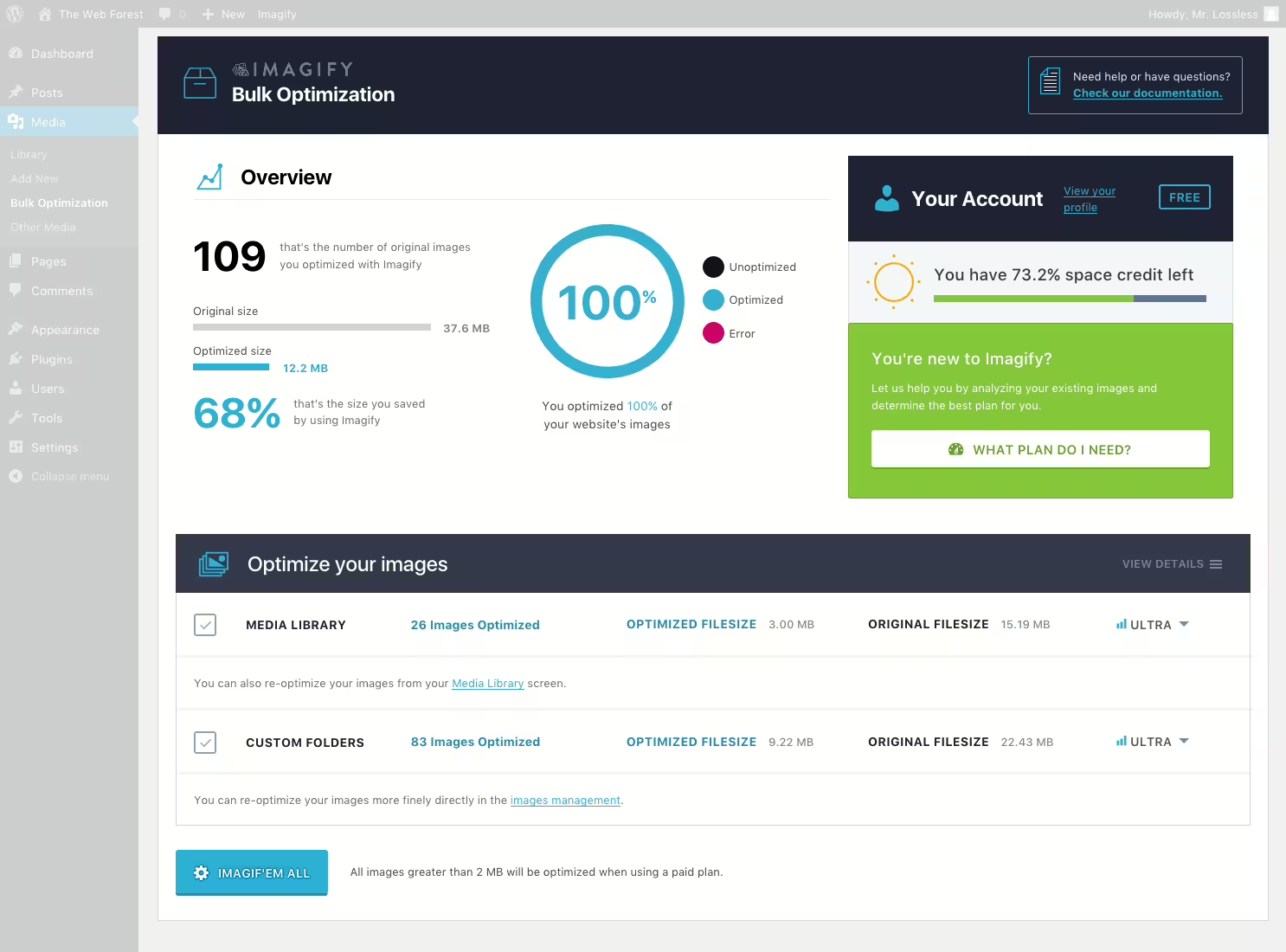
Imagify - Image optimization and WebP/AVIF conversion made easy
Imagify, developed by Imagify Image Optimizer, optimizes images efficiently without compromising quality. It enables asynchronous bulk optimization and conversion to WebP and AVIF, improving load times. With an average rating of 4.3 stars, the plugin is popular.
"The plugin helped me optimize the images on my site, which noticeably improved performance especially on mobile."
Features - Optimization tools and advanced options
- Bulk optimization - Asynchronous compression of multiple images at once.
- WebP/AVIF conversion - Improves load times using modern image formats.
- Server-side optimization - Saves your own server resources.
- 20 MB free optimization - About 200 images per month.
- Caching integration - Cooperation with WP Rocket to improve site performance.
- API communication - Requires API key to process images (Pro).
- Three compression levels - Normal, Aggressive, Ultra for customization.
"The license is fair, but if you seriously want to optimize, you should invest in the full version to bypass the limits of the free version."
Technical details - Important requirements and functionalities
API-powered image optimization with external server processing requires PHP version 7.4 and WordPress version 5.3. Current plugin version is 2.3.3. The requirements ensure stability and efficiency.
"The plugin requires certain minimum versions of PHP and WordPress to work smoothly, which makes sense given the complex tasks it has to handle."
Quality and support - Satisfaction and challenges
Excellent image compression without loss of quality; however heavy compression can cause blurriness. Support receives mixed reviews: fast, competent help but also delayed responses.
Conclusion - Strong features with room for improvement
Imagify offers comprehensive image optimization and integrates well into WordPress environments. Limitations of the free version and occasional technical issues should be considered. Support shows potential for improvement. Developed by WP Media, it is a good choice for users willing to invest in premium services.
Show more
Detailed plugin information
Plugin slug: imagify
Plugin name: Imagify
Plugin title: Imagify Image Optimization: Optimize Images | Compress & Convert to WebP/AVIF
Plugin keywords: #compress images #convert AVIF #convert webp #image optimization #optimize images
Plugin version: 2.3.3
Last updated: 2026-08
Release date: 2016-01-27
Required WP version: 5.3
Required PHP version: 7.4
Tested with WP version: 7.1
Active installations: 1 000 000+
Average rating: 4.3
Number of reviews: 1 653
Number of support requests: 2 (in the last 2 months)
Number of resolved support requests: 2 (in the last 2 months)
Plugin author: WP Media
Developer homepage: https://wordpress.org/plugins/imagify/
WP developer profile page: https://profiles.wordpress.org/wp_media/
Support URL in the WordPress Plugin Directory: https://wordpress.org/support/plugin/imagify/
Developer support URL: https://wordpress.org/support/plugin/imagify/#fallback-commercial-support-url
WP Plugin Directory: https://wordpress.org/plugins/imagify/
0.0
/ 10
#compress images #convert AVIF #convert webp #image optimization #optimize images
Number #
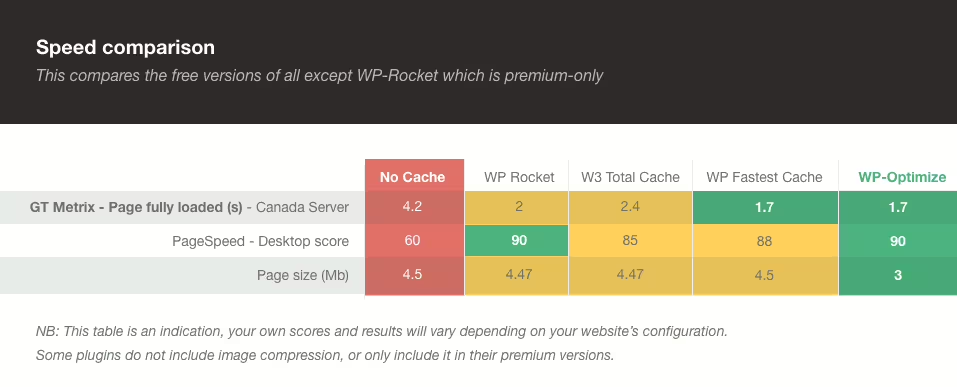
WP-Optimize - Efficient optimization for improved website performance
WP-Optimize increases, developed by TeamUpdraft, load times and performance. With 4.8 stars from 2 606 reviews it offers comprehensive features like caching, image compression and database cleanup.
"I love the simplicity of this plugin. Finally a caching plugin that I actually understand."
Features - Holistic optimization solutions
- Caching - Stores pages for faster access.
- Image compression - Compresses images for faster load times.
- Database cleanup - Removes redundant data to save resources.
- Minification - Optimizes HTML, CSS, JS for better performance.
- Cache Preloading - (Pro) Preloads cached content.
- Lazy Load - (Pro) Loads only visible content.
- Premium Support - (Pro) Prioritized support for complex settings.
"The Pro features have the potential to drastically improve our daily workflows. The additional features justify the price."
Technical details - Performance boost through innovative features
WP-Optimize improves performance through innovative database cleanup strategies and optimizes WooCommerce queries. It supports WP-CLI to automate site optimizations, which provides administrative efficiency for large networks.
Quality and support - Reliability with room for improvement
WP-Optimize is praised for reliable improvements in load times, although compatibility issues, for example with Elementor, occur. Users praise the support but want faster resolution times for complex requests. Support via official forum, for Pro users also separate contact.
"WP-Optimize does its job excellently, but compatibility with other plugins needs improvement."
Conclusion - Versatile but still improvable
WP-Optimize offers comprehensive optimization options for WordPress sites, developed by David Anderson. Despite impressive features there are some compatibility issues. It remains a solid choice for webmasters willing to accept occasional technical challenges.
Show more
Detailed plugin information
Plugin slug: wp-optimize
Plugin name: Wp Optimize
Plugin title: WP-Optimize – Cache, Compress images, Minify & Clean database to boost page speed & performance
Plugin keywords: #cache #caching #image cache #minify #performance cache
Plugin Version: 4.6.1
Last updated: 2026-08
Release date: 2009-01-21
Required WP version: 4.9
Required PHP version: 7.2
Tested with WP version: 7.1
Active installations: 1 000 000+
Average rating: 4.8
Number of reviews: 2 606
Number of support requests: 16 (in the last 2 months)
Number of resolved support requests: 16 (in the last 2 months)
Plugin author: David Anderson / Team Updraft
Developer homepage: https://teamupdraft.com/wp-optimize
WP developer profile page: https://profiles.wordpress.org/davidanderson/
Support URL in the WordPress Plugin Directory: https://wordpress.org/support/plugin/wp-optimize/
Developer support URL: https://wordpress.org/support/plugin/wp-optimize/#fallback-commercial-support-url
WP Plugin Directory: https://wordpress.org/plugins/wp-optimize/
0.0
/ 10
#cache #caching #image cache #minify #performance cache
Number #
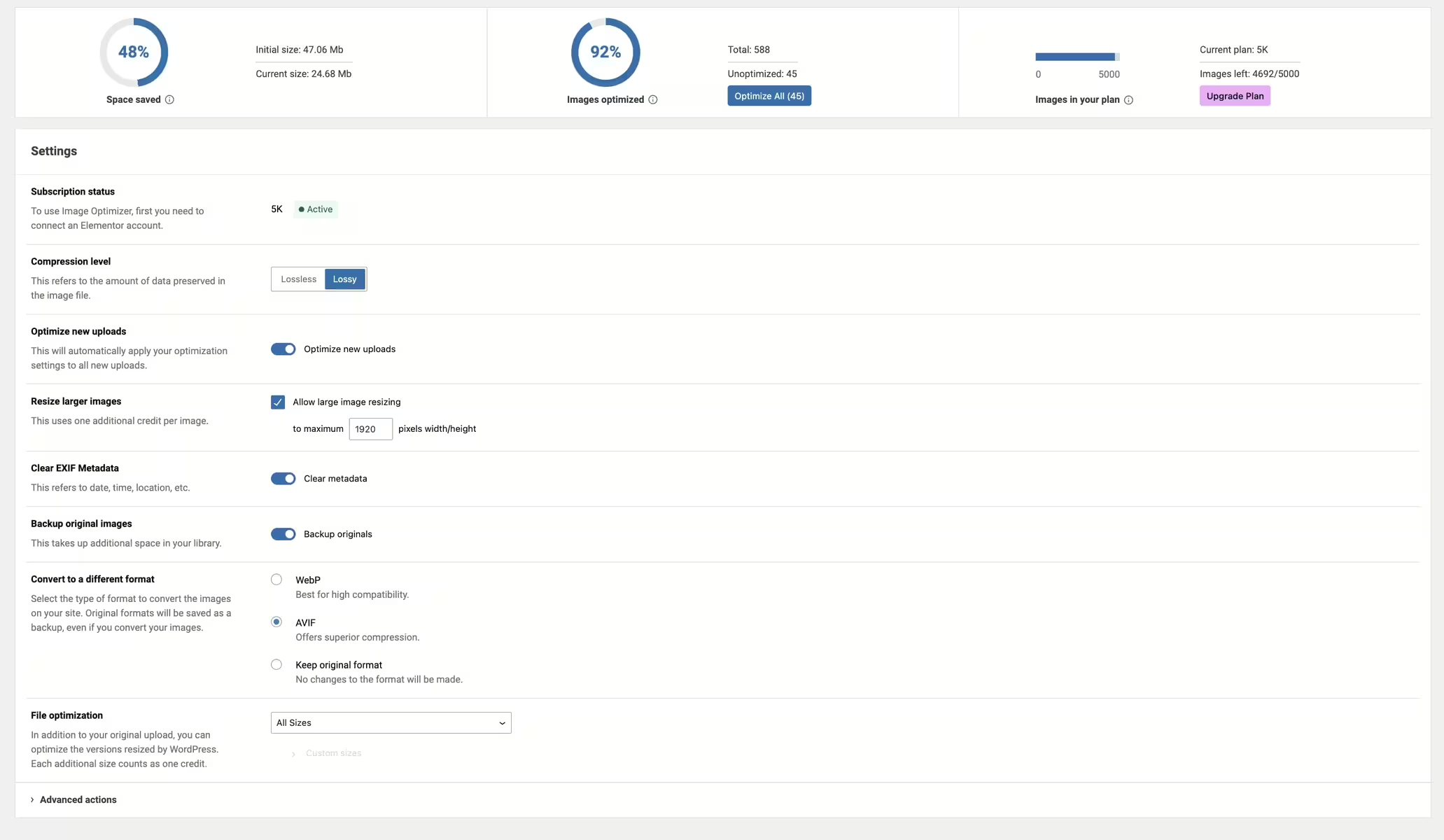
Image Optimizer - efficient image optimization and conversion
The Image Optimization plugin was developed by Elementor.com and is widely used with over 1 000 000+ active installations. It compresses images efficiently to reduce load times. Notably it performs background optimization without user monitoring. The plugin has an average rating of 1.7 out of 5 stars based on 77 reviews.
"The ability to convert images to WebP results in faster load times without compromising quality."
Features - extensive optimization and compression
- Supported image formats - JPEG, PNG, WebP, AVIF, GIF.
- Background optimization - Automatic background optimization.
- Resizing large images - Automatic downscaling to maximum pixel width.
- 2 compression levels - Lossless and lossy.
- Conversion to WebP and AVIF - Enables efficient formats (Pro).
- Optimization on upload - Automatic optimization on upload.
- EXIF metadata - Option to remove metadata.
„It is super easy to use - just a few clicks, and my images were optimized without quality loss.“
Technical details - Integration and requirements
Image Optimization integrates deeply into WordPress, uses an external service for image optimization and has minimal database interaction for better performance. It requires a PHP version of 7.4 or higher and is compatible with WordPress 6.7 and above. Tested up to version 7.0.4. Extensive API integration allows customization via filters and actions. Compatibility in multisite environments is not fully documented.
„It meets the technical requirements and is well compatible with current WordPress versions.“
Quality and support - Effective compression, mixed support ratings
The compression efficiency of "Image Optimization" is high, with significant savings in load times. Users appreciate the flexibility of compression options, however there are technical issues and mixed reviews regarding support. Reachable via the official support forum or commercial support. The quality of support provision varies.
„The plugin delivers amazing compression efficiency while maintaining image quality, which significantly improved my site's overall performance.“
Conclusion - Powerful but needs improvement
The "Image Optimization" plugin from Elementor offers versatile image optimization options, but is not free of criticism, such as unexpected installations and incompatibilities with other plugins. These challenges and inconsistent support reduce the user experience, although the core functionality is perceived as efficient and useful.
Show more
Detailed plugin information
Plugin slug: image-optimization
Plugin name: Image Optimization
Plugin title: Image Optimization – Compress Images and Convert to WebP or AVIF
Plugin keywords: #convert AVIF #convert webp #image compression #image optimization #performance
Plugin version: 1.7.6
Last update: 2026-07
Release date: 2024-01-08
Required WP version: 6.7
Required PHP version: 7.4
Tested with WP version: 7.0.4
Active installations: 1 000 000+
Average rating: 1.7
Number of reviews: 77
Number of support requests: 1 (in the last 2 months)
Number of Resolved Support Requests: 1 (in the last 2 months)
Plugin author: Elementor
Developer homepage: https://go.elementor.com/wp-repo-description-tab-io-product-page/
WP developer profile page: https://profiles.wordpress.org/elemntor/
Support URL in the WordPress Plugin Directory: https://wordpress.org/support/plugin/image-optimization/
Developer support URL: https://wordpress.org/support/plugin/image-optimization/#fallback-commercial-support-url
WP Plugin Directory: https://wordpress.org/plugins/image-optimization/
0.0
/ 10
#convert AVIF #convert webp #image compression #image optimization #performance
Number #
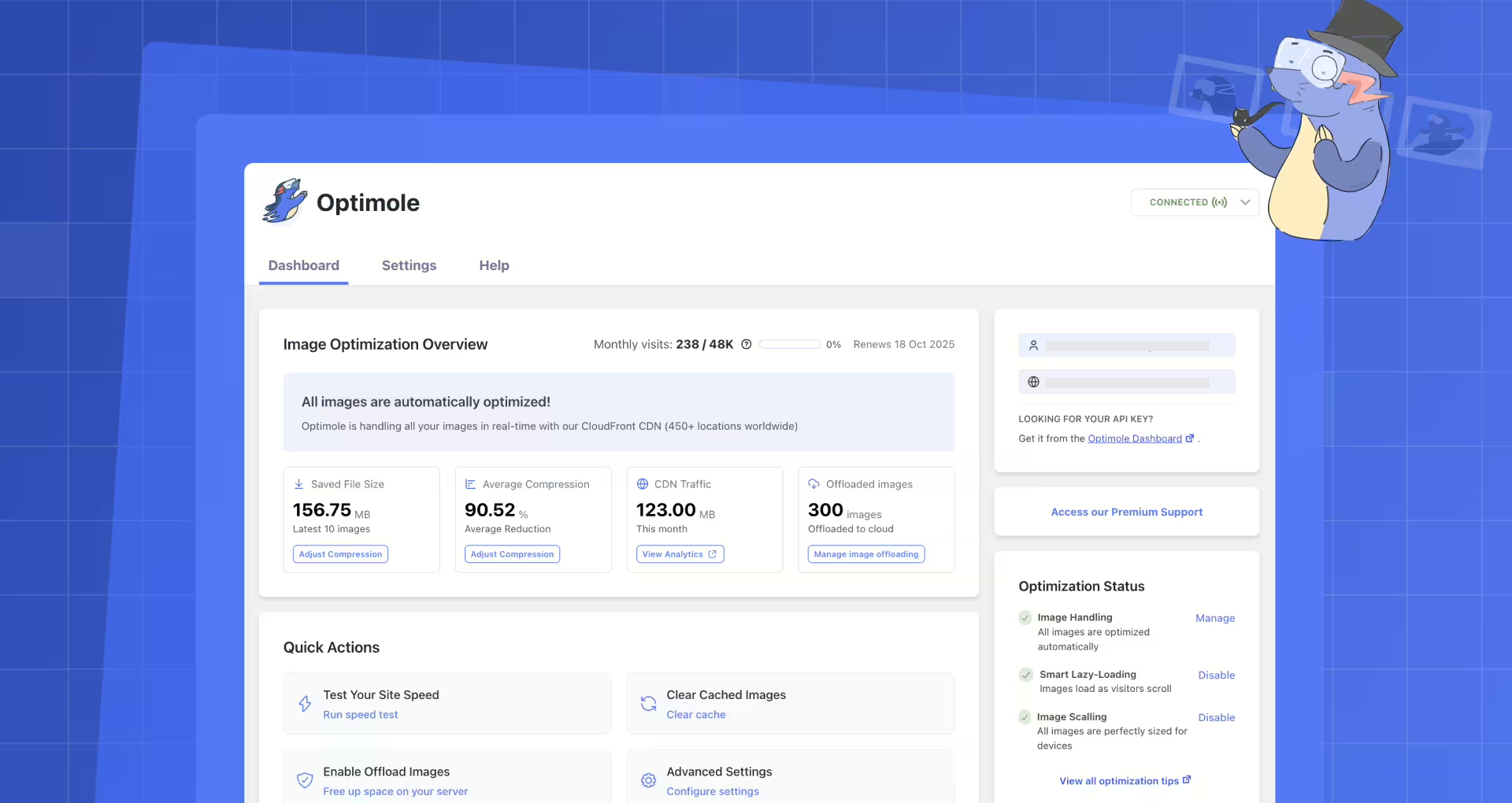
Image Optimization by Optimole - performance and innovation for WordPress
Optimole Wp is a versatile WordPress plugin developed by Optimole for efficient image optimization, ideal for site owners. It offers automatic image adjustments and runs cloud based for fast and specialized delivery.
"The combination of lazy loading, CDN delivery, and automatic conversion to WebP and AVIF formats is fantastic."
Features - various options for optimized images
- Real time image optimization - automatic adjustment to the specific device.
- Automated image compression - optimal image quality through machine learning.
- Smart Cropping - automatic cropping for image focus.
- CDN access - access to AWS CloudFront with global reach.
- Advanced image optimization (Pro) - for over 40,000 monthly active users.
- Advanced CDN features (Pro) - globally optimized delivery.
- Watermarking - automatic protection via watermarking.
"Far surpasses other free plugins. The CDN is great The WebP integration works flawlessly."
Technical details - efficiency through seamless integration
Real time compression and transformation via CDN supporting all major image formats. Seamless integration through cloud based URL replacement and automated device adjustments. Optimized images are cached for one month.
Quality and support - proven performance with help when needed
Optimole Wp offers high quality image delivery through real time optimization and machine learning. WebP and AVIF formats reduce image size without quality loss, with occasional rendering issues at high frequency. Support is available via support forum and commercial site though response time experiences vary.
"The team replied very quickly and helped solve the problem."
Conclusion - a well thought out solution for image issues
Optimole Wp stands out as a comprehensive image optimization solution developed by Optimole. It makes managing and displaying images easier for WordPress users. Despite occasional limitations and criticism about upgrade prompts, the plugin provides a solid foundation for improved website performance. Check carefully whether the pro features are necessary or if the free version is sufficient.
Show more
Detailed plugin information
Plugin slug: optimole-wp
Plugin name: Optimole Wp
Plugin title: Optimole – Optimize Images | Convert WebP & AVIF | CDN & Lazy Load | Image Optimization
Plugin Keywords: #AVIF #compress images #image optimization #optimize images #webp
Plugin version: 4.2.11
Last updated: 2026-08
Release Date: 2018-09-23
Required WP Version: 5.5
Required PHP version: 7.4
Tested with WP version: 7.1
Active Installations: 200 000+
Average rating: 4.7
Number of reviews: 638
Number of support requests: 2 (in the last 2 months)
Number of resolved support requests: 2 (in the last 2 months)
Plugin author: Optimole
Developer Homepage: https://wordpress.org/support/plugin/optimole-wp/#fallback-homepage
WP Developer Profile: https://profiles.wordpress.org/optimole/
Support URL in WordPress Plugin Directory: https://wordpress.org/support/plugin/optimole-wp/
Developer Support URL: https://wordpress.org/support/plugin/optimole-wp/#fallback-commercial-support-url
WP Plugin Directory: https://wordpress.org/plugins/optimole-wp/
0.0
/ 10
#AVIF #compress images #image optimization #optimize images #webp
Number #
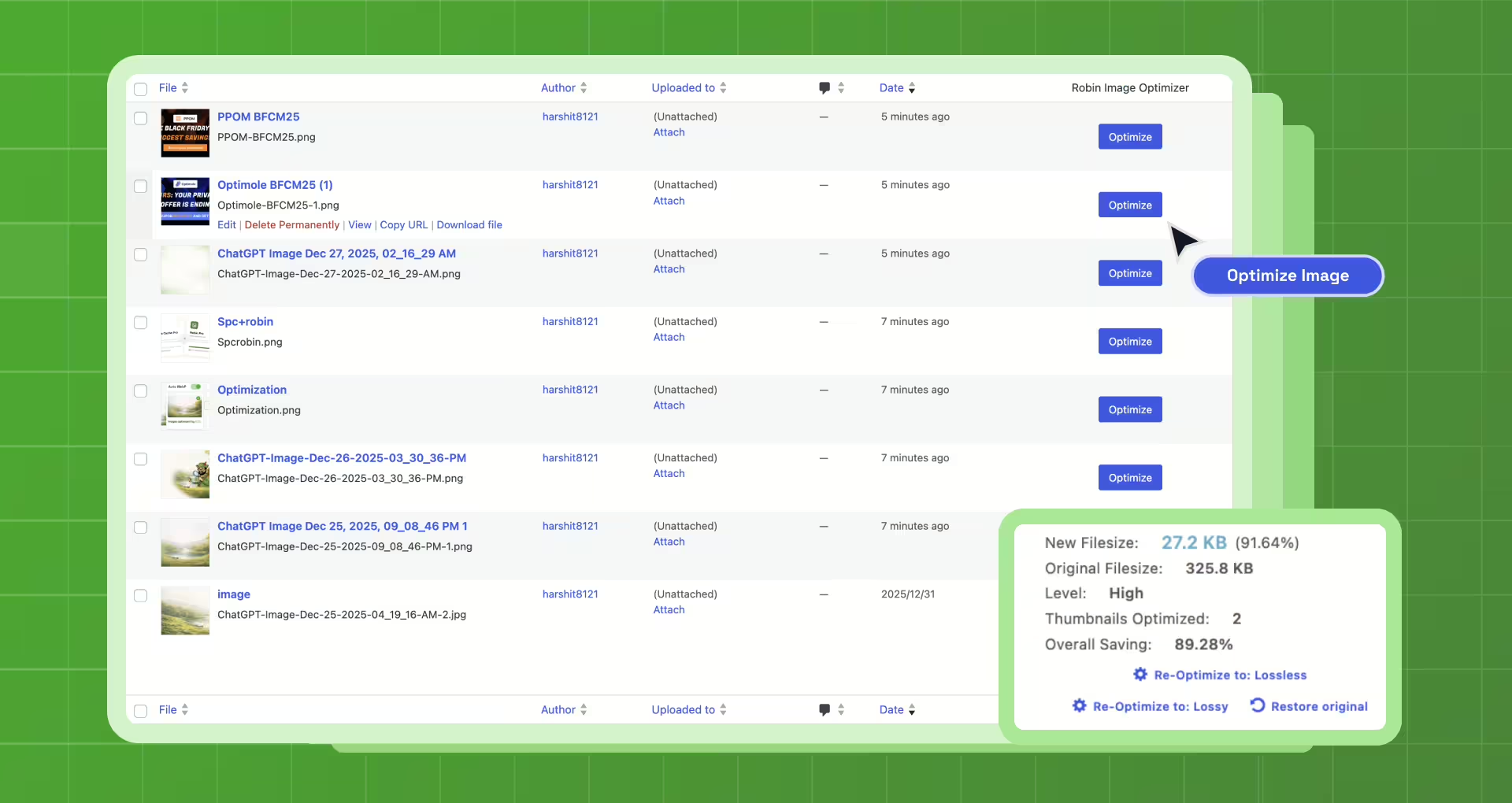
Robin Image Optimizer - Efficient image compression for WordPress
Robin Image Optimizer is a well known WordPress plugin by Creative Motion, released on 2018-08-12. It reduces image size by up to 80 percent, improves load time and is especially beneficial for mobile users. With over 100 000+ active installations and a rating of 4.4 out of 5 stars it delights its users. It stands out by offering free use without restrictions.
"I used Robin Optimization which worked much better for me than other optimizers I tried."
Features - Comprehensive image optimization capabilities
- Free Image Optimizer - Competitive with paid alternatives.
- Automatic Optimization - Optimizes images in the background.
- Manual Bulk Optimization - Saves time by optimizing all images at once.
- Choice of Compression Mode - Select from various compression levels.
- Detailed Statistics - Insight into optimized image data.
- WP CLI Commands (Pro) - Advanced control and automation.
- webP Support (Pro) - Better image format for modern websites.
"The webP option is only available in the Pro version."
Technical Details - Flexibility and integration
Robin Image Optimizer uses modern compression algorithms and supports WP CLI for automation. Compatible with the media library, it provides seamless optimization in the file system. Requires at least PHP 7.4 and WordPress 5.6. On-site memory optimization without delays. Regular updates ensure security.
"The plugin is constantly updated, which shows the development team cares about long-term functionality and security."
Quality and Support - Reliable performance with some support caveats
Robin Image Optimizer compresses losslessly by up to 80%. User-friendly interface for all skill levels. Mixed experiences are reported about support, often depending on response times. While many praise the support, some report long wait times.
Conclusion - Effective, cost-efficient optimization solution
Robin Image Optimizer, developed by Creative Motion, establishes itself as a valuable, mostly positively reviewed image optimization solution. Its features match those of more expensive alternatives. Despite occasional issues and mixed support, its effectiveness and ease of use are appreciated. The Pro version offers additional benefits, especially webP support.
Show more
Detailed plugin information
Plugin slug: robin-image-optimizer
Plugin name: Robin Image Optimizer
Plugin title: Robin Image Optimizer – Unlimited Image Optimization, WebP & AVIF
Plugin Keywords: #AVIF #compress images #image optimization #optimize images #webp
Plugin Version: 2.0.6
Last updated: 2026-08
Release Date: 2018-08-12
Required WP Version: 5.6
Required PHP version: 7.4
Tested with WP version: 7.1
Active installations: 100 000+
Average Rating: 4.4
Number of reviews: 129
Number of support requests: 1 (in the last 2 months)
Number of Resolved Support Requests: 1 (in the last 2 months)
Plugin author: Themeisle
Developer Homepage: https://robinoptimizer.com
Profile page of the WP developer: https://profiles.wordpress.org/themeisle/
Support URL in the WordPress Plugin Directory: https://wordpress.org/support/plugin/robin-image-optimizer/
Developer Support URL: https://wordpress.org/support/plugin/robin-image-optimizer/#fallback-commercial-support-url
WP Plugin Directory: https://wordpress.org/plugins/robin-image-optimizer/
0.0
/ 10
#AVIF #compress images #image optimization #optimize images #webp
Number #
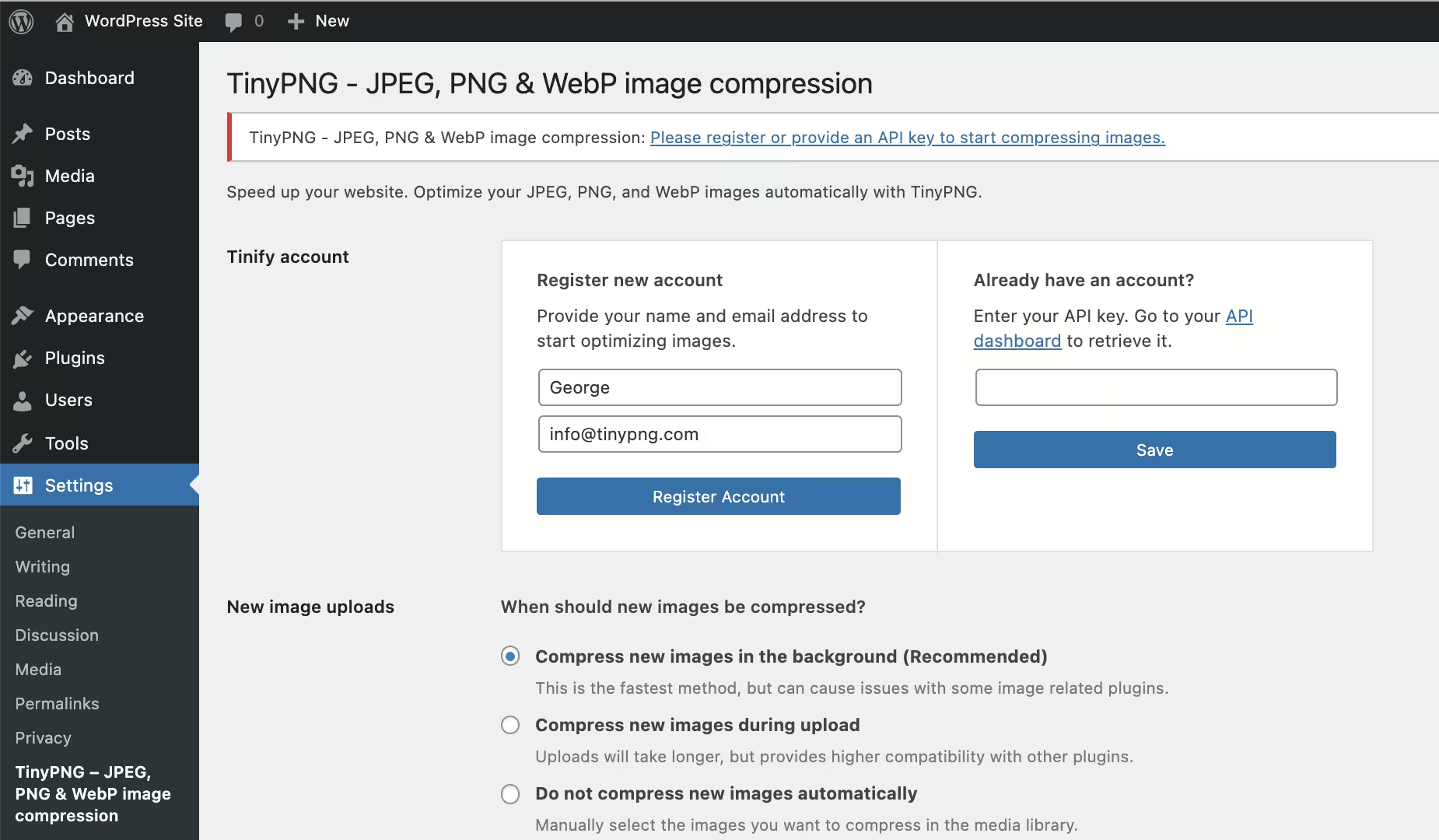
TinyPNG - Efficient image compression for fast websites
Tiny Compress Images offers fast and effective image optimization for WordPress users to boost website performance.
Features - Wide functionality for different needs
- Automatic image optimization on upload
- Bulk optimization of the media library
- Multisite support with a single API key
- Compatible with WPML and WooCommerce
- Dashboard widget with total savings
- Optimize images via mobile app
- Advanced background optimization (Pro)
- Unlimited image optimization with Premium (Pro)
Technical details - Flexible API integration and security aspects
Tiny Compress Images uses the TinyPNG and TinyJPG API for seamless image optimization. Secure transfer is performed via HTTPS, ensuring data security. Developers can manage API keys centrally, which is beneficial for multisite installations. The plugin requires at least PHP version 7.4 and WordPress 4.0, tested up to version 5.9, with regular updates to maintain functionality and security.
“Regular updates and smooth operation are signs of good plugin maintenance.”
Quality and support - Reliable compression, fast help
Despite strong image compression, visual quality is preserved - conversions of JPEGs and PNGs are efficient. Support responds positively to technical inquiries, reachable through various channels, including Email and @tinypng.
“This plugin does a great job optimizing images while maintaining impeccable quality.”
Conclusion - A well-designed plugin with room for improvement
Tiny Compress Images from TinyPNG scores with diverse features and user-friendliness. Pricing structure allows adaptation to project size. Despite some criticisms, such as image limit management and technical challenges, the plugin offers a reliable compression solution.
Show more
Detailed plugin information
Plugin slug: tiny-compress-images
Plugin name: Tiny Compress Images
Plugin title: TinyPNG – JPEG, PNG & WebP image compression
Plugin keywords: #compress images #compression #image size #Page Speed #performance
Plugin version: 3.8.0
Last updated: 2026-08
Release date: 2015-02-12
Required WP version: 4.0
Required PHP version: 7.4
Tested with WP version: 7.1
Active installations: 100 000+
Average rating: 4.5
Number of reviews: 176
Number of support requests: 1 (in the last 2 months)
Number of resolved support requests: 0 (in the last 2 months)
Plugin author: TinyPNG
Developer homepage: https://wordpress.org/support/plugin/tiny-compress-images/#fallback-homepage
WP developer profile page: https://profiles.wordpress.org/tinypng/
Support URL in the WordPress Plugin Directory: https://wordpress.org/support/plugin/tiny-compress-images/
Developer support URL: https://wordpress.org/support/plugin/tiny-compress-images/#fallback-commercial-support-url
WP Plugin Directory: https://wordpress.org/plugins/tiny-compress-images/
0.0
/ 10
#compress images #compression #image size #Page Speed #performance
Number #
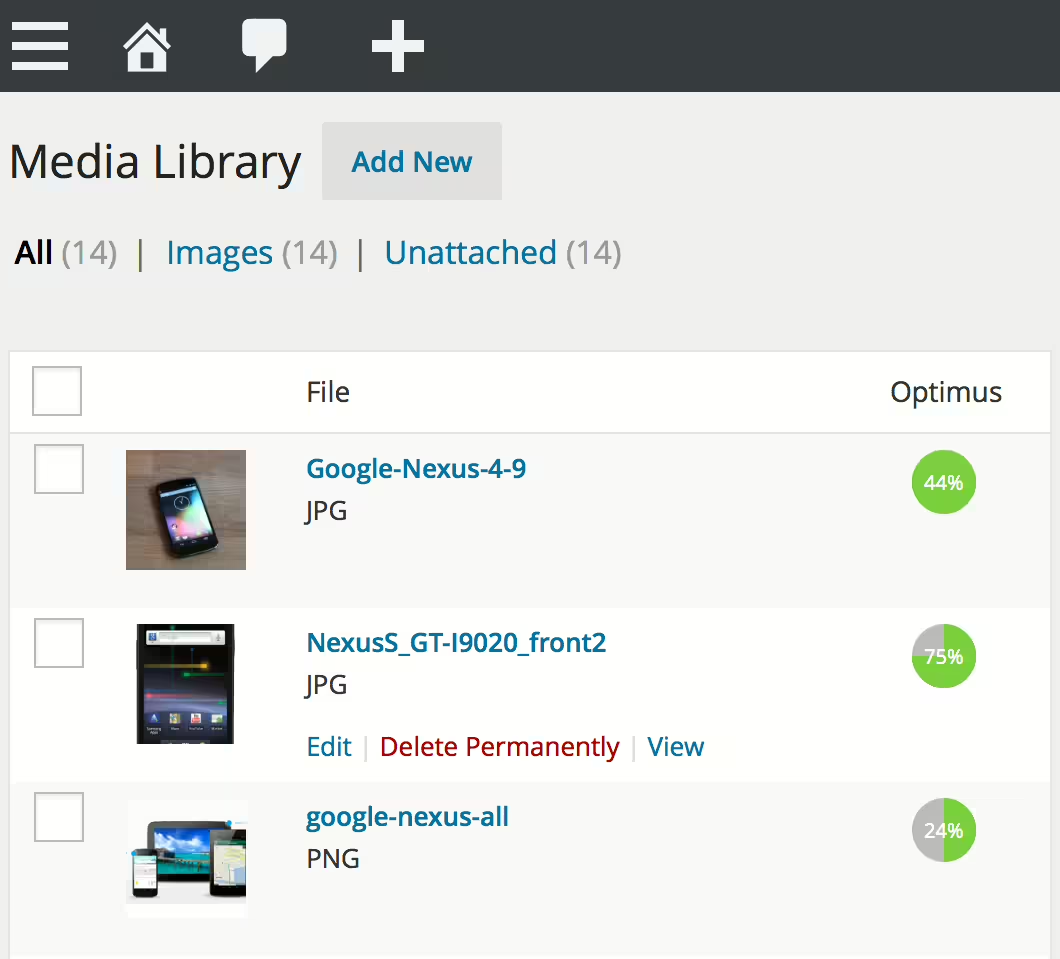
Optimus - Effective image compression for WordPress
Optimus by KeyCDN, with over 30 000+ installations, optimizes media files to improve load times. Notable is the compression of images by up to 70% in the background. It is ideal for bloggers and developers who want to improve speed and usability.
"Optimus not only saves a lot of time, but also works absolutely efficiently."
Features - Powerful image optimization
- Automatic file size reduction - Optimization on upload.
- Bulk optimization - Optimize existing images.
- No code changes - Easy integration.
- Keep EXIF/IPTC metadata - Optional.
- WebP conversion - Modern image support (Pro).
- HTTPS image transfer - Secure transfer (Pro).
- WooCommerce and multisite support - Broad compatibility.
"The ability to create WebP images is a big advantage for page load speed."
Technical details - Internal processes and requirements
Optimus works server-side, optimizes images externally and delivers them ready to use. WebP creation improves load times. Caching and low memory usage (backend: ~0.19 MB; frontend: ~0.01 MB) protect server performance. Requires at least PHP version 5.6 and WordPress version 4.6. Current plugin version: 1.6.3 and ongoing updates provide reliability.
"Optimus runs reliably on my multilingual multisite installation without causing complications."
Quality and Support - Performance and Customer Experiences
Optimus offers efficient compression without quality loss, which users appreciate. Support varies in response time and effectiveness; some praise fast problem resolution while others criticize a lack of friendliness. Experiences are mixed, with overall positive reviews prevailing.
"Support is great with quick responses and problem resolution."
Conclusion - Pros and Cons at a Glance
Optimus is a strong solution for image compression on WordPress sites. It integrates seamlessly but offers limited features in the free version (100 KB limit). Pro versions score with more comprehensive features. Despite technical advantages there are mixed experiences with support and limited free features. KeyCDN delivers a solid overall offering, but users should consider the limits of the free version.
Show more
Detailed plugin information
Plugin slug: optimus
Plugin name: Optimus
Plugin title: Optimus – WordPress Image Optimizer
Plugin Keywords: #image optimizer #images #Optimize image #webp #wordpress image optimizer
Plugin Version: 1.6.3
Last Update: 2026-03
Release Date: 2012-10-05
Required WP version: 4.6
Required PHP version: 5.6
Tested with WP version: 6.9.7
Active Installations: 30 000+
Average Rating: 4.2
Number of Reviews: 69
Number of support requests: 0 (in the last 2 months)
Number of resolved support requests: 0 (in the last 2 months)
Plugin author: KeyCDN
Developer Homepage: https://optimus.io
WP Developer Profile Page: https://profiles.wordpress.org/keycdn/
Support URL in the WordPress Plugin Directory: https://wordpress.org/support/plugin/optimus/
Developer Support URL: https://wordpress.org/support/plugin/optimus/#fallback-commercial-support-url
WP Plugin Directory: https://wordpress.org/plugins/optimus/
0.0
/ 10
#image optimizer #images #Optimize image #webp #wordpress image optimizer
In comparison with:
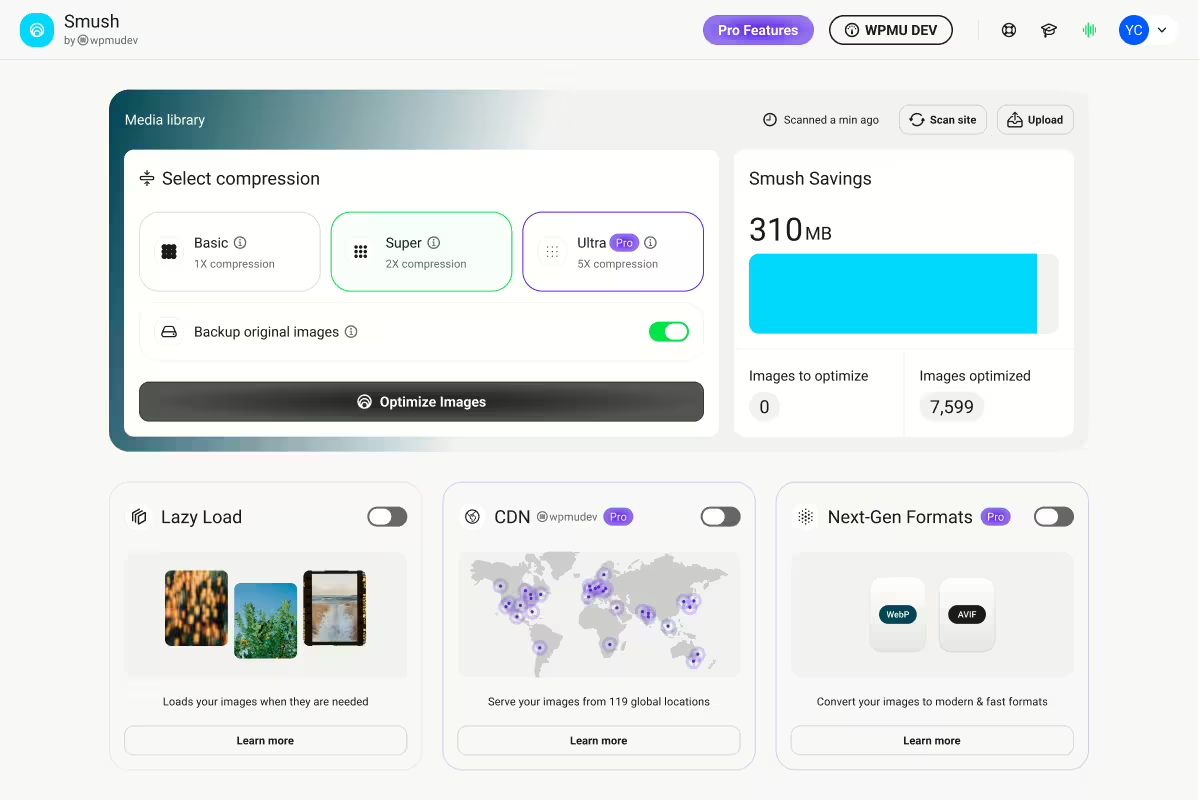
WP Smushit - Image optimization and compression
WP Smushit, by WPMU DEV, is a well-known WordPress plugin for image optimization. With over 1 000 000+ installations it offers both lossless and lossy image compression. An average rating of 4.8 from 6 051 reviews shows its popularity.
"The best plugin for optimizing images on WordPress sites."
Features - Extensive image optimization and compression features
- Lossless compression - Preserve image quality without data loss.
- Lossy compression - Up to 2x stronger compression possible.
- Lazy Loading - Images load only when needed.
- Bulk Smush - Bulk optimize images with one click.
- Convert to WebP - Automatic conversion to WebP (Pro).
- Ultra Smush - Up to 5x stronger compression (Pro).
- CDN support - Global 123-point CDN for fast delivery (Pro).
Technical details - Efficient design and integration
WP Smushit optimizes images via the WPMU DEV Smush API, minimizes server load and is flexible thanks to shortcodes and hooks. Gutenberg integration allows image compression info directly in the WordPress editor. Multisite compatible with global settings. Minimum: PHP 7.4 and WordPress 6.4. Tested up to version 5.8.
"The plugin is remarkably stable and easy to integrate with other tools."
Quality and support - reliable image optimization with supportive assistance
WP Smushit offers high-quality image optimization through lossless methods and Ultra Smush. Lazy Loading improves performance. Support can be contacted via the WordPress Plugin Directory or WPMU DEV, although access for free users is limited. Overall rating: very positive.
"Works great! Also a great support team."
Conclusion - strengths and weaknesses of WP Smushit at a glance
WP Smushit provides powerful image optimization features, including WebP conversion and Ultra Smush (Pro). The plugin shows some display issues and limited undo options. Support needs improvement, especially for free users. For many it remains a preferred solution.
Show more
Detailed plugin information
Plugin slug: wp-smushit
Plugin name: Wp Smushit
Plugin title: Smush – Image Optimization, Compression, Lazy Load, WebP & CDN
Plugin keywords: #compress images #convert webp #image optimization #image optimizer #optimize images
Plugin version: 4.3.2
Last updated: 2026-08
Release date: 2008-12-05
Required WP version: 6.4
Required PHP version: 7.4
Tested with WP version: 7.1
Active installations: 1 000 000+
Average rating: 4.8
Number of reviews: 6 051
Number of support requests: 4 (in the last 2 months)
Number of support requests resolved: 4 (in the last 2 months)
Plugin author: WPMU DEV - Your All-in-One WordPress Platform
Developer homepage: https://wpmudev.com/project/wp-smush-pro/
WP developer profile page: https://profiles.wordpress.org/wpmudev/
Support URL in the WordPress Plugin Directory: https://wordpress.org/support/plugin/wp-smushit/
Developer support URL: https://wpmudev.com/project/wp-smush-pro/
WP Plugin Directory: https://wordpress.org/plugins/wp-smushit/
#compress images #convert webp #image optimization #image optimizer #optimize images
Was the comparison to Wp Smushit helpful?
All about Smush – Image Optimization, Compression, Lazy Load, WebP & CDN
Smush Image Optimization - Optimize Images | Compress & Lazy Load Images | Convert WebP | Image CDN
WP Smushit, developed by WPMU DEV, is a popular WordPress plugin that was first released on 2008-12-05. It has over 1 000 000+ active installations and is used for image optimization, compression, and conversion to the WebP format to enable faster load times. A notable feature is the ability to perform lossless and lossy compression, allowing you to choose between higher image quality or smaller file sizes. It is aimed at WordPress users who want to improve their websites' performance through optimized images, regardless of their experience level. Thanks to a average rating of 4.8 out of 5 stars from 6 051 reviews, it is considered a trusted solution for image optimization. The following paragraph highlights the plugin's key features and explores the capabilities it offers.
"The best plugin for optimizing images on WordPress sites."
Features - Extensive image optimization and more
WP Smushit stands out with its versatile features that go far beyond basic image optimization. One notable feature is support for WebP conversion, which allows you to convert images to a compressed format with improved quality, resulting in a significant reduction in load times. With this feature, Smush ranks among the top plugins, especially for WordPress sites that value both speed and image quality. The ability to choose between lossless and lossy compression adds extra flexibility.
"Thanks to WP Smushit image optimization on my website is easier and more effective than ever before."
Free-Features - Extensive capabilities in the free version
- Lossless compression - Data is removed and images are compressed without affecting image quality.
- Lossy compression - Images can be compressed up to 2x more than with lossless compression.
- Built-In Lazy Loading - Images are only loaded when they are in the viewport.
- Bulk Smush - Images can be optimized and compressed in bulk with one click.
- Resize Images - Large images are scaled to a maximum width and height during optimization.
- Incorrect Image Size Detection - Finds images that slow down page load speed.
- Directory Smush - Optimizes images that are not in WordPress's standard media library.
- Automated Optimization - Images are automatically compressed on upload.
- No Monthly Limits - Unlimited optimization of all images (up to 5 MB) for free.
- Gutenberg Block Integration - Displays image compression information directly in image blocks.
- Multisite Compatible - Flexible global and subsite settings for multisite installations.
- Optimize All Image Files - Supports optimization of all PNG and JPEG files.
- No Performance Impact On Your Server - Optimization does not run on the website's server.
- Configs - Preferred settings can be saved and uploaded to other sites.
Pro-Features - Advanced options for even more optimization
- Ultra Smush - 5x more compression power for images while preserving image quality.
- Convert to WebP - Automatically converts images to the WebP format.
- Background Optimization - Optimization runs in the background even when the plugin is closed.
- 123-point global CDN Fast image delivery worldwide, including automatic WebP conversion and image resizing.
"The Pro version offers significant benefits, especially the background optimization which simplified my work."
License & price performance - Free and cost-effective
WP Smushit offers a free license that unlocks most features, making it an affordable solution for users who do not need intensive optimization. The Pro version, however, requires a paid license but comes with additional features and benefits, such as more aggressive compression and the use of a global CDN. Many users report satisfaction with the free model but appreciate the professionalism and extra features of the Pro version. This value proposition is especially appreciated by users who recognize the benefit of the advanced features.
"The free version already offers a variety of useful features, but the Pro features are a must for serious optimization."
Technical details - Deep dive into how it works
The technical operation of WP Smushit is evident in its lean and resource-saving architecture. Image optimization does not occur directly on the server hosting the website but is performed via the WPMU DEV Smush API. This externalization ensures that the website's server resources are hardly burdened and that reliable and fast processing is guaranteed. The use of shortcodes, hooks, and the Smush API provides flexibility for developers who want to design custom solutions. Another notable feature is the integration of a Gutenberg block that allows information about image compression to be displayed directly in the WordPress editor. The plugin's multisite capability also allows global or individual configuration for different sites in a network installation. By saving preferred settings and applying them to other sites, efficient management of image optimizations across the entire network is possible.
"The plugin is remarkably stable and easy to integrate with other tools."
System requirements - Compatible environment for smooth performance
To use WP Smushit smoothly, there are some basic system requirements that must be met. The plugin requires at least PHP version 7.4 and WordPress version 6.4 or higher as prerequisites for installation. It was tested for compatibility up to WordPress version 5.8. The current plugin version number is 4.3.2, and the last update was on 2026-08. These constants form the basis for the plugin's reliability and performance on most WordPress installations. Users working with older versions might encounter compatibility issues and should update their system environment accordingly to fully benefit from the plugin.
"The regular updates and good system requirements make Smush a reliable tool in the WordPress plugin world."
Quality - Smushit convinces with high-quality image optimization
WP Smushit delivers remarkable quality in image optimization for WordPress sites. By combining lossless and lossy compression, images can be heavily optimized without compromising visual integrity. Especially the “Ultra Smush” feature of the Pro version, which maintains up to five times stronger compression power without reducing image quality, stands out from other offerings on the market. In addition, integrated lazy loading contributes to improved website performance by loading images only when needed. The ability to convert images to WebP format makes Smushit a future-proof option to reduce file sizes while preserving optimal quality.
"Smush's image compression drastically improved my page load times and the image quality remains unmatched."
Support - Contact options and user experiences
The support for WP Smushit offers various options to help users with their concerns. Users can contact the official plugin support in the WordPress Plugin Directory or reach out directly to the development team via WPMU DEV. Support ratings are mixed. While some users praise support as fast and helpful, there is also criticism regarding the accessibility of customer service, especially for users of the free version. This limitation is highlighted in several reviews, indicating a need for improvement in accessibility.
"Works great! Also a great support team."
Rating - User voices and star ratings
WP Smushit enjoys consistently positive feedback from the WordPress community. With an impressive average rating of 4.8 out of 5 stars and a total of 6 051 reviews, the plugin is particularly praised for its ease of use and efficiency. Reviews often emphasize how the plugin effectively reduces image sizes and thereby significantly improves website load times.
One user commented particularly praising:
"I had no idea my load time was being affected by the images. The plugin nearly halved the time." - karlcw
Despite general approval there are occasional criticisms. Some users have noted that the plugin does not always deliver the expected improvements in loading speed:
"Sorry for the review. My blog scored 49 points for mobile on pagespeed.web.dev. After using Smush to reduce image size the score actually dropped to 44."
Overall, WP Smushit is nonetheless primarily perceived positively and recommended as a reliable tool for image optimization:
"Smush reduced the overall file size of my site and increased browsing speed. Well done, folks!" - pdci
Criticism - Issues and suggestions for improvement
The WordPress plugin WP Smushit receives mixed feedback when it comes to user criticism. Some users report issues affecting their website after using the plugin. A recurring issue is that optimized images are sometimes not displayed correctly, causing significant display problems on websites. In addition, there is no easy way to undo the changes made, which limits the user experience. Customer support is hard to reach for users of the free version, making it difficult to quickly find solutions to problems. Ongoing development and improvement of the plugin seems to indicate necessary adjustments to ensure security standards and user satisfaction.
"After activation I noticed that on my gallery page all images were stacked on top of each other."
Despite no reported security vulnerabilities, criticism of the privacy practices persists, particularly regarding interaction with the servers of WPMU DEV, to which images are sent for optimization, although EXIF data is not stored. Community suggestions for improvement include, for example, an advanced undo feature that allows users to easily restore image changes to retain control over their original content.
"This plugin 'hides' the images and prevents the product images on my site from being displayed."
Conclusion - Strengths and Weaknesses of WP Smushit at a Glance
WP Smushit from WPMU DEV offers a wide range of features that prove extremely useful for WordPress site users for image optimization. Its ability to convert to WebP, versatile compression methods, and integration into the Gutenberg block make it an attractive option for many users. While the free version is suitable for performing basic optimizations efficiently, professional users especially benefit from the Pro version with advanced features like Ultra Smush and a global CDN.
Despite its advantages, WP Smushit also faces some criticisms. Issues with image display after optimization and the limited undo functionality can cause problems in certain scenarios. Support also shows room for improvement, especially for users of the free version. Nevertheless, WP Smushit remains a preferred choice for image optimization in the WordPress community by offering a notable mix of functionality and usability.
Show more
Detailed plugin information
Plugin slug: wp-smushit
Plugin name: Wp Smushit
Plugin title: Smush – Image Optimization, Compression, Lazy Load, WebP & CDN
Plugin keywords: #compress images #convert webp #image optimization #image optimizer #optimize images
Plugin version: 4.3.2
Last updated: 2026-08
Release date: 2008-12-05
Required WP version: 6.4
Required PHP version: 7.4
Tested with WP version: 7.1
Active installations: 1 000 000+
Average rating: 4.8
Number of reviews: 6 051
Number of support requests: 4 (in the last 2 months)
Number of support requests resolved: 4 (in the last 2 months)
Plugin author: WPMU DEV - Your All-in-One WordPress Platform
Developer homepage: https://wpmudev.com/project/wp-smush-pro/
WP developer profile page: https://profiles.wordpress.org/wpmudev/
Support URL in the WordPress Plugin Directory: https://wordpress.org/support/plugin/wp-smushit/
Developer support URL: https://wpmudev.com/project/wp-smush-pro/
WP Plugin Directory: https://wordpress.org/plugins/wp-smushit/
Before switching to the alternative
If you have problems with the plugin "Smush – Image Optimization, Compression, Lazy Load, WebP & CDN" it might be useful to check the requirements for WordPress and the server before switching to an alternative plugin.
The current plugin version 4.3.2 from 2026-08 requires at least WordPress version 6.4 and was tested with WordPress 7.1. The server should preferably be an Apache server running at least PHP version 7.4.
WordPress offers a support forum for the Wp Smushit plugin. Within the last two months 4 questions were posted there and 4 of them were answered by WPMU DEV - Your All-in-One WordPress Platform, which indicates the support activity.
Further troubleshooting information may be provided by the Wp Smushit website and its support page.
Wp Smushit has been developed by WPMU DEV - Your All-in-One WordPress Platform since 2008-12-05 and runs on a total of 1 000 000+ active WordPress installations. About 6051 users have rated the plugin an average of 4.8 stars. However, some users are looking for an alternative with different features.
The alternative plugins can be found in the official WordPress Plugin Directory with the following tags and can be downloaded for free: #compress images #convert webp #image optimization #image optimizer #optimize images
The comparison above presents and evaluates the most important features of these plugin alternatives.
Decision criteria of the plugin ranking
- Usability:
The plugin should be easy to install, configure and use. - Functionality:
The plugin should perform the promised functions reliably and efficiently. - Performance:
It should not negatively impact the site's load times and should be resource efficient. - Security:
The plugin must receive regular updates to ensure continuous secure operation. - Reviews:
Positive experiences from many users give a good indication of quality and reliability. - Support:
Good customer support and comprehensive documentation are crucial to resolve issues quickly. - Documentation:
Detailed and understandable documentation makes setup and use of the plugin easier. - Value for money:
The plugin should either be free or offer fair value for money. - Adaptability:
The plugin should be flexible enough to allow individual requirements and customizations. - Compatibility:
The plugin should be compatible with different WordPress versions, themes, and other plugins.
