
Password correct. Please wait...
Disable the chat with .custom-disable-chat
WP Plugin Comparisonby neo-wp.com


WP Plugin Image Optimization
Test report
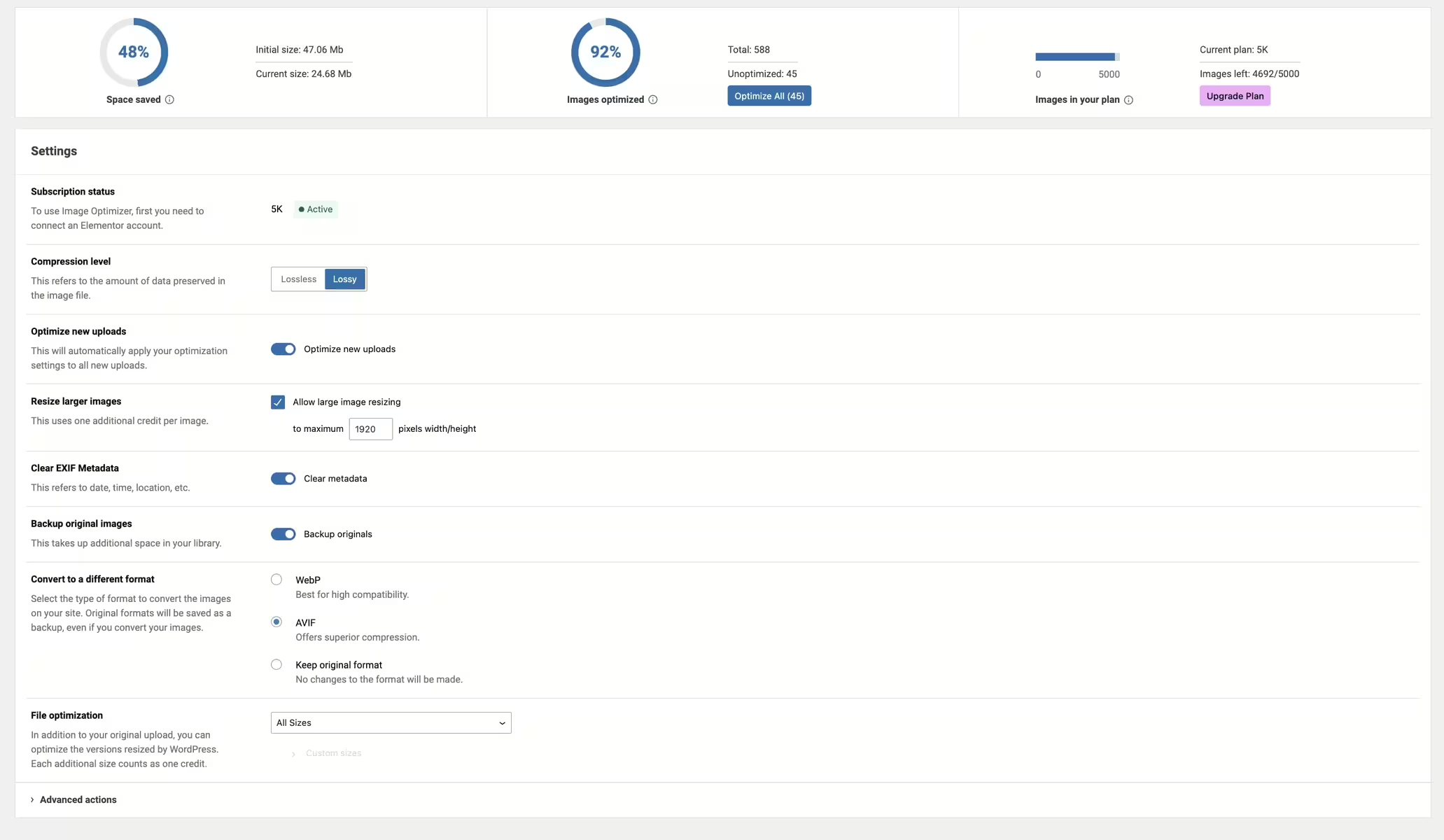
Image Optimizer - Optimize Images and Convert to WebP or AVIF
Image Optimization is a plugin integrated into WordPress, developed by Elementor.com and released on 2024-01-08. With over 1 000 000+ active installations, it is a widely used tool for image optimization on WordPress websites. The plugin is notable for its ability to compress images efficiently while preserving image quality, which ultimately reduces load times and improves the user experience. A unique feature is background optimization, which allows images to be optimized in the background without the user having to monitor it actively. This feature makes it particularly suitable for site owners who use a large number of images and want to optimize load times without impacting site performance. The plugin has a average rating of 1.7 out of 5 stars based on 77 reviews in the official WordPress Plugin Directory. The next section will go into detail about the plugin's features and functions.
"The ability to convert images to WebP results in faster load times without compromising quality."
Features - Extensive options for image optimization
The WordPress plugin "Image Optimization" offers a variety of features that go beyond basic image compression. One notable aspect is support for multiple image formats, including JPEG, PNG, WebP, AVIF and GIF. This versatility ensures users can optimize a wide range of image types. Another noteworthy feature is automatic resizing, which allows uploaded images to be reduced to a predetermined pixel width. This function is especially useful to ensure image sizes do not impact site performance.
„It is super easy to use - just a few clicks, and my images were optimized without quality loss.“
Free features - Comprehensive capabilities in the free version
- Supported image formats - Supports JPEG, PNG, WebP, AVIF and GIF.
- Background optimization - Optimizes images in the background without requiring the page to remain open during optimization.
- Resizing large images - Ability to set a maximum pixel width after which images are automatically reduced.
- 2 compression levels - Lossless (highest quality with minimal compression) and lossy (maximum compression with some reduced quality).
- Optimization on upload - Images are automatically optimized when uploaded.
- Bulk or single optimization - Flexible options for image optimization, both on demand and for the entire media library.
- EXIF metadata - Option to remove image metadata to further reduce size without affecting image quality.
- Backup of original images - Option to permanently delete backups to save storage space.
- Restore original images - Option to restore original images (all sizes) for selected media items.
- Conversion to WebP and AVIF - Enables more efficient and faster-loading formats for better web performance.
- Image thumbnails - Default resizing of all image sizes; users can choose specific image sizes based on WordPress-registered thumbnail sizes.
License - Flexible usage options
The plugin "Image Optimization" is offered as a free version that covers many image optimization features. With its broad feature set, it enables users to achieve high-quality image compression with reduced effort. Users appreciate the plugin’s flexibility and the fact that it does not incur immediate costs. The absence of paid features in the base version makes it an attractive option for site owners seeking a cost-effective solution.
Technical details - Behind the scenes of Image Optimization
The WordPress plugin "Image Optimization" from Elementor integrates deeply into a site’s infrastructure and offers developers and IT professionals interesting insights into how it works. Primarily, the plugin works in conjunction with an external third-party service that is responsible for optimizing uploaded images in JPG, PNG, GIF, or WEBP formats. This optimization occurs on the file system, where original images are replaced by web-optimized versions depending on user-selected automatic or manual settings.
A central aspect is the API integration required for the connection between the Elementor account and the plugin. This interface not only ensures smooth user identification but also enables image management via hooks. This architecture allows developers to further customize and optimize behavior using filters and actions.
Database interaction is minimal because the plugin mainly relies on server-side operations controlled via the file system. This reduces database load significantly and results in higher overall web application performance. Web developers appreciate this efficient resource usage and the potential customization options provided by technical hooks.
Integration into multisite environments is theoretically possible, however specific implementations in large networks are not yet comprehensively documented. This could pose a hurdle for operators of large networks to meet their individual requirements.
System requirements - Technical requirements at a glance
The plugin "Image Optimization" requires specific system requirements to function properly. At minimum a PHP version of 7.4 is required, as well as a WordPress version of 6.7 or higher. The plugin has been tested up to WordPress version 7.0.4 and thus offers a certain level of compatibility assurance for more recent installations.
The current plugin version number is 1.7.6 and the last update was published in 2026-07. These details are important to ensure the plugin can be operated on a compatible and secure basis.
„It meets the technical requirements and is well compatible with current WordPress versions.“
Quality - High-quality image compression and savings
The WordPress plugin "Image Optimization" stands out for the high quality of its compression methods. User reports highlight that the plugin's compression efficiency is impressive, as it significantly reduces file size without noticeably degrading image quality. In particular, support for modern formats like WebP and AVIF enables savings in load times and bandwidth, which positively affects the user experience. The choice between lossless and lossy compression offers flexibility to meet the different needs of website operators. Nevertheless there have been occasional negative reports of technical issues that may impact the user experience. These are more the exception and the plugin's core functionality and quality remain highly regarded.
„The plugin delivers amazing compression efficiency while maintaining image quality, which significantly improved my site's overall performance.“
Support - Experiences and availability
Experiences with the support for the "Image Optimization" plugin are mixed. Users point out both positive and negative aspects. Some praise the quick response time and helpful assistance while others report unsatisfactory experiences where support did not seem competent or helpful. Contact options include the official support forum as well as a commercial support option from the developer. Through these channels a variety of user inquiries are handled, with the quality and satisfaction with the support provided varying greatly.
"If a support manager at Elementor reads this, they should rethink how they support or do not support their paying customers."
Rating - Diverging user opinions
The "Image Optimization" plugin for WordPress has received an overall average rating of 1.7 out of 5 stars based on 77 reviews. The ratings show a mixed picture: while some users praise the plugin's functionality and performance, others raise criticisms, particularly regarding integration into paid plans.
Some users are enthusiastic about the plugin's power:
"This plugin is a real game-changer! It feels like it was designed specifically for web developers like me."
Others are bothered by the pricing policy and missing features in certain subscriptions:
"That should be included in the Pro plan that I am already paying for."
Nevertheless there are many positive responses highlighting the plugin's compression efficiency:
"The plugin works so well compared to other solutions."
Criticism - Bugs and shortcomings of the plugin
The WordPress image optimization plugin despite its popularity faces some criticisms related to its functionality and usability. A commonly cited issue is the spam-like behavior that occurs when the plugin is not activated. Users report that Elementor repeatedly prompts to install the plugin which is perceived as annoying. Furthermore pricing is seen as misleading; the final price often only becomes apparent during use and can lead to unexpected costs.
Another issue concerns technical challenges and bugs in the plugin. Users report long optimization times and frequent error messages especially in conjunction with the Rankmath plugin which impairs image compression. Such technical hurdles make smooth use difficult and worsen the user experience.
The criticism also covers installations without prior consent where the plugin is automatically installed which is considered unacceptable. The quality of support was also rated negatively; it is accused of inefficiency and lack of knowledge in handling customer inquiries.
On the security aspect there is little cause for concern since there are no specific reports of security vulnerabilities. This also applies to data protection aspects where no significant deficiencies were identified.
"The plugin was installed without my consent which is an absolute no-go."
Conclusion - A versatile but controversially discussed plugin
The "Image Optimization" plugin from Elementor offers a comprehensive solution for image compression and optimization for WordPress websites. With support for numerous image formats and flexible compression options it simplifies image management and helps improve load times. However the plugin is not without criticism. Users report unexpected installations and incompatibilities with other plugins which can impair the user experience. There are also mixed reviews of support, which varies in response time and efficiency. Despite these challenges the core functionality remains impressive and provides a significant improvement to website performance through effective image compression.
#convert AVIF #convert webp #image compression #image optimization #performance
Show more
Detailed plugin information
Plugin slug: image-optimization
Plugin name: Image Optimization
Plugin title: Image Optimization – Compress Images and Convert to WebP or AVIF
Plugin keywords: #convert AVIF #convert webp #image compression #image optimization #performance
Plugin version: 1.7.6
Last update: 2026-07
Release date: 2024-01-08
Required WP version: 6.7
Required PHP version: 7.4
Tested with WP version: 7.0.4
Active installations: 1 000 000+
Average rating: 1.7
Number of reviews: 77
Number of support requests: 1 (in the last 2 months)
Number of Resolved Support Requests: 1 (in the last 2 months)
Plugin author: Elementor
Developer homepage: https://go.elementor.com/wp-repo-description-tab-io-product-page/
WP developer profile page: https://profiles.wordpress.org/elemntor/
Support URL in the WordPress Plugin Directory: https://wordpress.org/support/plugin/image-optimization/
Developer support URL: https://wordpress.org/support/plugin/image-optimization/#fallback-commercial-support-url
WP Plugin Directory: https://wordpress.org/plugins/image-optimization/
Was the test report about Image Optimization helpful?
Image Optimization Was the right plugin?
Image Optimization - Compare nowOpen plugin in sandboxTo the official WP StorePopular alternatives to Image Optimization
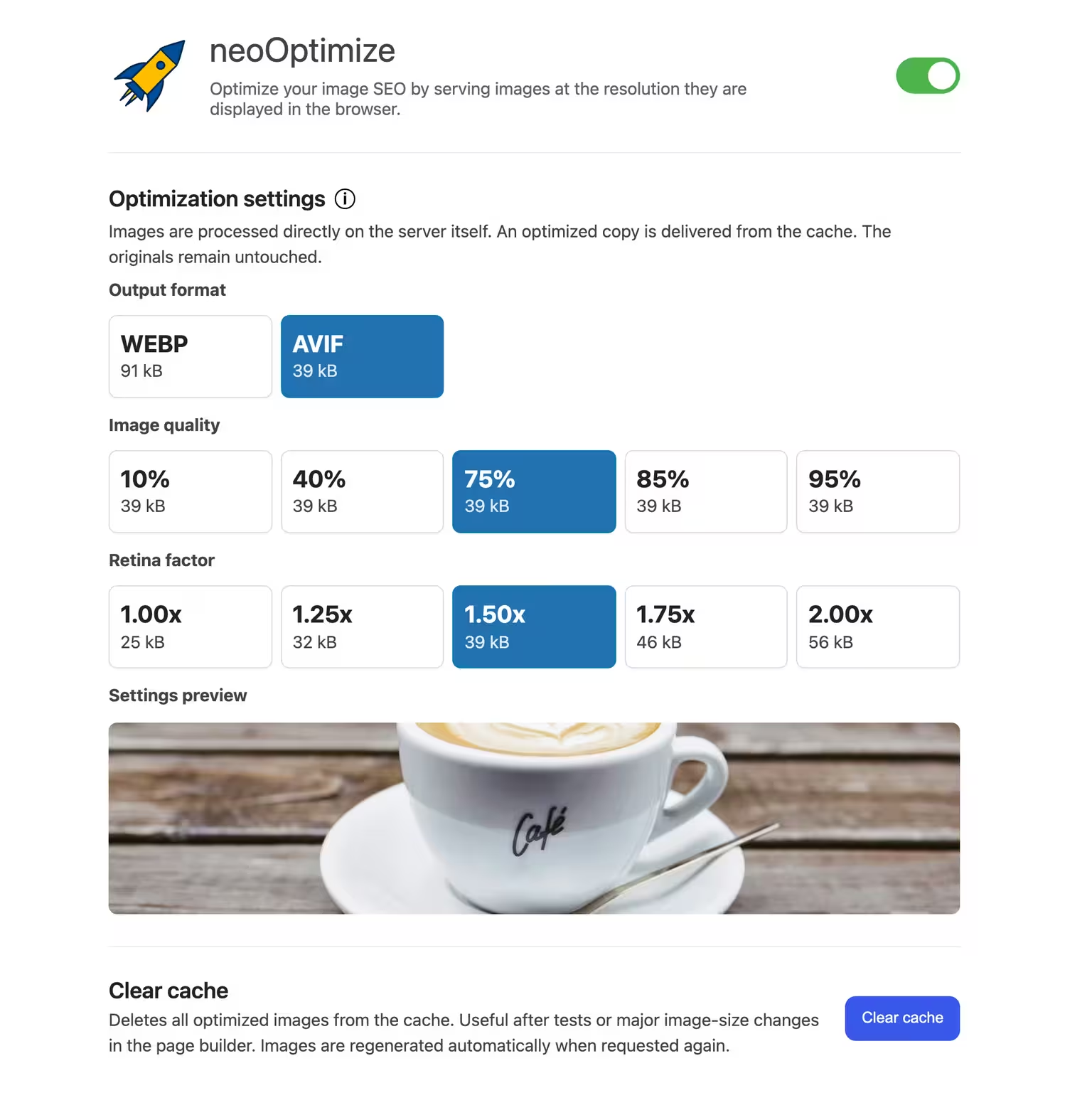


neo Optimize
Optimize your image SEO by serving images at the resolution they are displayed in the browser.
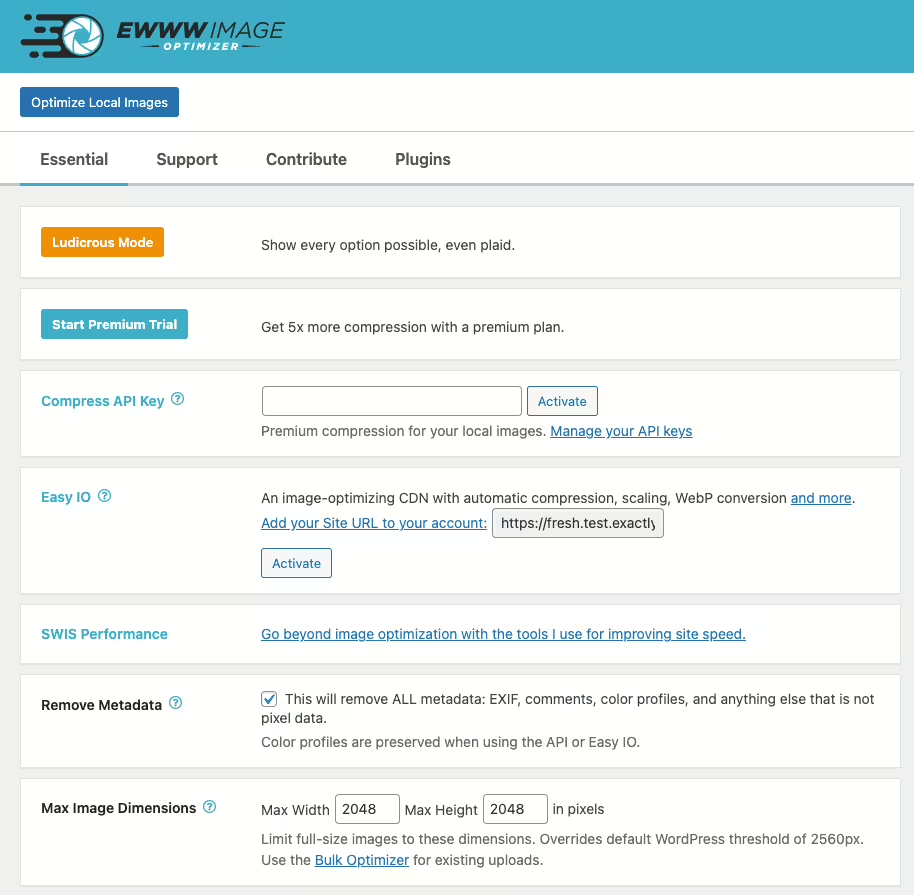
Ewww Image Optimizer
EWWW Image Optimizer
#compress #convert #lazy load #resize #webp
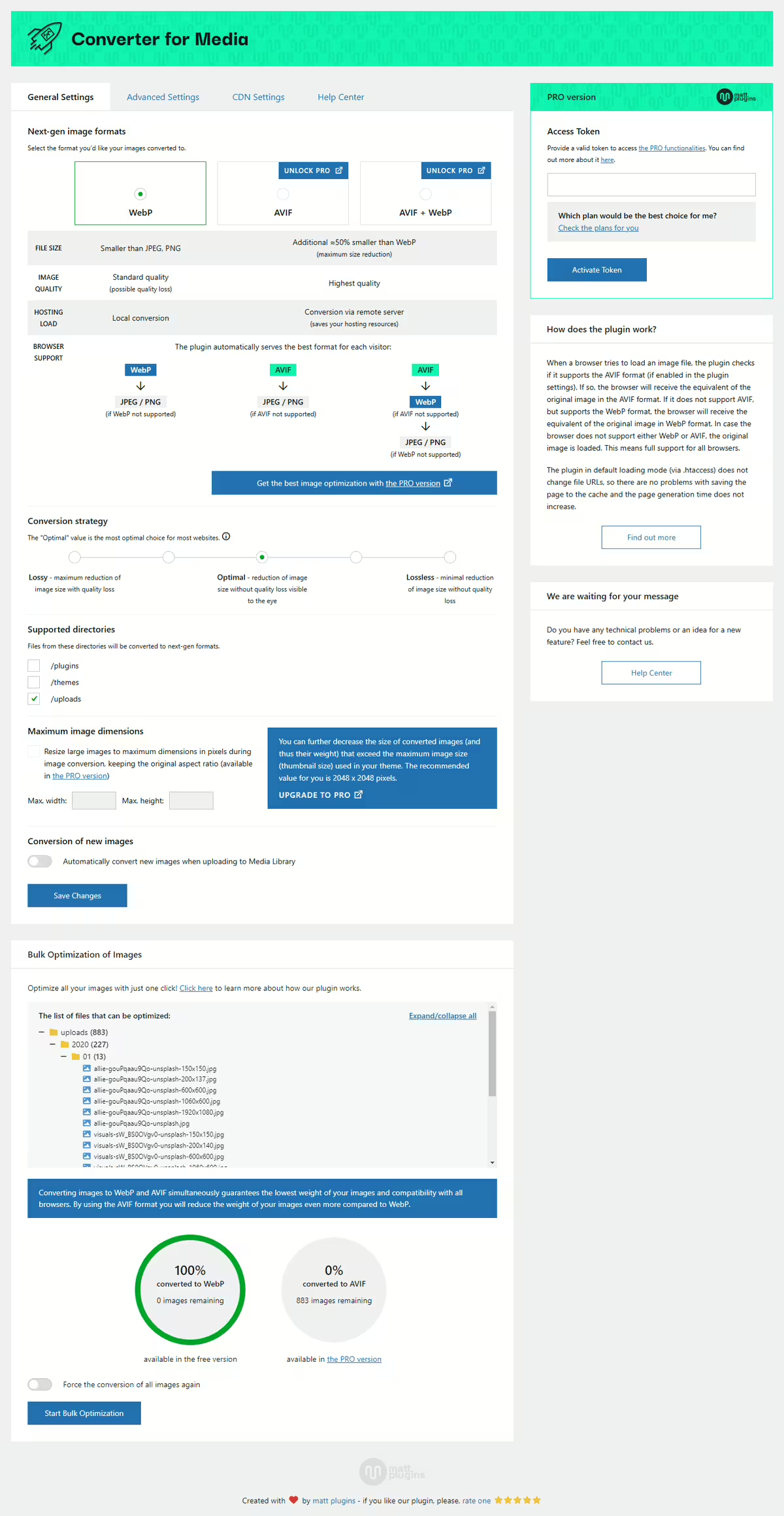
Webp Converter For Media
Converter for Media – Optimize images | Convert WebP & AVIF
#compress images #convert webp #image optimization #optimize images #webp
Shortpixel Image Optimiser
ShortPixel Image Optimizer – Optimize Images, Convert WebP & AVIF
#compress images #convert webp #image optimization #optimize images #resize
