{user_name}

Best WordPress Image Optimization with Cache

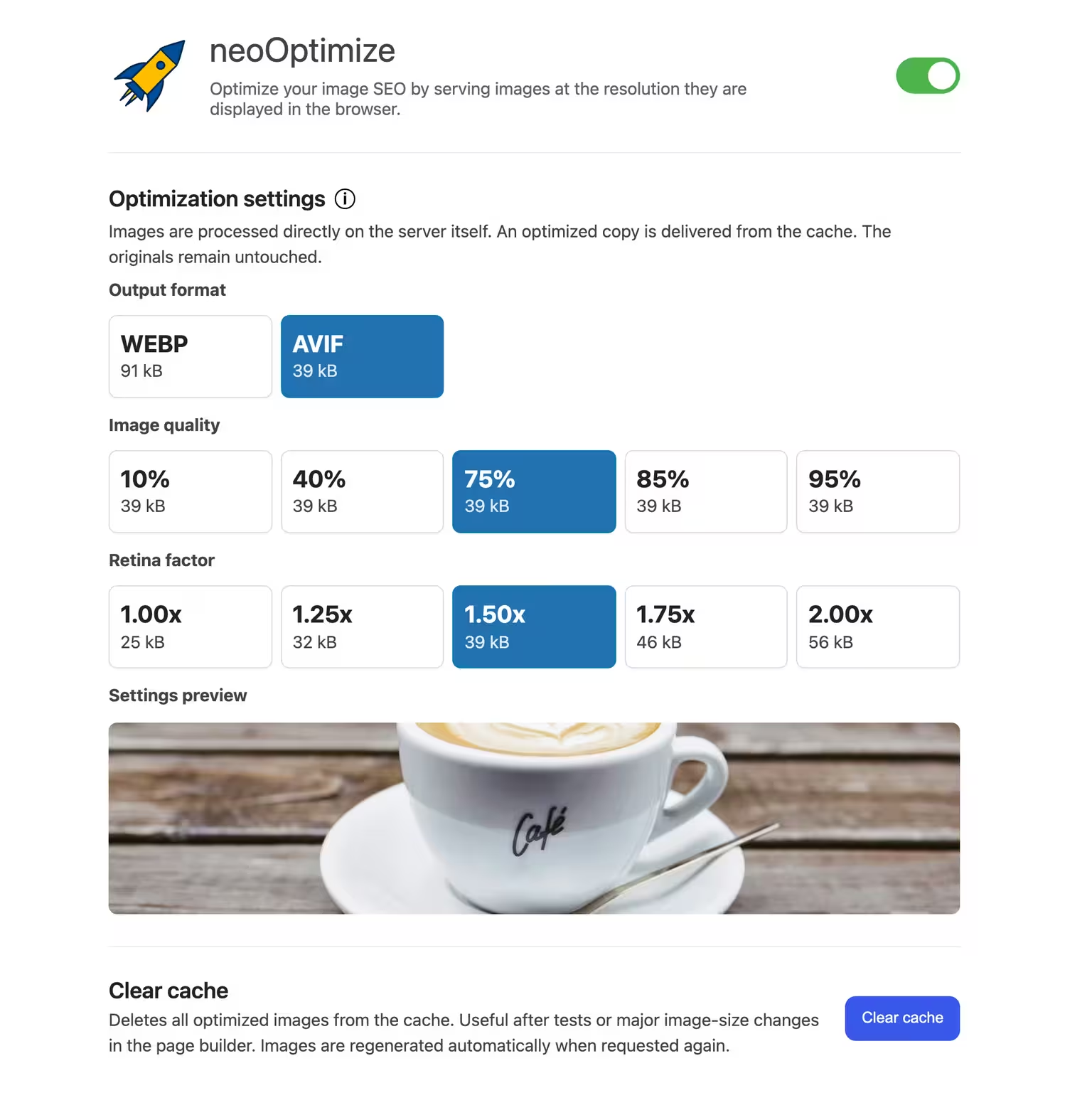
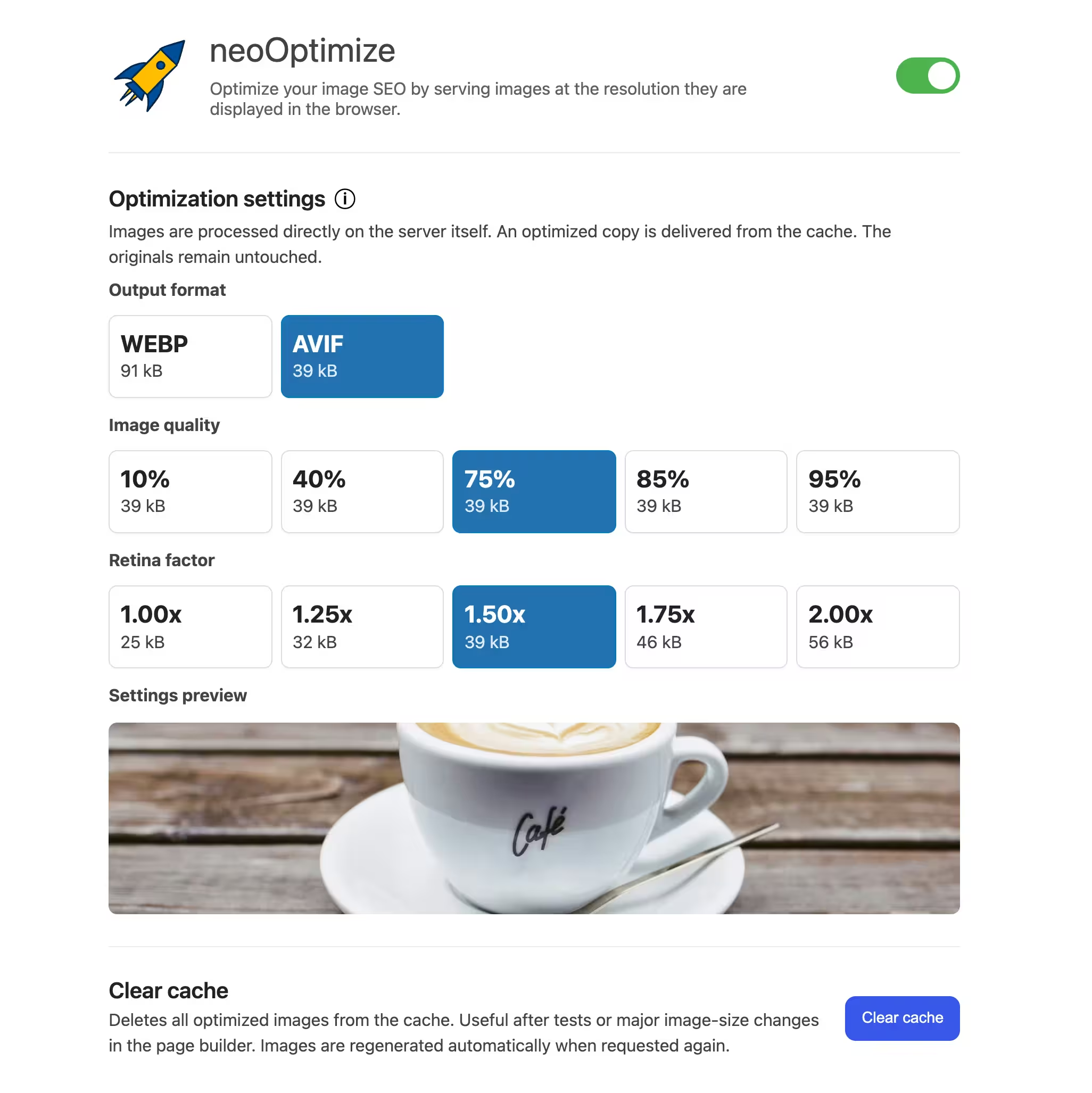
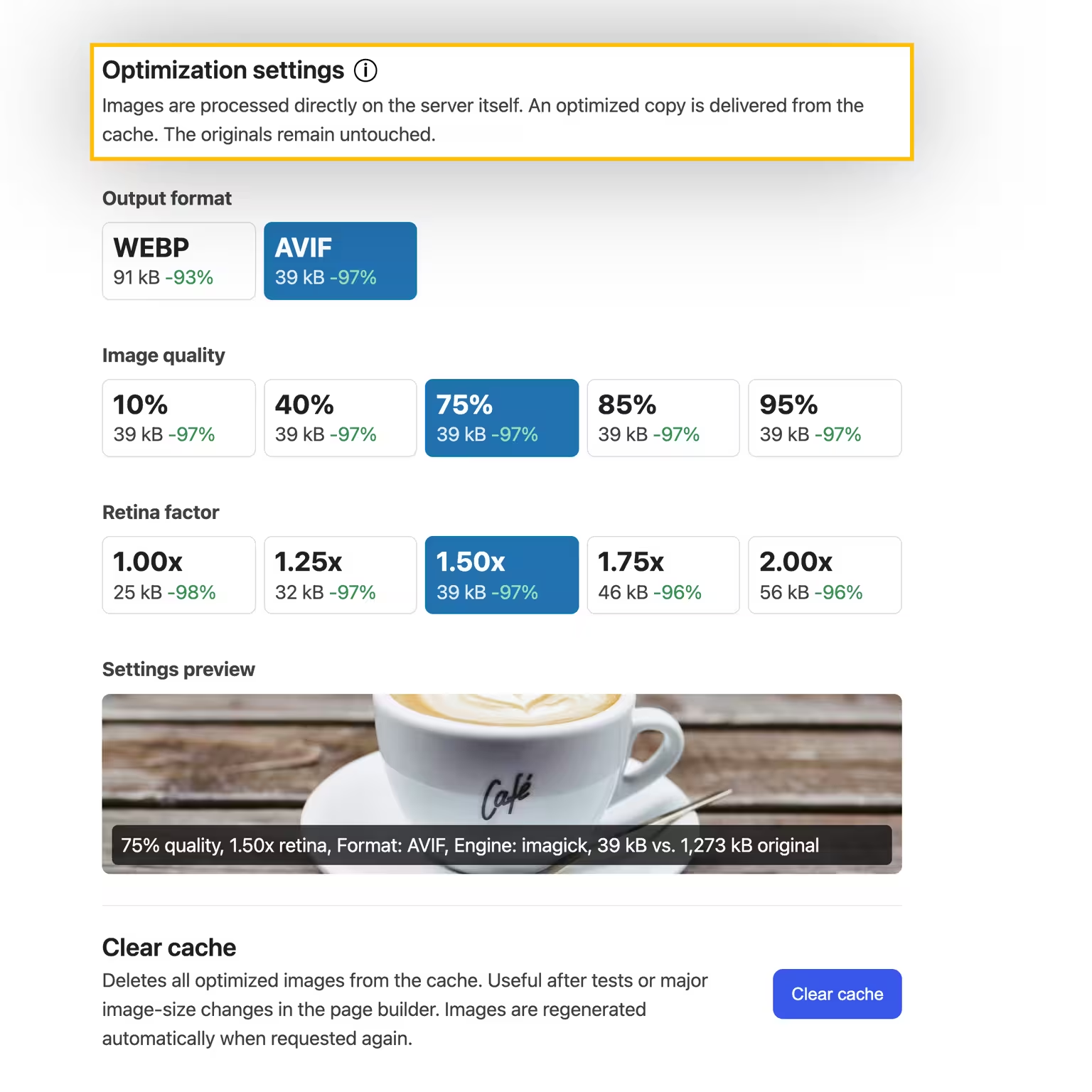
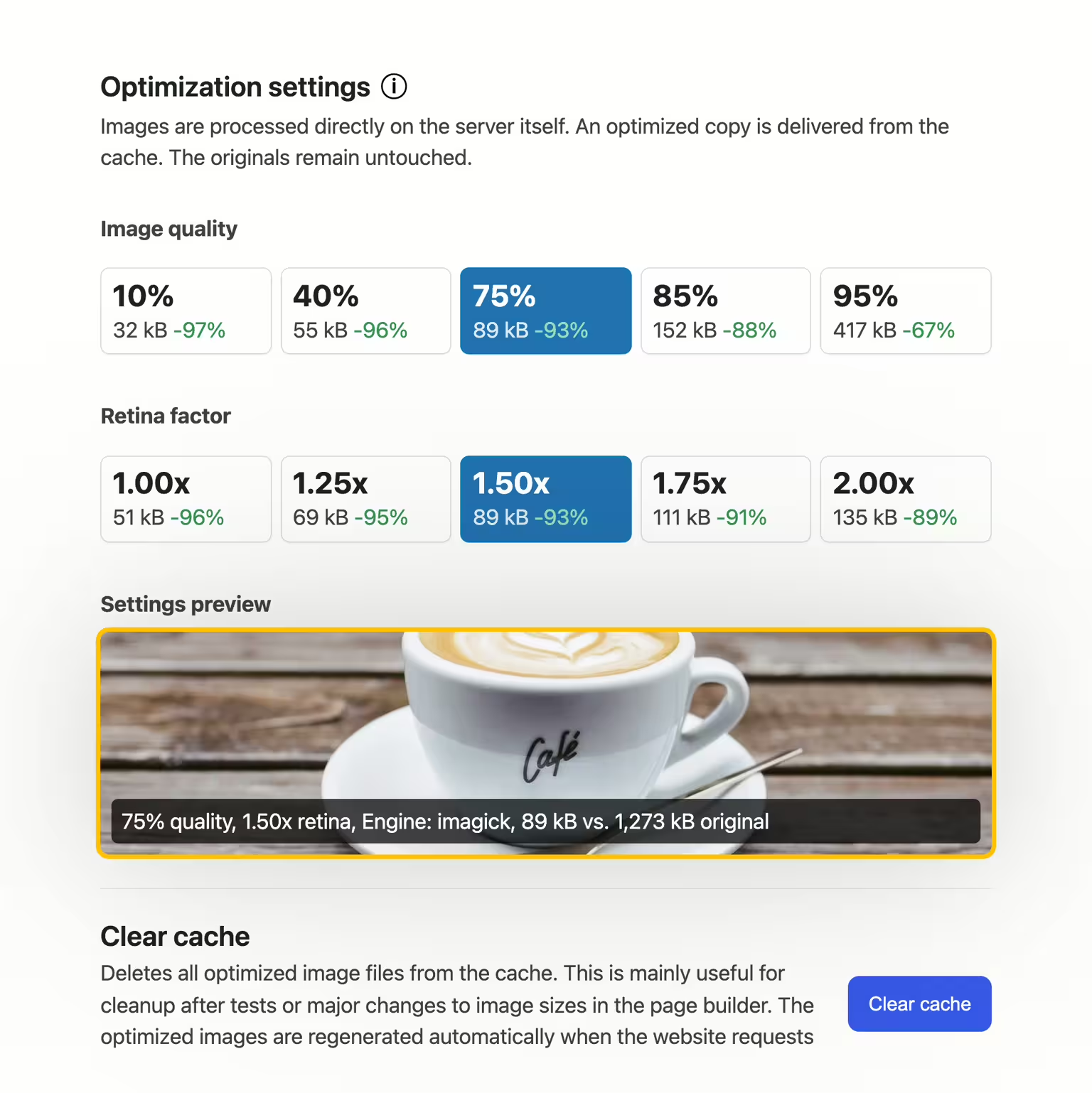
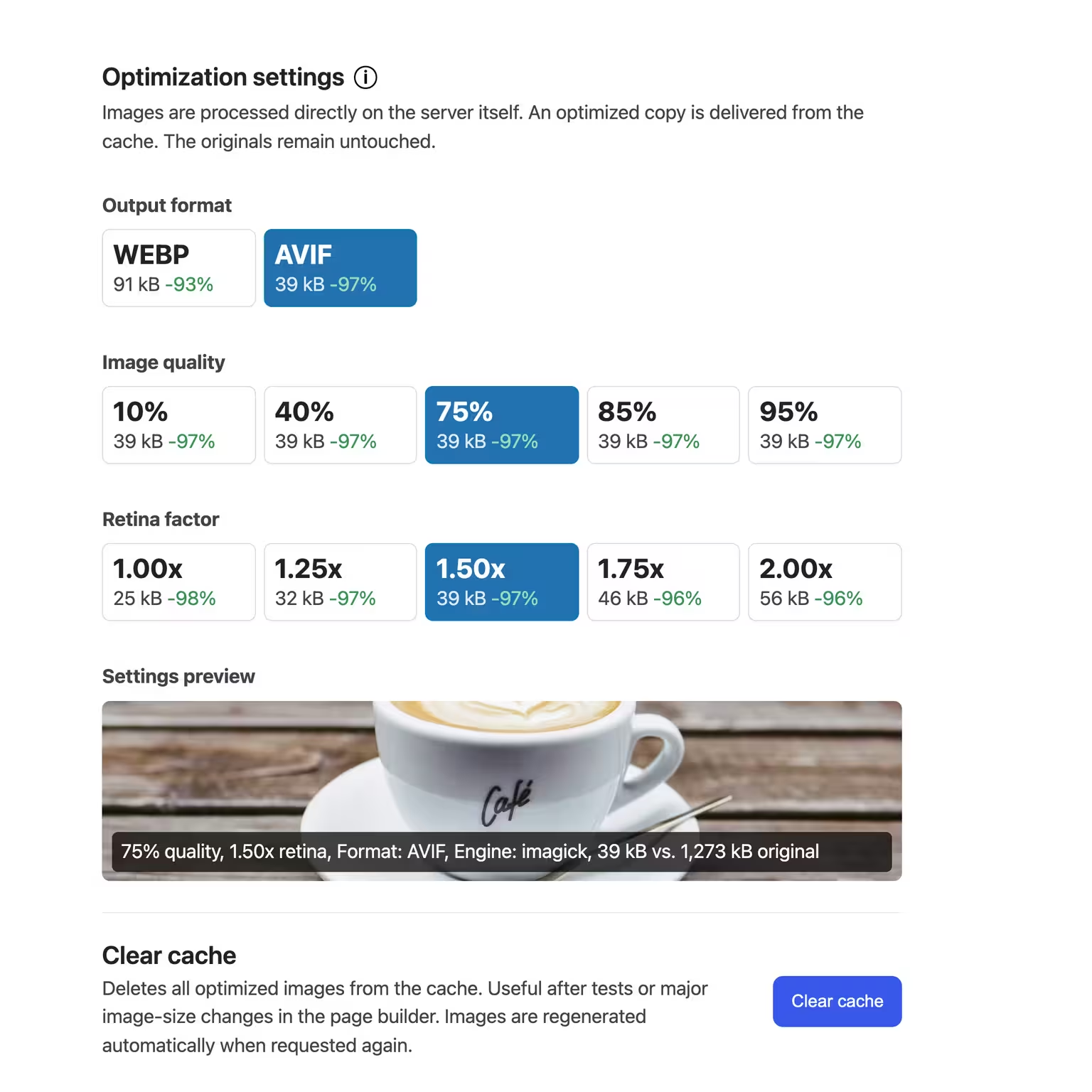
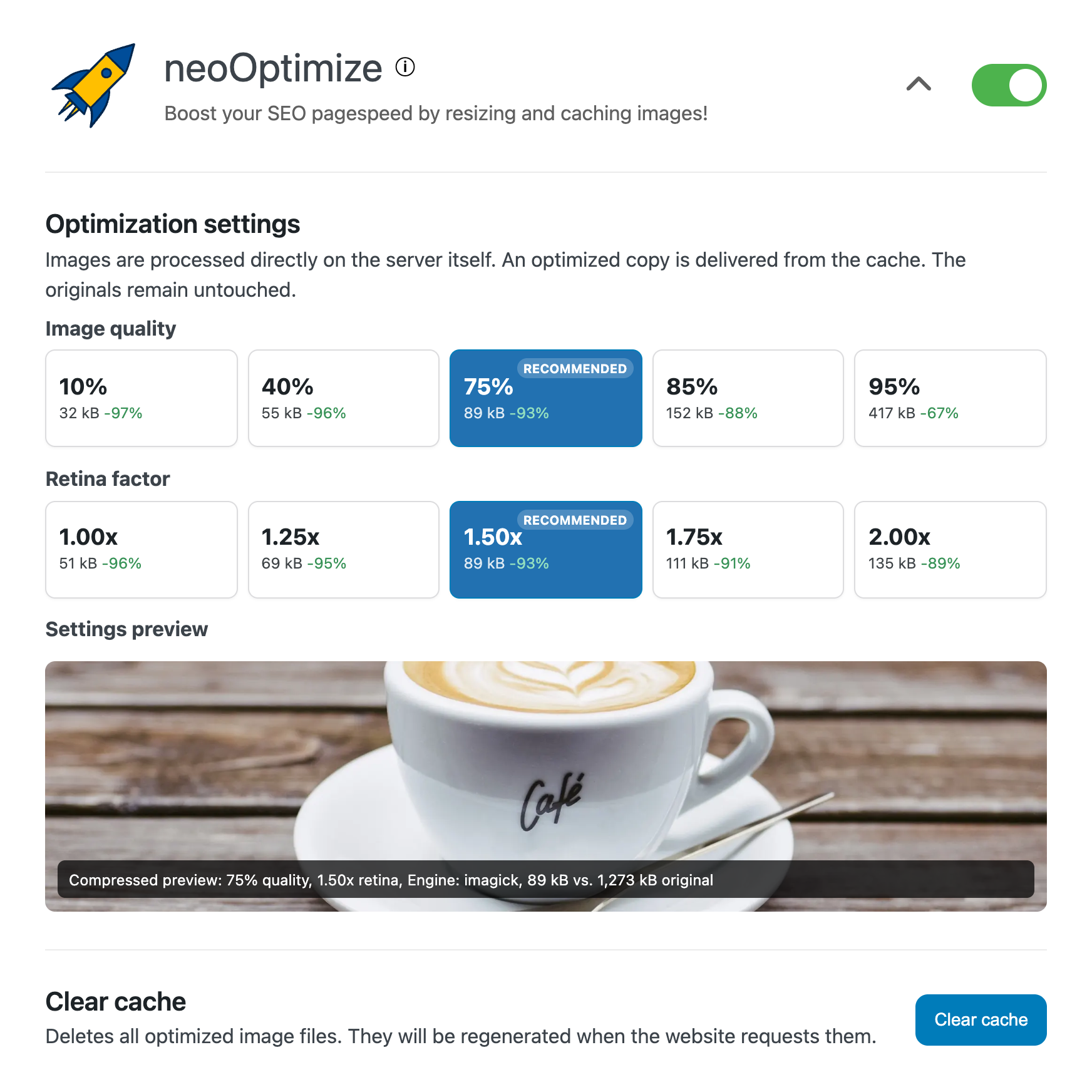
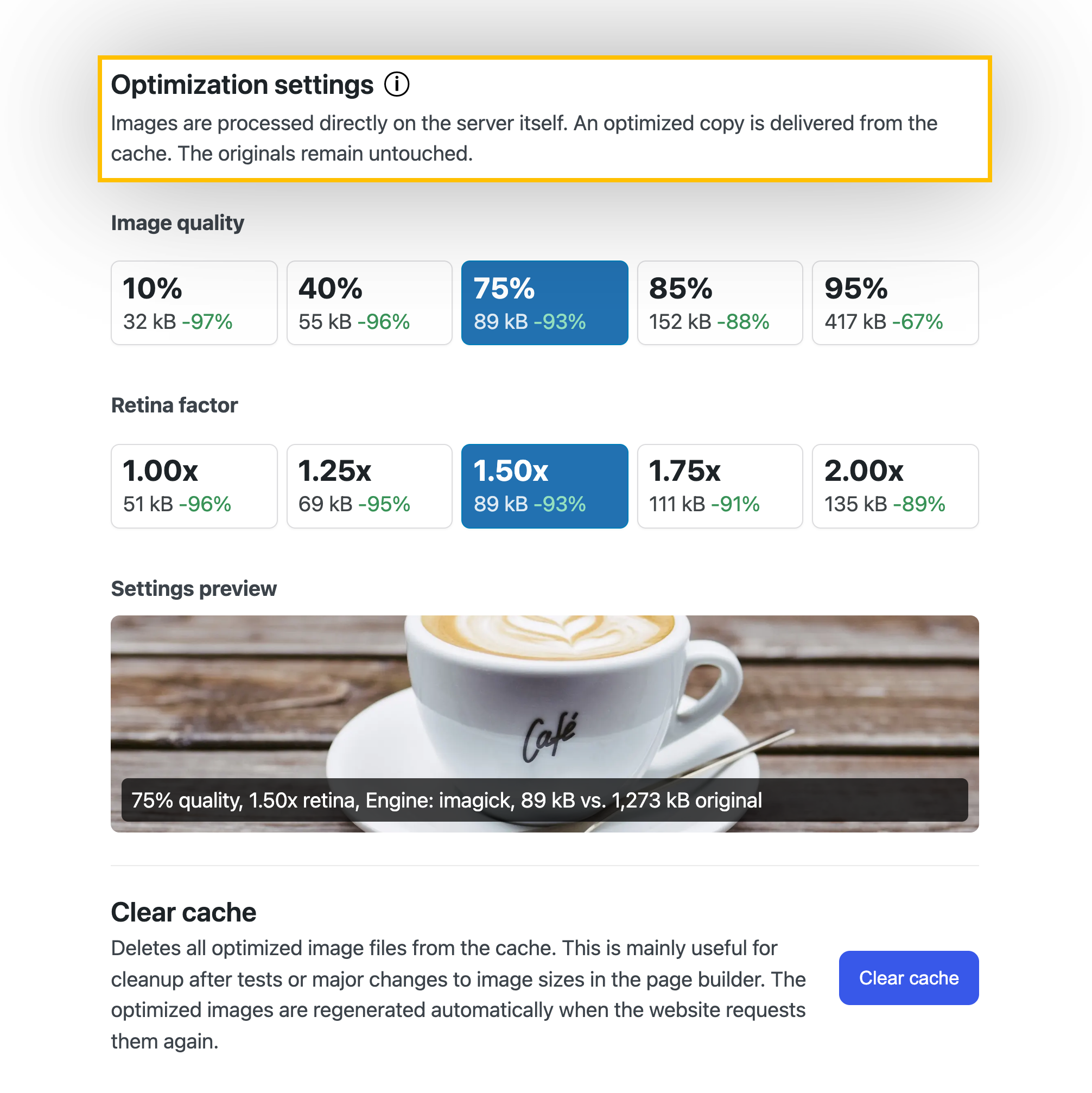
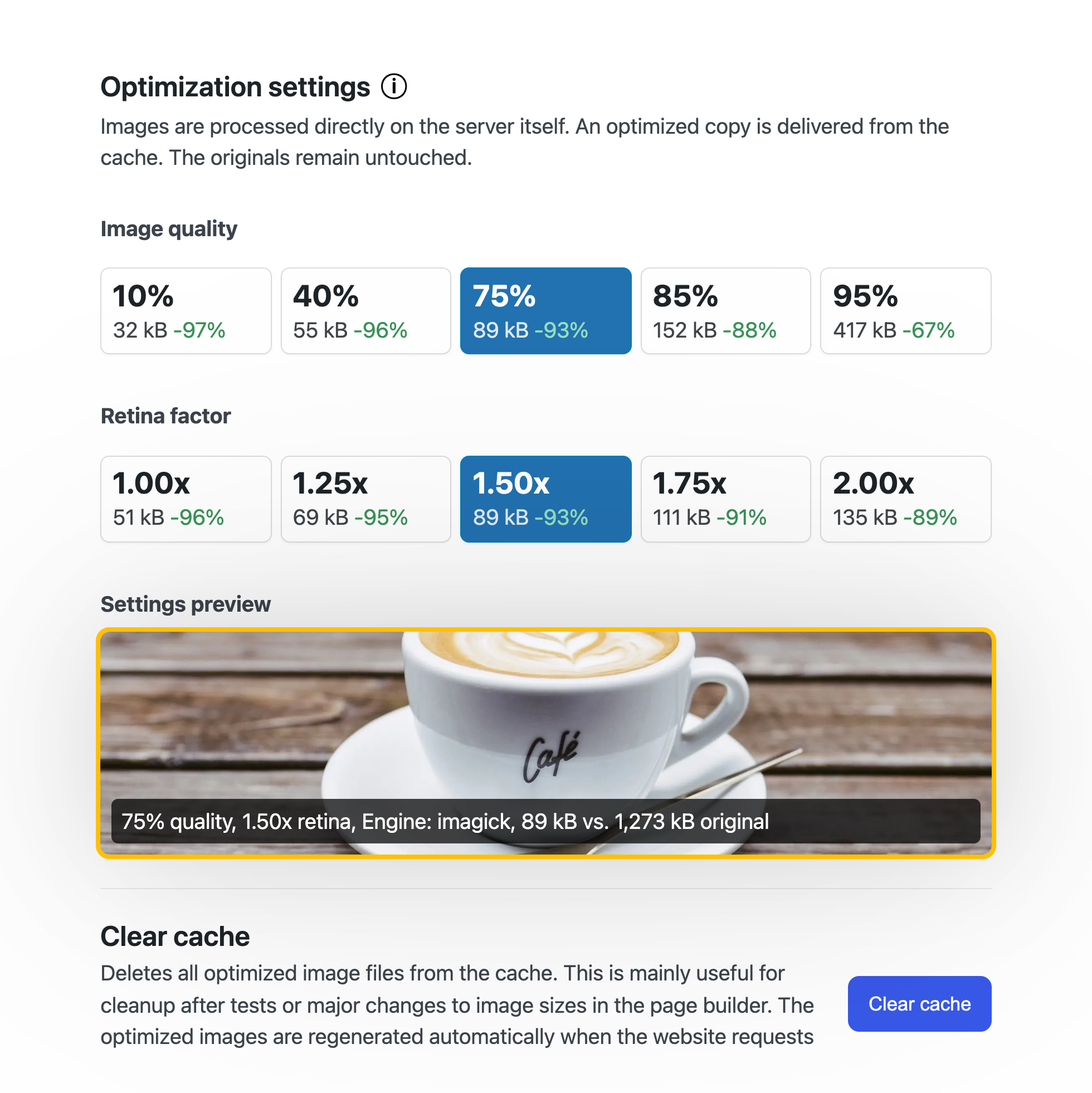
Maximize your SEO ranking with faster-loading images optimized in WebP format. Images are resized and cached directly on your server. The original images and your database remain untouched.
With neo Optimize you get perfect image quality and maximum performance for your website.

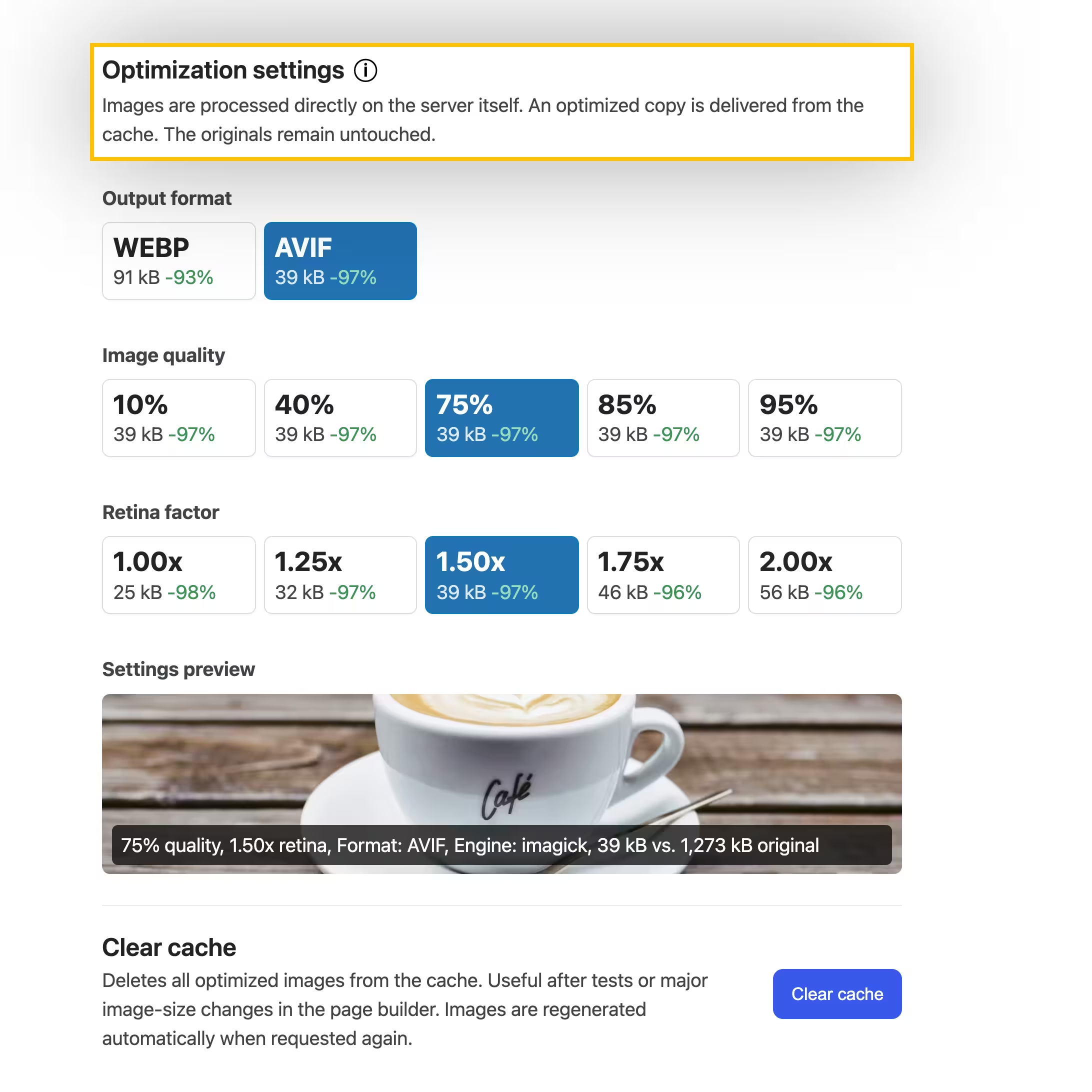
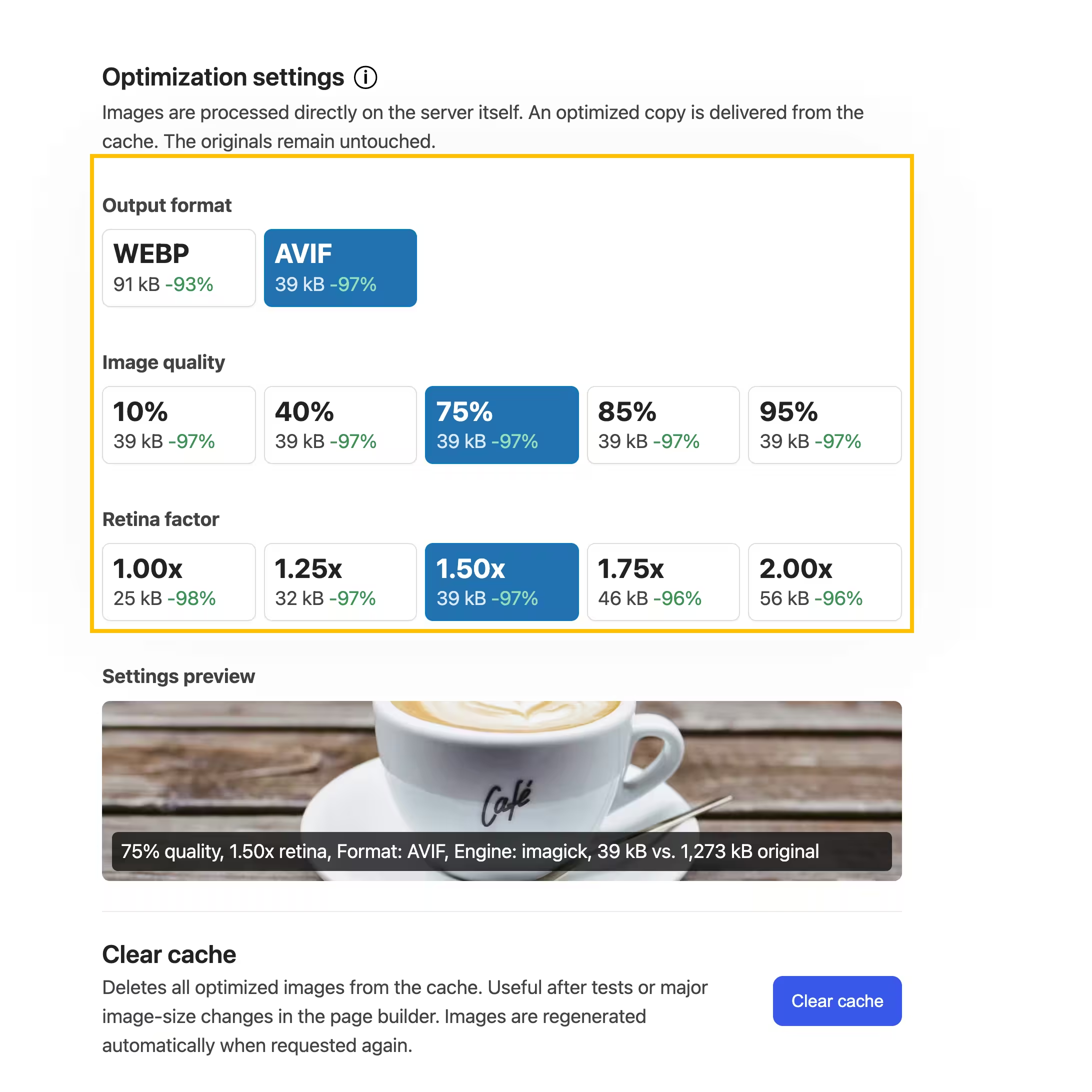
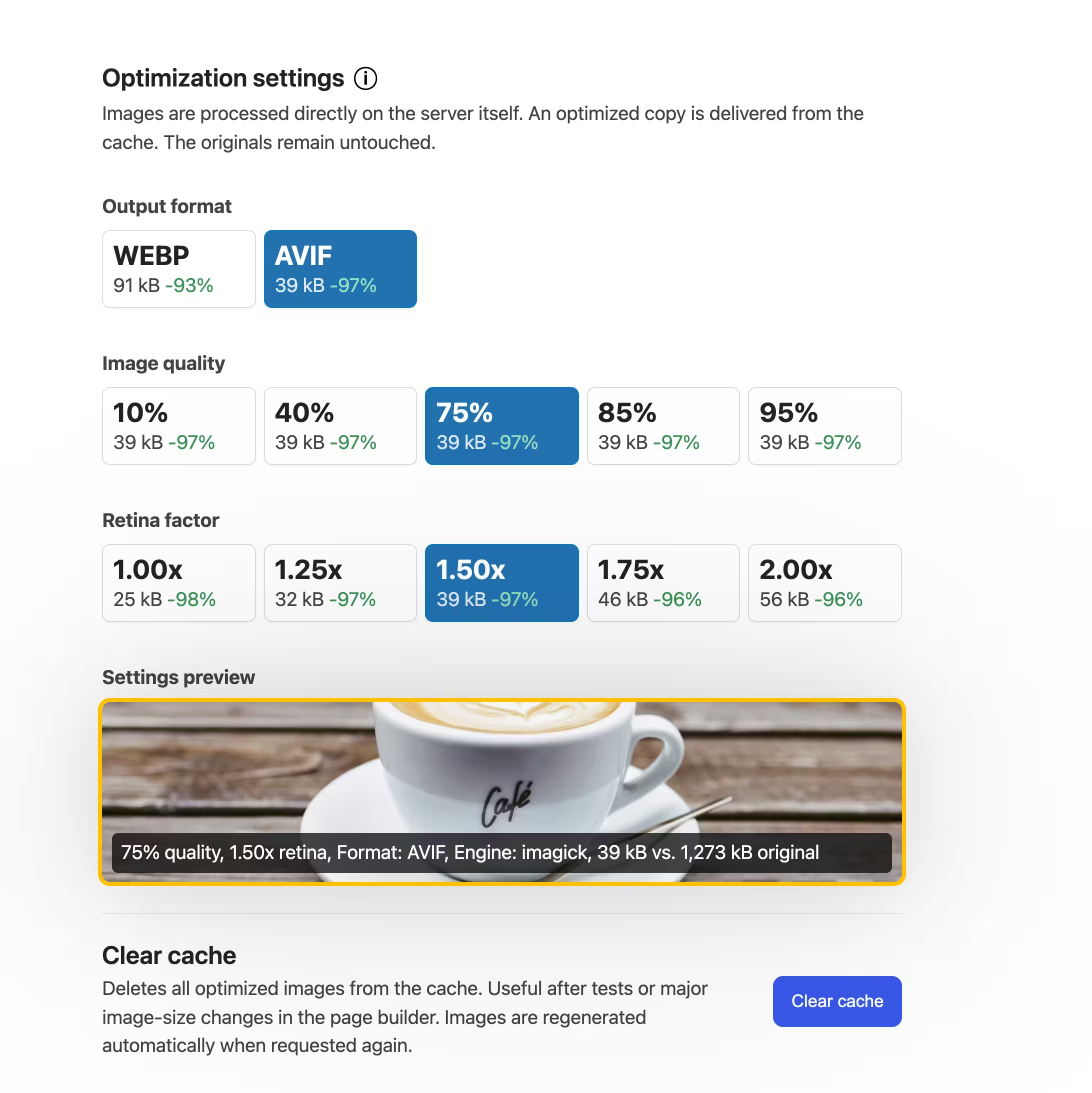
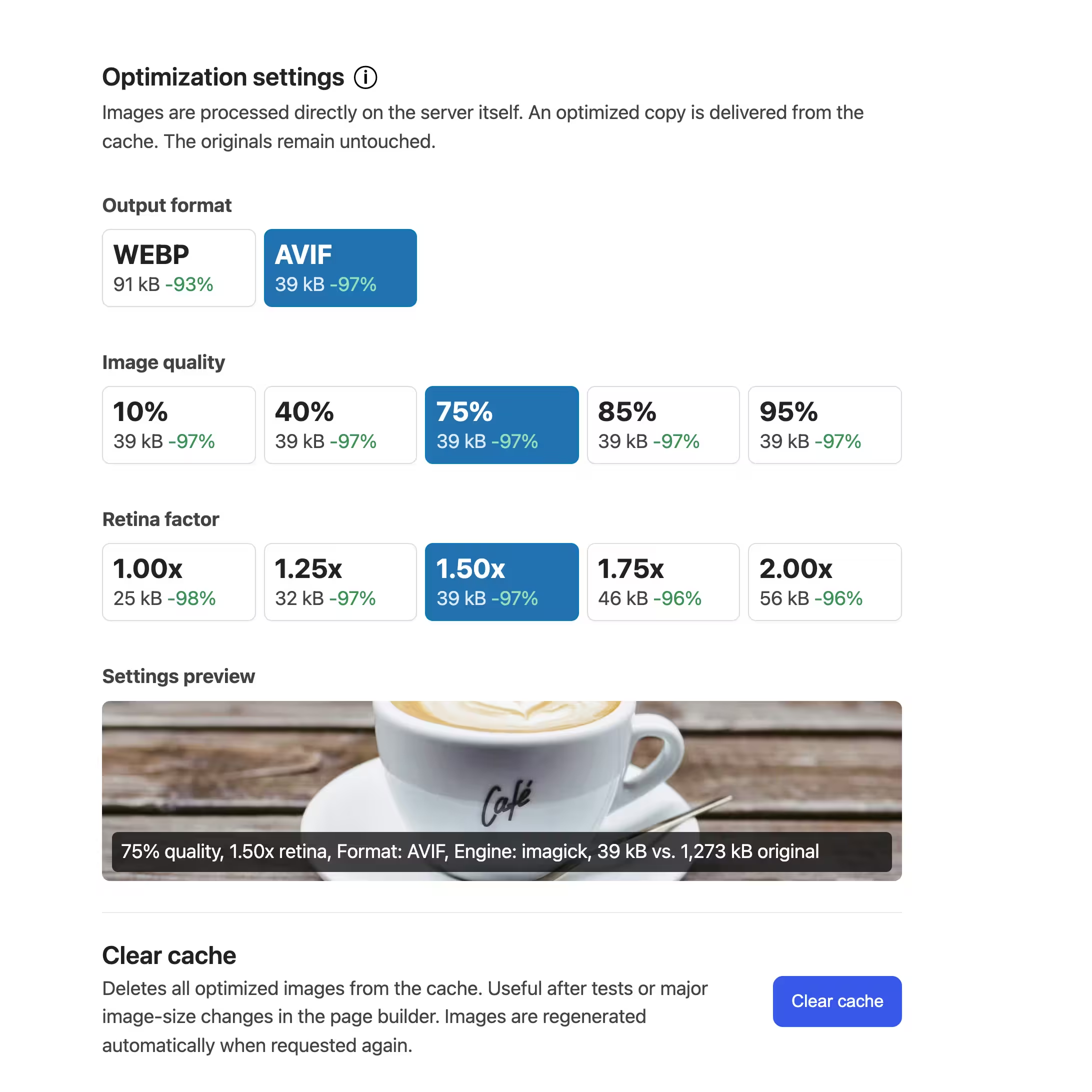
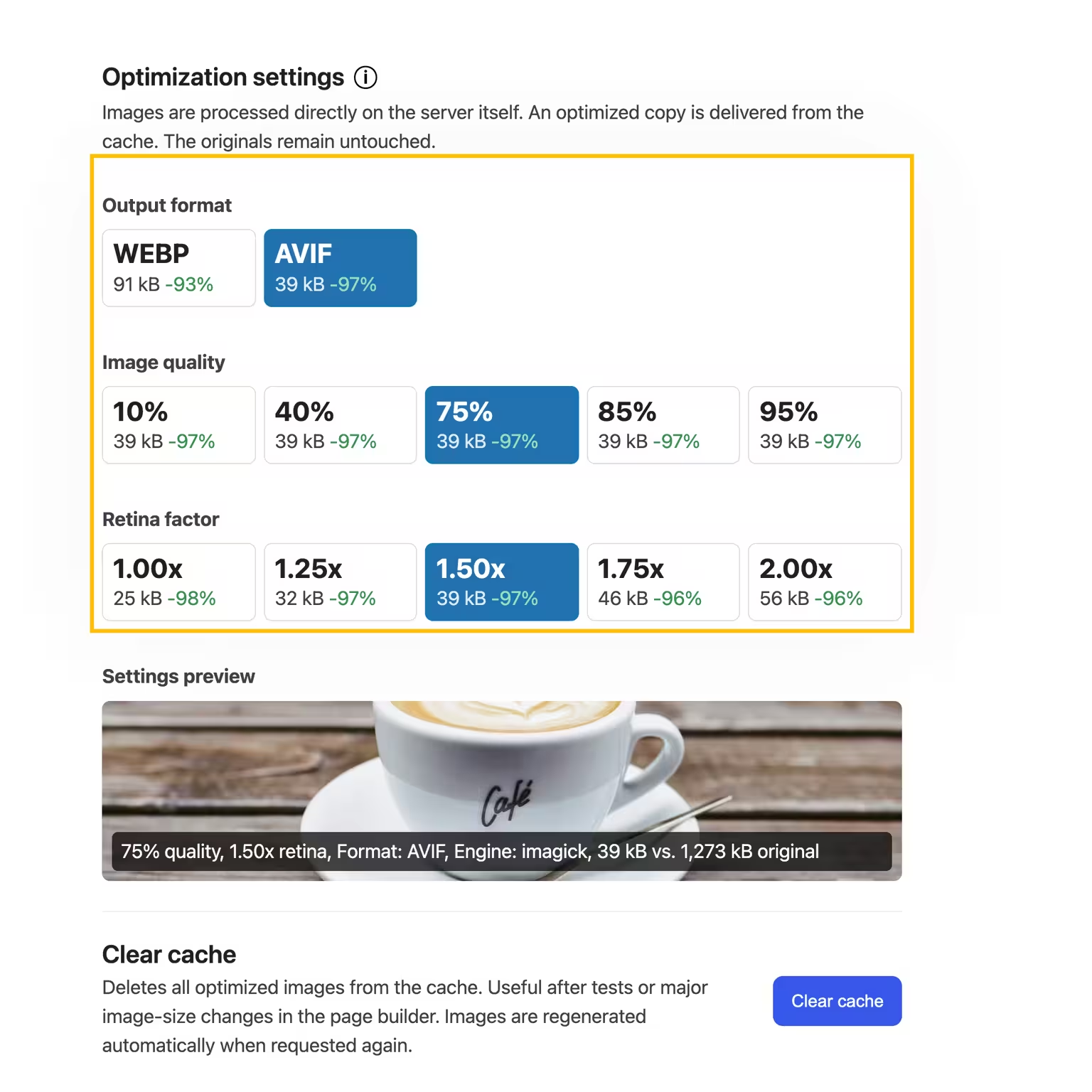
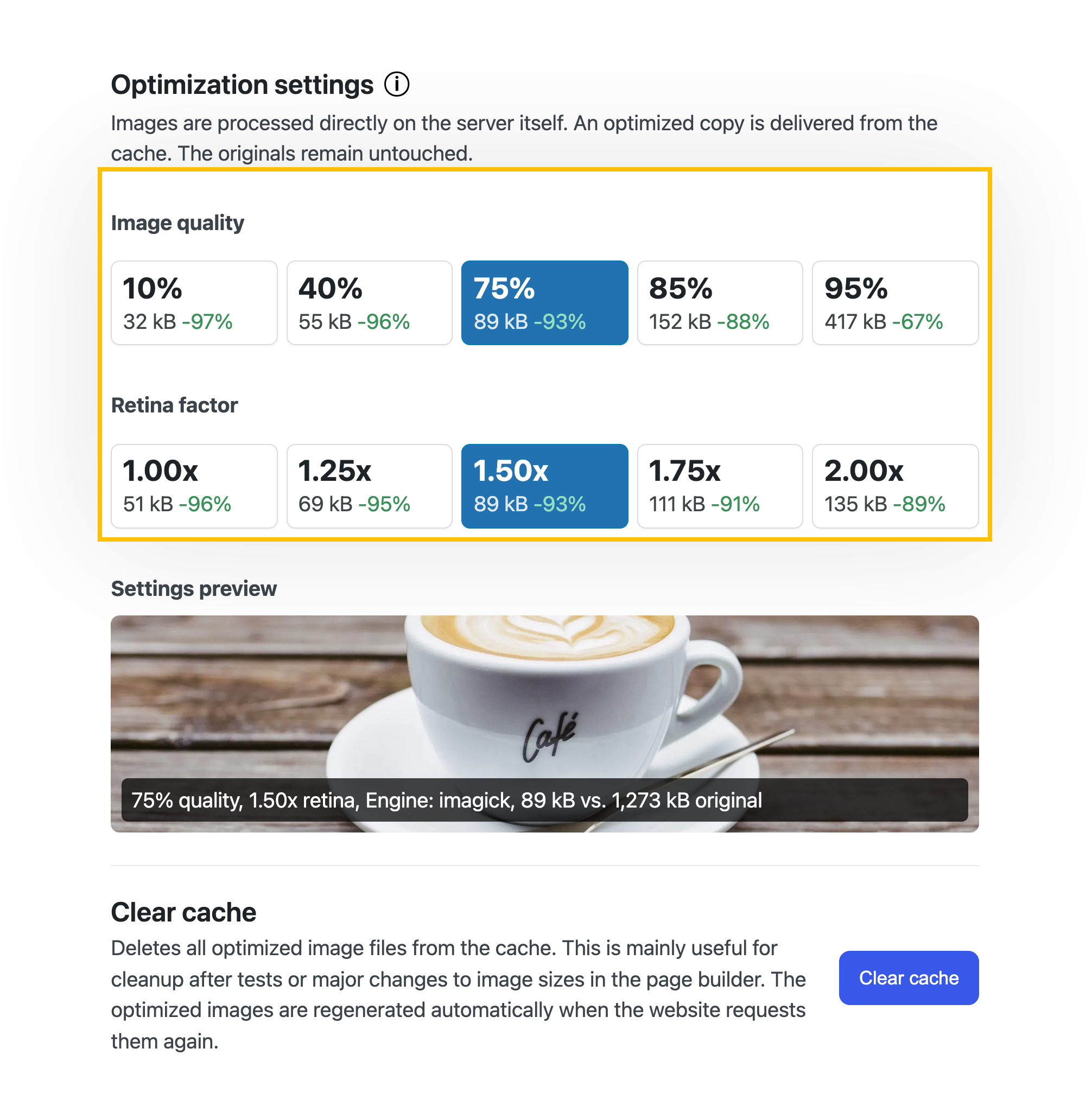
👑 Pro: Use advanced settings to precisely adjust image quality and retina factor.

Plugin neo Optimize Screenshot

Local. Resize. Cache.

Band Coming Soon - neo WP Plugin for WordPress is coming soonWordPress Media Plugin Optimize - Logo - Resize and compress images to the fast WebP image format for SEO

neoOptimize

Fastest image boost!

neoOptimize.zip

All neo Optimize features at a glance.

Boost your SEO Pagespeed by resizing and caching images!

neo Optimize Plugin - fastest image cache for WordPress

Best media optimizer for WordPress ✓ Maximum PageSpeed ✓ Better SEO ranking ✓ Resize, compress & cache ✓ Image support JPG, PNG, WebP ➔ Plugin download

neoOptimize.zip
Icon Crown - neo WP Pro - All plugins in one ZIP file perfectly coordinated.

Be the king of
neoUniverse!

All plugins in one ZIP file perfectly coordinated.

Buy now

Experience with the WordPress plugin neoOptimize.

Review Portrait - Jonas Gruber - Bach & Gruber Holding Ltd. - marketing agency, Google Ads, Shopify, digital agency, SEOReview Logo - Bach & Gruber Holding Ltd. - Jonas Gruber - marketing agency, Google Ads, Shopify, digital agency, SEO
★★★★★

Jonas Gruber

Agency Owner

... What is very well solved in neo Optimize is that all images and the entire content folder remain untouched.

Read review

Review of: neo Optimize Plugin - Fastest Image Cache for WordPress

Leaves database and content folder untouched

As a beta tester I was allowed to thoroughly test neo Optimize. What is very well solved in neo Optimize is that all images and the entire content folder remain untouched. The plugin creates thumbnails in a separate folder and leaves the database 100% unchanged. I haven't seen such a solution in any other media optimize plugin so far.

Jonas Gruber

More about the project
Review Portrait - Sasha Oleksandra Simonova - Avonomis - 3D animations, Cinema 4D, effects, models, design, artistReview Logo - Avonomis - Sasha Oleksandra Simonova - 3D animations, Cinema 4D, effects, models, design, artist
★★★★★

Sasha Simonova

Animation Designer

... I especially like the image quality setting with an immediate preview of the compressed image. The neoTeam did a great job.

Read review

Review of: neo Optimize Plugin - Fastest Image Cache for WordPress

Handy preview of image quality

In an early test version neo Optimize completely impressed me. Once activated everything runs by itself - exactly as you want. Images are automatically optimized and cached on first page load without you having to worry about anything. I especially like the image quality setting with an immediate preview of the compressed image. It's simply a thoroughly successful plugin that works reliably and convinced me completely. The neoTeam did a great job.

Sasha Simonova

Würzburg, Germany

More about the project
Review Portrait - Florens Bach - SEO Agency - Marketing Agency, Google Ads, Shopify, Digital Agency, SEO OptimizationReview Logo - SEO Agency - Florens Bach - Marketing Agency, Google Ads, Shopify, Digital Agency, SEO Optimization
★★★★★

Florens Bach

Online Marketing Expert

... A very intuitive and powerful drawing tool. The whole design looks very cohesive and well thought out.

Read review

Review of: neo Draw Plugin - Draw diagrams and icons in WordPress

Great tool for creatives!

I discovered neo Draw when I was looking for Paint for WordPress and found exactly that. A very intuitive and powerful drawing tool. Unlike Paint, neo Draw has well-chosen color palettes. ;) I especially like the consistent drawing look with the matching font. The whole design looks very cohesive and well thought out. The built-in icon library includes emojis, a wide selection of icons and even animated GIFs. You can also add your own images, GIFs and icons to the drawings. Thanks for the valuable tool!

Florens Bach

Schweinfurt, Germany

More about the project
Review Portrait - Jonas Gruber - Bach & Gruber Holding Ltd. - marketing agency, Google Ads, Shopify, digital agency, SEOReview Logo - Bach & Gruber Holding Ltd. - Jonas Gruber - marketing agency, Google Ads, Shopify, digital agency, SEO
★★★★★

Jonas Gruber

Agency Owner

... The plugin is super fast and perfectly integrated into WordPress. Editing drawings is possible directly in the PageBuilder.

Read review

Review of: neo Draw Plugin - Draw diagrams and icons in WordPress

Very well integrated

During the development phase I had the opportunity to test neo Draw more closely. The plugin is super fast and perfectly integrated into WordPress. Editing the drawings is possible directly in the PageBuilder. The raw data is embedded in the image file and can be transferred to another domain simply by downloading the file. It's amazing that the drawings are still displayed even if the plugin is deactivated. Very nice! Everything is very high quality and reliable. The developer also responds to technical questions immediately. I'm very satisfied.

Jonas Gruber

More about the project
Review Portrait - Sasha Oleksandra Simonova - Avonomis - 3D animations, Cinema 4D, effects, models, design, artistReview Logo - Avonomis - Sasha Oleksandra Simonova - 3D animations, Cinema 4D, effects, models, design, artist
★★★★★

Sasha Simonova

Animation Designer

... You can draw anything easily: logos, icons, tables, decorations, ... You can also draw and paint over existing images.

Read review

Review of: neo Draw Plugin - Draw diagrams and icons in WordPress

Logos, icons, tables, ...

Through a software developer from neo WP I got early access to neo Draw. I actually just wanted to create a few drawings until I realized what is possible with neo Draw. You can draw anything easily: logos, icons, tables, decorations, ... You can also draw and paint over existing images. With the link function I even drew my own buttons and linked them. Especially brilliant is that everything can be animated with just one click, which looks very impressive.

Sasha Simonova

Würzburg, Germany

More about the project
Review Portrait - Florian Krines - Knusper Photography - Photographer, Videographer, Wedding Photographer, Portraits, WürzburgReview Logo - Knusper Photography - Florian Krines - Photographer, Videographer, Wedding Photographer, Portraits, Würzburg
★★★★★

Florian Krines

Photographer

... Practical is that metadata like alt texts are always preserved. A solid plugin that works smoothly.

Read review

Review of: neo Replace Plugin - Replace images & media in WordPress

Metadata remains preserved

I am a beta tester of neo Replace. As a photographer I use the plugin for my portfolio site. I often replace existing images with edited versions. Previously that was tedious because I had to replace the images on each page individually. The neo Replace plugin not only replaces the image files for me, but also shows where I used the images on the website. Practical is that metadata like alt texts are always preserved. A solid plugin that works smoothly.

Florian Krines

Würzburg, Germany

More about the project
Review Portrait - Jonas Gruber - Bach & Gruber Holding Ltd. - marketing agency, Google Ads, Shopify, digital agency, SEOReview Logo - Bach & Gruber Holding Ltd. - Jonas Gruber - marketing agency, Google Ads, Shopify, digital agency, SEO
★★★★★

Jonas Gruber

Agency Owner

... Just like neo Rename, neo Replace also performs its tasks in the database cleanly and reliably. Simply brilliant.

Read review

Review of: neo Replace Plugin - Replace images & media in WordPress

The usual neo WP quality

As with renaming plugins, I am cautious with replace plugins too. That’s why I thoroughly checked neo Replace on a test instance first. Just like neo Rename, neo Replace also performs its tasks in the database cleanly and reliably. This plugin also shows me before replacing where the image is used everywhere. Simply brilliant.

Jonas Gruber

More about the project
Review Portrait - Sasha Oleksandra Simonova - Avonomis - 3D animations, Cinema 4D, effects, models, design, artistReview Logo - Avonomis - Sasha Oleksandra Simonova - 3D animations, Cinema 4D, effects, models, design, artist
★★★★★

Sasha Simonova

Animation Designer

... The slogan Drag-Drop-Swap hits the mark. Just drag a new image onto the old one and done. Well done!

Read review

Review of: neo Replace Plugin - Replace images & media in WordPress

Drag-Drop-Swap!

With early access to neo Replace I can write a few words about it. The slogan Drag-Drop-Swap hits the mark. Just drag a new image onto the old one and done. The new image is uploaded automatically, thumbnails are created and the image is replaced in all posts and pages. As with other neo plugins, the handling is cleverly solved here too. Well done!

Sasha Simonova

Würzburg, Germany

More about the project
Review Portrait - Florens Bach - SEO Agency - Marketing Agency, Google Ads, Shopify, Digital Agency, SEO OptimizationReview Logo - SEO Agency - Florens Bach - Marketing Agency, Google Ads, Shopify, Digital Agency, SEO Optimization
★★★★★

Florens Bach

Online Marketing Expert

... I especially liked the integration of scroll and hover animations, which give my website that certain something.

Read review

Review of: neo Animate - SVG and path animations for WordPress

Interactive and creative animations

In the beta test I already had the opportunity to create some animations. It's childishly easy. There are a variety of ways to control and change the animations, especially the playback in the frontend. I especially liked the integration of scroll and hover animations, which give my website that certain something. For example, I created a graphic that builds up piece by piece when you scroll to that spot. That gives my website additional expressive power.

Florens Bach

Schweinfurt, Germany

More about the project
Review Portrait - Florian Krines - Knusper Photography - Photographer, Videographer, Wedding Photographer, Portraits, WürzburgReview Logo - Knusper Photography - Florian Krines - Photographer, Videographer, Wedding Photographer, Portraits, Würzburg
★★★★★

Florian Krines

Photographer

... In the frontend the animation plays back smoothly and draws attention. Incredible that something like this works directly in WordPress.

Read review

Review of: neo Animate - SVG and path animations for WordPress

Animations as eye-catchers

As part of the beta tester team I was able to extensively test neo Animate in various WordPress environments. neo Animate is not comparable to complex animation tools. I just tried it with one of my neoDraw drawings: you only have to choose what should be animated and when, and it looks great immediately! The editor is really brilliant. In the frontend the animation plays smoothly and draws attention. Incredible that something like this works directly in WordPress. Thanks for these new possibilities!

Florian Krines

Würzburg, Germany

More about the project

We look forward to your feedback!

★★★★★

Rate now!

neo Optimize - Coming soon in the official WP Plugin Directory.

WordPress Media Plugin Optimize - WP Plugin Banner - Fastest image boost! - Local. Resize. Cache.

neo Optimize - Cache and resize images - the original remains untouched

Band Coming Soon - neo WP Plugin for WordPress is coming soon
Plugin Alternatives »

AVERAGE RATING

(0.0) Open Popup FeedbackOpen Popup Review

(based on 2 reviews)

neoOptimize.zip
Could not read ZIP at /var/www/download.neo-wp.com/neo-optimize-full.26.3.17.zip: NeoProdPro\NeoGlobal\GlobalException: Readme file not found in ZIP: /var/www/download.neo-wp.com/neo-optimize-full.26.3.17.zip - 🙋 in /var/www/neo-wp.com/wp-content/plugins/neo-prod/_global--log.php:59 Stack trace: #0 /var/www/neo-wp.com/wp-content/plugins/neo-prod/neo-bundler--prod.php(616): NeoProdPro\NeoGlobal\throw_global_exception() #1 /var/www/neo-wp.com/wp-content/plugins/neo-prod/_global--hook.php(54): {closure:/var/www/neo-wp.com/wp-content/plugins/neo-prod/neo-bundler--prod.php:601}() #2 /var/www/neo-wp.com/wp-content/plugins/neo-prod/neo-prod.php(121): {closure:{closure:NeoProdPro\NeoGlobal\add_shortcode_hook():51}:52}() #3 /var/www/neo-wp.com/wp-content/plugins/neo-prod/_global--hook.php(52): NeoProdPro\NeoEntrypoint\suppress_plugin_on_error() #4 /var/www/neo-wp.com/wp-includes/shortcodes.php(434): {closure:NeoProdPro\NeoGlobal\add_shortcode_hook():51}() #5 [internal function]: do_shortcode_tag() #6 /var/www/neo-wp.com/wp-includes/shortcodes.php(273): preg_replace_callback() #7 /var/www/neo-wp.com/wp-content/themes/bricks/includes/elements/shortcode.php(96): do_shortcode() #8 /var/www/neo-wp.com/wp-content/themes/bricks/includes/elements/base.php(2731): Bricks\Element_Shortcode->render() #9 /var/www/neo-wp.com/wp-content/themes/bricks/includes/frontend.php(701): Bricks\Element->init() #10 /var/www/neo-wp.com/wp-content/themes/bricks/includes/elements/container.php(946): Bricks\Frontend::render_element() #11 /var/www/neo-wp.com/wp-content/themes/bricks/includes/elements/base.php(2731): Bricks\Element_Container->render() #12 /var/www/neo-wp.com/wp-content/themes/bricks/includes/frontend.php(701): Bricks\Element->init() #13 /var/www/neo-wp.com/wp-content/themes/bricks/includes/elements/container.php(946): Bricks\Frontend::render_element() #14 /var/www/neo-wp.com/wp-content/themes/bricks/includes/elements/base.php(2731): Bricks\Element_Container->render() #15 /var/www/neo-wp.com/wp-content/themes/bricks/includes/frontend.php(701): Bricks\Element->init() #16 /var/www/neo-wp.com/wp-content/themes/bricks/includes/frontend.php(766): Bricks\Frontend::render_element() #17 /var/www/neo-wp.com/wp-content/themes/bricks/includes/elements/tabs-nested.php(407): Bricks\Frontend::render_children() #18 /var/www/neo-wp.com/wp-content/themes/bricks/includes/elements/base.php(2731): Bricks\Element_Tabs_Nested->render() #19 /var/www/neo-wp.com/wp-content/themes/bricks/includes/frontend.php(701): Bricks\Element->init() #20 /var/www/neo-wp.com/wp-content/themes/bricks/includes/elements/container.php(946): Bricks\Frontend::render_element() #21 /var/www/neo-wp.com/wp-content/themes/bricks/includes/elements/base.php(2731): Bricks\Element_Container->render() #22 /var/www/neo-wp.com/wp-content/themes/bricks/includes/frontend.php(701): Bricks\Element->init() #23 /var/www/neo-wp.com/wp-content/themes/bricks/includes/elements/container.php(946): Bricks\Frontend::render_element() #24 /var/www/neo-wp.com/wp-content/themes/bricks/includes/elements/base.php(2731): Bricks\Element_Container->render() #25 /var/www/neo-wp.com/wp-content/themes/bricks/includes/frontend.php(701): Bricks\Element->init() #26 /var/www/neo-wp.com/wp-content/themes/bricks/includes/elements/container.php(946): Bricks\Frontend::render_element() #27 /var/www/neo-wp.com/wp-content/themes/bricks/includes/elements/base.php(2731): Bricks\Element_Container->render() #28 /var/www/neo-wp.com/wp-content/themes/bricks/includes/frontend.php(701): Bricks\Element->init() #29 /var/www/neo-wp.com/wp-content/themes/bricks/includes/frontend.php(847): Bricks\Frontend::render_element() #30 /var/www/neo-wp.com/wp-content/themes/bricks/includes/frontend.php(1099): Bricks\Frontend::render_data() #31 /var/www/neo-wp.com/wp-content/themes/bricks/single.php(15): Bricks\Frontend::render_content() #32 /var/www/neo-wp.com/wp-includes/template-loader.php(125): include('...') #33 /var/www/neo-wp.com/wp-blog-header.php(19): require_once('...') #34 /var/www/neo-wp.com/index.php(17): require('...') #35 {main}

FAQ of neo Optimize

Could not read ZIP at /var/www/download.neo-wp.com/neo-optimize-full.26.3.17.zip: NeoProdPro\NeoGlobal\GlobalException: Readme file not found in ZIP: /var/www/download.neo-wp.com/neo-optimize-full.26.3.17.zip - 🙋 in /var/www/neo-wp.com/wp-content/plugins/neo-prod/_global--log.php:59 Stack trace: #0 /var/www/neo-wp.com/wp-content/plugins/neo-prod/neo-bundler--prod.php(616): NeoProdPro\NeoGlobal\throw_global_exception() #1 /var/www/neo-wp.com/wp-content/plugins/neo-prod/_global--hook.php(54): {closure:/var/www/neo-wp.com/wp-content/plugins/neo-prod/neo-bundler--prod.php:601}() #2 /var/www/neo-wp.com/wp-content/plugins/neo-prod/neo-prod.php(121): {closure:{closure:NeoProdPro\NeoGlobal\add_shortcode_hook():51}:52}() #3 /var/www/neo-wp.com/wp-content/plugins/neo-prod/_global--hook.php(52): NeoProdPro\NeoEntrypoint\suppress_plugin_on_error() #4 /var/www/neo-wp.com/wp-includes/shortcodes.php(434): {closure:NeoProdPro\NeoGlobal\add_shortcode_hook():51}() #5 [internal function]: do_shortcode_tag() #6 /var/www/neo-wp.com/wp-includes/shortcodes.php(273): preg_replace_callback() #7 /var/www/neo-wp.com/wp-content/themes/bricks/includes/elements/shortcode.php(96): do_shortcode() #8 /var/www/neo-wp.com/wp-content/themes/bricks/includes/elements/base.php(2731): Bricks\Element_Shortcode->render() #9 /var/www/neo-wp.com/wp-content/themes/bricks/includes/frontend.php(701): Bricks\Element->init() #10 /var/www/neo-wp.com/wp-content/themes/bricks/includes/elements/container.php(946): Bricks\Frontend::render_element() #11 /var/www/neo-wp.com/wp-content/themes/bricks/includes/elements/base.php(2731): Bricks\Element_Container->render() #12 /var/www/neo-wp.com/wp-content/themes/bricks/includes/frontend.php(701): Bricks\Element->init() #13 /var/www/neo-wp.com/wp-content/themes/bricks/includes/elements/container.php(946): Bricks\Frontend::render_element() #14 /var/www/neo-wp.com/wp-content/themes/bricks/includes/elements/base.php(2731): Bricks\Element_Container->render() #15 /var/www/neo-wp.com/wp-content/themes/bricks/includes/frontend.php(701): Bricks\Element->init() #16 /var/www/neo-wp.com/wp-content/themes/bricks/includes/frontend.php(766): Bricks\Frontend::render_element() #17 /var/www/neo-wp.com/wp-content/themes/bricks/includes/elements/tabs-nested.php(407): Bricks\Frontend::render_children() #18 /var/www/neo-wp.com/wp-content/themes/bricks/includes/elements/base.php(2731): Bricks\Element_Tabs_Nested->render() #19 /var/www/neo-wp.com/wp-content/themes/bricks/includes/frontend.php(701): Bricks\Element->init() #20 /var/www/neo-wp.com/wp-content/themes/bricks/includes/elements/container.php(946): Bricks\Frontend::render_element() #21 /var/www/neo-wp.com/wp-content/themes/bricks/includes/elements/base.php(2731): Bricks\Element_Container->render() #22 /var/www/neo-wp.com/wp-content/themes/bricks/includes/frontend.php(701): Bricks\Element->init() #23 /var/www/neo-wp.com/wp-content/themes/bricks/includes/elements/container.php(946): Bricks\Frontend::render_element() #24 /var/www/neo-wp.com/wp-content/themes/bricks/includes/elements/base.php(2731): Bricks\Element_Container->render() #25 /var/www/neo-wp.com/wp-content/themes/bricks/includes/frontend.php(701): Bricks\Element->init() #26 /var/www/neo-wp.com/wp-content/themes/bricks/includes/elements/container.php(946): Bricks\Frontend::render_element() #27 /var/www/neo-wp.com/wp-content/themes/bricks/includes/elements/base.php(2731): Bricks\Element_Container->render() #28 /var/www/neo-wp.com/wp-content/themes/bricks/includes/frontend.php(701): Bricks\Element->init() #29 /var/www/neo-wp.com/wp-content/themes/bricks/includes/frontend.php(847): Bricks\Frontend::render_element() #30 /var/www/neo-wp.com/wp-content/themes/bricks/includes/frontend.php(1099): Bricks\Frontend::render_data() #31 /var/www/neo-wp.com/wp-content/themes/bricks/single.php(15): Bricks\Frontend::render_content() #32 /var/www/neo-wp.com/wp-includes/template-loader.php(125): include('...') #33 /var/www/neo-wp.com/wp-blog-header.php(19): require_once('...') #34 /var/www/neo-wp.com/index.php(17): require('...') #35 {main}

Changelog of neo Optimize

Could not read ZIP at /var/www/download.neo-wp.com/neo-optimize-full.26.3.17.zip: NeoProdPro\NeoGlobal\GlobalException: Readme file not found in ZIP: /var/www/download.neo-wp.com/neo-optimize-full.26.3.17.zip - 🙋 in /var/www/neo-wp.com/wp-content/plugins/neo-prod/_global--log.php:59 Stack trace: #0 /var/www/neo-wp.com/wp-content/plugins/neo-prod/neo-bundler--prod.php(616): NeoProdPro\NeoGlobal\throw_global_exception() #1 /var/www/neo-wp.com/wp-content/plugins/neo-prod/_global--hook.php(54): {closure:/var/www/neo-wp.com/wp-content/plugins/neo-prod/neo-bundler--prod.php:601}() #2 /var/www/neo-wp.com/wp-content/plugins/neo-prod/neo-prod.php(121): {closure:{closure:NeoProdPro\NeoGlobal\add_shortcode_hook():51}:52}() #3 /var/www/neo-wp.com/wp-content/plugins/neo-prod/_global--hook.php(52): NeoProdPro\NeoEntrypoint\suppress_plugin_on_error() #4 /var/www/neo-wp.com/wp-includes/shortcodes.php(434): {closure:NeoProdPro\NeoGlobal\add_shortcode_hook():51}() #5 [internal function]: do_shortcode_tag() #6 /var/www/neo-wp.com/wp-includes/shortcodes.php(273): preg_replace_callback() #7 /var/www/neo-wp.com/wp-content/themes/bricks/includes/elements/shortcode.php(96): do_shortcode() #8 /var/www/neo-wp.com/wp-content/themes/bricks/includes/elements/base.php(2731): Bricks\Element_Shortcode->render() #9 /var/www/neo-wp.com/wp-content/themes/bricks/includes/frontend.php(701): Bricks\Element->init() #10 /var/www/neo-wp.com/wp-content/themes/bricks/includes/elements/container.php(946): Bricks\Frontend::render_element() #11 /var/www/neo-wp.com/wp-content/themes/bricks/includes/elements/base.php(2731): Bricks\Element_Container->render() #12 /var/www/neo-wp.com/wp-content/themes/bricks/includes/frontend.php(701): Bricks\Element->init() #13 /var/www/neo-wp.com/wp-content/themes/bricks/includes/elements/container.php(946): Bricks\Frontend::render_element() #14 /var/www/neo-wp.com/wp-content/themes/bricks/includes/elements/base.php(2731): Bricks\Element_Container->render() #15 /var/www/neo-wp.com/wp-content/themes/bricks/includes/frontend.php(701): Bricks\Element->init() #16 /var/www/neo-wp.com/wp-content/themes/bricks/includes/frontend.php(766): Bricks\Frontend::render_element() #17 /var/www/neo-wp.com/wp-content/themes/bricks/includes/elements/tabs-nested.php(407): Bricks\Frontend::render_children() #18 /var/www/neo-wp.com/wp-content/themes/bricks/includes/elements/base.php(2731): Bricks\Element_Tabs_Nested->render() #19 /var/www/neo-wp.com/wp-content/themes/bricks/includes/frontend.php(701): Bricks\Element->init() #20 /var/www/neo-wp.com/wp-content/themes/bricks/includes/elements/container.php(946): Bricks\Frontend::render_element() #21 /var/www/neo-wp.com/wp-content/themes/bricks/includes/elements/base.php(2731): Bricks\Element_Container->render() #22 /var/www/neo-wp.com/wp-content/themes/bricks/includes/frontend.php(701): Bricks\Element->init() #23 /var/www/neo-wp.com/wp-content/themes/bricks/includes/elements/container.php(946): Bricks\Frontend::render_element() #24 /var/www/neo-wp.com/wp-content/themes/bricks/includes/elements/base.php(2731): Bricks\Element_Container->render() #25 /var/www/neo-wp.com/wp-content/themes/bricks/includes/frontend.php(701): Bricks\Element->init() #26 /var/www/neo-wp.com/wp-content/themes/bricks/includes/elements/container.php(946): Bricks\Frontend::render_element() #27 /var/www/neo-wp.com/wp-content/themes/bricks/includes/elements/base.php(2731): Bricks\Element_Container->render() #28 /var/www/neo-wp.com/wp-content/themes/bricks/includes/frontend.php(701): Bricks\Element->init() #29 /var/www/neo-wp.com/wp-content/themes/bricks/includes/frontend.php(847): Bricks\Frontend::render_element() #30 /var/www/neo-wp.com/wp-content/themes/bricks/includes/frontend.php(1099): Bricks\Frontend::render_data() #31 /var/www/neo-wp.com/wp-content/themes/bricks/single.php(15): Bricks\Frontend::render_content() #32 /var/www/neo-wp.com/wp-includes/template-loader.php(125): include('...') #33 /var/www/neo-wp.com/wp-blog-header.php(19): require_once('...') #34 /var/www/neo-wp.com/index.php(17): require('...') #35 {main}

Screenshots of neo Optimize

No screenshots

Reviews of neo Optimize

⭐⭐⭐⭐⭐

Leaves database and content folder untouched

by Jonas Gruber - Agency Owner - Bach & Gruber Holding Ltd.

As a beta tester I was allowed to test neo Optimize extensively. What neo Optimize does very well is that all images and the entire content folder remain untouched. The plugin creates thumbnails in a separate folder and leaves the database 100% unchanged. I have not seen such a solution in any other media optimization plugin so far.


⭐⭐⭐⭐⭐

Practical preview of image quality

by Sasha Simonova - Animation Designer - Avonomis

In an early test version neo Optimize completely impressed me. Once activated, everything runs by itself - exactly as you want it. The images are automatically optimized and cached on the first page load without you having to worry about anything. I especially like the setting of image quality with a direct preview of the compressed image. It is simply a thoroughly successful plugin that works reliably and absolutely convinced me. The neoTeam did a great job.


WordPress plugin neo Optimize
Alternatives & comparison

Compared with:

Plugin neo Optimize Screenshot

neoOptimize

(0.0) Open Popup FeedbackOpen Popup Review

neo Optimize - Cache and resize images - the original remains untouched

The WordPress plugin neo Optimize from neo WP was released on 2026-04-01 and is part of the new neoWP plugin series. The plugin leverages modern web development capabilities, reflected in its performance and intuitive design. Reviews indicate that since its release the plugin has delighted users with well-chosen and cleverly implemented features. Particularly noteworthy is the solid programming. A look at the source code confirms that an experienced software development company stands behind the plugin.

“The plugins in the neo package are very well coordinated and solve all common image problems in WordPress.”

Features - Powerful tools cleverly implemented

  • Maximize the SEO ranking of your images
  • We keep your media file in its original
  • Resizing on your own server
  • Free WebP support for delivered images
  • Optimization of neo Draw SVG graphics
  • Image scaling based on the display size in the frontend
  • Adjustable image quality (optional: per image) (Pro)
  • SEO-friendly, automatically generated alt texts based on SVG text contents (Pro)
  • Minimizing raster graphics in SVG files (Pro)

“Great what you can do with neo Rename. The Pro version takes it even further.”

Technical Details - Modern implementation with high compatibility

The plugin neo Optimize is available for free for download in its current version 1.0.0. It requires at minimum the WordPress version and PHP version or higher. The plugin was tested by the beta tester group up to the current version . The developers published the last update in 2026-04. The continuous updating and expansion of the plugin reflects the commitment to further development.

“It's convenient to get all media plugins from a single developer. The entire neo universe runs performantly, reliably and stably.”

Quality and Support - Fast and helpful assistance

Support for neo Optimize receives mostly positive feedback, mainly thanks to fast response times and effective problem solving. Many users report that the developers provide committed and helpful support for both the free and Pro versions. The neo WP team is directly reachable via the developer page by chat, email, and contact form. Additionally, the official support forum is available for further assistance.

“The developers respond quickly, personally, and are very helpful.”

Conclusion - Very high-quality WordPress plugin package

The plugin neo Optimize fully lives up to its slogan “Boost your SEO pagespeed by resizing and caching images!” Even in the free version, the entire neo plugin series offers a comprehensive solution for the typical media management needs in WordPress. If you already use neo Optimize, it’s worth taking a look at the other plugins from neo WP.

Show more

Detailed plugin information

Plugin slug: neo-optimize
Plugin name: neoOptimize
Plugin title: neo Optimize - Bilder cachen und resizen - das Original bleibt unberührt
Plugin keywords: #optimize #optimizer #resize #cache #compress
Plugin version: 1.0.0
Last updated: 2026-04
Release date: 2026-04-01
Required WP version:
Required PHP version:
Tested up to WP version:
Active installations: 1+
Average rating: 5.0
Number of ratings: 2
Number of support threads: 0 (in the last 2 months)
Number of resolved support threads: 0 (in the last 2 months)
Plugin author: neo WP
Developer homepage: https://neo-wp.com/?ref=wporg-info
WP developer profile page: https://profiles.wordpress.org/neoplugins/
Support URL in the WordPress Plugin Directory: https://neo-wp.com/support/?ref=wporg-info
Developer support URL: https://neo-wp.com/support/?ref=wporg-info
WP Plugin Directory: https://neo-wp.com/plugin/neo-optimize/?ref=wporg-info

#optimize #optimizer #resize #cache #compress

Alternatives to neo Optimize
Open plugin in sandboxTo the official plugin store

Number #

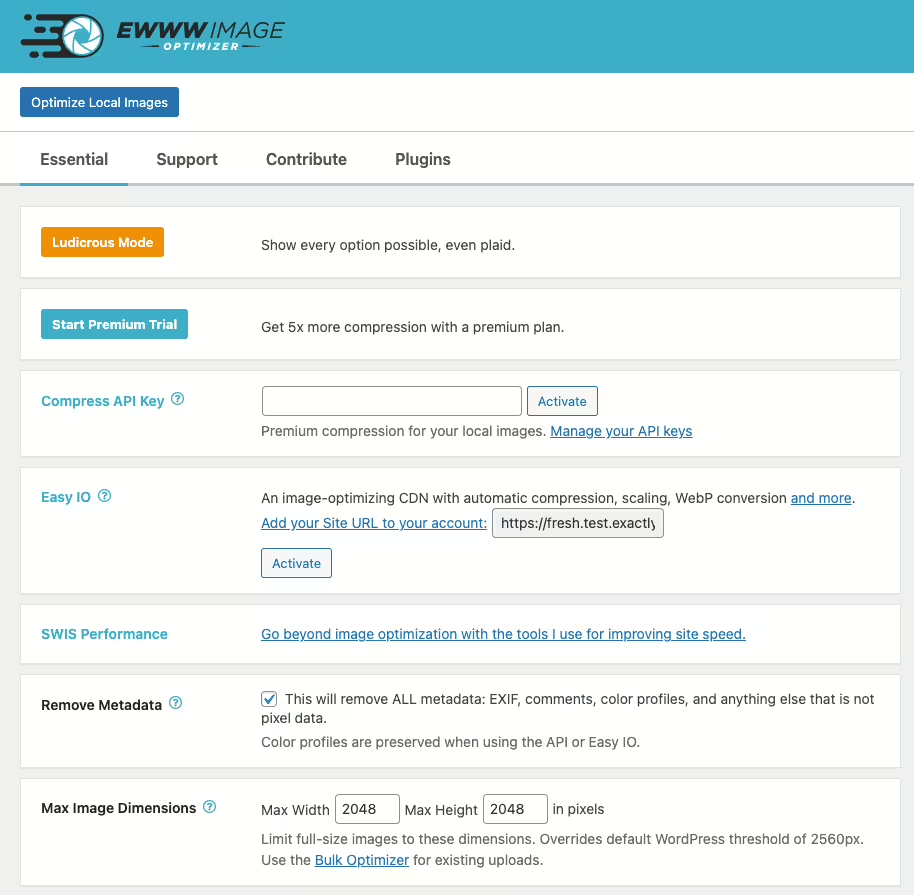
Screenshot of the WordPress plugin ewww-image-optimizer on the topic: compress, convert, lazy load, resize, webp

Ewww Image Optimizer

(0.0) Open Popup FeedbackOpen Popup Review

EWWW Image Optimizer - Overview of its features

EWWW Image Optimizer is a WordPress plugin by Exactly WWW, that improves website performance through image optimization and has over 1 000 000+ active installations.

"Optimizes all current and newly added images like magic."

Features - Wide range of image optimization tools

  • Server-side image optimization - Full control without external servers.
  • Bulk optimization - Optimize all images of a website in one step.
  • WebP conversion - Faster load times and reduced storage usage.
  • Automatic image optimization - For new images (Pro).
  • Pixel-perfect optimization - Precise control over image quality.
  • CDN support - Integration with various CDNs.
  • Commercial license - Free and accessible to everyone.

Technical details - Developer entry points

EWWW Image Optimizer uses server-side WordPress installations with support via WP-CLI to handle large numbers of images. Using GD, ImageMagick and other tools enables precise compression settings. WebP can be converted with the GD library, and storing metadata in databases increases traceability.

Quality and support - High image quality and reliable service

The plugin preserves high image quality even after compression. Support is free via WordPress.org, with fast email support through the official website. Users praise the personal support especially for the Pro version, despite occasional waiting times.

"Excellent support and quick solutions despite complex issues."

Conclusion - Strengths and Areas for Improvement

The EWWW Image Optimizer provides effective image optimization for WordPress with server-side processing and WebP conversion. Free use and broad compatibility make it appealing. The community is mostly satisfied, despite security warnings and isolated criticisms. Continuous improvements are being made, which makes EWWW Image Optimizer one of the best plugins in its category.

Show more

Detailed plugin information

Plugin slug: ewww-image-optimizer
Plugin name: Ewww Image Optimizer
Plugin title: EWWW Image Optimizer
Plugin keywords: #compress #convert #lazy load #resize #webp
Plugin version: 8.5.0
Last updated: 2026-04
Released on: 2012-06-07
Required WP version: 6.6
Required PHP version: 7.4
Tested up to WP Version: 7.0
Active installations: 1 000 000+
Average rating: 4.8
Number of reviews: 1 826
Number of support requests: 3 (in the last 2 months)
Number of resolved support requests: 2 (in the last 2 months)
Plugin author: nosilver4u
Developer homepage: https://wordpress.org/plugins/ewww-image-optimizer/
WP developer profile page: https://profiles.wordpress.org/nosilver4u/
Support URL in the WordPress Plugin Directory: https://wordpress.org/support/plugin/ewww-image-optimizer/
Developer support URL: https://ewww.io/
WP Plugin Directory: https://wordpress.org/plugins/ewww-image-optimizer/

#compress #convert #lazy load #resize #webp

Alternatives to Ewww Image Optimizer
Open plugin in sandboxTo the official plugin store

Number #

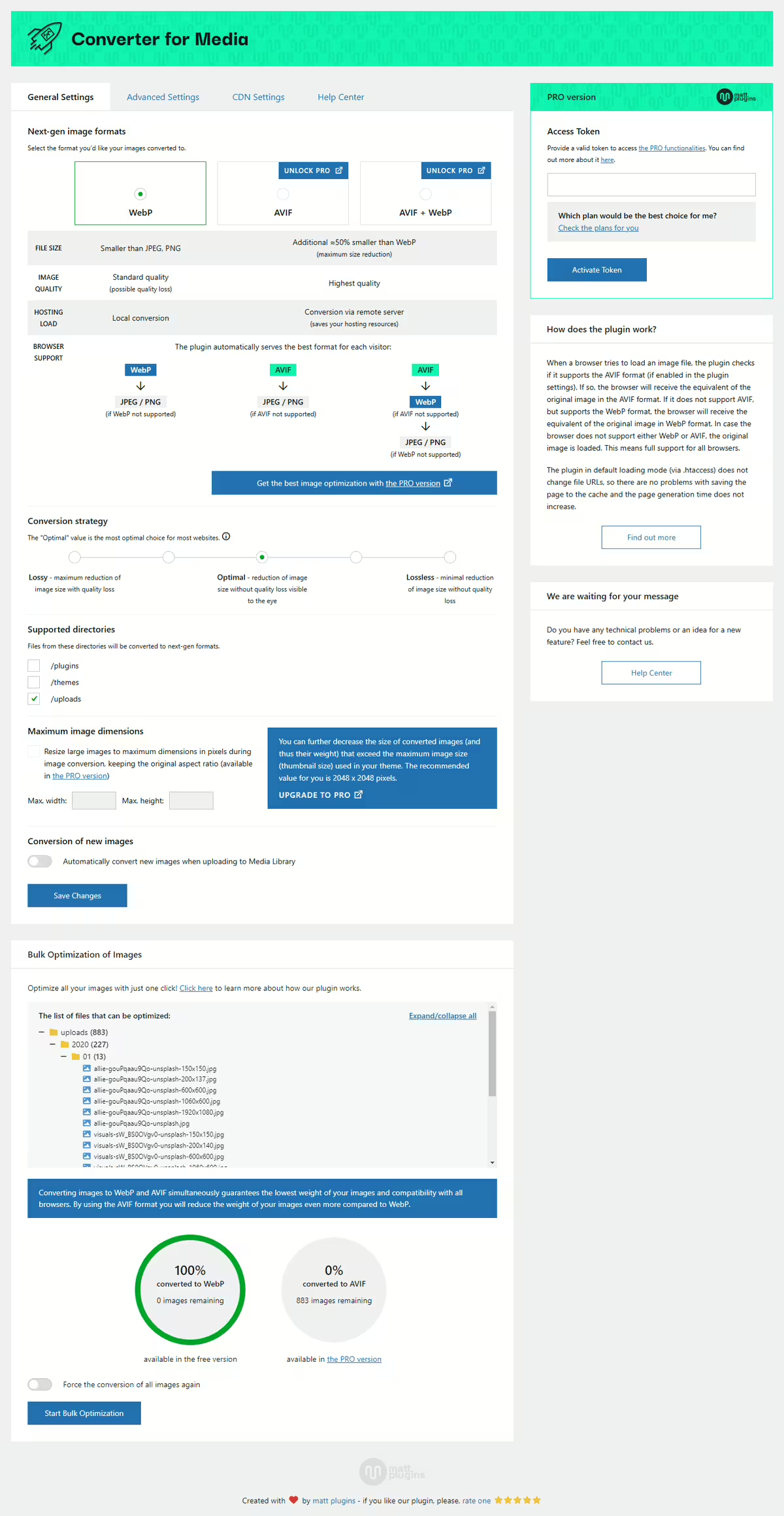
Screenshot of the WordPress plugin webp-converter-for-media on the topic: compress images, convert webp, image optimization, optimize images, webp

Webp Converter For Media

(0.0) Open Popup FeedbackOpen Popup Review

Introduction - Revolutionary Image Optimization for WordPress

Webp Converter For Media by matt plugins - Optimize images by convert WebP & AVIF revolutionizes image optimization with an impressive number of active users. It converts images to WebP and AVIF, significantly reduces file size, and improves website performance without loss of quality. With its fully automatic optimization it supports most modern browsers and is highly rated in the WordPress Plugin Directory.

"The plugin delivers what we've been promised since WordPress 6.0: a proper way to replace JPEG and PNG with WebP images to make our sites faster."

Features - Comprehensive and efficient image conversion

  • Image Optimization - Automatic conversion to WebP.
  • AVIF Support - (Pro) Even better compression.
  • Support for Additional Directories - (Pro) Optimization beyond the basics.
  • Original Image Safety - Originals remain untouched.
  • No Redirects - Direct image delivery.
  • No Residue - Complete trace removal.
  • Access to Advanced Features - (Pro) For better performance.

Technical Details - Lean architecture for versatile use

Webp Converter For Media uses custom PHP routines for image conversion, avoids integration issues with caching solutions, and offers an alternative via PHP load path. Supports directory image optimization and can be extended via shortcodes and APIs.

System requirements are PHP 7.1, WordPress 4.9, tested up to 5.8, latest version 6.5.5. Updated in 2026-04 for maximum compatibility.

Quality and Support - High efficiency and exemplary support

The plugin offers excellent compression without visible quality loss, improving load times and user experience. Support is described as fast and effective, with praise for the dedicated assistance via support forum and developer page. Individual users note areas for improvement on specific issues.

"The team's support is outstanding and really fast. Thanks, Mateusz, for your great work."

Conclusion - Efficient and popular solution for image optimization

The Webp Converter For Media plugin by Mateusz Gbiorczyk effectively optimizes images and is highly appreciated by users. It impresses with comprehensive features, although there is room for improvement in communicating Pro features. Nevertheless, due to its flexibility and performance gains it remains a preferred choice among WordPress users.

Show more

Detailed plugin information

Plugin slug: webp-converter-for-media
Plugin name: Webp Converter For Media
Plugin title: Converter for Media – Optimize images | Convert WebP & AVIF
Plugin keywords: #compress images #convert webp #image optimization #optimize images #webp
Plugin version: 6.5.5
Last updated: 2026-04
Released on: 2019-06-16
Required WP version: 4.9
Required PHP version: 7.1
Tested up to WP version: 6.9.4
Active installations: 500 000+
Average rating: 4.9
Number of reviews: 1 078
Number of Support Requests: 8 (in the last 2 months)
Number of resolved support threads: 7 (in the last 2 months)
Plugin author: Mateusz Gbiorczyk
Developer homepage: https://mattplugins.com/products/webp-converter-for-media-pro
WP developer profile page: https://profiles.wordpress.org/mateuszgbiorczyk/
Support URL in the WordPress Plugin Directory: https://wordpress.org/support/plugin/webp-converter-for-media/
Developer support URL: https://wordpress.org/support/plugin/webp-converter-for-media/#fallback-commercial-support-url
WP Plugin Directory: https://wordpress.org/plugins/webp-converter-for-media/

#compress images #convert webp #image optimization #optimize images #webp

Alternatives to Webp Converter For Media
Open plugin in sandboxTo the official plugin store

neoUniversum

Everything you need for WordPress media.

Band Coming Soon - neo WP Plugin for WordPress is coming soon
WordPress Media Plugin Library - Logo - Media library to manage, organize, rename, replace and optimize images

neo Library - The new Image Media Library

Bring order to your media library with the advanced image manager!
neoLibrary.zip
More details
(0.0) Open Popup FeedbackOpen Popup Review
1+ active installations
Last updated: 2026-04
✓ Tested with WordPress
(0.0) Open Popup FeedbackOpen Popup Review
1+ active installations
Last updated: 2026-04
✓ Tested with WordPress
Band Coming Soon - neo WP Plugin for WordPress is coming soon
WordPress Media Plugin Replace - Logo - Replacer for swapping images, videos and documents in the WP Library

neo Replace - Easy replace via Drag & Drop

Simple replacement via drag & drop!
neoReplace.zip
More details
(0.0) Open Popup FeedbackOpen Popup Review
1+ active installations
Last updated: 2026-04
✓ Tested with WordPress
Band Coming Soon - neo WP Plugin for WordPress is coming soon
WordPress Media Plugin Duplicate - Logo - Duplicates images, videos and documents in the WordPress media library

neo Duplicate - Duplicate images with one click!

Duplicate images for SEO with page-specific ALT texts.
neoDuplicate.zip
More details
(0.0) Open Popup FeedbackOpen Popup Review
1+ active installations
Last updated: 2026-04
✓ Tested with WordPress
Band Coming Soon - neo WP Plugin for WordPress is coming soon
WordPress Media Plugin Lazy - Logo - Lazy loader for delayed loading of images and videos from the WP Media Library

neo Lazy - native delayed lazy loading of images for PageSpeed

Best user experience thanks to delayed image loading!
neoLazy.zip
More details
(0.0) Open Popup FeedbackOpen Popup Review
1+ active installations
Last updated: 2026-04
✓ Tested with WordPress
Band Coming Soon - neo WP Plugin for WordPress is coming soon
WordPress Media Plugin Draw - Logo - Editor to create and edit drawings and diagrams directly in WordPress

neo Draw - create diagrams & icons without leaving WordPress

Bring creative ideas to life with drawings directly in WordPress!
neoDraw.zip
More details
(0.0) Open Popup FeedbackOpen Popup Review
1+ active installations
Last updated: 2026-04
✓ Tested with WordPress
Band Coming Soon - neo WP Plugin for WordPress is coming soon
WordPress Media Plugin Animate - Logo - Stroke path line animations to animate outlines in neo Draw drawings

neo Animate - Impressive animation editor for neo Draw

Make an impression with animated line-path effects!
neoAnimate.zip
More details
(0.0) Open Popup FeedbackOpen Popup Review
1+ active installations
Last updated: 2026-04
✓ Tested with WordPress
Band Coming Soon - neo WP Plugin for WordPress is coming soon
WordPress Media Plugin Motion - Logo - Stop motion animations from sequences of frames in the SVG vector graphic format

neo Motion - Creative stop-motion editor for neo Draw

Make an impression with captivating stop-motion animations!
neoMotion.zip
More details
(0.0) Open Popup FeedbackOpen Popup Review
1+ active installations
Last updated: 2026-04
✓ Tested with WordPress
WordPress Media Plugin Universe - Logo - Plugin manager to download, install and activate neoPlugins

neo Plugins - The whole neoUniverse in one plugin!

All free neo Media plugins for WordPress.
More details
(0.0) Open Popup FeedbackOpen Popup Review
1+ active installations
Last updated: 2026-04
✓ Tested with WordPress

WordPress plugin neo Optimize
Alternatives & comparison

Compared with:

Plugin neo Optimize Screenshot

neoOptimize

(0.0) Open Popup FeedbackOpen Popup Review

neo Optimize - Cache and resize images - the original remains untouched

The WordPress plugin neo Optimize from neo WP was released on 2026-04-01 and is part of the new neoWP plugin series. The plugin leverages modern web development capabilities, reflected in its performance and intuitive design. Reviews indicate that since its release the plugin has delighted users with well-chosen and cleverly implemented features. Particularly noteworthy is the solid programming. A look at the source code confirms that an experienced software development company stands behind the plugin.

“The plugins in the neo package are very well coordinated and solve all common image problems in WordPress.”

Features - Powerful tools cleverly implemented

  • Maximize the SEO ranking of your images
  • We keep your media file in its original
  • Resizing on your own server
  • Free WebP support for delivered images
  • Optimization of neo Draw SVG graphics
  • Image scaling based on the display size in the frontend
  • Adjustable image quality (optional: per image) (Pro)
  • SEO-friendly, automatically generated alt texts based on SVG text contents (Pro)
  • Minimizing raster graphics in SVG files (Pro)

“Great what you can do with neo Rename. The Pro version takes it even further.”

Technical Details - Modern implementation with high compatibility

The plugin neo Optimize is available for free for download in its current version 1.0.0. It requires at minimum the WordPress version and PHP version or higher. The plugin was tested by the beta tester group up to the current version . The developers published the last update in 2026-04. The continuous updating and expansion of the plugin reflects the commitment to further development.

“It's convenient to get all media plugins from a single developer. The entire neo universe runs performantly, reliably and stably.”

Quality and Support - Fast and helpful assistance

Support for neo Optimize receives mostly positive feedback, mainly thanks to fast response times and effective problem solving. Many users report that the developers provide committed and helpful support for both the free and Pro versions. The neo WP team is directly reachable via the developer page by chat, email, and contact form. Additionally, the official support forum is available for further assistance.

“The developers respond quickly, personally, and are very helpful.”

Conclusion - Very high-quality WordPress plugin package

The plugin neo Optimize fully lives up to its slogan “Boost your SEO pagespeed by resizing and caching images!” Even in the free version, the entire neo plugin series offers a comprehensive solution for the typical media management needs in WordPress. If you already use neo Optimize, it’s worth taking a look at the other plugins from neo WP.

Show more

Detailed plugin information

Plugin slug: neo-optimize
Plugin name: neoOptimize
Plugin title: neo Optimize - Bilder cachen und resizen - das Original bleibt unberührt
Plugin keywords: #optimize #optimizer #resize #cache #compress
Plugin version: 1.0.0
Last updated: 2026-04
Release date: 2026-04-01
Required WP version:
Required PHP version:
Tested up to WP version:
Active installations: 1+
Average rating: 5.0
Number of ratings: 2
Number of support threads: 0 (in the last 2 months)
Number of resolved support threads: 0 (in the last 2 months)
Plugin author: neo WP
Developer homepage: https://neo-wp.com/?ref=wporg-info
WP developer profile page: https://profiles.wordpress.org/neoplugins/
Support URL in the WordPress Plugin Directory: https://neo-wp.com/support/?ref=wporg-info
Developer support URL: https://neo-wp.com/support/?ref=wporg-info
WP Plugin Directory: https://neo-wp.com/plugin/neo-optimize/?ref=wporg-info

#optimize #optimizer #resize #cache #compress

Alternatives to neo Optimize
Open plugin in sandboxTo the official plugin store

Number #

Screenshot of the WordPress plugin ewww-image-optimizer on the topic: compress, convert, lazy load, resize, webp

Ewww Image Optimizer

(0.0) Open Popup FeedbackOpen Popup Review

EWWW Image Optimizer - Overview of its features

EWWW Image Optimizer is a WordPress plugin by Exactly WWW, that improves website performance through image optimization and has over 1 000 000+ active installations.

"Optimizes all current and newly added images like magic."

Features - Wide range of image optimization tools

  • Server-side image optimization - Full control without external servers.
  • Bulk optimization - Optimize all images of a website in one step.
  • WebP conversion - Faster load times and reduced storage usage.
  • Automatic image optimization - For new images (Pro).
  • Pixel-perfect optimization - Precise control over image quality.
  • CDN support - Integration with various CDNs.
  • Commercial license - Free and accessible to everyone.

Technical details - Developer entry points

EWWW Image Optimizer uses server-side WordPress installations with support via WP-CLI to handle large numbers of images. Using GD, ImageMagick and other tools enables precise compression settings. WebP can be converted with the GD library, and storing metadata in databases increases traceability.

Quality and support - High image quality and reliable service

The plugin preserves high image quality even after compression. Support is free via WordPress.org, with fast email support through the official website. Users praise the personal support especially for the Pro version, despite occasional waiting times.

"Excellent support and quick solutions despite complex issues."

Conclusion - Strengths and Areas for Improvement

The EWWW Image Optimizer provides effective image optimization for WordPress with server-side processing and WebP conversion. Free use and broad compatibility make it appealing. The community is mostly satisfied, despite security warnings and isolated criticisms. Continuous improvements are being made, which makes EWWW Image Optimizer one of the best plugins in its category.

Show more

Detailed plugin information

Plugin slug: ewww-image-optimizer
Plugin name: Ewww Image Optimizer
Plugin title: EWWW Image Optimizer
Plugin keywords: #compress #convert #lazy load #resize #webp
Plugin version: 8.5.0
Last updated: 2026-04
Released on: 2012-06-07
Required WP version: 6.6
Required PHP version: 7.4
Tested up to WP Version: 7.0
Active installations: 1 000 000+
Average rating: 4.8
Number of reviews: 1 826
Number of support requests: 3 (in the last 2 months)
Number of resolved support requests: 2 (in the last 2 months)
Plugin author: nosilver4u
Developer homepage: https://wordpress.org/plugins/ewww-image-optimizer/
WP developer profile page: https://profiles.wordpress.org/nosilver4u/
Support URL in the WordPress Plugin Directory: https://wordpress.org/support/plugin/ewww-image-optimizer/
Developer support URL: https://ewww.io/
WP Plugin Directory: https://wordpress.org/plugins/ewww-image-optimizer/

#compress #convert #lazy load #resize #webp

Alternatives to Ewww Image Optimizer
Open plugin in sandboxTo the official plugin store

Number #

Screenshot of the WordPress plugin webp-converter-for-media on the topic: compress images, convert webp, image optimization, optimize images, webp

Webp Converter For Media

(0.0) Open Popup FeedbackOpen Popup Review

Introduction - Revolutionary Image Optimization for WordPress

Webp Converter For Media by matt plugins - Optimize images by convert WebP & AVIF revolutionizes image optimization with an impressive number of active users. It converts images to WebP and AVIF, significantly reduces file size, and improves website performance without loss of quality. With its fully automatic optimization it supports most modern browsers and is highly rated in the WordPress Plugin Directory.

"The plugin delivers what we've been promised since WordPress 6.0: a proper way to replace JPEG and PNG with WebP images to make our sites faster."

Features - Comprehensive and efficient image conversion

  • Image Optimization - Automatic conversion to WebP.
  • AVIF Support - (Pro) Even better compression.
  • Support for Additional Directories - (Pro) Optimization beyond the basics.
  • Original Image Safety - Originals remain untouched.
  • No Redirects - Direct image delivery.
  • No Residue - Complete trace removal.
  • Access to Advanced Features - (Pro) For better performance.

Technical Details - Lean architecture for versatile use

Webp Converter For Media uses custom PHP routines for image conversion, avoids integration issues with caching solutions, and offers an alternative via PHP load path. Supports directory image optimization and can be extended via shortcodes and APIs.

System requirements are PHP 7.1, WordPress 4.9, tested up to 5.8, latest version 6.5.5. Updated in 2026-04 for maximum compatibility.

Quality and Support - High efficiency and exemplary support

The plugin offers excellent compression without visible quality loss, improving load times and user experience. Support is described as fast and effective, with praise for the dedicated assistance via support forum and developer page. Individual users note areas for improvement on specific issues.

"The team's support is outstanding and really fast. Thanks, Mateusz, for your great work."

Conclusion - Efficient and popular solution for image optimization

The Webp Converter For Media plugin by Mateusz Gbiorczyk effectively optimizes images and is highly appreciated by users. It impresses with comprehensive features, although there is room for improvement in communicating Pro features. Nevertheless, due to its flexibility and performance gains it remains a preferred choice among WordPress users.

Show more

Detailed plugin information

Plugin slug: webp-converter-for-media
Plugin name: Webp Converter For Media
Plugin title: Converter for Media – Optimize images | Convert WebP & AVIF
Plugin keywords: #compress images #convert webp #image optimization #optimize images #webp
Plugin version: 6.5.5
Last updated: 2026-04
Released on: 2019-06-16
Required WP version: 4.9
Required PHP version: 7.1
Tested up to WP version: 6.9.4
Active installations: 500 000+
Average rating: 4.9
Number of reviews: 1 078
Number of Support Requests: 8 (in the last 2 months)
Number of resolved support threads: 7 (in the last 2 months)
Plugin author: Mateusz Gbiorczyk
Developer homepage: https://mattplugins.com/products/webp-converter-for-media-pro
WP developer profile page: https://profiles.wordpress.org/mateuszgbiorczyk/
Support URL in the WordPress Plugin Directory: https://wordpress.org/support/plugin/webp-converter-for-media/
Developer support URL: https://wordpress.org/support/plugin/webp-converter-for-media/#fallback-commercial-support-url
WP Plugin Directory: https://wordpress.org/plugins/webp-converter-for-media/

#compress images #convert webp #image optimization #optimize images #webp

Alternatives to Webp Converter For Media
Open plugin in sandboxTo the official plugin store

Experiences with the WordPress plugin.

Review Portrait - Jonas Gruber - Bach & Gruber Holding Ltd. - marketing agency, Google Ads, Shopify, digital agency, SEOReview Logo - Bach & Gruber Holding Ltd. - Jonas Gruber - marketing agency, Google Ads, Shopify, digital agency, SEO
★★★★★

Jonas Gruber

Agency Owner

... What is very well solved in neo Optimize is that all images and the entire content folder remain untouched.

Read review

Review of: neo Optimize Plugin - Fastest Image Cache for WordPress

Leaves database and content folder untouched

As a beta tester I was allowed to thoroughly test neo Optimize. What is very well solved in neo Optimize is that all images and the entire content folder remain untouched. The plugin creates thumbnails in a separate folder and leaves the database 100% unchanged. I haven't seen such a solution in any other media optimize plugin so far.

Jonas Gruber

More about the project
Review Portrait - Sasha Oleksandra Simonova - Avonomis - 3D animations, Cinema 4D, effects, models, design, artistReview Logo - Avonomis - Sasha Oleksandra Simonova - 3D animations, Cinema 4D, effects, models, design, artist
★★★★★

Sasha Simonova

Animation Designer

... I especially like the image quality setting with an immediate preview of the compressed image. The neoTeam did a great job.

Read review

Review of: neo Optimize Plugin - Fastest Image Cache for WordPress

Handy preview of image quality

In an early test version neo Optimize completely impressed me. Once activated everything runs by itself - exactly as you want. Images are automatically optimized and cached on first page load without you having to worry about anything. I especially like the image quality setting with an immediate preview of the compressed image. It's simply a thoroughly successful plugin that works reliably and convinced me completely. The neoTeam did a great job.

Sasha Simonova

Würzburg, Germany

More about the project
Review Portrait - Florens Bach - SEO Agency - Marketing Agency, Google Ads, Shopify, Digital Agency, SEO OptimizationReview Logo - SEO Agency - Florens Bach - Marketing Agency, Google Ads, Shopify, Digital Agency, SEO Optimization
★★★★★

Florens Bach

Online Marketing Expert

... A very intuitive and powerful drawing tool. The whole design looks very cohesive and well thought out.

Read review

Review of: neo Draw Plugin - Draw diagrams and icons in WordPress

Great tool for creatives!

I discovered neo Draw when I was looking for Paint for WordPress and found exactly that. A very intuitive and powerful drawing tool. Unlike Paint, neo Draw has well-chosen color palettes. ;) I especially like the consistent drawing look with the matching font. The whole design looks very cohesive and well thought out. The built-in icon library includes emojis, a wide selection of icons and even animated GIFs. You can also add your own images, GIFs and icons to the drawings. Thanks for the valuable tool!

Florens Bach

Schweinfurt, Germany

More about the project
Show more

FAQ - Frequently Asked Questions about neo Optimize

You get a whole universe of specialized media plugins for modern media management in WordPress. Included are perfectly harmonized tools for renaming, replacing, optimizing, drawing, animating and managing media. Each plugin is designed to improve your SEO ranking, boost your site’s performance and save you valuable time when creating content.

With the Pro version you get all features in a single plugin. One ZIP file, one settings page, one update and full control. In the neoPlugin settings  you activate exactly the features you need.

Behind neo WP is a dedicated team of experienced web developers. With great attention to detail and a high standard of code quality we continuously develop the neoUniverse further.

With the Free version you get all neo plugins with their basic features. On the download page you can download the plugins individually or install them directly with the neoPlugins ZIP. After installation the neo plugins appear as separate entries in the WordPress backend and must be managed and updated individually. Support is provided via the public WordPress forum.

With the Pro version you get all neo plugins including all Pro features in a single ZIP file. You upload just this one file and then find all features as one plugin entry in your dashboard. Via the plugin overview in the settings you toggle exactly the modules you need. All Pro features with the crown icon 👑 are available to you immediately. These include, for example, displaying all posts that use a particular image, bulk actions in neoRenamer, an advanced animation editor for drawings and much more. Thanks to automatic security and feature updates you always stay up to date. Newly released media plugins and tools will be included in the future at no extra cost. With the Pro version you also enjoy prioritized premium support directly from the developer team.

So if you want to save time, stay flexible and use all pro functions immediately, the Pro version is the right choice for you.

All neo plugins are regularly updated, hosted on German servers and fully comply with European data protection regulations (GDPR). In addition, all updates are intensively tested by experienced WordPress professionals before release.

Yes! You can test all neo plugins directly in the online sandbox without installation. You also have the option to try all neoPro features on your own WordPress site free for 14 days. You can activate this trial period in the WordPress backend under the neo WP settings. This lets you take your time to find out if neo WP is right for you.

We are often asked: Why pink and green? What’s up with the colors? Why do I still see the plugin when I close my eyes? We wanted to stand out. If you want to give your optic nerve a break: in the Pro version you automatically get a calmer color scheme in dark blue and gold. Many users have fallen in love with the neon colors. That’s why there’s a color-scheme switch in the Pro settings.

Yes! The neo WP team is happy to receive feedback, ideas and suggestions. Everything that lands in our wishlist will be discussed by the team. We respond to every piece of feedback.

Yes, all neo plugins support multiple languages, including English and German. If a language is not yet available, the English version will be shown automatically.

After the purchase you will receive two emails with your invoice, the download link and your personal license key. If the emails don’t appear in your inbox, check the spam folder. Alternatively, you can find all information in your account. You can then easily install the plugin in your WordPress dashboard as a ZIP file via “Plugins > Add Plugin > Upload Plugin” and enter the license key. You can delete the free neo plugins afterward, they are no longer needed. Existing settings and content are of course preserved when switching from Free to Pro.

There are licenses for 1, 5 or 25 websites. Each production site occupies one slot within the license - including within a WordPress Multisite installation. Development, testing, staging or local environments are free and do not require their own license, provided they are assigned to a licensed production site. Discounted license bundles for 5 or 25 websites can be selected directly via the pricing table or at checkout. If you need more than 25 licenses, contact us by email.

Yes! A domain change is possible without problems. You can deactivate the license on the old domain and then activate it again on the new domain. The assignment of licenses to domains can alternatively be viewed and adjusted at any time in the account. When you purchased the license, the access data were sent by email from neo-wp.com. If you have questions or problems, we’ll help you.

Show more FAQs
Page Plugin Single Lamp

Ready to make your website a highlight?

Experience the neo universe and its possibilities in the Playground yourself.
Or get a license today and take your website to the next level!

Thank you for your feedback!

★★★★★

Rate now!

[{user_coupon}]

{user_discount} Discount

Redeem now!