{user_name}

Clever Media Renamer for WordPress Images

Rename your images and videos in a flash and improve your website’s SEO performance. All references are automatically updated across the entire database.
Thanks to live preview, search-and-replace, batch processing and intelligent renaming rules you’ll optimize your media library in no time and increase your site’s visibility.

👑 Pro: SEO-friendly 301 redirects to the new image URL

Screenshot neo Rename - Media Renamer for WordPress images to rename filenames, titles, and slugs for SEO optimization

Filename. Title. Slug.

WordPress Media Plugin Rename - Logo - Rename path, URL, slug and filenames of images and videos in the WP Library

neoRename

The most thorough renamer!

Renaming tools

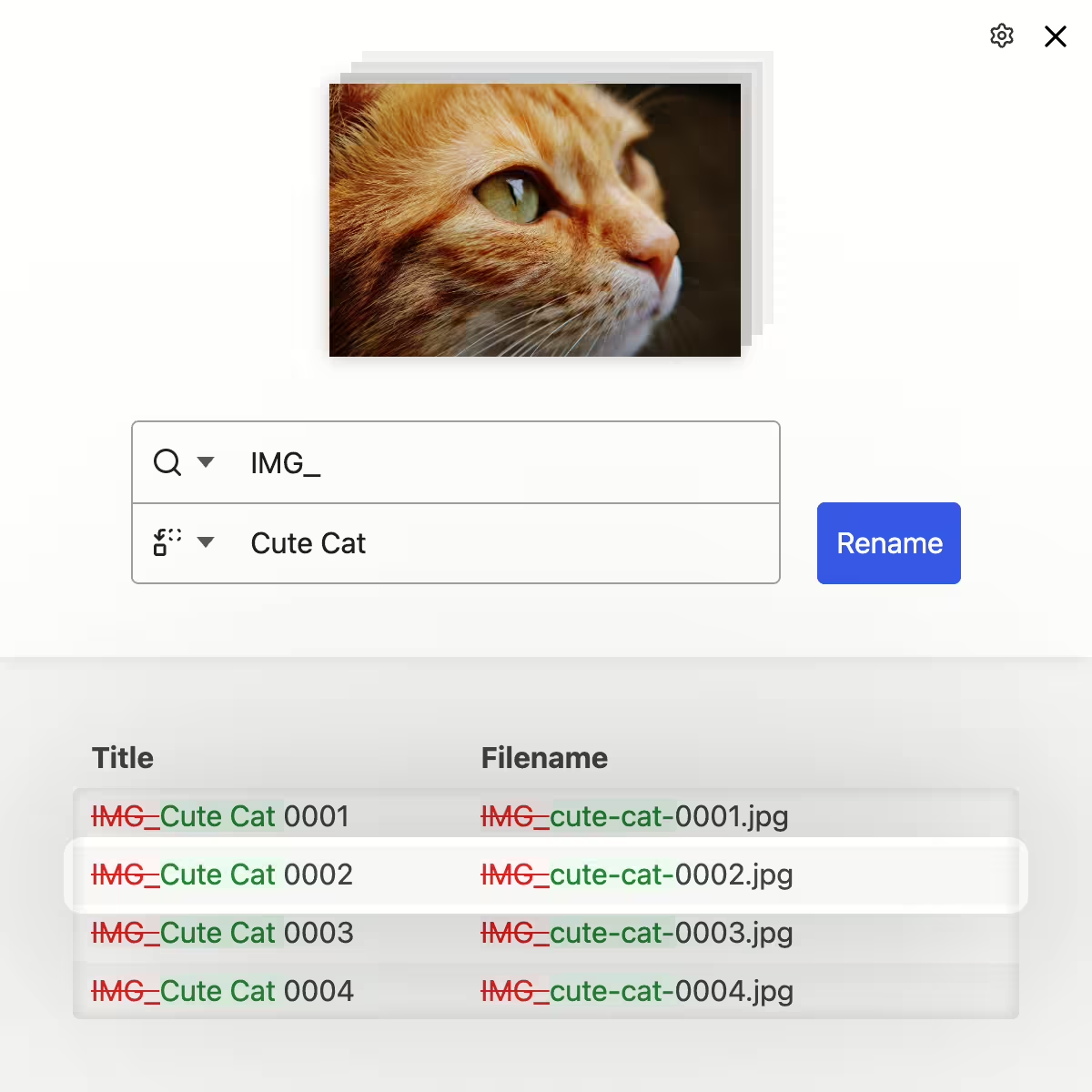
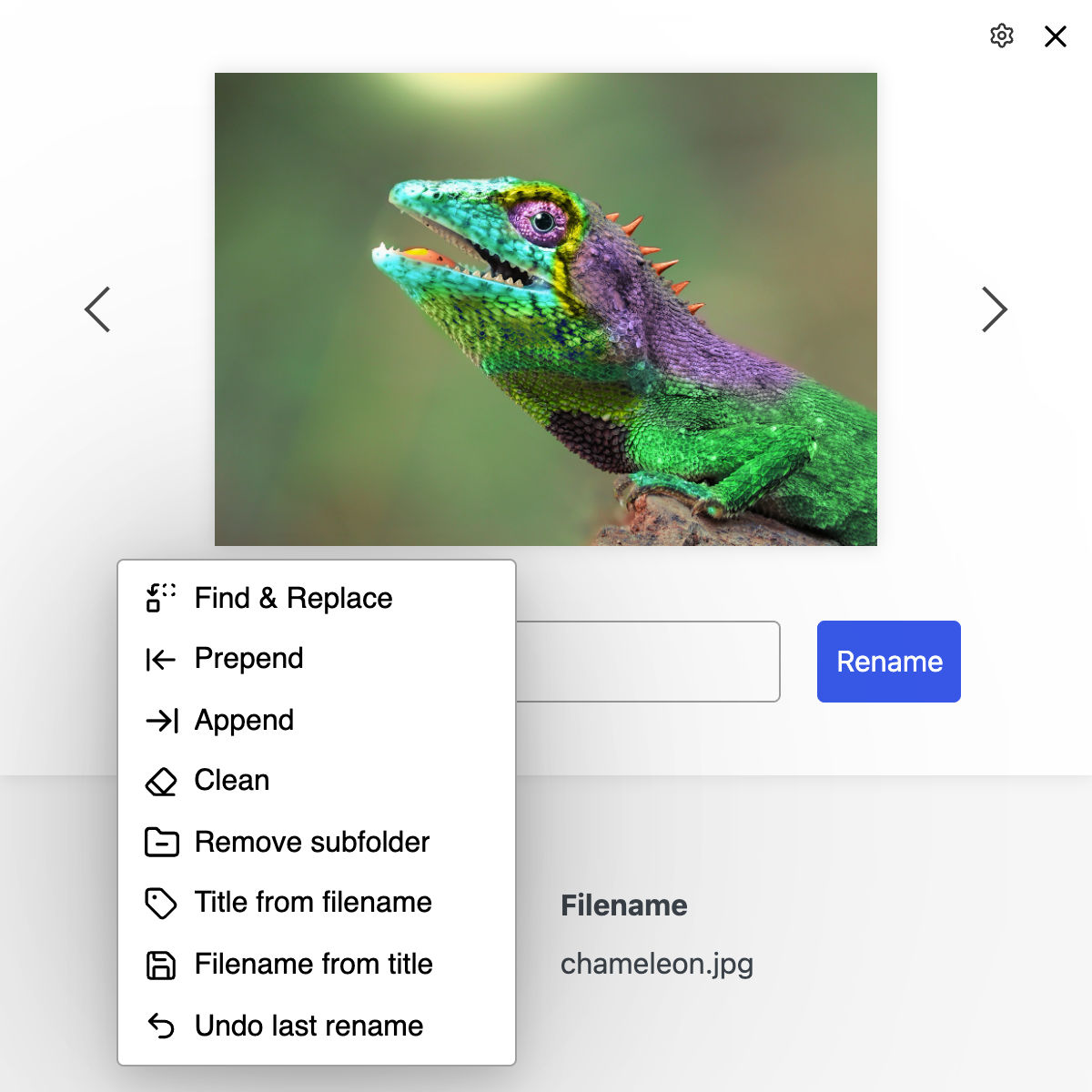
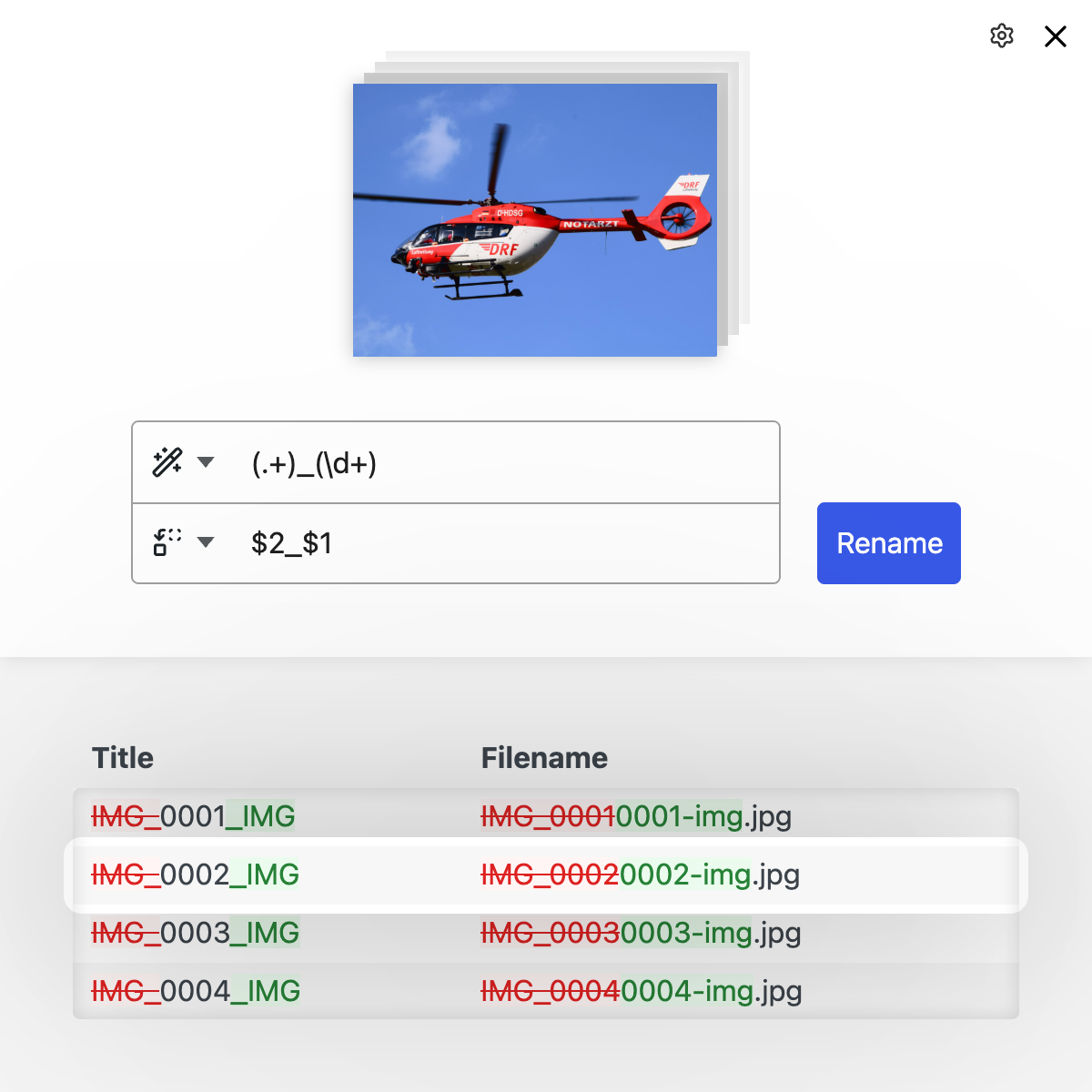
Find & Replace (Regex), Prefix, Suffix, New Name, Remove, Clean, Remove subfolders, Title from filename, ...

Find & Replace (Regex), Prefix, Suffix, New Name, Remove, Clean, Remove subfolders, Title from filename, ...

Smart titles

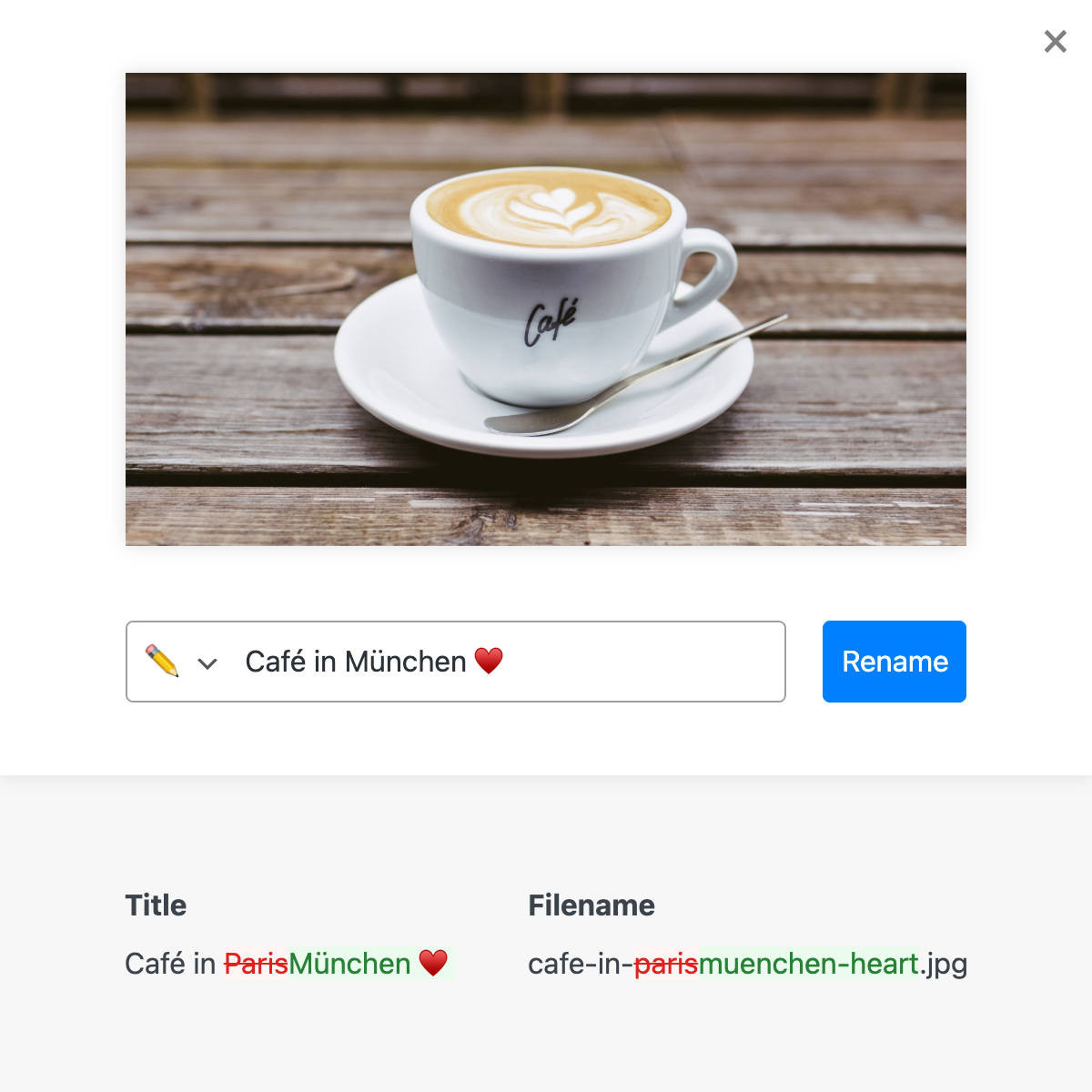
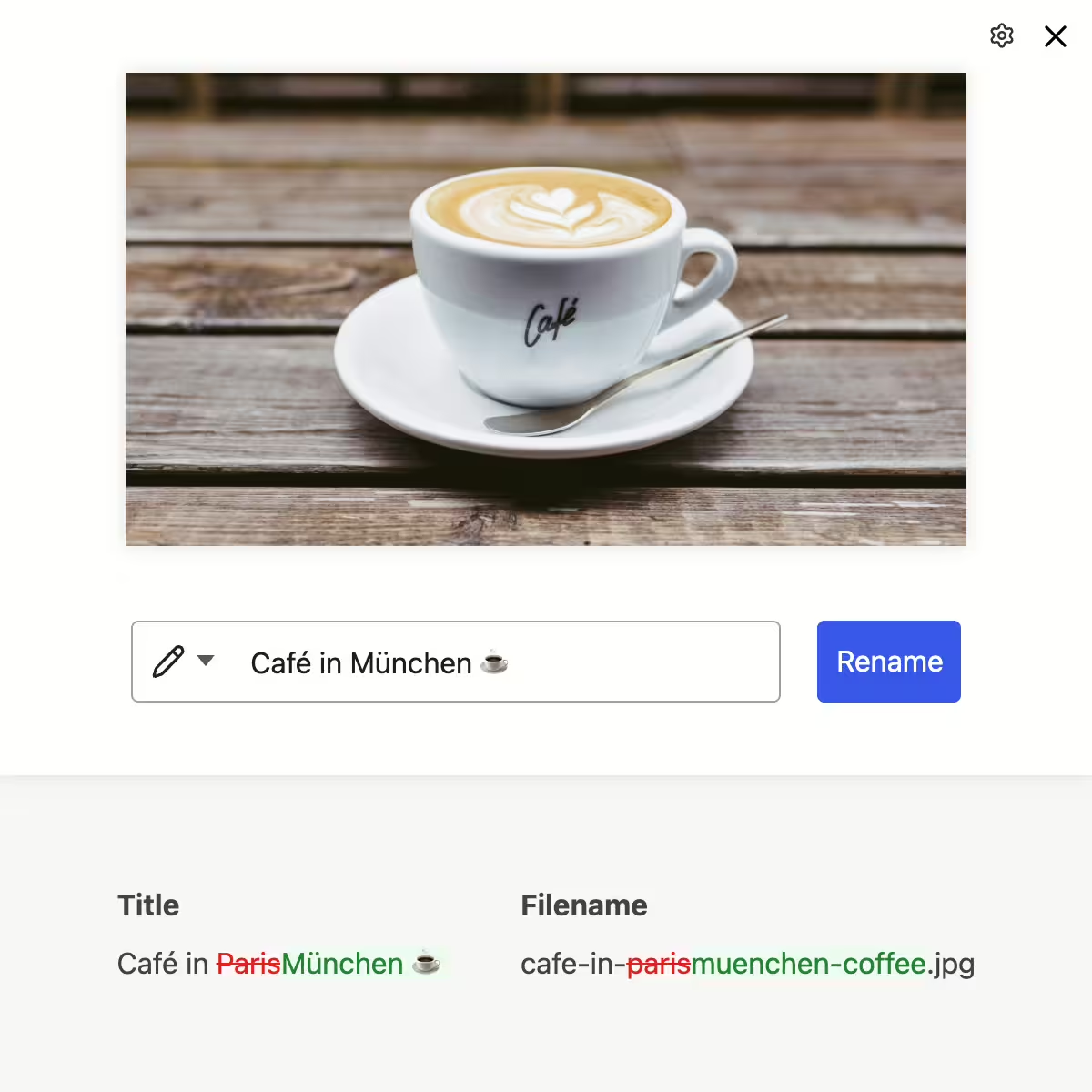
Rename images and videos with automatically generated filenames, titles and slugs based on entered terms

Rename images and videos with automatically generated filenames, titles and slugs based on entered terms

SEO redirects

Automatically generated 301 redirects for SEO-friendly media renaming and an undo button

Automatically generated 301 redirects for SEO-friendly media renaming and an undo button

Seamless integration

Button under image thumbnails in the WordPress Media Library to rename images without reloading the page

Button under image thumbnails in the WordPress Media Library to rename images without reloading the page

Reliable updates

Reliable adjustment of all image references across the entire database, including PHP arrays and ACF fields of all posts

Reliable adjustment of all image references across the entire database, including PHP arrays and ACF fields of all posts

Remove date folders

Remove year/month subfolders from the image URL and file path by moving the media into the main uploads directory

Remove year/month subfolders from the image URL and file path by moving the media into the main uploads directory

Subfolders

Move images into subfolders by typing ”/” in the image title (e.g. events/teamevent/image.jpg)

Move images into subfolders by typing "/" in the image title (e.g. events/teamevent/image.jpg)

Batch processing

Bulk processing with find-replace functionality including Bulk, Batch & Regex plus diff preview to track changes

Bulk processing with find-replace functionality including Bulk, Batch & Regex plus diff preview to track changes

Regex magic

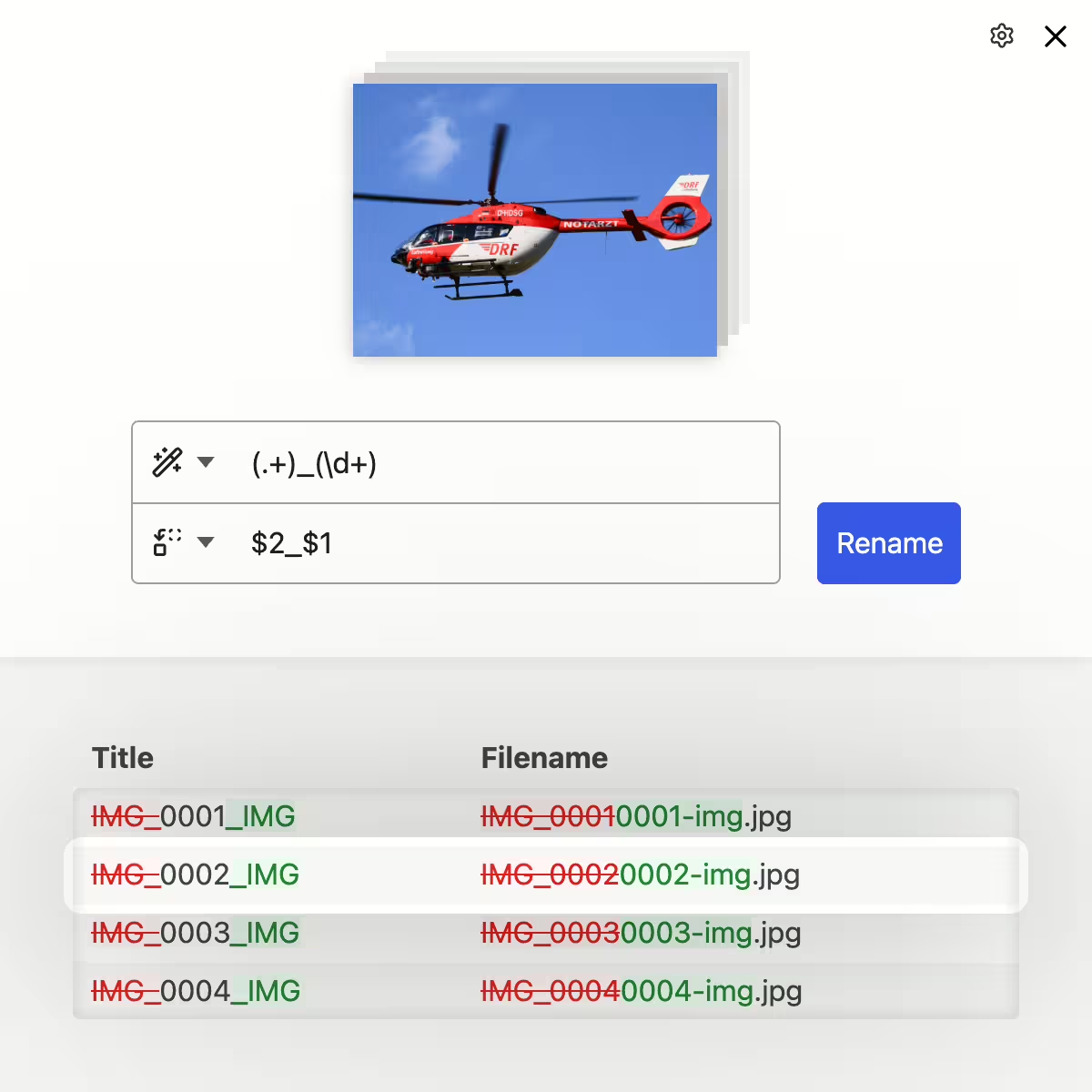
Mass renaming with regex to filter and replace name parts using dynamic replacement rules

Mass renaming with regex to filter and replace name parts using dynamic replacement rules

neo Rename - Simple handling, powerful features.

The neo Rename plugin integrates seamlessly into the Media Library and opens instantly as a dialog. When renaming, filename, title and slug are automatically generated and shown in a diff preview. With the powerful bulk processing and a regex filter, hundreds of files can be renamed flexibly at once. Optionally, SEO-friendly 301 redirects are created automatically. It’s even possible to remove year/month folders from the image URL. These practical features combined with easy handling make neo Rename unique.
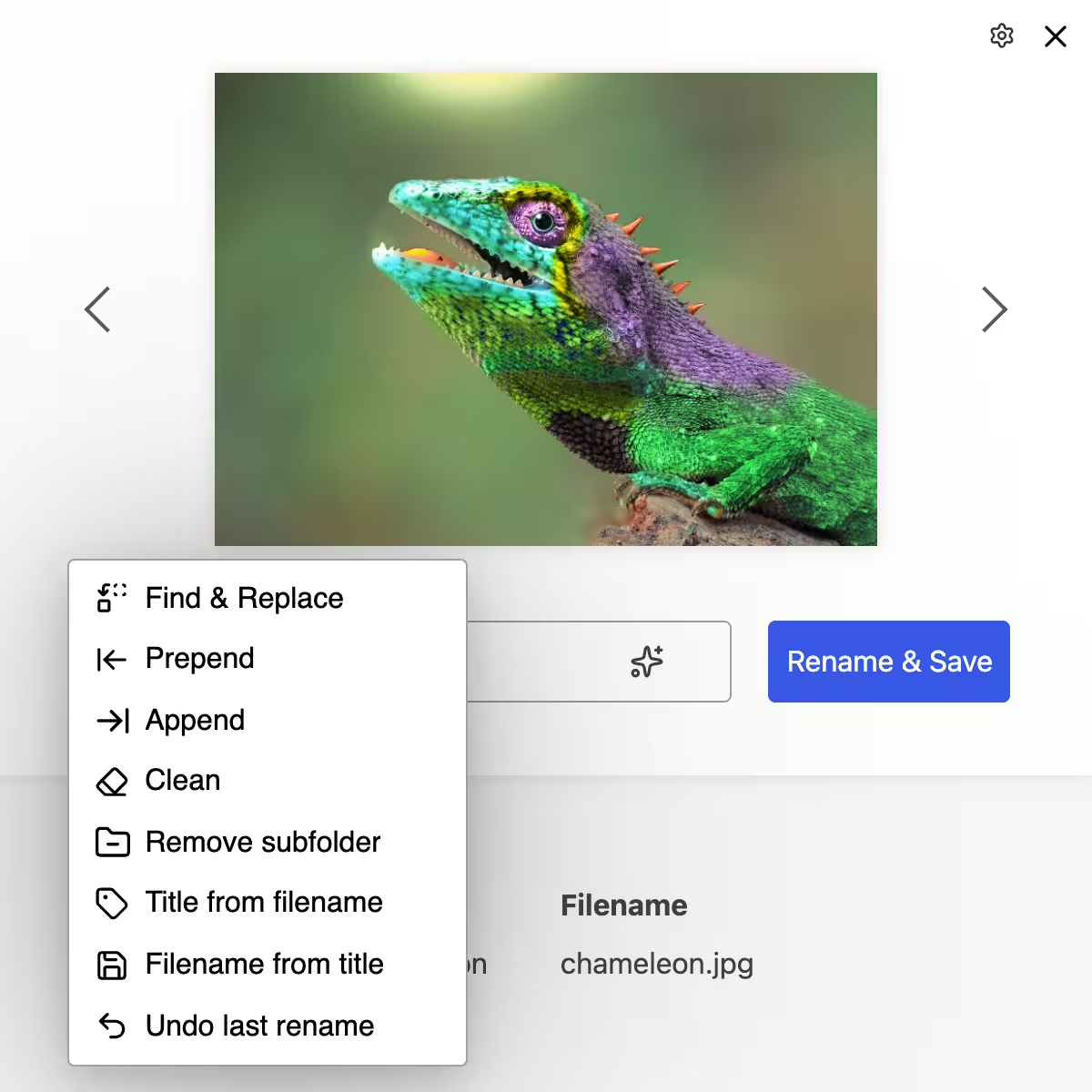
Find & Replace (Regex), Prefix, Suffix, New Name, Remove, Clean, Remove subfolders, Title from filename, ...

neo Rename - Tools for renaming

  • 🔁 Search & Replace (optional with regex)
    Replaces terms in filename, title and slug
  • ⬅️ Prepend (prefix)
    Places text at the beginning of the name
  • ➡️ Append (suffix)
    Adds text to the end of the name
  • Remove
    Deletes selected parts from the name
  • 🧹 Clean
    Capitalization, hyphens, emoji plain text, umlauts, ...
  • 🗂️ Remove subfolders
    Removes year/month subfolders from path & URL
  • 🏷️ Title from filename
    Derives the WordPress title from the filename
  • 💾 Filename from title
    Generates an SEO-friendly filename from the title
Rename images and videos with automatically generated filenames, titles and slugs based on entered terms

Intelligent filenames, titles & slugs

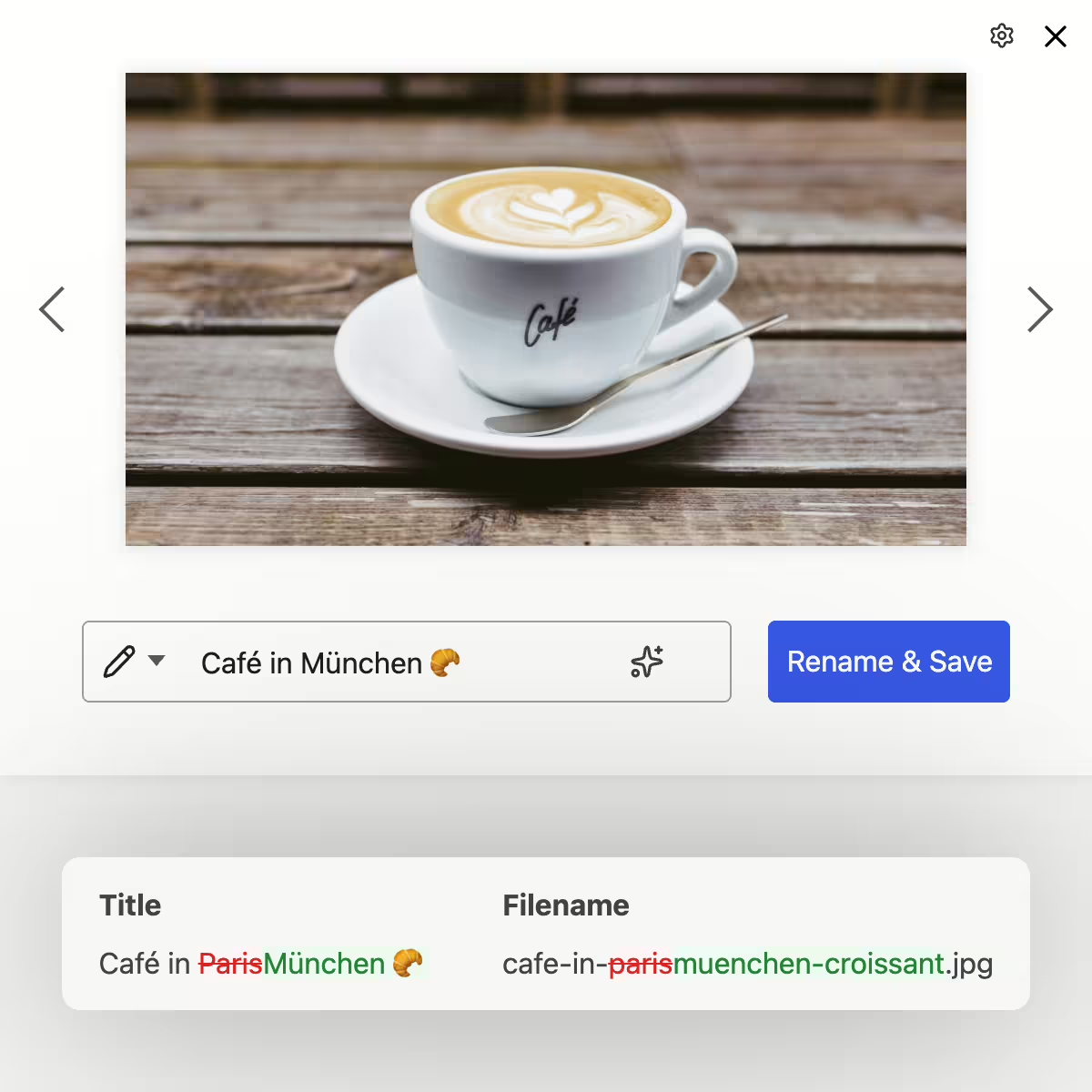
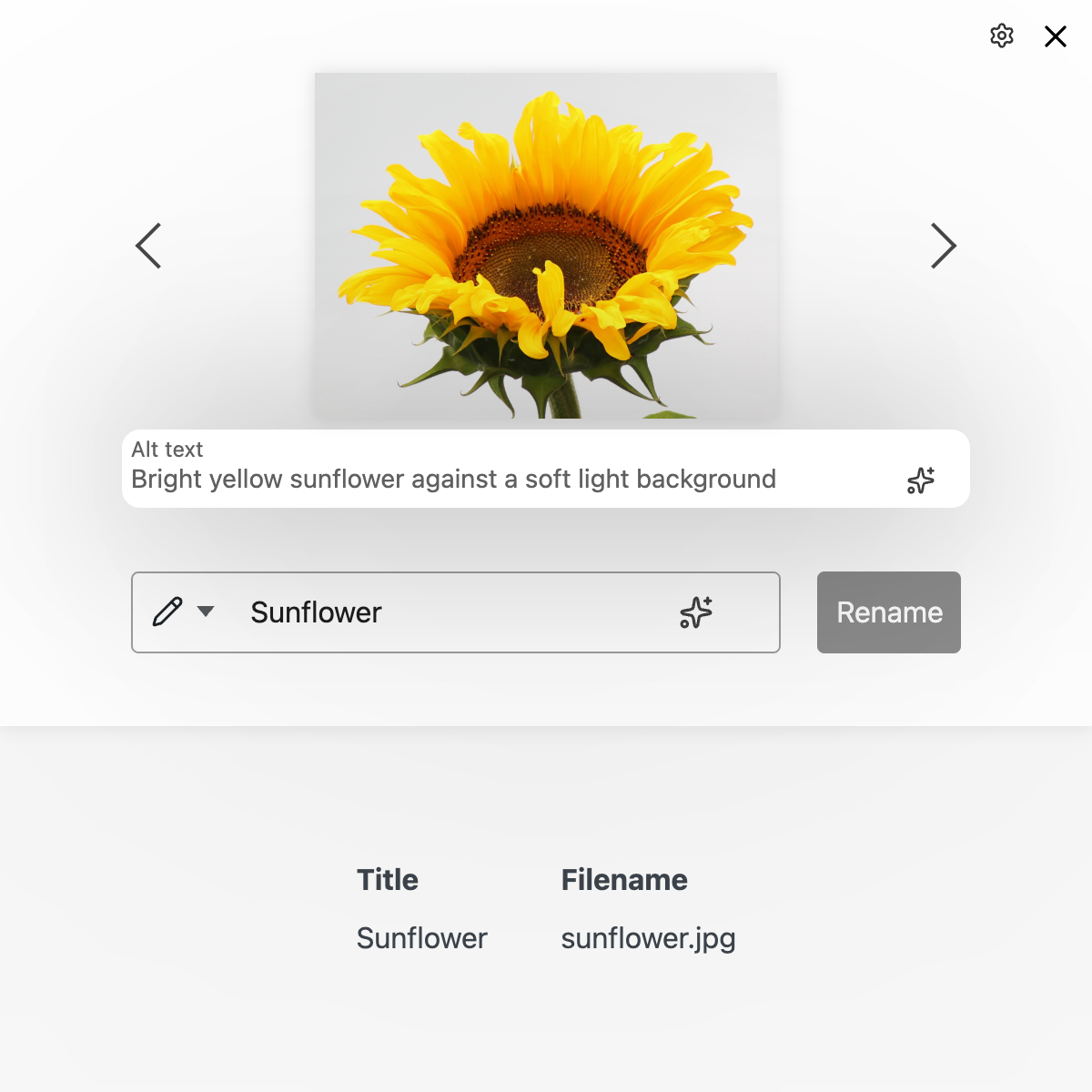
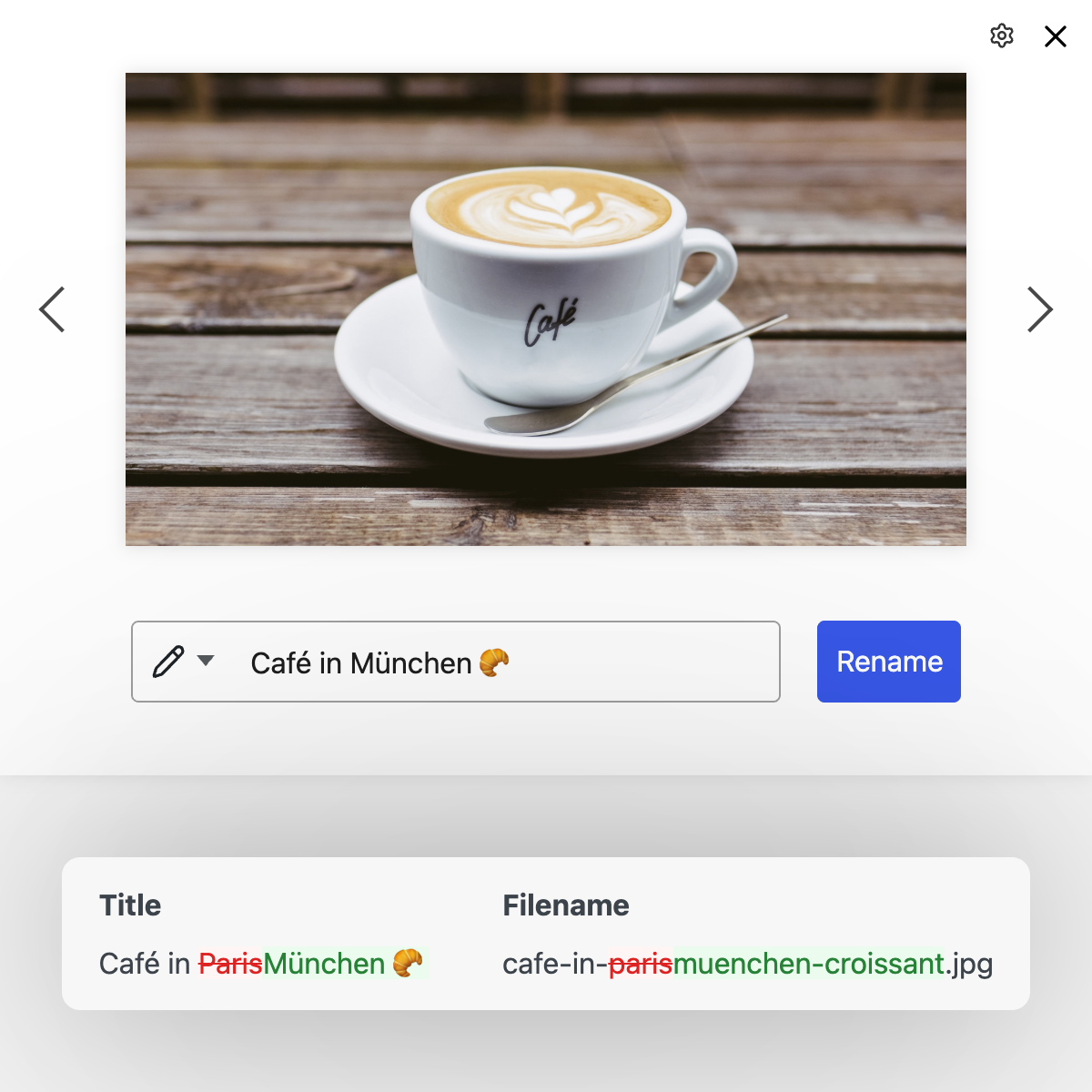
Enter a name - neo Rename does the rest:

  • Umlauts & special characters are replaced or removed
    "Café in München" → cafe-in-muenchen.jpg
  • Emojis are converted to plain text
    "File Name 🎉" → file-name-party-popper.jpg
  • Consistent formatting with hyphens & suffixes
    "my image.jpeg" → my-image.jpg
  • Automatic capitalization with title capitalization
    "edge-of-space.jpg" → Edge of  Space

Live preview of all changes

While you type, a diff shows the new values for title, filename and slug in a table. This is especially helpful when doing simultaneous bulk replacements.

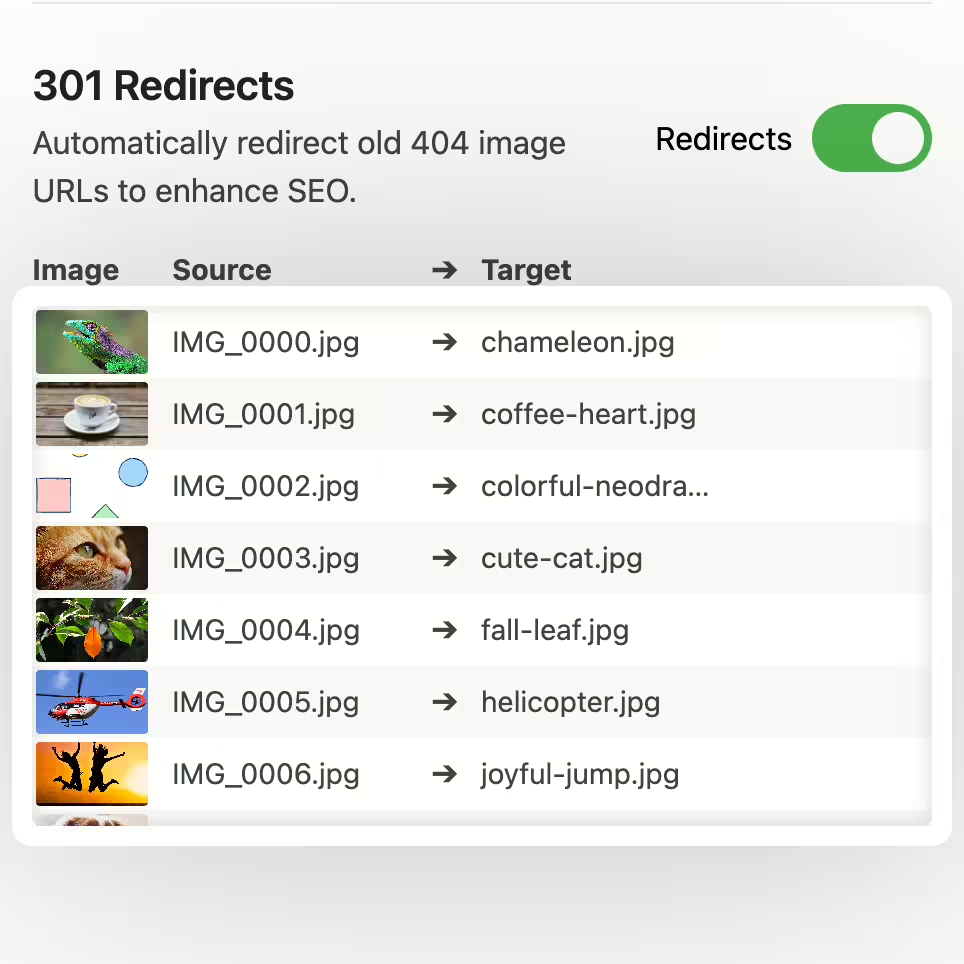
Automatically generated 301 redirects for SEO-friendly media renaming and an undo button

SEO-friendly 301 redirects

The Renamer can optionally create redirects from the old image URLs to the new ones automatically to preserve SEO ranking.

  • Table view of all 301 redirects
  • Automatic cleanup of obsolete entries
  • Configurable expiration for redirects

Full undo functionality

All performed renames can be undone at any time. One click and everything is back to how it was.

  • Change history for each individual file
  • Bulk action to undo multiple files
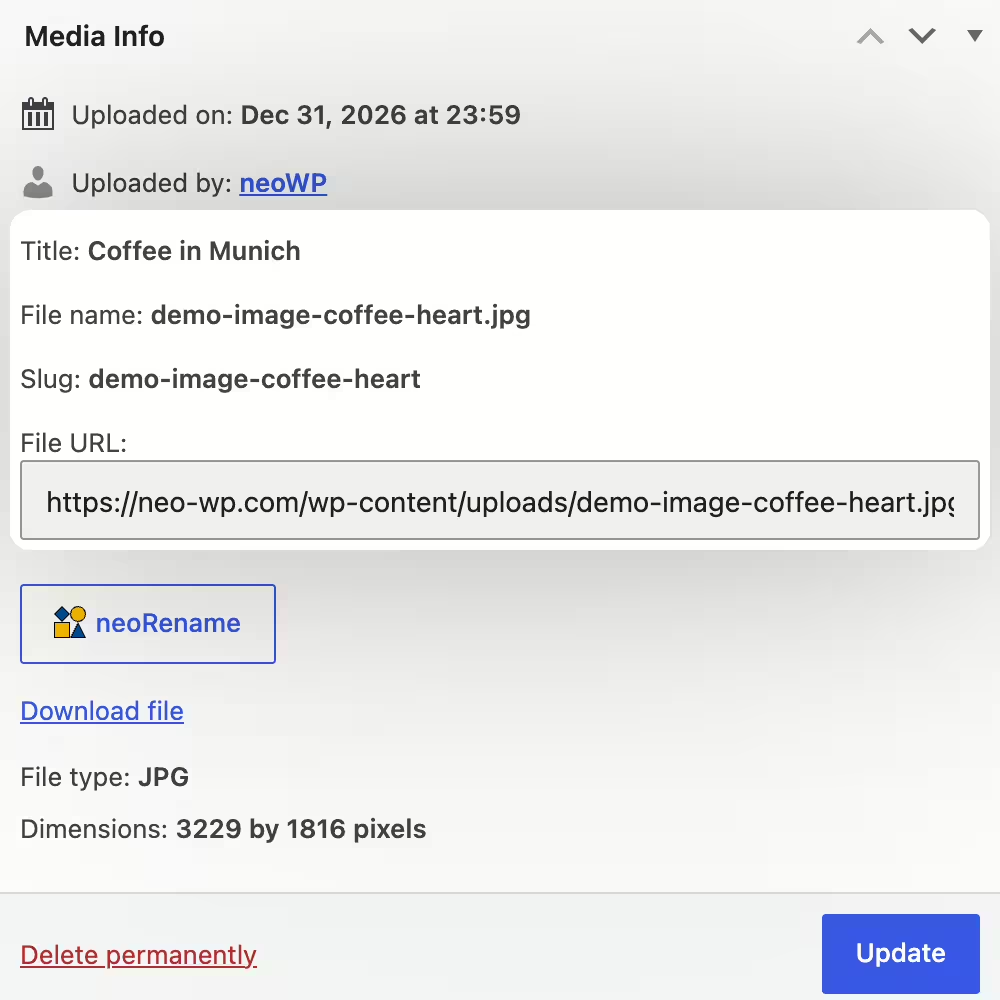
Button under image thumbnails in the WordPress Media Library to rename images without reloading the page

neo Rename integrates seamlessly into WP

The Renamer appears as a button under Media in the WordPress Media Library. In the neo Library it appears as a Rename icon next to images.

  • Appears as a dialog without reloading the page
  • Lightning-fast renaming Type -> Enter -> done

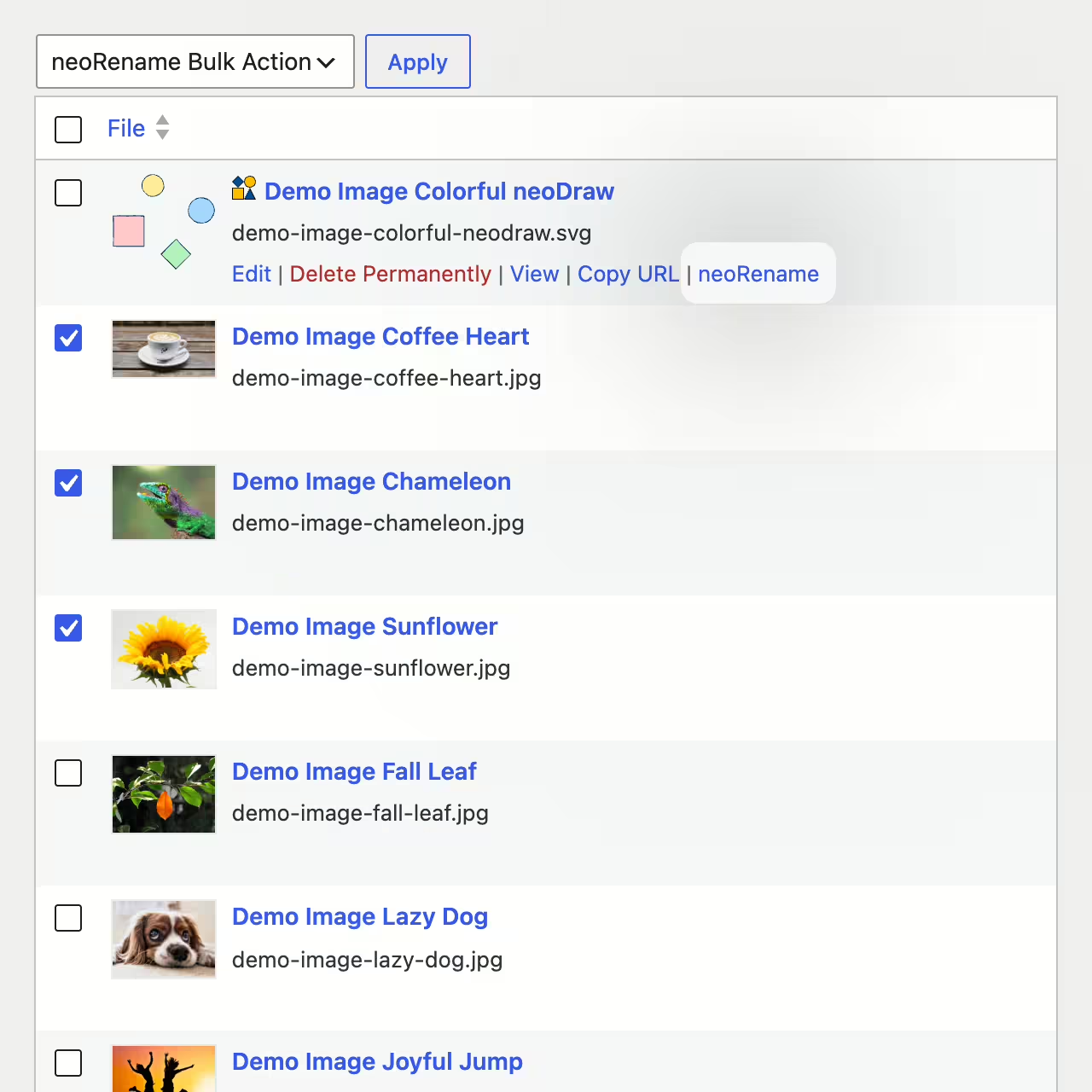
Batch processing with the batch renamer

With neo Rename you can rename multiple images at once. Simply select any number of files in the Media Library and start the action directly from the bulk actions dropdown. When renaming you can prepend or append text, and you can also search and replace specific terms.

Reliable adjustment of all image references across the entire database, including PHP arrays and ACF fields of all posts

Reliable updates

The Renamer misses no reference. It scans the entire database and replaces all relative and absolute path and URL references to the image file.

  • Images in posts including featured image are updated
  • Media references in ACF fields are adjusted
  • Serialized PHP arrays are processed correctly

Full compatibility

The plugin handles all file formats that can be uploaded to WordPress. This includes, for example, images, videos, and PDFs.

  • Typical supported file extensions: SVG, JPG, WEBP, AVIF, PNG, GIF, TIF, BMP, MP4, MOV, WEBM, AVI, MP3, WAV, PDF, TXT, ZIP, …
  • Renaming from .jpeg to .jpg is possible
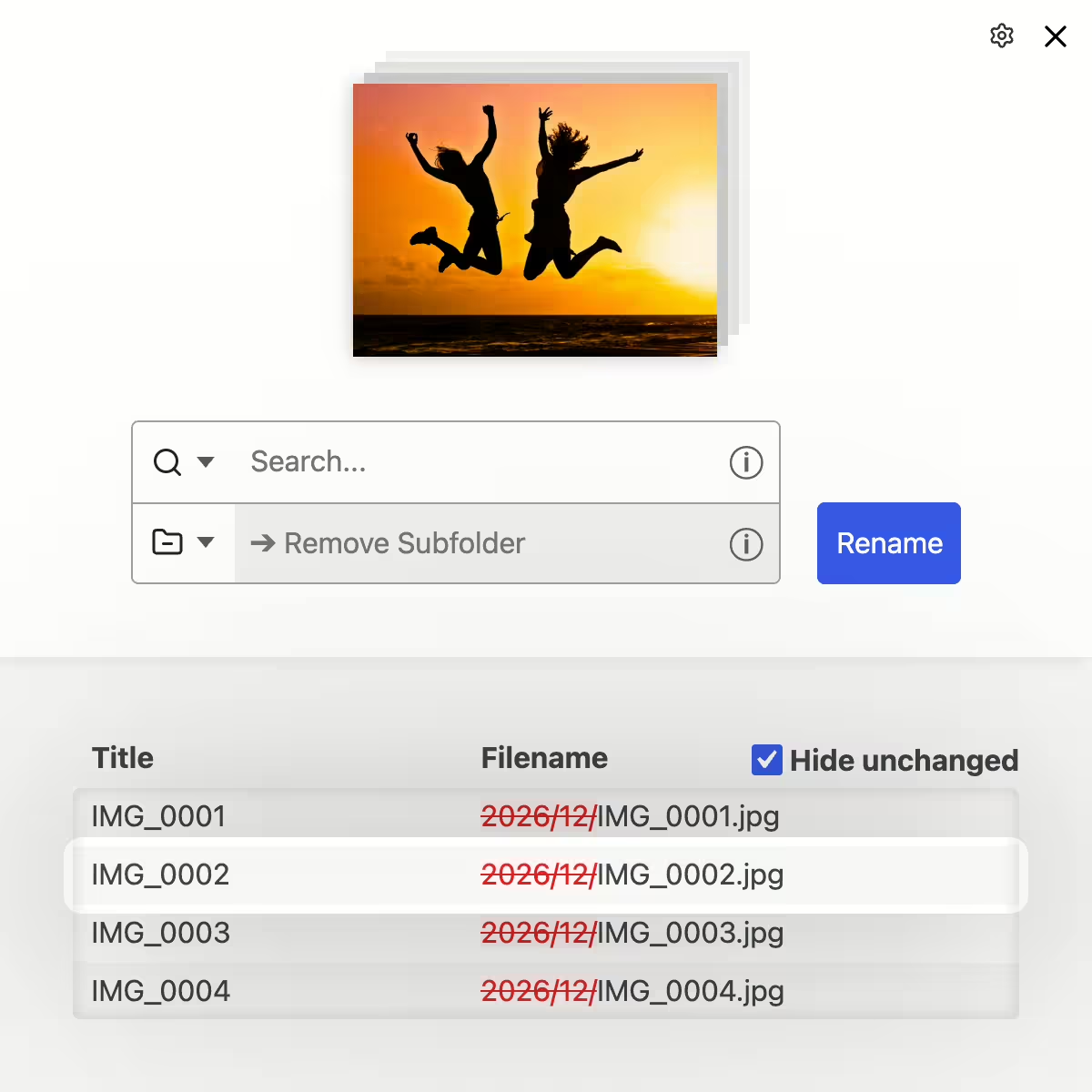
Remove year/month subfolders from the image URL and file path by moving the media into the main uploads directory

Remove year/month folders from the URL

The neo Rename plugin enables the retrospective removal of date subfolders from the image path. This is useful if, when setting up a new WordPress instance, you forgot to disable the option "Organize my uploads into month- and year-based folders". With a single click everything is done to remove the year and month segment from the file path and URL.

  • Move all media from date folders into the main uploads directory
  • Update all references across the entire database
  • Derive filename and title from removed subfolders
  • Switch the WordPress setting so that year/month folders are no longer created in the future
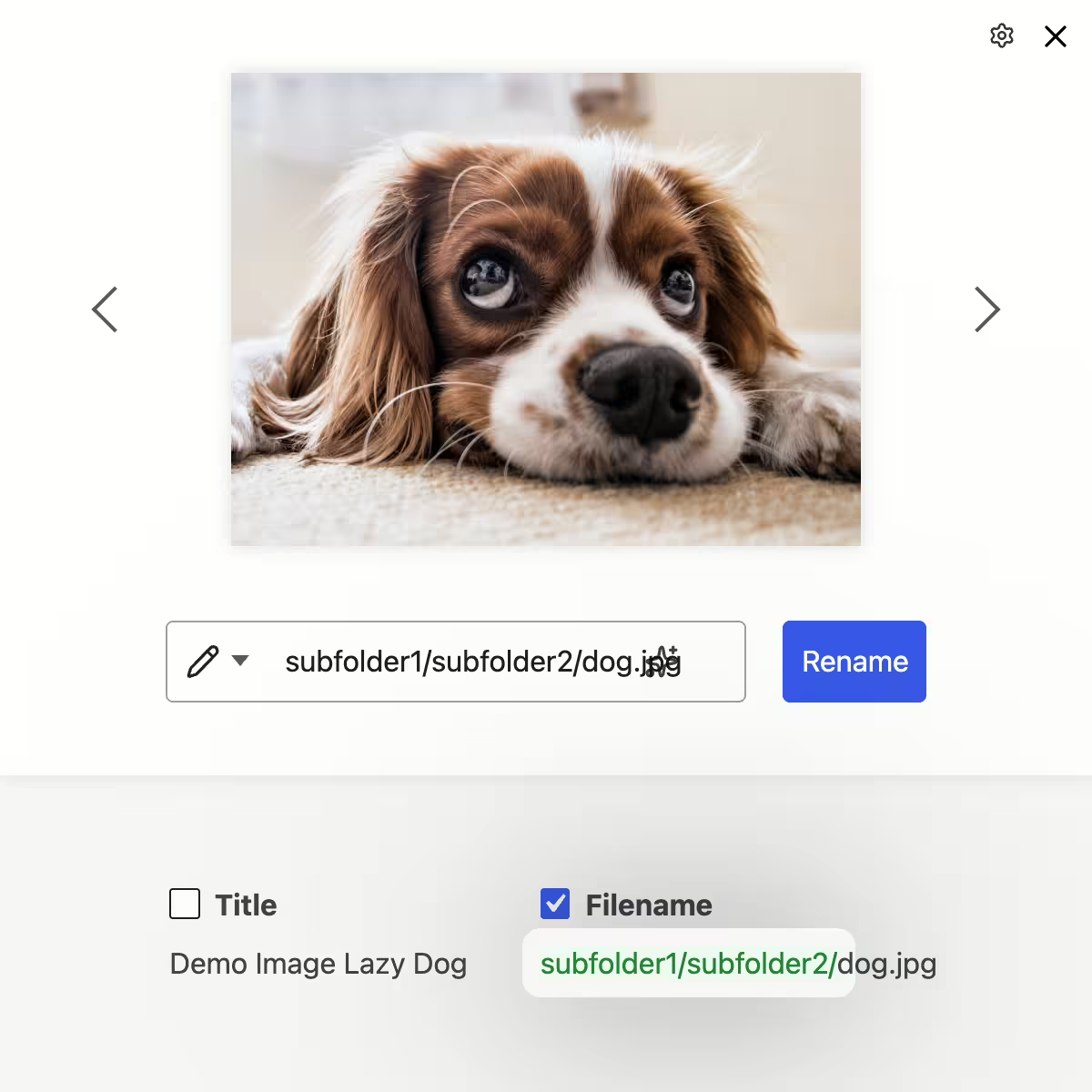
Move images into subfolders by typing ”/” in the image title (e.g. events/teamevent/image.jpg)

Move images into folders and subfolders

The neo Rename plugin supports creating folders in the file system. When entering the new image title you can create any number of subfolders using "/". For example, entering "events/teamevent/image.jpg" will move the image "image.jpg" into the folder "events" with the subfolder "teamevent".

  • Move images into folders with arbitrarily deep directory structure
  • Automatically creates missing folders in the file system
  • Automatically deletes empty folders, created by moving the last image
Bulk processing with find-replace functionality including Bulk, Batch & Regex plus diff preview to track changes

Batch processing with the bulk function

With the bulk function you select any number of files by click or filter, define your renaming rule via find-replace or regex, and see the result immediately in the live-diff preview. This way you stay in control, avoid typos, and rename hundreds of media at once.

  • Replace terms in files selected by filter
  • Prepend prefixes to the beginning of the filename
  • Append suffixes to the end of the filename
  • Overwrite the entire name
  • Remove individual parts from the name
  • Remove subfolders and insert the subfolder into the name
  • Derive title from filename and vice versa
  • Recompose filenames using regex filter
Mass renaming with regex to filter and replace name parts using dynamic replacement rules

Mass rename with  Regex‑magic

With the built‑in regex bulk feature you save yourself tedious manual work. Define your pattern once and let neo Rename do the job in seconds. (Tip: Chat‑GPT can write regex commands for your specific use case.)

  • Name components swap or reorder
    Example: produkt-123.jpg ➔ 123-produkt.jpg
  • Insert folder names into filenames
    Example: /2025/03/image.jpg ➔ /2025-03-image.jpg
  • Replace similar or multiple terms at once
    Example: img-cat.jpg / pic-dog.jpg ➔ my-cat.jpg / my-dog.jpg
  • Remove special characters
    Example: image!.jpg ➔ image.jpg
  • Collapse multiple underscores/spaces together
    Example: my--image.jpg ➔ my-image.jpg

neo Rename - regex usage examples

With neo Rename's regex mode you can filter multiple images at once, swap text segments, reorder or normalize them. All with a single regex command and live preview.

Tip: You don't even have to master regex: adjust the last two lines of the prompt and have GPT generate the appropriate regex command for you:

Write a regex for neo Rename in JS (filter: /.../flags and replacement: ...), 
to rename the following in the WP Media Library: 

The year and month should be appended to the title. 
E.g. 2025/03/image.jpg → Image 2025-03
Show regex examples

Collapse duplicate delimiters

Remove repeated characters like "--" or "__". By adjusting the following regex command any character repeated two or more times can be replaced.

Regex filter:     /[-]+/gi
Regex replacement:  -
Example:         my--image.jpg → my-image.jpg

Remove WordPress suffixes -scaled and -rotated

WordPress adds filename suffixes on upload when an image is scaled due to size or rotated via metadata. These suffixes can be easily removed with a regex command.

Regex filter:     /(-scaled|-rotated)(\.[a-z0-9]+$)/gi
Regex replacement:  
Example:         bild-rotated.jpg → bild.jpg

Remove thumbnail suffixes like -150x150

WordPress appends sizes for resized image versions such as 150x150, 300x300, 768x0, 1024x1024, 1536x1536 and 2048x2048. Remove these if they ended up in the title.

Regex filter:     /-\d+x\d+(\.[a-z0-9]+$)/gi\nRegex replacement:  \nExample:         Bildname-150x150.jpg → Bildname.jpg

Remove duplicate markers & filler words

Clean up upload duplicates and messy endings like "copy", "final", "(1)", ... That immediately looks more professional.

Regex filter:     /(copy|kopie|final|neu|new|\(\d+\))/gi\nRegex replacement:  \nExample:         image-copy.jpg → image.jpg

Unify file extension .jpeg to .jpg

The neo Rename plugin automatically replaces the .jpeg extension with .jpg. With regex you can also replace the extension in the title and filename itself.

Regex filter:     /jpeg\.jpeg/gi\nRegex replacement:  jpg.jpg\nExample:         image JPEG.jpeg → image-jpg.jpg

Convert camera prefixes (IMG_, DSC_) to meaningful names

Make generic camera names descriptive (e.g. word + image number).

Regex filter:     /\b(IMG|DSC)[_-]?(\d+)/gi\nRegex replacement:  projekt-$2\nExample:         IMG_1234.jpg → projekt-1234.jpg

Reverse order & swap words: “-123” → “123-”

Move IDs or article numbers to the front. This is useful for series and sorting.

Regex filter:     /([a-z]+)-(\d+)/gi\nRegex replacement:  $2-$1\nExample:         produkt-123.jpg → 123-produkt.jpg

Pull year/month from path into filename

The Renamer has a dedicated “Remove subfolder” mode to remove year/month folders. With regex you can additionally write that info into the filename.

Regex filter:     /^(\d+)\/(\d+)\/([^\/]+)$/gi\nRegex replacement:  $1-$2-$3\nExample:         2025/03/image.jpg → 2025-03-image.jpg

Clean emojis & exotic characters

The neo Rename plugin replaces emojis in the filename and slug with plain text. (e.g. 🎉 → party-popper) With regex you can remove all emojis entirely from title, filename and slug.

Regex filter:     /(?:[\u{1F1E6}-\u{1F1FF}]{2}|[\u{1F600}-\u{1F64F}\u{1F300}-\u{1F5FF}\u{1F680}-\u{1F6FF}\u{1F900}-\u{1F9FF}\u{1FA70}-\u{1FAFF}\u2600-\u26FF\u2700-\u27BF])\uFE0F?/giu\nRegex replacement:  \nExample:         geburtstagsparty🎉.jpg → geburtstagsparty.jpg

Remove non-ASCII characters

The Renamer already allows only ASCII in filename and slug.
With regex you can also keep titles ASCII-clean.

Regex filter:     /[^\x00-\x7F]+/gi\nRegex replacement:  \nExample:         project-大学.jpg → project.jpg

Name filename like title

The plugin offers special modes “Title from filename” and “Filename from title” to make the title the filename or vice versa.

Test neo Rename live in the WordPress sandbox

One click is enough. Then you’ll experience the full power of neo Rename. The WordPress backend launches right in the browser, no installation required. Start your mission now! The countdown is on.

Open plugin in sandbox

All neo Rename features at a glance.

Rename images efficiently and maximize SEO ranking!

neo Rename Plugin - rename image filenames in WordPress

Best media renamer for WordPress ✓ Rename title, slug and filename ✓ For images, videos ✓ SEO redirects ✓ Batch processing ➔ Plugin download

Icon Crown - neo WP Pro - All plugins in one ZIP file perfectly coordinated.

Be the king of
neoUniverse!

All plugins in one ZIP file perfectly coordinated.

Buy now

Experiences with the WordPress plugin neoRename.

Review Portrait - Jonas Gruber - Bach & Gruber Holding Ltd. - marketing agency, Google Ads, Shopify, digital agency, SEOReview Logo - Bach & Gruber Holding Ltd. - Jonas Gruber - marketing agency, Google Ads, Shopify, digital agency, SEO
★★★★★

Jonas Gruber

Agency Owner

... The plugin simply detects every image reference hiding somewhere in the database. Whether in post content, an ACF field, or your own JS code.

Read review

Review of: neo Rename Plugin - Rename image filenames in WordPress

Reliable and solid

I'm generally cautious with renaming plugins because they've often broken references and PHP arrays in my database. That's why I put neo Rename through its paces on a test instance. What can I say? I couldn't break neo Rename. The plugin simply detects every image reference hiding somewhere in the database. Whether in post content, an ACF field, or your own JS code. I especially like that the plugin shows me where the image is used before renaming. That gives me extra confidence.

Jonas Gruber

More about the project
Review Portrait - Florian Krines - Knusper Photography - Photographer, Videographer, Wedding Photographer, Portraits, WürzburgReview Logo - Knusper Photography - Florian Krines - Photographer, Videographer, Wedding Photographer, Portraits, Würzburg
★★★★★

Florian Krines

Photographer

... As a photographer I use many images and update them regularly on my website. With neo Rename I keep titles and alt tags consistent.

Read review

Review of: neo Rename Plugin - Rename image filenames in WordPress

Consistent image metadata

I was able to use neo Rename in beta. It is simply reliable. As a professional photographer I use many images and update them regularly on my website. With neo Rename I keep titles and alt tags consistent. This plugin saves me a lot of time.

Florian Krines

Würzburg, Germany

More about the project
Review Portrait - Florian Krines - Knusper Photography - Photographer, Videographer, Wedding Photographer, Portraits, WürzburgReview Logo - Knusper Photography - Florian Krines - Photographer, Videographer, Wedding Photographer, Portraits, Würzburg
★★★★★

Florian Krines

Photographer

... Practical is that metadata like alt texts are always preserved. A solid plugin that works smoothly.

Read review

Review of: neo Replace Plugin - Replace images & media in WordPress

Metadata remains preserved

I am a beta tester of neo Replace. As a photographer I use the plugin for my portfolio site. I often replace existing images with edited versions. Previously that was tedious because I had to replace the images on each page individually. The neo Replace plugin not only replaces the image files for me, but also shows where I used the images on the website. Practical is that metadata like alt texts are always preserved. A solid plugin that works smoothly.

Florian Krines

Würzburg, Germany

More about the project
Review Portrait - Jonas Gruber - Bach & Gruber Holding Ltd. - marketing agency, Google Ads, Shopify, digital agency, SEOReview Logo - Bach & Gruber Holding Ltd. - Jonas Gruber - marketing agency, Google Ads, Shopify, digital agency, SEO
★★★★★

Jonas Gruber

Agency Owner

... Just like neo Rename, neo Replace also performs its tasks in the database cleanly and reliably. Simply brilliant.

Read review

Review of: neo Replace Plugin - Replace images & media in WordPress

The usual neo WP quality

As with renaming plugins, I am cautious with replace plugins too. That’s why I thoroughly checked neo Replace on a test instance first. Just like neo Rename, neo Replace also performs its tasks in the database cleanly and reliably. This plugin also shows me before replacing where the image is used everywhere. Simply brilliant.

Jonas Gruber

More about the project
Review Portrait - Sasha Oleksandra Simonova - Avonomis - 3D animations, Cinema 4D, effects, models, design, artistReview Logo - Avonomis - Sasha Oleksandra Simonova - 3D animations, Cinema 4D, effects, models, design, artist
★★★★★

Sasha Simonova

Animation Designer

... The slogan Drag-Drop-Swap hits the mark. Just drag a new image onto the old one and done. Well done!

Read review

Review of: neo Replace Plugin - Replace images & media in WordPress

Drag-Drop-Swap!

With early access to neo Replace I can write a few words about it. The slogan Drag-Drop-Swap hits the mark. Just drag a new image onto the old one and done. The new image is uploaded automatically, thumbnails are created and the image is replaced in all posts and pages. As with other neo plugins, the handling is cleverly solved here too. Well done!

Sasha Simonova

Würzburg, Germany

More about the project
Review Portrait - Sasha Oleksandra Simonova - Avonomis - 3D animations, Cinema 4D, effects, models, design, artistReview Logo - Avonomis - Sasha Oleksandra Simonova - 3D animations, Cinema 4D, effects, models, design, artist
★★★★★

Sasha Simonova

Animation Designer

... Everything that bothered me about the WordPress Media Library is simply better with neo Library. Dear neoTeam, I'm thrilled! Keep it up!

Read review

Review of: neo Library Plugin - Best WordPress Media Image Organizer

Miles better than the WordPress Media Library

Right off the bat. I'm looking forward to the release of neo Library. Everything that bothered me about the WordPress Media Library is simply better with neo Library. One example is the ability to infinite-scroll instead of constantly switching between pages. When you reach the bottom, the library has already loaded more images. That saves me a lot of time and nerves. Another point is the fast preview that shows not only images but also videos and PDFs. With one click you can rename images, duplicate them, view them enlarged and even edit them. I'm sure my wish to find duplicate images will be implemented soon. ;) Dear neoTeam, I'm thrilled! Keep it up!

Sasha Simonova

Würzburg, Germany

More about the project
Review Portrait - Florian Krines - Knusper Photography - Photographer, Videographer, Wedding Photographer, Portraits, WürzburgReview Logo - Knusper Photography - Florian Krines - Photographer, Videographer, Wedding Photographer, Portraits, Würzburg
★★★★★

Florian Krines

Photographer

... Even with thousands of images the library loads lightning fast. I'm particularly impressed by this speed.

Read review

Review of: neo Library Plugin - Best WordPress Media Image Organizer

The fastest Media Library

Even before the release I was able to test neo Library extensively. Finally a really fast media library 💪 As a professional photographer I work daily with large amounts of high-resolution images. Even with thousands of images the library loads lightning fast. I'm particularly impressed by this speed. Another feature I especially appreciate is showing where an image is used across the website. That helps me enormously in organizing my portfolios and prevents accidentally deleting important images. Also the direct display of the file size served by neo Optimize in the overview is brilliant. neo Library is a great tool for anyone who wants to organize their media more efficiently.

Florian Krines

Würzburg, Germany

More about the project
Review Portrait - Jonas Gruber - Bach & Gruber Holding Ltd. - marketing agency, Google Ads, Shopify, digital agency, SEOReview Logo - Bach & Gruber Holding Ltd. - Jonas Gruber - marketing agency, Google Ads, Shopify, digital agency, SEO
★★★★★

Jonas Gruber

Agency Owner

... It's the first library plugin that shows me where I used each image on my website. Just for this feature the plugin is worth it.

Read review

Review of: neo Library Plugin - Best WordPress Media Image Organizer

Library with unique features

As a beta tester I had the chance to test neo Library extensively. I tried many plugins. It's the first library plugin that shows me where I used each image on my site. Even if it's embedded in an ACF field. Next to each image is a list of posts I can jump to with one click to quickly find my images. This feature alone makes the plugin worth it.

Jonas Gruber

More about the project
Review Portrait - Jonas Gruber - Bach & Gruber Holding Ltd. - marketing agency, Google Ads, Shopify, digital agency, SEOReview Logo - Bach & Gruber Holding Ltd. - Jonas Gruber - marketing agency, Google Ads, Shopify, digital agency, SEO
★★★★★

Jonas Gruber

Agency Owner

... What is very well solved in neo Optimize is that all images and the entire content folder remain untouched.

Read review

Review of: neo Optimize Plugin - Fastest Image Cache for WordPress

Leaves database and content folder untouched

As a beta tester I was allowed to thoroughly test neo Optimize. What is very well solved in neo Optimize is that all images and the entire content folder remain untouched. The plugin creates thumbnails in a separate folder and leaves the database 100% unchanged. I haven't seen such a solution in any other media optimize plugin so far.

Jonas Gruber

More about the project
Review Portrait - Sasha Oleksandra Simonova - Avonomis - 3D animations, Cinema 4D, effects, models, design, artistReview Logo - Avonomis - Sasha Oleksandra Simonova - 3D animations, Cinema 4D, effects, models, design, artist
★★★★★

Sasha Simonova

Animation Designer

... I especially like the image quality setting with an immediate preview of the compressed image. The neoTeam did a great job.

Read review

Review of: neo Optimize Plugin - Fastest Image Cache for WordPress

Handy preview of image quality

In an early test version neo Optimize completely impressed me. Once activated everything runs by itself - exactly as you want. Images are automatically optimized and cached on first page load without you having to worry about anything. I especially like the image quality setting with an immediate preview of the compressed image. It's simply a thoroughly successful plugin that works reliably and convinced me completely. The neoTeam did a great job.

Sasha Simonova

Würzburg, Germany

More about the project

We look forward to your feedback!

★★★★★

Rate now!

neo Rename - Coming soon to the official WP Plugin Directory.

WordPress Media Plugin Rename - Best Media Renamer! - Filename. Title. Slug.

neo Rename - Best media renamer for renaming images

Plugin Alternatives »

AVERAGE RATING

(0.0) Open Popup FeedbackOpen Popup Review

(based on 2 reviews)

Rename images efficiently and maximize SEO ranking!

Rename your images and videos in a flash and improve your website's SEO performance. All references are automatically updated across the entire database. Thanks to live preview, find-and-replace, batch processing, and smart renaming rules, you’ll optimize your media library in no time and boost your website’s visibility.

👑 Pro: SEO-friendly 301 redirects to the new image URL

🏝️ Sandbox for neo Rename

Try neo Rename right in the browser without having to install it.

→ Start sandbox

🚀️ Main Features of neo Rename

  • ✅ Reliable renaming of filename, title, and slug 🎉
  • ✅ Improve your SEO ranking with descriptive image names
  • ✅ Replace words in multiple images at once via batch processing
  • ✅ Live preview of changes in old and new filenames
  • ✅ Restore original title and filename
  • ✅ Fast, automatic update of image URLs in all posts - across the entire database
  • ✅ Supports renaming all media file types, including videos and PDFs
  • ✅ Renamer with SEO-friendly 301 redirect to the new image URL 👑
  • ✅ Automatically generate missing alt texts from the image title for SEO 👑
  • ✅ Move media from date-based folders into the upload directory 👑
  • ✅ Magic regex filters and tools like: title from filename, filename from title 👑
  • ➡️ Clever media renamer for WordPress images

🎉 Be the king of the neoUniverse

Get the ultimate bundle!

  • 🗂️ neo Library
    Bring order to your media library with the advanced image manager!
  • ✏️ neo Rename
    Rename images efficiently and maximize SEO ranking!
  • 🔄 neo Replace
    Simple replacement via drag & drop!
  • 🖇️ neo Duplicate
    Duplicate images for SEO with page-specific ALT texts.
  • 🚀 neo Optimize
    Boost your SEO Pagespeed by resizing and caching images!
  • 🐌 neo Lazy
    Best user experience thanks to delayed image loading!
  • 🎨 neo Draw
    Bring creative ideas to life with drawings directly in WordPress!
  • 🎬 neo Animate
    Make an impression with animated line-path effects!
  • 🏃  ♂️ neo Motion
    Make an impression with captivating stop-motion animations!
  • neo Plugins
    All free neo Media plugins for WordPress.

❤️ Our drive

Feedback on neo Rename from WP pros that drives us every day:

  • ... The plugin simply detects every image reference hiding somewhere in the database. Whether in post content, an ACF field, or your own JS code.
    Jonas Gruber ⭐⭐⭐⭐⭐
  • ... As a photographer I use many images and regularly update them on my website. With neo Rename I keep titles and alt tags consistent.
    Florian Krines ⭐⭐⭐⭐⭐

Read more reviews

🎁 Help us make neo Rename even better! Your opinion matters. ➔ Send us feedback

🔮 A look into the future

We’re constantly working on new features. Do you have wishes or suggestions? Then let us know!

Request another feature

🔍 Related plugins

We learned from the best to develop the Renamer plugin. If you’re looking for an alternative to neo Rename, check out the following plugins:

  • Media File Renamer: Rename for better SEO (AI-Powered) - Features: file, media, move, rename, seo
  • Phoenix Media Rename - Features: image, retitle
  • Rename Media Files: Improve Your WordPress SEO - Features: characters, renaming
  • Media Library Tools – AI-Powered Rename, Clean & CSV Import/Export - Features: Alt Text, cleaner, csv export-import, duplicate
  • File Media Renamer for SEO - Features: bulk rename images, image seo, image titles, rename media files

🤝️ Compatibility

The Renamer plugin offers maximum compatibility:

  • Tested from WordPress 6.2 and PHP 8.0. Optimized for WP 6.9.
  • Multilingual support for e.g. English, German, …
  • The Renamer plugin integrates seamlessly into the WordPress backend and is compatible with WooCommerce.
  • Compatible media file types: SVG, JPG, JPEG, WEBP, AVIF, PNG, GIF, TIF, BMP, MP4, MOV, WEBM, AVI, MP3, WAV, PDF, TXT, ZIP, …
  • The Renamer plugin is compatible with all common page builders and has been tested with: Bricks, Elementor, Divi, Gutenberg, Classic Editor, …

🛡️ Security & Performance

The Renamer plugin keeps your data safe and your website fast:

  • Regular updates for maximum reliability and security
  • Thorough testing of new plugin updates by WordPress experts
  • Resource-efficient for a fast WordPress backend
  • SEO-optimized for higher search engine rankings
  • Clean uninstallation without leftover database entries
  • German security according to EU standards GDPR and DSGVO

🌍 Our Community & Support

We continuously develop the Renamer plugin. If you have questions or issues, we’re here for you - in the WordPress forum or for Pro users on our website.


neo Rename - Filename. Title. Slug. - by neo WP


Technology knows no borders. We are proud that our software is used worldwide. media • image • rename • Medien • Bild • umbenennen • média • image • renommer • medios • imagen • renombrar • media • immagine • rinominare • media • afbeelding • hernoemen • vyombo vya habari • picha • badilisha jina • 媒体 • 图片 • 重命名 • メディア • 画像 • 名前を変更する • मीडिया • छवि • नाम बदलें

Help and support

Get Pro features

Find out what the Pro version of neo Rename has to offer to unlock the full potential of your media. ➔ What the Pro version can do

Installation & Activation

Installation via the WordPress Plugin Directory

  • Open the WordPress backend > Plugins > Add New
  • Search for „neo Rename“ and click „Install Now“.
  • After installation click „Activate“.

Installing neo Rename from the official neoWP website

  • Download the Renamer plugin from the official website neo-wp.com.
  • Open the WordPress backend > Plugins > Add New > Upload Plugin > Activate Plugin

Manual installation of neo Rename via FTP

  • Download the Renamer plugin from the official website neo-wp.com.
  • Unzip the ZIP file and upload the folder neo-rename via FTP to the directory /wp-content/plugins/ of your WordPress installation.
  • Go to the WordPress backend > Plugins > In the list find „neo Rename“ and click „Activate“.

After activating the Renamer plugin

  • In the sidebar of the WordPress backend click „neoWP“ to review and adjust default options.
  • Adjust the „neo Rename“ settings to your individual requirements.

Compatibility and requirements

Minimum system requirements for the Renamer plugin

Compatible plugins and tools with neo Rename

The neo Rename plugin was tested with: Bricks, Elementor, Divi, Beaver, Oxygen, Breakdance, Gutenberg, WP Fastest Cache, LiteSpeed Cache, WP Rocket, W3 Total Cache, WP Super Cache, WP-Optimize, Autoptimize, Breeze, Cache Enabler

Legal notice about the Renamer plugin

The neo Rename plugin is provided free of charge under the "GPLv2 or later" license and without warranty. Use is at your own risk; liability for damages is excluded. Users outside Germany are responsible for complying with local regulations. This plugin may process personal data to the extent necessary for, for example, licensing, updates, and secure operation.
Find details in the full privacy policy.

FAQ of neo Rename

Features of neo Rename

Which features are included in the plugin?

The main features of the Renamer plugin are:

  • ✅ Optimize your SEO with descriptive image names 🎉
  • ✅ Reliable renaming of filename, title and slug
  • ✅ Batch processing to change multiple filenames at once
  • ✅ Immediate preview of changes between old and new names
  • ✅ Undo renames
  • ✅ Fast, automatic update of image URLs in all posts
  • ✅ Supports all file formats, including videos and PDFs
  • ✅ SEO-friendly redirect to the new image URL 👑
  • ✅ Generate missing alt texts from image titles for SEO 👑
  • ✅ Remove year/month folders from the image path 👑
  • ✅ Use regex to search, replace and filter and advanced tools 👑

Short and concise

What is neo Rename?

The plugin neo Rename is a WordPress plugin that lets you efficiently rename images, videos, and other media files in your media library. It automatically updates all references in the database to refresh existing links and improve your SEO ranking **by** improving**.

SEO benefits?

What benefits does neo Rename offer for SEO?

The plugin neo Rename optimizes image titles, filenames, and slugs, creates SEO-friendly redirects (301 redirects), and can automatically generate missing alt texts from image titles. This sustainably improves your site's visibility in search engines.

Bulk renaming?

Can I rename multiple files at once?

Yes - with the built-in bulk/batch processing you can rename multiple files at once using neo Rename. A preview feature shows all planned changes beforehand.

Supported formats?

Which file formats can I rename?

All common media formats are supported by neo Rename for images, videos, and documents, including: JPG, PNG, WEBP, SVG, PDF, MP4, MOV, MP3, ZIP and many more.

Redirects & references?

What happens to my existing image URLs after renaming?

When renaming, neo Rename automatically updates all references in your WordPress database, including post content, ACF fields and even PHP arrays. Additionally, a 301 redirect ensures that the old, already Google-indexed image links remain reachable. This keeps your SEO performance stable and prevents ranking loss due to broken links.

Before renaming

What should I consider before renaming?

Renaming files in WordPress can affect existing image references and links. Before renaming media we recommend:

✅ Make a backup: Create a backup of your site before renaming many files at once.

✅ Start single: Test renaming with neo Rename on individual files first.

🛠️ Clear plugin cache: If issues occur after renaming, clearing the plugin cache can help, as old image references may still be stored there.

🛠️ Clear browser cache: If incorrect or old images still appear, clearing the browser cache can update outdated references.

🔙 Use the undo feature: With one click you can revert changes in neo Rename if something goes wrong.

🧠 SEO tip: By redirecting old URLs with neo Rename you avoid negative impacts on your Google ranking!

Undo?

Can I undo renames?

Yes, the plugin neo Rename has an undo feature that can restore the previous filenames, titles, and slugs after renaming.

WooCommerce?

Is neo Rename compatible with WooCommerce?

Yes, neo Rename works seamlessly with WooCommerce and detects all image and media references even in product pages, galleries and descriptions.

Neo universe

What is the neoUniverse?

The neoUniverse is more than just a plugin collection. It’s your complete toolbox for all media challenges in WordPress. It currently includes ten specialized plugins: neo Library, neo Rename, neo Replace, neo Duplicate, neo Optimize, neo Lazy, neo Draw, neo Animate and neo Motion. They integrate seamlessly, are perfectly coordinated and cover all areas around media management, SEO and performance. Whether renaming images, replacing files, optimizing SEO, enabling lazy load or drawing and animating content. The neoUniverse makes your media workflow noticeably simpler and more efficient. And the best part: the neoUniverse keeps expanding. New tools and features make your WordPress everyday life even better.

Download with Safari

Why is only one folder shown when downloading?

If you use Safari, your Mac may automatically extract the ZIP file. Instead of the ZIP file you then only get the extracted folder. You cannot upload this directly to WordPress.

Solution: Open the Safari Preferences and disable the option ”Open safe files after downloading”. Afterwards the ZIP file will remain as you need it.

The video titled ”How to disable Safari auto extract for ZIP files when downloading WordPress plugins” on YouTube shows you the exact details.

More questions

I have more questions. Can you help me?

Sure! You can ask us your questions at any time via our support page. We will reply shortly.

Changelog of neo Rename

Show full changelog: https://neo-wp.com/changelog/#neo-rename

  • 2026-04-12 Feature - neoRename: Intro tutorial for neo Rename
  • 2026-04-10 Feature - neoReset: Button to reset tutorial notices
  • 2026-04-03 Improvement - neoReset: Clear dropdown for different options to reset the plugin
  • 2026-04-02 Improvement - neoSettings: Settings organized and grouped per plugin
  • 2026-04-02 Improvement - neoSettings: Improved accessibility of the settings page
  • 2026-03-25 Improvement - neoManagerInstaller: Enable and disable individual plugin modules via neoSettings possible
  • 2026-03-22 Improvement - neoRename: In Replace mode, show renames only after Replace input is entered
  • 2026-03-21 Improvement - neoFreemius: Contact via settings page combined into Support link
  • 2026-03-21 Improvement - neoRename: When renaming multiple media, show confirmation dialog only from two images onward
  • 2026-03-21 Improvement - neoRename: Notice after completing a batch operation
  • 2026-03-21 Improvement - neoRename: X button to clear the search field
  • 2026-03-21 Improvement - neoRename: Info tooltips explaining all rename actions
  • 2026-03-21 Improvement - neoRename: Larger preview image in the neo Rename dialog
  • 2026-03-21 Improvement - neoManagerInstaller: Plugin list is now collapsible
  • 2026-03-17 Release - neoRename: Release of neo Rename Full
  • 2026-03-04 Improvement - neoRename: MariaDB compatibility extended to MySQL on PHP 8.2.27
  • 2026-03-03 Feature - neoImageCachebust: Update renamed images in Bricks, Elementor, Divi, Gutenberg and Classic Editor using cachebust.
  • 2026-02-25 Fix - neoRename: Only rename same-named media files of different types if there is no separate post for them
  • 2026-01-30 Improvement - neoGlobal: Secure log folder name derived from WP Secret Key
  • 2026-01-30 Feature - neoRename: neo Rename also accessible from the grid view of the classic WP media library
  • 2026-01-28 Improvement - neoLog: Consolidation of all logs into an additional log file
  • 2026-01-16 Fix - neoGlobal: Fixed issue with settings cards occasionally not displaying
  • 2026-01-16 Improvement - neoGlobal: Settings page loads faster due to optimized loading behavior of plugin icons
  • 2026-01-15 Fix - neoGlobal: Sporadically missing plugin icons in the neo Manager are now reliably displayed
  • 2026-01-15 Improvement - neoGlobal: Turned-on but disabled switches get a slight green tint
  • 2026-01-15 Fix - neoRename: No loading spinner in dialog image preview when media library is empty
  • 2026-01-15 Improvement - neoRename: Clearer assistant for removing subfolders
  • 2026-01-14 Fix - neoGlobal: Robustness against PHP-protected folders due to php.ini open_basedir setting
  • 2026-01-02 Release - neoRename: Release of neo Rename Beta
  • 2026-01-01 Feature - neoSettings: Settings page for neo WP
  • 2026-01-01 Feature - neoReset: Implementation of neoReset
  • 2026-01-01 Feature - neoFreemius: Freemius integration
  • 2026-01-01 Feature - neoRename: Optimize SEO with descriptive image names
  • 2026-01-01 Feature - neoRename: Reliable renaming of filename, title, and slug
  • 2026-01-01 Feature - neoRename: Batch processing to change multiple filenames at once
  • 2026-01-01 Feature - neoRename: Instant preview of changes between old and new names
  • 2026-01-01 Feature - neoRename: Undo renames
  • 2026-01-01 Feature - neoRename: Fast, automatic update of image URLs in all posts
  • 2026-01-01 Feature - neoRename: Support for all file formats, including videos and PDFs
  • 2026-01-01 Feature - neoManagerInstaller: Implement neo Manager
  • 2023-03-12 Birthday - neowp: Founding of neo WP
  • 2023-03-12 Birthday - neoRename: Birthday of the idea of neo Rename
  • 2023-01-30 Improvement - neowp: Improve implementation of the font size set in browser settings

Screenshots of neo Rename

Search & Replace (Regex), Prefix, Suffix, New name, Remove, Clean, Remove subfolders, Title from filename, ...
Rename images and videos with automatically generated filenames, titles and slugs based on entered terms
Automatically generated 301 redirects for SEO-friendly media renaming and button for undo function
Button under image thumbnails in the WordPress media library to rename images without reloading the page
Reliable adjustment of all image references across the entire database, including PHP arrays and ACF fields of all posts
Remove year/month subfolders from the image URL and file path by moving the media into the main uploads directory
Images by entering "/" im Bildtitel in Unterordner verschieben (z.B. events/teamevent/image.jpg)
Move images into subfolders by typing "/" in the image title (e.g. events/teamevent/image.jpg)
Bulk processing with search-replace function with Bulk, Batch & Regex plus diff preview to track changes
Mass renaming with regex to filter and replace name parts based on dynamic replacement rules

Ratings of neo Rename

⭐⭐⭐⭐⭐

Reliable and solid

by Jonas Gruber - Agency Owner - Bach & Gruber Holding Ltd.

I'm generally cautious with renaming plugins because they've often broken references and PHP arrays in my database. That's why I put neo Rename through its paces on a test instance. What can I say? I couldn't beat neo Rename. The plugin simply detects every image reference hiding anywhere in the database - whether in post content, an ACF field, or in my own JS code. I especially like that the plugin shows me where the image is used before renaming. That gives me extra confidence.


⭐⭐⭐⭐⭐

Consistent image metadata

by Florian Krines - Photographer - Knusper Photography

I was able to use neo Rename during the beta test. It's simply reliable. As a professional photographer I use a lot of images and regularly update them on my website. With neo Rename I keep titles and alt tags consistent. This plugin saves me a lot of time.


WordPress plugin neo Rename
Alternatives & comparison

Compared with:

Screenshot neo Rename - Media Renamer for WordPress images to rename filenames, titles, and slugs for SEO optimization
Find & Replace (Regex), Prefix, Suffix, New Name, Remove, Clean, Remove subfolders, Title from filename, ...
Rename images and videos with automatically generated filenames, titles and slugs based on entered terms
Automatically generated 301 redirects for SEO-friendly media renaming and an undo button
Button under image thumbnails in the WordPress Media Library to rename images without reloading the page

neoRename

(0.0) Open Popup FeedbackOpen Popup Review

neo Rename - Best media renamer for renaming images

The WordPress plugin neo Rename from neo WP was released on 2026-04-01 and is part of the new neoWP plugin series. The plugin leverages modern web development capabilities, reflected in its performance and intuitive design. Reviews suggest the plugin has impressed users since release with well-chosen, cleverly implemented features. Notably, the solid coding stands out. A look at the source confirms that an experienced software development company is behind the plugin.

“The plugins in the neo package are very well coordinated and solve all common image problems in WordPress.”

Features - Powerful tools cleverly implemented

  • Optimize your SEO with descriptive image names
  • Reliable renaming of filename, title and slug
  • Batch processing to change multiple filenames at once
  • Instant preview of changes between old and new names
  • Undo renames
  • Fast, automatic update of image URLs across all posts
  • Supports all file formats, including videos and PDFs
  • SEO-friendly redirect to the new image URL (Pro)
  • Generate missing alt texts from image titles for SEO (Pro)
  • Remove year/month folders from the image path (Pro)
  • Search, replace and filter with regex and advanced tools (Pro)

“Great what you can do with neo Rename. The Pro version takes it even further.”

Technical Details - Modern implementation with high compatibility

The plugin neo Rename is available for free in the current version 1.0.0 for download. It requires at least the WordPress version and PHP version or higher. The plugin was tested by the beta tester group up to the current version . The developers released the last update in 2026-04. Continuous updates and extensions reflect the commitment to further development.

“It's convenient to get all media plugins from a single developer. The entire neo universe runs performantly, reliably and stably.”

Quality and Support - Fast and helpful assistance

Support for neo Rename receives predominantly positive feedback, mainly thanks to fast response times and effective problem solving. Many users report that the developers provide dedicated and helpful support for both the free and Pro versions. The neo WP team is directly reachable via the developers' page by chat, email and contact form. Additionally, the official support forum is available for further assistance.

“The developers respond quickly, personally, and are very helpful.”

Conclusion - Very high-quality WordPress plugin package

The plugin neo Rename lives up to its slogan “Efficiently rename images and maximize SEO ranking!” in every respect. Even in the free version, the entire neo plugin series offers a comprehensive solution for typical media management needs in WordPress. If you're already using neo Rename, it's worth taking a look at the other plugins from neo WP.

Show more

Detailed plugin information

Plugin slug: neo-rename
Plugin name: neoRename
Plugin title: neo Rename - Bester Media Renamer zum Bilder umbenennen
Plugin keywords: #rename #renamer #image #media #filename
Plugin version: 1.0.0
Last updated: 2026-04
Release date: 2026-04-01
Required WP version:
Required PHP version:
Tested up to WP version:
Active installations: 1+
Average rating: 5.0
Number of ratings: 2
Number of support threads: 0 (in the last 2 months)
Number of resolved support threads: 0 (in the last 2 months)
Plugin author: neo WP
Developer homepage: https://neo-wp.com/?ref=wporg-info
WP developer profile page: https://profiles.wordpress.org/neoplugins/
Support URL in the WordPress Plugin Directory: https://neo-wp.com/support/?ref=wporg-info
Developer support URL: https://neo-wp.com/support/?ref=wporg-info
WP Plugin Directory: https://neo-wp.com/plugin/neo-rename/?ref=wporg-info

#rename #renamer #image #media #filename

Alternatives to neo Rename
Open plugin in sandboxTo the official plugin store

Number #

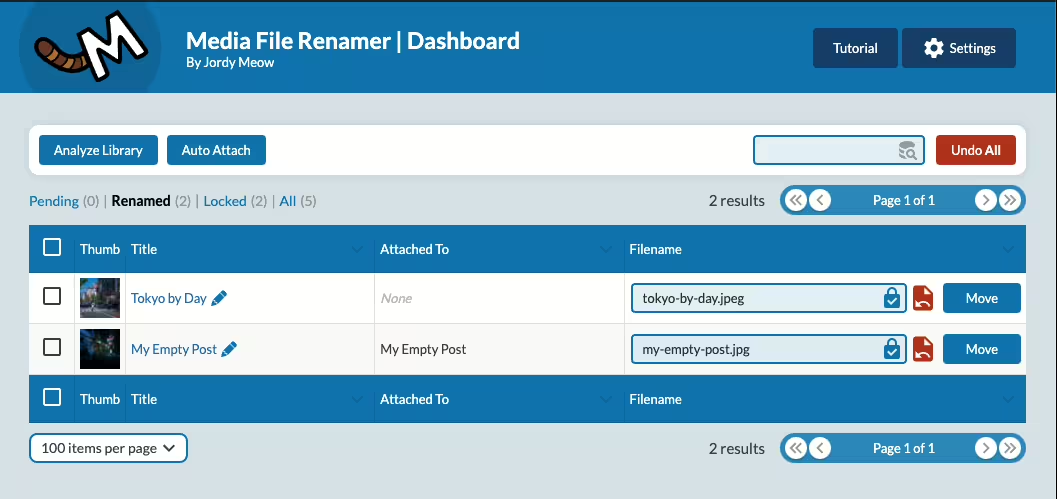
Screenshot of the WordPress plugin media-file-renamer about: file, media, move, rename, seo

Media File Renamer

(0.0) Open Popup FeedbackOpen Popup Review

Media File Renamer - An SEO optimization tool

Media File Renamer by Jordy Meow has been a popular WordPress plugin since 2011-01-27. With over 40 000+ users, it offers automatic and AI-powered media file renaming features for optimized SEO in the media library. It has an average rating of 4.6 out of 5 stars based on 439 reviews in the Plugin Directory.

"This plugin saves a lot of time and is perfect for SEO."

Features - Efficient media file management

  • Automatic renaming - Optimizes filenames for SEO.
  • AI-powered name suggestions (Pro) - Intelligent AI assistance.
  • Notes and encryption (Pro) - Provides file protection.
  • Bulk move functions (Pro) - Convenient file moving.
  • Metadata synchronization - Consistent ALT texts and titles.
  • Support for various formats - Retinas, WebP, PDFs.

"I use Media File Renamer Pro for every SEO project! It reliably redirects old image URLs."

Technical details - Key data and requirements

The plugin works database-driven and efficiently updates metadata like title and ALT text. It can handle large datasets and remains consistent despite renamed files. Requirements are at least PHP 7.4 and WordPress 6.0, tested up to version 6.9.4. The plugin version is 6.2.4, last updated in 2026-04.

Quality and support - Services and user experiences

Media File Renamer improves organization in the media library. Although some challenges occur with large datasets, many users appreciate the support quality, though experiences are mixed. Support is provided via the official forum and the developer's support page.

"I had some problems and wrote an unfriendly support ticket. To his credit Jordy replied very kindly."

Conclusion - Summary of pros and cons

The Media File Renamer plugin by Jordy Meow offers strong features for SEO optimization of media files. It saves time through AI-powered suggestions and metadata synchronization. While uninstallation can cause issues, it remains an important WordPress tool for many. The Pro version expands functionality for more demanding users.

Show more

Detailed plugin information

Plugin slug: media-file-renamer
Plugin name: Media File Renamer
Plugin title: Media File Renamer: Rename for better SEO (AI-Powered)
Plugin keywords: #file #media #move #rename #seo
Plugin version: 6.2.4
Last updated: 2026-04
Release date: 2011-01-27
Required WP version: 6.0
Required PHP version: 7.4
Tested up to WP version: 6.9.4
Active installations: 40 000+
Average rating: 4.6
Number of reviews: 439
Number of support threads: 0 (in the last 2 months)
Number of resolved support threads: 0 (in the last 2 months)
Plugin author: Jordy Meow
Developer homepage: https://meowapps.com
WP developer profile page: https://profiles.wordpress.org/tigroumeow/
Support URL in the WordPress Plugin Directory: https://wordpress.org/support/plugin/media-file-renamer/
Developer support URL: https://wordpress.org/support/plugin/media-file-renamer/#fallback-commercial-support-url
WP Plugin Directory: https://wordpress.org/plugins/media-file-renamer/

#file #media #move #rename #seo

Alternatives to Media File Renamer
Open plugin in sandboxTo the official plugin store

Number #

Screenshot of the WordPress plugin phoenix-media-rename on the topic: file, image, media, rename, retitle

Phoenix Media Rename

(0.0) Open Popup FeedbackOpen Popup Review

Phoenix Media Rename - Efficient SEO optimization tool

Phoenix Media Rename is a popular WordPress plugin by crossi72, published on 2016-08-29, with over 50 000+ active installations. It offers simple renaming of media files for better SEO.

“This plugin specifically focuses on doing one task right - namely renaming media files that you uploaded thoughtlessly with non-SEO-friendly names.”

Features - Comprehensive media management capabilities

  • Rename media filenames - Improves SEO.
  • Bulk renaming - Allows renaming many files at once.
  • Integration with the WordPress interface - Operate directly in the familiar environment.
  • Free and no Pro version - Full functionality without extra cost.
  • Technical integrity - Efficient, database-integrated renaming.
  • Backward compatibility - URL redirects preserve old links.

“In a time when many plugins are paid, this one is a welcome exception.”

Technical details - Architecture and requirements

Phoenix Media Rename uses the WordPress API for metadata changes directly in the media library. Requires at least PHP version 8.0, compatible with WordPress from version 5.0, tested up to version 6.8.5. Currently version 3.13.1, last updated in 2025-09.

“Easy to install and compatible with the latest WordPress updates - it integrates smoothly into the existing system.”

Quality and support - Positive user experiences

Excellent reviews with 4.7 out of 5 stars from 75 reviews. Praise for easy handling, especially for SEO optimization. Some technical issues are reported, but compensated by efficient support on WordPress.org. Commercial support available via separate channels.

“This plugin works great! I used it to clean up some filenames on my site, it was super easy to use.”

Conclusion - Strengths and Weaknesses at a Glance

Phoenix Media Rename offers efficient media file renaming with a strong SEO focus. Benefits include ease of use, free availability, and high-quality integration. Technical issues and compatibility questions exist, but the advantages outweigh them, making it a useful SEO tool.

Show more

Detailed plugin information

Plugin slug: phoenix-media-rename
Plugin name: Phoenix Media Rename
Plugin title: Phoenix Media Rename
Plugin Keywords: #file #image #media #rename #retitle
Plugin Version: 3.13.1
Last Updated: 2025-09
Release Date: 2016-08-29
Required WP Version: 5.0
Required PHP Version: 8.0
Tested up to WP Version: 6.8.5
Active Installations: 50 000+
Average rating: 4.7
Number of Reviews: 75
Number of support threads: 0 (in the last 2 months)
Number of resolved support threads: 0 (in the last 2 months)
Plugin author: crossi72
Developer Homepage: https://www.eurosoftlab.com/en/phoenix-media-rename/
WP Developer Profile: https://profiles.wordpress.org/crossi72/
Support URL in the WordPress Plugin Directory: https://wordpress.org/support/plugin/phoenix-media-rename/
Developer Support URL: https://wordpress.org/support/plugin/phoenix-media-rename/#fallback-commercial-support-url
WP Plugin Directory: https://wordpress.org/plugins/phoenix-media-rename/

#file #image #media #rename #retitle

Alternatives to Phoenix Media Rename
Open plugin in sandboxTo the official plugin store

neoUniversum

Everything you need for WordPress media.

Band Coming Soon - neo WP Plugin for WordPress is coming soon
WordPress Media Plugin Library - Logo - Media library to manage, organize, rename, replace and optimize images

neo Library - The new Image Media Library

Bring order to your media library with the advanced image manager!
neoLibrary.zip
More details
(0.0) Open Popup FeedbackOpen Popup Review
1+ active installations
Last updated: 2026-04
✓ Tested with WordPress
Band Coming Soon - neo WP Plugin for WordPress is coming soon
WordPress Media Plugin Replace - Logo - Replacer for swapping images, videos and documents in the WP Library

neo Replace - Easy replace via Drag & Drop

Simple replacement via drag & drop!
neoReplace.zip
More details
(0.0) Open Popup FeedbackOpen Popup Review
1+ active installations
Last updated: 2026-04
✓ Tested with WordPress
Band Coming Soon - neo WP Plugin for WordPress is coming soon
WordPress Media Plugin Duplicate - Logo - Duplicates images, videos and documents in the WordPress media library

neo Duplicate - Duplicate images with one click!

Duplicate images for SEO with page-specific ALT texts.
neoDuplicate.zip
More details
(0.0) Open Popup FeedbackOpen Popup Review
1+ active installations
Last updated: 2026-04
✓ Tested with WordPress
Band Coming Soon - neo WP Plugin for WordPress is coming soon
WordPress Media Plugin Optimize - Logo - Resize and compress images to the fast WebP image format for SEO

neo Optimize - cache and resize images - the original remains untouched

Boost your SEO Pagespeed by resizing and caching images!
neoOptimize.zip
More details
(0.0) Open Popup FeedbackOpen Popup Review
1+ active installations
Last updated: 2026-04
✓ Tested with WordPress
Band Coming Soon - neo WP Plugin for WordPress is coming soon
WordPress Media Plugin Lazy - Logo - Lazy loader for delayed loading of images and videos from the WP Media Library

neo Lazy - native delayed lazy loading of images for PageSpeed

Best user experience thanks to delayed image loading!
neoLazy.zip
More details
(0.0) Open Popup FeedbackOpen Popup Review
1+ active installations
Last updated: 2026-04
✓ Tested with WordPress
Band Coming Soon - neo WP Plugin for WordPress is coming soon
WordPress Media Plugin Draw - Logo - Editor to create and edit drawings and diagrams directly in WordPress

neo Draw - create diagrams & icons without leaving WordPress

Bring creative ideas to life with drawings directly in WordPress!
neoDraw.zip
More details
(0.0) Open Popup FeedbackOpen Popup Review
1+ active installations
Last updated: 2026-04
✓ Tested with WordPress
Band Coming Soon - neo WP Plugin for WordPress is coming soon
WordPress Media Plugin Animate - Logo - Stroke path line animations to animate outlines in neo Draw drawings

neo Animate - Impressive animation editor for neo Draw

Make an impression with animated line-path effects!
neoAnimate.zip
More details
(0.0) Open Popup FeedbackOpen Popup Review
1+ active installations
Last updated: 2026-04
✓ Tested with WordPress
Band Coming Soon - neo WP Plugin for WordPress is coming soon
WordPress Media Plugin Motion - Logo - Stop motion animations from sequences of frames in the SVG vector graphic format

neo Motion - Creative stop-motion editor for neo Draw

Make an impression with captivating stop-motion animations!
neoMotion.zip
More details
(0.0) Open Popup FeedbackOpen Popup Review
1+ active installations
Last updated: 2026-04
✓ Tested with WordPress
WordPress Media Plugin Universe - Logo - Plugin manager to download, install and activate neoPlugins

neo Plugins - The whole neoUniverse in one plugin!

All free neo Media plugins for WordPress.
More details
(0.0) Open Popup FeedbackOpen Popup Review
1+ active installations
Last updated: 2026-04
✓ Tested with WordPress

WordPress plugin neo Rename
Alternatives & comparison

Compared with:

Screenshot neo Rename - Media Renamer for WordPress images to rename filenames, titles, and slugs for SEO optimization
Find & Replace (Regex), Prefix, Suffix, New Name, Remove, Clean, Remove subfolders, Title from filename, ...
Rename images and videos with automatically generated filenames, titles and slugs based on entered terms
Automatically generated 301 redirects for SEO-friendly media renaming and an undo button
Button under image thumbnails in the WordPress Media Library to rename images without reloading the page

neoRename

(0.0) Open Popup FeedbackOpen Popup Review

neo Rename - Best media renamer for renaming images

The WordPress plugin neo Rename from neo WP was released on 2026-04-01 and is part of the new neoWP plugin series. The plugin leverages modern web development capabilities, reflected in its performance and intuitive design. Reviews suggest the plugin has impressed users since release with well-chosen, cleverly implemented features. Notably, the solid coding stands out. A look at the source confirms that an experienced software development company is behind the plugin.

“The plugins in the neo package are very well coordinated and solve all common image problems in WordPress.”

Features - Powerful tools cleverly implemented

  • Optimize your SEO with descriptive image names
  • Reliable renaming of filename, title and slug
  • Batch processing to change multiple filenames at once
  • Instant preview of changes between old and new names
  • Undo renames
  • Fast, automatic update of image URLs across all posts
  • Supports all file formats, including videos and PDFs
  • SEO-friendly redirect to the new image URL (Pro)
  • Generate missing alt texts from image titles for SEO (Pro)
  • Remove year/month folders from the image path (Pro)
  • Search, replace and filter with regex and advanced tools (Pro)

“Great what you can do with neo Rename. The Pro version takes it even further.”

Technical Details - Modern implementation with high compatibility

The plugin neo Rename is available for free in the current version 1.0.0 for download. It requires at least the WordPress version and PHP version or higher. The plugin was tested by the beta tester group up to the current version . The developers released the last update in 2026-04. Continuous updates and extensions reflect the commitment to further development.

“It's convenient to get all media plugins from a single developer. The entire neo universe runs performantly, reliably and stably.”

Quality and Support - Fast and helpful assistance

Support for neo Rename receives predominantly positive feedback, mainly thanks to fast response times and effective problem solving. Many users report that the developers provide dedicated and helpful support for both the free and Pro versions. The neo WP team is directly reachable via the developers' page by chat, email and contact form. Additionally, the official support forum is available for further assistance.

“The developers respond quickly, personally, and are very helpful.”

Conclusion - Very high-quality WordPress plugin package

The plugin neo Rename lives up to its slogan “Efficiently rename images and maximize SEO ranking!” in every respect. Even in the free version, the entire neo plugin series offers a comprehensive solution for typical media management needs in WordPress. If you're already using neo Rename, it's worth taking a look at the other plugins from neo WP.

Show more

Detailed plugin information

Plugin slug: neo-rename
Plugin name: neoRename
Plugin title: neo Rename - Bester Media Renamer zum Bilder umbenennen
Plugin keywords: #rename #renamer #image #media #filename
Plugin version: 1.0.0
Last updated: 2026-04
Release date: 2026-04-01
Required WP version:
Required PHP version:
Tested up to WP version:
Active installations: 1+
Average rating: 5.0
Number of ratings: 2
Number of support threads: 0 (in the last 2 months)
Number of resolved support threads: 0 (in the last 2 months)
Plugin author: neo WP
Developer homepage: https://neo-wp.com/?ref=wporg-info
WP developer profile page: https://profiles.wordpress.org/neoplugins/
Support URL in the WordPress Plugin Directory: https://neo-wp.com/support/?ref=wporg-info
Developer support URL: https://neo-wp.com/support/?ref=wporg-info
WP Plugin Directory: https://neo-wp.com/plugin/neo-rename/?ref=wporg-info

#rename #renamer #image #media #filename

Alternatives to neo Rename
Open plugin in sandboxTo the official plugin store

Number #

Screenshot of the WordPress plugin media-file-renamer about: file, media, move, rename, seo

Media File Renamer

(0.0) Open Popup FeedbackOpen Popup Review

Media File Renamer - An SEO optimization tool

Media File Renamer by Jordy Meow has been a popular WordPress plugin since 2011-01-27. With over 40 000+ users, it offers automatic and AI-powered media file renaming features for optimized SEO in the media library. It has an average rating of 4.6 out of 5 stars based on 439 reviews in the Plugin Directory.

"This plugin saves a lot of time and is perfect for SEO."

Features - Efficient media file management

  • Automatic renaming - Optimizes filenames for SEO.
  • AI-powered name suggestions (Pro) - Intelligent AI assistance.
  • Notes and encryption (Pro) - Provides file protection.
  • Bulk move functions (Pro) - Convenient file moving.
  • Metadata synchronization - Consistent ALT texts and titles.
  • Support for various formats - Retinas, WebP, PDFs.

"I use Media File Renamer Pro for every SEO project! It reliably redirects old image URLs."

Technical details - Key data and requirements

The plugin works database-driven and efficiently updates metadata like title and ALT text. It can handle large datasets and remains consistent despite renamed files. Requirements are at least PHP 7.4 and WordPress 6.0, tested up to version 6.9.4. The plugin version is 6.2.4, last updated in 2026-04.

Quality and support - Services and user experiences

Media File Renamer improves organization in the media library. Although some challenges occur with large datasets, many users appreciate the support quality, though experiences are mixed. Support is provided via the official forum and the developer's support page.

"I had some problems and wrote an unfriendly support ticket. To his credit Jordy replied very kindly."

Conclusion - Summary of pros and cons

The Media File Renamer plugin by Jordy Meow offers strong features for SEO optimization of media files. It saves time through AI-powered suggestions and metadata synchronization. While uninstallation can cause issues, it remains an important WordPress tool for many. The Pro version expands functionality for more demanding users.

Show more

Detailed plugin information

Plugin slug: media-file-renamer
Plugin name: Media File Renamer
Plugin title: Media File Renamer: Rename for better SEO (AI-Powered)
Plugin keywords: #file #media #move #rename #seo
Plugin version: 6.2.4
Last updated: 2026-04
Release date: 2011-01-27
Required WP version: 6.0
Required PHP version: 7.4
Tested up to WP version: 6.9.4
Active installations: 40 000+
Average rating: 4.6
Number of reviews: 439
Number of support threads: 0 (in the last 2 months)
Number of resolved support threads: 0 (in the last 2 months)
Plugin author: Jordy Meow
Developer homepage: https://meowapps.com
WP developer profile page: https://profiles.wordpress.org/tigroumeow/
Support URL in the WordPress Plugin Directory: https://wordpress.org/support/plugin/media-file-renamer/
Developer support URL: https://wordpress.org/support/plugin/media-file-renamer/#fallback-commercial-support-url
WP Plugin Directory: https://wordpress.org/plugins/media-file-renamer/

#file #media #move #rename #seo

Alternatives to Media File Renamer
Open plugin in sandboxTo the official plugin store

Number #

Screenshot of the WordPress plugin phoenix-media-rename on the topic: file, image, media, rename, retitle

Phoenix Media Rename

(0.0) Open Popup FeedbackOpen Popup Review

Phoenix Media Rename - Efficient SEO optimization tool

Phoenix Media Rename is a popular WordPress plugin by crossi72, published on 2016-08-29, with over 50 000+ active installations. It offers simple renaming of media files for better SEO.

“This plugin specifically focuses on doing one task right - namely renaming media files that you uploaded thoughtlessly with non-SEO-friendly names.”

Features - Comprehensive media management capabilities

  • Rename media filenames - Improves SEO.
  • Bulk renaming - Allows renaming many files at once.
  • Integration with the WordPress interface - Operate directly in the familiar environment.
  • Free and no Pro version - Full functionality without extra cost.
  • Technical integrity - Efficient, database-integrated renaming.
  • Backward compatibility - URL redirects preserve old links.

“In a time when many plugins are paid, this one is a welcome exception.”

Technical details - Architecture and requirements

Phoenix Media Rename uses the WordPress API for metadata changes directly in the media library. Requires at least PHP version 8.0, compatible with WordPress from version 5.0, tested up to version 6.8.5. Currently version 3.13.1, last updated in 2025-09.

“Easy to install and compatible with the latest WordPress updates - it integrates smoothly into the existing system.”

Quality and support - Positive user experiences

Excellent reviews with 4.7 out of 5 stars from 75 reviews. Praise for easy handling, especially for SEO optimization. Some technical issues are reported, but compensated by efficient support on WordPress.org. Commercial support available via separate channels.

“This plugin works great! I used it to clean up some filenames on my site, it was super easy to use.”

Conclusion - Strengths and Weaknesses at a Glance

Phoenix Media Rename offers efficient media file renaming with a strong SEO focus. Benefits include ease of use, free availability, and high-quality integration. Technical issues and compatibility questions exist, but the advantages outweigh them, making it a useful SEO tool.

Show more

Detailed plugin information

Plugin slug: phoenix-media-rename
Plugin name: Phoenix Media Rename
Plugin title: Phoenix Media Rename
Plugin Keywords: #file #image #media #rename #retitle
Plugin Version: 3.13.1
Last Updated: 2025-09
Release Date: 2016-08-29
Required WP Version: 5.0
Required PHP Version: 8.0
Tested up to WP Version: 6.8.5
Active Installations: 50 000+
Average rating: 4.7
Number of Reviews: 75
Number of support threads: 0 (in the last 2 months)
Number of resolved support threads: 0 (in the last 2 months)
Plugin author: crossi72
Developer Homepage: https://www.eurosoftlab.com/en/phoenix-media-rename/
WP Developer Profile: https://profiles.wordpress.org/crossi72/
Support URL in the WordPress Plugin Directory: https://wordpress.org/support/plugin/phoenix-media-rename/
Developer Support URL: https://wordpress.org/support/plugin/phoenix-media-rename/#fallback-commercial-support-url
WP Plugin Directory: https://wordpress.org/plugins/phoenix-media-rename/

#file #image #media #rename #retitle

Alternatives to Phoenix Media Rename
Open plugin in sandboxTo the official plugin store

Experiences with the WordPress plugin.

Review Portrait - Jonas Gruber - Bach & Gruber Holding Ltd. - marketing agency, Google Ads, Shopify, digital agency, SEOReview Logo - Bach & Gruber Holding Ltd. - Jonas Gruber - marketing agency, Google Ads, Shopify, digital agency, SEO
★★★★★

Jonas Gruber

Agency Owner

... The plugin simply detects every image reference hiding somewhere in the database. Whether in post content, an ACF field, or your own JS code.

Read review

Review of: neo Rename Plugin - Rename image filenames in WordPress

Reliable and solid

I'm generally cautious with renaming plugins because they've often broken references and PHP arrays in my database. That's why I put neo Rename through its paces on a test instance. What can I say? I couldn't break neo Rename. The plugin simply detects every image reference hiding somewhere in the database. Whether in post content, an ACF field, or your own JS code. I especially like that the plugin shows me where the image is used before renaming. That gives me extra confidence.

Jonas Gruber

More about the project
Review Portrait - Florian Krines - Knusper Photography - Photographer, Videographer, Wedding Photographer, Portraits, WürzburgReview Logo - Knusper Photography - Florian Krines - Photographer, Videographer, Wedding Photographer, Portraits, Würzburg
★★★★★

Florian Krines

Photographer

... As a photographer I use many images and update them regularly on my website. With neo Rename I keep titles and alt tags consistent.

Read review

Review of: neo Rename Plugin - Rename image filenames in WordPress

Consistent image metadata

I was able to use neo Rename in beta. It is simply reliable. As a professional photographer I use many images and update them regularly on my website. With neo Rename I keep titles and alt tags consistent. This plugin saves me a lot of time.

Florian Krines

Würzburg, Germany

More about the project
Review Portrait - Florian Krines - Knusper Photography - Photographer, Videographer, Wedding Photographer, Portraits, WürzburgReview Logo - Knusper Photography - Florian Krines - Photographer, Videographer, Wedding Photographer, Portraits, Würzburg
★★★★★

Florian Krines

Photographer

... Practical is that metadata like alt texts are always preserved. A solid plugin that works smoothly.

Read review

Review of: neo Replace Plugin - Replace images & media in WordPress

Metadata remains preserved

I am a beta tester of neo Replace. As a photographer I use the plugin for my portfolio site. I often replace existing images with edited versions. Previously that was tedious because I had to replace the images on each page individually. The neo Replace plugin not only replaces the image files for me, but also shows where I used the images on the website. Practical is that metadata like alt texts are always preserved. A solid plugin that works smoothly.

Florian Krines

Würzburg, Germany

More about the project
Show more

FAQ - Frequently Asked Questions about neo Rename

The plugin neo Rename is a WordPress plugin that lets you efficiently rename images, videos, and other media files in your media library. It automatically updates all references in the database to refresh existing links and improve your SEO ranking.

The plugin neo Rename optimizes image titles, filenames, and slugs, creates SEO-friendly redirects (301 redirects), and can automatically generate missing alt texts from image titles. This sustainably improves your site's visibility in search engines.

Yes - with the built-in bulk/batch processing you can rename multiple files at once using neo Rename. A preview feature shows all planned changes beforehand.

All common media formats are supported by neo Rename for images, videos, and documents, including: JPG, PNG, WEBP, SVG, PDF, MP4, MOV, MP3, ZIP and many more.

When renaming, neo Rename automatically updates all references in your WordPress database, including post content, ACF fields and even PHP arrays. Additionally, a 301 redirect ensures that the old, already Google-indexed image links remain reachable. This keeps your SEO performance stable and prevents ranking loss due to broken links.

Renaming files in WordPress can affect existing image references and links. Before renaming media we recommend:

✅ Make a backup: Create a backup of your site before renaming many files at once.

✅ Start single: Test renaming with neo Rename on individual files first.

🛠️ Clear plugin cache: If issues occur after renaming, clearing the plugin cache can help, as old image references may still be stored there.

🛠️ Clear browser cache: If incorrect or old images still appear, clearing the browser cache can update outdated references.

🔙 Use the undo feature: With one click you can revert changes in neo Rename if something goes wrong.

🧠 SEO tip: By redirecting old URLs with neo Rename you avoid negative impacts on your Google ranking!

Yes, the plugin neo Rename has an undo feature that can restore the previous filenames, titles, and slugs after renaming.

Yes, neo Rename works seamlessly with WooCommerce and detects all image and media references even in product pages, galleries and descriptions.

You get a whole universe of specialized media plugins for modern media management in WordPress. Included are perfectly harmonized tools for renaming, replacing, optimizing, drawing, animating and managing media. Each plugin is designed to improve your SEO ranking, boost your site’s performance and save you valuable time when creating content.

With the Pro version you get all features in a single plugin. One ZIP file, one settings page, one update and full control. In the neoPlugin settings  you activate exactly the features you need.

Behind neo WP is a dedicated team of experienced web developers. With great attention to detail and a high standard of code quality we continuously develop the neoUniverse further.

With the Free version you get all neo plugins with their basic features. On the download page you can download the plugins individually or install them directly with the neoPlugins ZIP. After installation the neo plugins appear as separate entries in the WordPress backend and must be managed and updated individually. Support is provided via the public WordPress forum.

With the Pro version you get all neo plugins including all Pro features in a single ZIP file. You upload just this one file and then find all features as one plugin entry in your dashboard. Via the plugin overview in the settings you toggle exactly the modules you need. All Pro features with the crown icon 👑 are available to you immediately. These include, for example, displaying all posts that use a particular image, bulk actions in neoRenamer, an advanced animation editor for drawings and much more. Thanks to automatic security and feature updates you always stay up to date. Newly released media plugins and tools will be included in the future at no extra cost. With the Pro version you also enjoy prioritized premium support directly from the developer team.

So if you want to save time, stay flexible and use all pro functions immediately, the Pro version is the right choice for you.

Show more FAQs
Page Plugin Single Lamp

Ready to make your website a highlight?

Experience the neo universe and its possibilities in the Playground yourself.
Or get a license today and take your website to the next level!

Thank you for your feedback!

★★★★★

Rate now!

[{user_coupon}]

{user_discount} Discount

Redeem now!