{user_name}

Create drawings, diagrams, and sketches directly in WordPress.

Impress your website visitors with striking diagrams, icons, and sketches! You create and edit these directly in the backend without leaving WordPress. This gives your site a unique look.
With neo Draw, you bring your creative ideas to life quickly and easily!

👑 Pro: Animate your created graphics with path-stroke and stop-motion animations. Make your website an unmistakable eye-catcher!

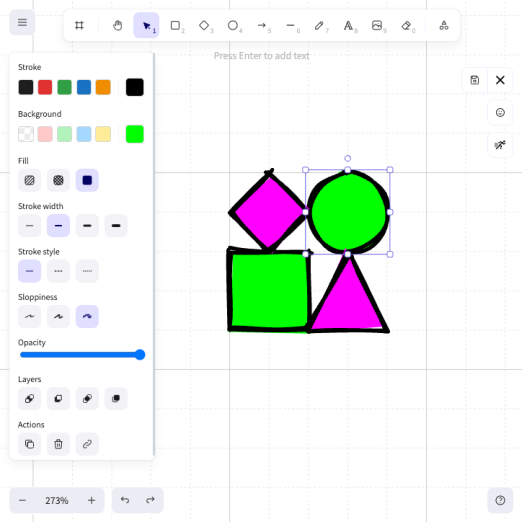
Plugin neo Draw Screenshot

Imagine. Illustrate. Astonish.

Band Coming Soon - neo WP Plugin for WordPress is coming soonWordPress Media Plugin Draw - Logo - Editor to create and edit drawings and diagrams directly in WordPress

neoDraw

Creativity knows no limits!

neoDraw.zip

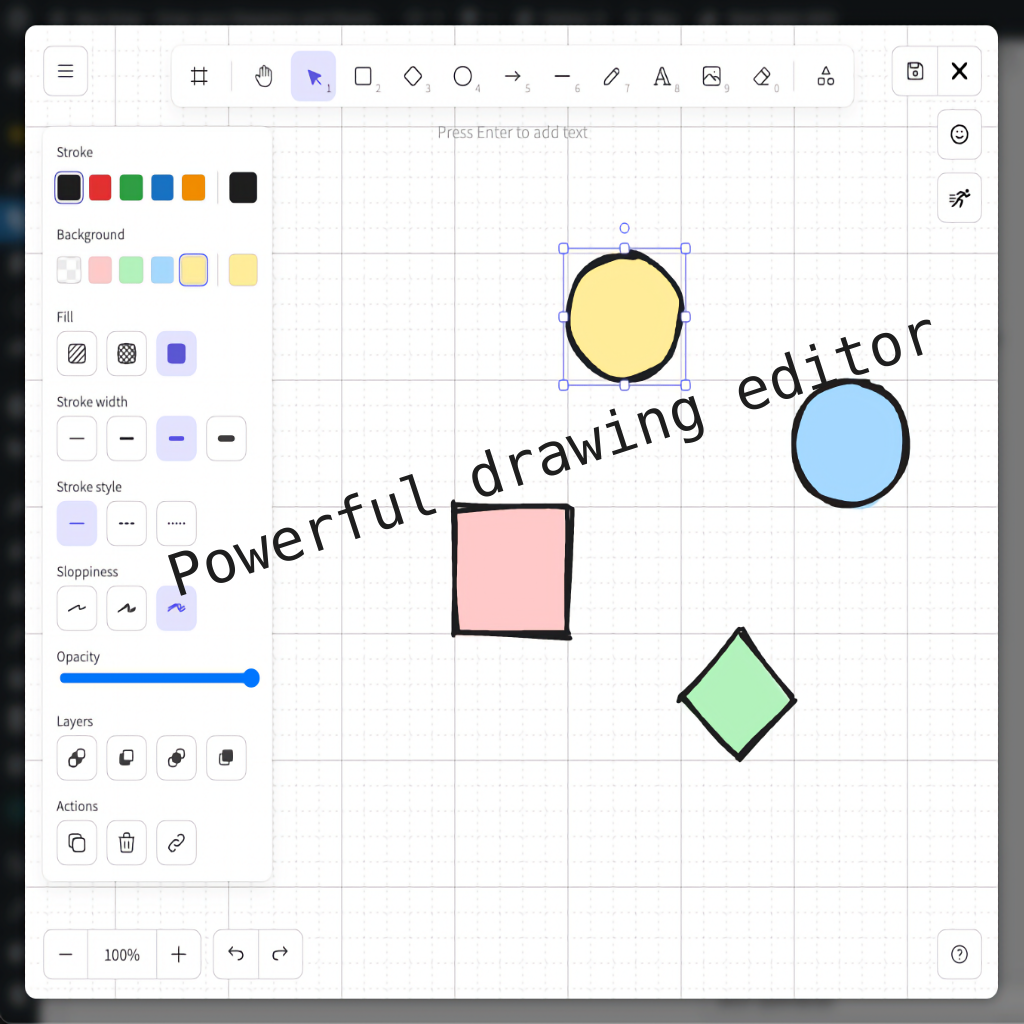
Powerful Shape Editor

Powerful Shape Editor

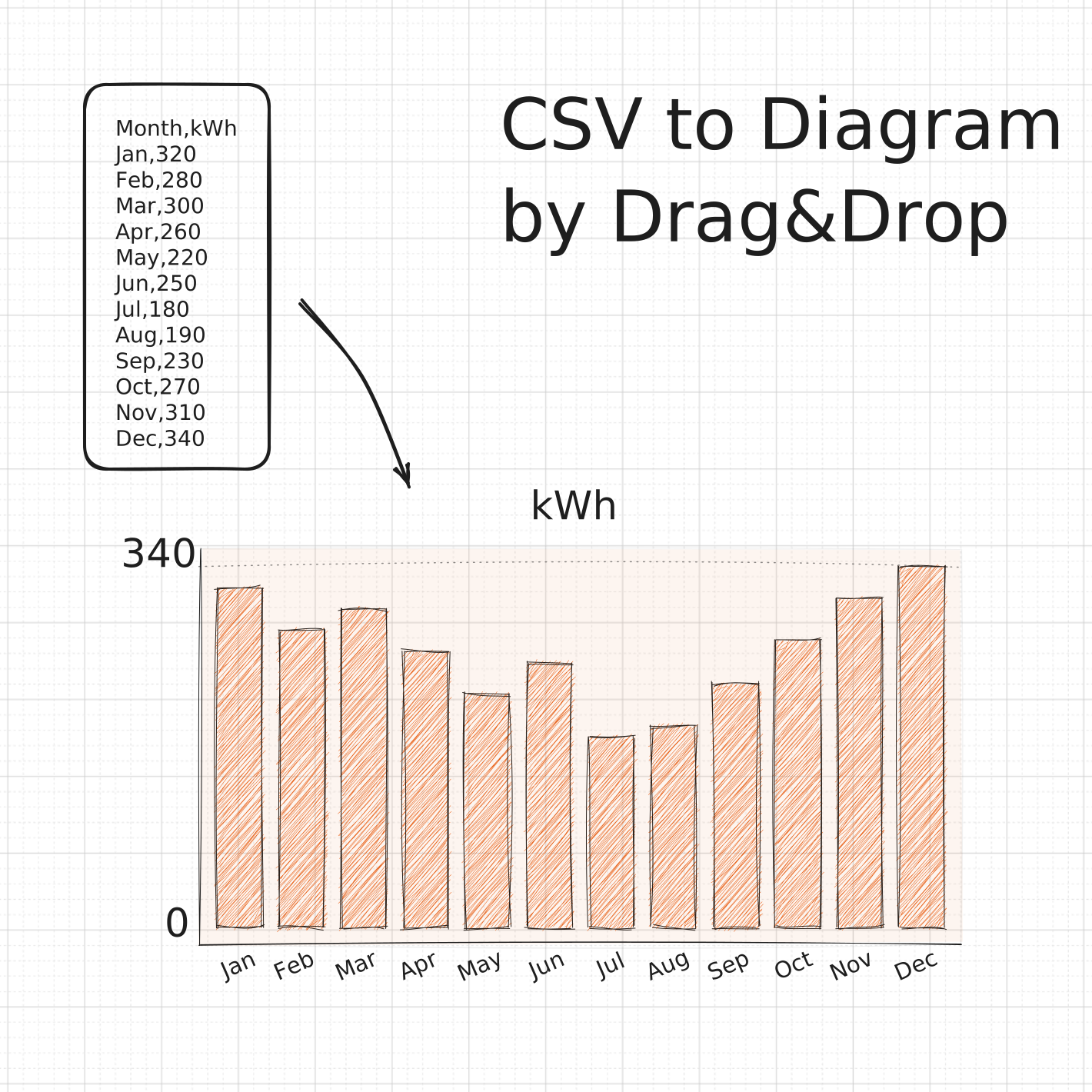
Insert CSV files and tables directly as bar charts

Insert CSV files and tables directly as bar charts

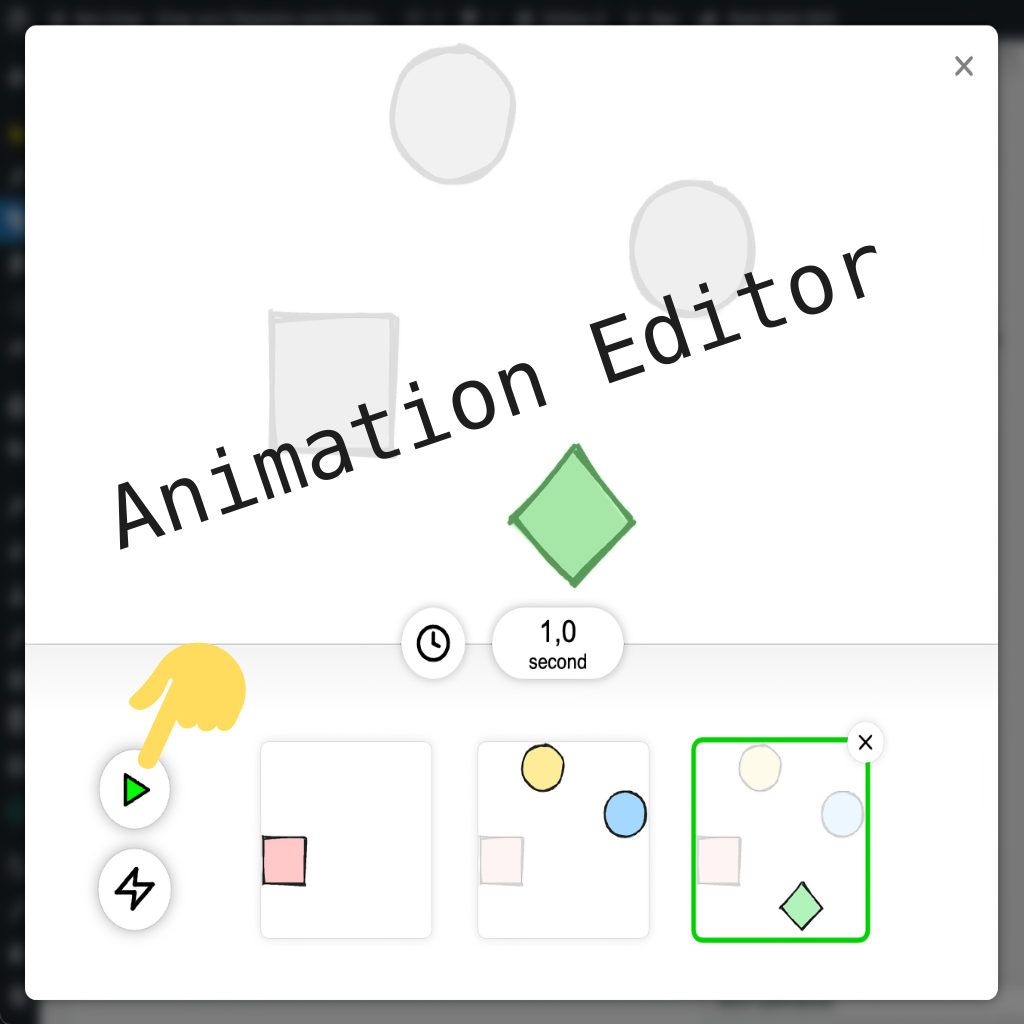
Animation Editor

Animation Editor

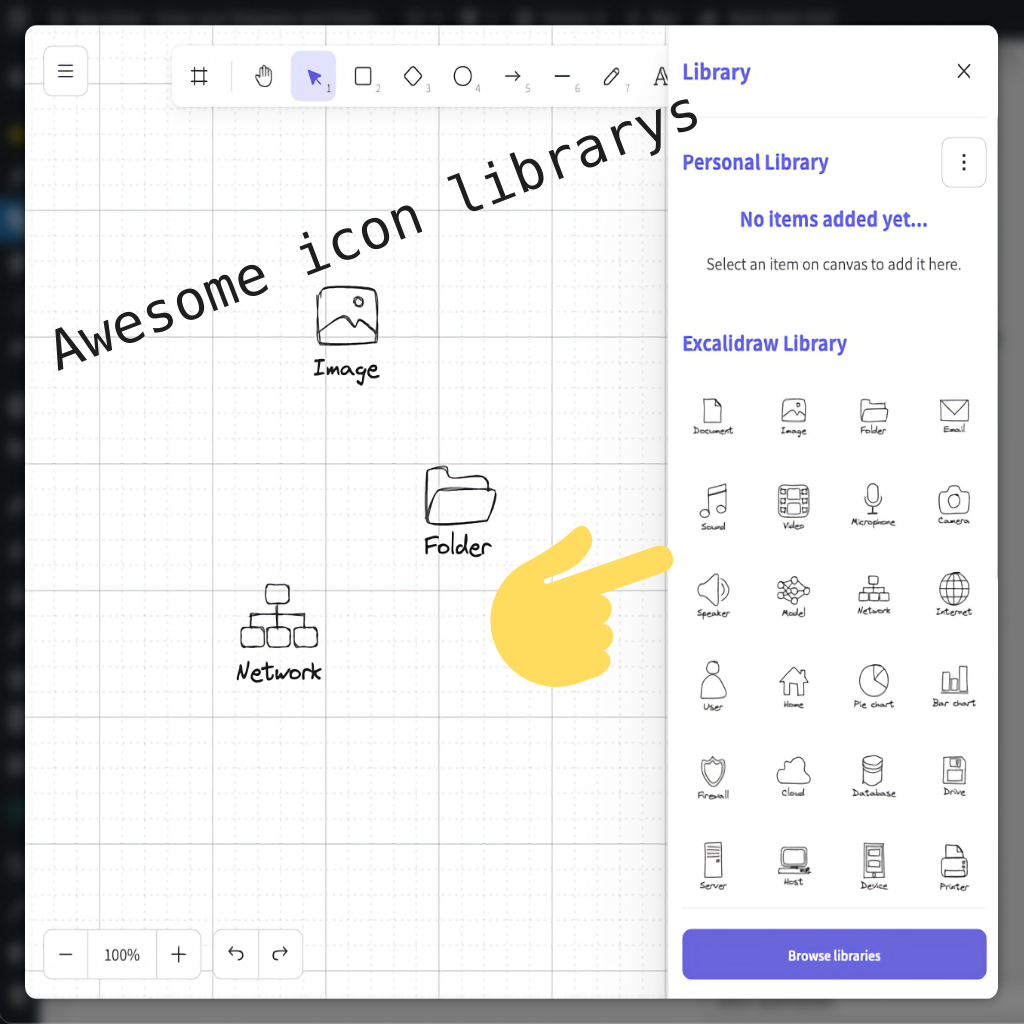
Fantastic Icon Libraries

Fantastic Icon Libraries

Image Export

Image Export

Always safe with a backup

Always safe with a backup

Elementor Integration

Elementor Integration

Gutenberg Integration

Gutenberg Integration

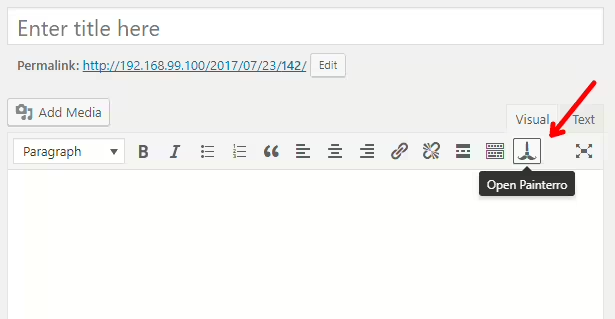
Classic Editor Integration

Classic Editor Integration

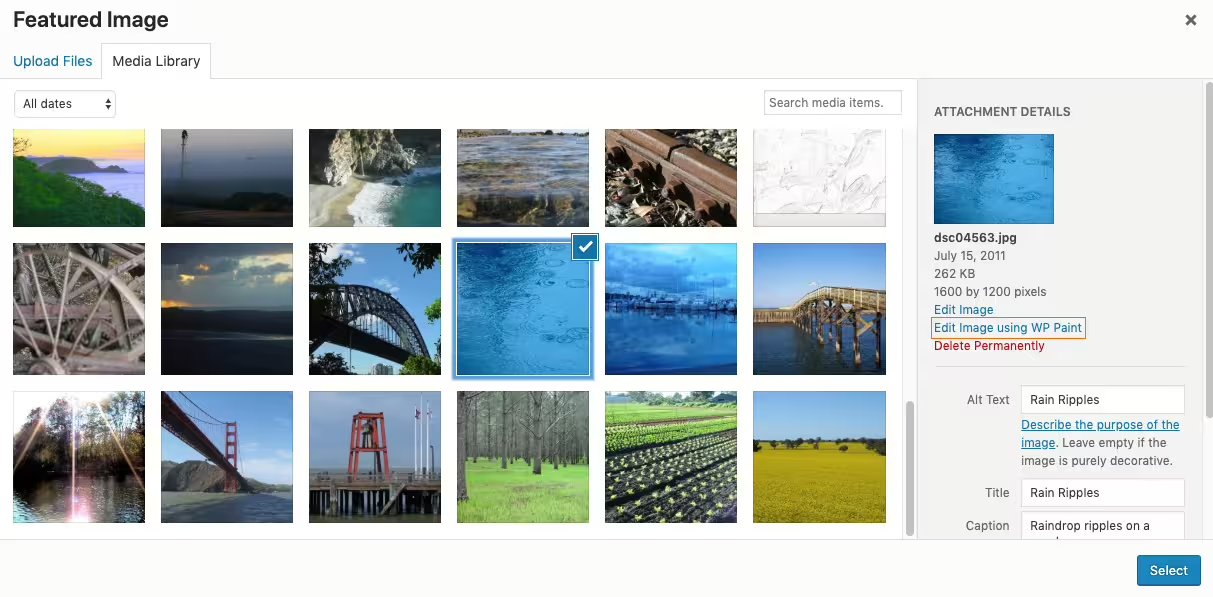
Integration into the WordPress Media Library

Integration into the WordPress Media Library

To the point.

The neo Draw plugin lets you create drawings, diagrams, and sketches directly in the backend, without having to leave WordPress. The plugin is fully integrated into WordPress, compatible with all common page builders, and uses the standardized SVG image format. All drawings are saved in the media library and can be inserted into posts and pages like regular images. Extensions provide additional features such as creating interactive elements and animations.

Creativity without limits!

With neo Draw, websites become alive and interactive. Powerful drawing tools and animations push the boundaries of traditional website design with WordPress.

Plugin Draw - Creativity - Hand-drawn geometric shapes like triangle, circle, square, and diamond in a sketch-doodle style
Sketch style
Plugin Draw - Creativity - Four drawing tools like cursor, pen, text icon, and photo for editing and painting images
Powerful tools
Plugin Draw - Creativity - Four colorful pastel circles representing a harmonious color palette
Beautiful colors
Plugin Draw - Creativity - Four emoji icons representing versatile icon library packs
Icon packs

Practical drawing tools for engaging designs

The WP plugin neo Draw offers a variety of drawing tools for creating impressive website content.

The unique sketch style in doodle design enables the creation of hand-drawn graphics with a creative look. In addition to common drawing tools like shapes, text, and freehand pen, neo Draw also offers emoji and icon libraries to enhance graphics. Aesthetic color palettes and selected fonts complete the powerful toolbox.

Plugin Draw - Creativity - Arrow cursor with rays, focusing on interactivity and user-friendly navigation
link
Plugin Draw - Creativity - Hand cursor pointing at a jagged line, symbol for clickable areas on websites
hover
Plugin Draw - Creativity - Figure with motion lines, depicting dynamic animations and movement effects
animate
Plugin Draw - Creativity - Downward arrow, optimized for scroll interactions and intuitive website navigation
scroll

Interactive and lively sketches

With the neo Draw plugin, drawings become alive and interactive.

Just like on the website itself, texts and clickable areas in neoDraw drawings can be linked without additional programming. This lets visitors navigate the site intuitively and attractively.

Additionally, any drawing element can be animated with just a few clicks. Animations trigger via interactions like hovering or scrolling and capture visitors' attention at exactly the right moment. This directs focus to the most important content. The website becomes a living canvas.

Seamlessly integrated!

Working with drawings is just as easy with neo Draw as inserting images in WordPress. Wherever images can be added, drawings can be created and edited.
Plugin Draw - PageBuilder Bricks - Visual website editor - Best website builder - powerful, reliable and fast
Bricks
Plugin Draw - PageBuilder Elementor - Visual website editor - Intuitive drag-and-drop page builder with design widgets
Elementor
Plugin Draw - PageBuilder Classic Editor - Visual website editor - classic WordPress editor for text editing
Classic Editor
Plugin Draw - PageBuilder Gutenberg - Visual page editor - WordPress block editor with WP’s modular structure
Gutenberg

Optimized for all page builders

The plugin provides integration for all page builders that allow inserting images from the WordPress Media Library.

In Bricks, Elementor, the Gutenberg Block Editor and the Classic Editor, neo Draw integrates directly into the image widget and offers additional options provided by the page builder's image element. Full compatibility is also ensured with Divi, Beaver Builder and Oxygen. The plugin also integrates perfectly on platforms like WordPress.com and WP Engine.

Plugin Draw - Integration - WordPress - WordPress logo for site management, web design and content creation for blogs
WordPress
Plugin Draw - Integration - WP Media Library - illustrative icon for managing media content like images, videos and documents
Media Library

New tools for the WordPress Media Library

Drawings can be created directly in the WordPress Media Library with neo Draw. WordPress treats the drawings like regular images.

Optionally, the neo Library extension can be enabled. This additional media view allows renaming, duplicating and replacing drawings and images in the WordPress Media Library.

Plugin Draw - Integration - neo Draw data format - SVG document in scalable vector format for lossless graphics
Image format

Brilliant vector graphics with the neo Draw file format

The neoDraw drawing editor is based on the Excalidraw editor and stores drawings in the standardized SVG image format. Since SVG files are treated like regular images by the WordPress media library and all common page builders, drawings can be easily integrated into websites. For delivery, however, they are provided in an SEO-optimized and compressed file format.

A neoDraw drawing, like an image, consists of a single file stored in the WordPress media library. This SVG file contains all image information, animations, and metadata of the drawing. By simply downloading the image file, drawings can be backed up locally or uploaded to another website-everything comes with it.

The wow factor for your website

The neo Draw plugin offers new ways to visually present website content and to break up long blocks of text with graphics. Interactive areas and impressive animations guide and captivate website visitors, keeping them on the site longer.

Plugin Draw - Example - Technical drawing with symbols to represent electronic circuits and diagrams
Circuit diagrams
Plugin Draw - Example - Creative play with pen and paper shown as a hand-drawn simple pattern in draft
Sketches
Plugin Draw - Example - Flowcharts for processes in a structured flow diagram for process visualization
Flowcharts
Plugin Draw - Example - Bar chart diagram for data-driven visualizations, analytics, and business dashboards
Charts

Circuit diagrams, charts, and sketches

With the neo Draw editor you can create illustrative drawings and sketches. This enables professional presentation of technical product information with custom tables, charts, and infographics. Even complex schematics like UML and flowcharts as well as circuit diagrams can be implemented directly in WordPress. This allows tutorials and instructions to be enhanced with graphics. The ability to edit all drawing content directly in the WordPress backend makes neo Draw especially valuable for designers, developers, and content creators.

Plugin Draw - Example - Map with interactive areas with selectable houses for site plans and directions
Clickable areas
Plugin Draw - Example - ”Click me!” button in arrow and rectangle shape for call-to-action elements and page navigation
Buttons

Buttons, overlays, and hotspots

Interactive zones and clickable areas allow neoDraw drawings to respond to user input. With overlays, maps for site plans and seat reservations can be implemented easily. Buttons and call-to-action buttons (CTAs) can also be freely designed, animated, and linked.

Plugin Draw - Example - Lettering design from brush stroke and paintbrush in color for lettering and typographic designs
Lettering designs
Plugin Draw - Example - Labeling on a world map with the text 'Welcome to Miami' and markers for place labels
Labels
Plugin Draw - Example - Mockup with cat, heart symbol and the caption ”My sweet cat”, for creative preview images
Mockups
Plugin Draw - Example - Logo with geometric shapes like circle, triangle and square in pastel colors for design concepts
Logos

Logos, icons and designs

Creative type designs, illustrative mockups and custom labeled cards are just some of the versatile possibilities neo Draw offers for modern design. With the plugin's powerful tools, you can create basic icons, appealing logos and custom lettering directly in WordPress. Typography elements can also be precisely crafted with the Apple Pencil on the iPad.

Vibrant SVG animations for your website

With neo Draw, drawings effortlessly become animated eye-catchers. Simple path animations can be generated with a single click. For full control, you can draw frame by frame yourself.

WordPress Media Plugin Motion - Animated logo - Individual frames from vector graphics form the sequence of an SVG animation

Stop motion animations

The extension neo Motion enables you to draw individual frames with neo Draw that seamlessly merge into a lively sequence like a flipbook. This allows you to create simple scribble animations and sophisticated cartoon projects that leave a lasting impression on website visitors. The created animations are played on the website in a lean SVG format as crisp vector graphics. Optionally, the sequences can be exported as GIFs and used in various ways.

WordPress Media Plugin Animate - Animated logo - Stroke path line animation path animation contour animation

Stroke path animations

The extension neo Animate offers the ability to create impressive line animations with just a few clicks in the simplest way. In such a stroke-path animation, the individual lines, paths and shapes are revealed piece by piece. It creates the impression that the drawing's contours are being sketched live. Adjustable triggers can start this effect, for example on hover or when the graphic scrolls into view. At the right moment, the animation draws attention and stays memorable.

This website was created with
♥ and neo Draw designed.

All neo Draw features at a glance.

Bring creative ideas to life with drawings directly in WordPress!

neo Draw plugin - draw diagrams and icons in WordPress

Best editor for drawing diagrams, charts, images and icons without leaving WordPress ✓ Animations ✓ Excalidraw SVG support ➔ Plugin download

neoDraw.zip
Icon Crown - neo WP Pro - All plugins in one ZIP file perfectly coordinated.

Be the king of
neoUniverse!

All plugins in one ZIP file perfectly coordinated.

Buy now

Experiences with the WordPress plugin neoDraw.

Review Portrait - Florens Bach - SEO Agency - Marketing Agency, Google Ads, Shopify, Digital Agency, SEO OptimizationReview Logo - SEO Agency - Florens Bach - Marketing Agency, Google Ads, Shopify, Digital Agency, SEO Optimization
★★★★★

Florens Bach

Online Marketing Expert

... A very intuitive and powerful drawing tool. The whole design looks very cohesive and well thought out.

Read review

Review of: neo Draw Plugin - Draw diagrams and icons in WordPress

Great tool for creatives!

I discovered neo Draw when I was looking for Paint for WordPress and found exactly that. A very intuitive and powerful drawing tool. Unlike Paint, neo Draw has well-chosen color palettes. ;) I especially like the consistent drawing look with the matching font. The whole design looks very cohesive and well thought out. The built-in icon library includes emojis, a wide selection of icons and even animated GIFs. You can also add your own images, GIFs and icons to the drawings. Thanks for the valuable tool!

Florens Bach

Schweinfurt, Germany

More about the project
Review Portrait - Jonas Gruber - Bach & Gruber Holding Ltd. - marketing agency, Google Ads, Shopify, digital agency, SEOReview Logo - Bach & Gruber Holding Ltd. - Jonas Gruber - marketing agency, Google Ads, Shopify, digital agency, SEO
★★★★★

Jonas Gruber

Agency Owner

... The plugin is super fast and perfectly integrated into WordPress. Editing drawings is possible directly in the PageBuilder.

Read review

Review of: neo Draw Plugin - Draw diagrams and icons in WordPress

Very well integrated

During the development phase I had the opportunity to test neo Draw more closely. The plugin is super fast and perfectly integrated into WordPress. Editing the drawings is possible directly in the PageBuilder. The raw data is embedded in the image file and can be transferred to another domain simply by downloading the file. It's amazing that the drawings are still displayed even if the plugin is deactivated. Very nice! Everything is very high quality and reliable. The developer also responds to technical questions immediately. I'm very satisfied.

Jonas Gruber

More about the project
Review Portrait - Sasha Oleksandra Simonova - Avonomis - 3D animations, Cinema 4D, effects, models, design, artistReview Logo - Avonomis - Sasha Oleksandra Simonova - 3D animations, Cinema 4D, effects, models, design, artist
★★★★★

Sasha Simonova

Animation Designer

... You can draw anything easily: logos, icons, tables, decorations, ... You can also draw and paint over existing images.

Read review

Review of: neo Draw Plugin - Draw diagrams and icons in WordPress

Logos, icons, tables, ...

Through a software developer from neo WP I got early access to neo Draw. I actually just wanted to create a few drawings until I realized what is possible with neo Draw. You can draw anything easily: logos, icons, tables, decorations, ... You can also draw and paint over existing images. With the link function I even drew my own buttons and linked them. Especially brilliant is that everything can be animated with just one click, which looks very impressive.

Sasha Simonova

Würzburg, Germany

More about the project
Review Portrait - Florens Bach - SEO Agency - Marketing Agency, Google Ads, Shopify, Digital Agency, SEO OptimizationReview Logo - SEO Agency - Florens Bach - Marketing Agency, Google Ads, Shopify, Digital Agency, SEO Optimization
★★★★★

Florens Bach

Online Marketing Expert

... I especially liked the integration of scroll and hover animations, which give my website that certain something.

Read review

Review of: neo Animate - SVG and path animations for WordPress

Interactive and creative animations

In the beta test I already had the opportunity to create some animations. It's childishly easy. There are a variety of ways to control and change the animations, especially the playback in the frontend. I especially liked the integration of scroll and hover animations, which give my website that certain something. For example, I created a graphic that builds up piece by piece when you scroll to that spot. That gives my website additional expressive power.

Florens Bach

Schweinfurt, Germany

More about the project
Review Portrait - Florian Krines - Knusper Photography - Photographer, Videographer, Wedding Photographer, Portraits, WürzburgReview Logo - Knusper Photography - Florian Krines - Photographer, Videographer, Wedding Photographer, Portraits, Würzburg
★★★★★

Florian Krines

Photographer

... In the frontend the animation plays back smoothly and draws attention. Incredible that something like this works directly in WordPress.

Read review

Review of: neo Animate - SVG and path animations for WordPress

Animations as eye-catchers

As part of the beta tester team I was able to extensively test neo Animate in various WordPress environments. neo Animate is not comparable to complex animation tools. I just tried it with one of my neoDraw drawings: you only have to choose what should be animated and when, and it looks great immediately! The editor is really brilliant. In the frontend the animation plays smoothly and draws attention. Incredible that something like this works directly in WordPress. Thanks for these new possibilities!

Florian Krines

Würzburg, Germany

More about the project
Review Portrait - Florian Krines - Knusper Photography - Photographer, Videographer, Wedding Photographer, Portraits, WürzburgReview Logo - Knusper Photography - Florian Krines - Photographer, Videographer, Wedding Photographer, Portraits, Würzburg
★★★★★

Florian Krines

Photographer

... With neo Motion I can flexibly adjust frame rate and delay time. I have full control over playback in the frontend.

Read review

Review of: neo Motion - Stop Motion Animations for WordPress

Full control

As a beta tester I was already able to use neo Motion. Unlike neo Animate, neo Motion also allows shifting of elements and I can precisely control how my drawing moves. Step by step I created my own animation. Embedding it into the frontend can also be configured. With neo Motion I can flexibly adjust frame rate and delay time. I have full control over playback in the frontend. If neo Animate seems too limiting, the more comprehensive neoMotion plugin is perfect.

Florian Krines

Würzburg, Germany

More about the project
Review Portrait - Sasha Oleksandra Simonova - Avonomis - 3D animations, Cinema 4D, effects, models, design, artistReview Logo - Avonomis - Sasha Oleksandra Simonova - 3D animations, Cinema 4D, effects, models, design, artist
★★★★★

Sasha Simonova

Animation Designer

... The animations on the website were really created by the neo WP guys with their own plugin. Only after the test session could I believe it.

Read review

Review of: neo Motion - Stop Motion Animations for WordPress

Incredible animations

Thanks, the test session was great! I would love to use neo Motion in production already, please release the plugin soon! With neo Motion everything is possible. Every frame can be created individually with neo Draw. Yes, it's a bit of work, but the effort is forgotten as soon as you hit the save button and see the result. The animations on the website were really created by the neo WP guys with their own plugin. Only after the test session could I believe it. Nicely implemented!

Sasha Simonova

Würzburg, Germany

More about the project
Review Portrait - Florens Bach - SEO Agency - Marketing Agency, Google Ads, Shopify, Digital Agency, SEO OptimizationReview Logo - SEO Agency - Florens Bach - Marketing Agency, Google Ads, Shopify, Digital Agency, SEO Optimization
★★★★★

Florens Bach

Online Marketing Expert

... With neo Motion I can let my creativity run wild. Frame by frame, impressive stop-motion videos emerge from line drawings.

Read review

Review of: neo Motion - Stop Motion Animations for WordPress

Unique Flipbook

I was among the first to try neo Motion in an early beta. The neo Motion plugin is basically the flipbook for neoDraw drawings. With neo Motion I can let my creativity run wild. Frame by frame, impressive stop-motion videos emerge from line drawings. A useful trick I like to share is to draw the frames in a sketch style. That makes even static lines tremble slightly from frame to frame. It brings the animation to life! With its dynamic animations, neo Motion gives every creation on the website a unique touch.

Florens Bach

Schweinfurt, Germany

More about the project
Review Portrait - Jonas Gruber - Bach & Gruber Holding Ltd. - marketing agency, Google Ads, Shopify, digital agency, SEOReview Logo - Bach & Gruber Holding Ltd. - Jonas Gruber - marketing agency, Google Ads, Shopify, digital agency, SEO
★★★★★

Jonas Gruber

Agency Owner

... What is very well solved in neo Optimize is that all images and the entire content folder remain untouched.

Read review

Review of: neo Optimize Plugin - Fastest Image Cache for WordPress

Leaves database and content folder untouched

As a beta tester I was allowed to thoroughly test neo Optimize. What is very well solved in neo Optimize is that all images and the entire content folder remain untouched. The plugin creates thumbnails in a separate folder and leaves the database 100% unchanged. I haven't seen such a solution in any other media optimize plugin so far.

Jonas Gruber

More about the project
Review Portrait - Sasha Oleksandra Simonova - Avonomis - 3D animations, Cinema 4D, effects, models, design, artistReview Logo - Avonomis - Sasha Oleksandra Simonova - 3D animations, Cinema 4D, effects, models, design, artist
★★★★★

Sasha Simonova

Animation Designer

... I especially like the image quality setting with an immediate preview of the compressed image. The neoTeam did a great job.

Read review

Review of: neo Optimize Plugin - Fastest Image Cache for WordPress

Handy preview of image quality

In an early test version neo Optimize completely impressed me. Once activated everything runs by itself - exactly as you want. Images are automatically optimized and cached on first page load without you having to worry about anything. I especially like the image quality setting with an immediate preview of the compressed image. It's simply a thoroughly successful plugin that works reliably and convinced me completely. The neoTeam did a great job.

Sasha Simonova

Würzburg, Germany

More about the project

We look forward to your feedback!

★★★★★

Rate now!

neo Draw - Coming soon to the official WP Plugin Directory.

WordPress Media Plugin Draw - WP Plugin Banner - Unleash your creativity! - Imagine. Illustrate. Impress.

neo Draw - create diagrams & icons without leaving WordPress

Band Coming Soon - neo WP Plugin for WordPress is coming soon
  • Version:
    1.0.0
  • Author:
    neo WP Team
  • Last updated:
    2026-04
  • Required WordPress Version:
    or higher
  • Compatible up to:
  • Required PHP version:
    or higher
  • Active installations:
    1+
  • Tags:
    diagram, draw, drawing, image, edit, editor, diagrams, annotations, chart, uml, icons, emojis, paint, excalidraw, drawIO, diagrams.net, doodle, sketchy styles, illustrations, icon library, animate
  • WordPress.org Plugin Page »
  • Plugin Homepage »
  • Plugin Support »
Plugin Alternatives »

AVERAGE RATING

(0.0) Open Popup FeedbackOpen Popup Review

(based on 3 reviews)

neoDraw.zip
Could not read ZIP at /var/www/download.neo-wp.com/neo-draw-full.26.3.17.zip: NeoProdPro\NeoGlobal\GlobalException: Readme file not found in ZIP: /var/www/download.neo-wp.com/neo-draw-full.26.3.17.zip - 🙋 in /var/www/neo-wp.com/wp-content/plugins/neo-prod/_global--log.php:59\nStack trace:\n#0 /var/www/neo-wp.com/wp-content/plugins/neo-prod/neo-bundler--prod.php(616): NeoProdPro\NeoGlobal\throw_global_exception()\n#1 /var/www/neo-wp.com/wp-content/plugins/neo-prod/_global--hook.php(54): {closure:/var/www/neo-wp.com/wp-content/plugins/neo-prod/neo-bundler--prod.php:601}()\n#2 /var/www/neo-wp.com/wp-content/plugins/neo-prod/neo-prod.php(121): {closure:{closure:NeoProdPro\NeoGlobal\add_shortcode_hook():51}:52}()\n#3 /var/www/neo-wp.com/wp-content/plugins/neo-prod/_global--hook.php(52): NeoProdPro\NeoEntrypoint\suppress_plugin_on_error()\n#4 /var/www/neo-wp.com/wp-includes/shortcodes.php(434): {closure:NeoProdPro\NeoGlobal\add_shortcode_hook():51}()\n#5 [internal function]: do_shortcode_tag()\n#6 /var/www/neo-wp.com/wp-includes/shortcodes.php(273): preg_replace_callback()\n#7 /var/www/neo-wp.com/wp-content/themes/bricks/includes/elements/shortcode.php(96): do_shortcode()\n#8 /var/www/neo-wp.com/wp-content/themes/bricks/includes/elements/base.php(2731): Bricks\Element_Shortcode->render()\n#9 /var/www/neo-wp.com/wp-content/themes/bricks/includes/frontend.php(701): Bricks\Element->init()\n#10 /var/www/neo-wp.com/wp-content/themes/bricks/includes/elements/container.php(946): Bricks\Frontend::render_element()\n#11 /var/www/neo-wp.com/wp-content/themes/bricks/includes/elements/base.php(2731): Bricks\Element_Container->render()\n#12 /var/www/neo-wp.com/wp-content/themes/bricks/includes/frontend.php(701): Bricks\Element->init()\n#13 /var/www/neo-wp.com/wp-content/themes/bricks/includes/elements/container.php(946): Bricks\Frontend::render_element()\n#14 /var/www/neo-wp.com/wp-content/themes/bricks/includes/elements/base.php(2731): Bricks\Element_Container->render()\n#15 /var/www/neo-wp.com/wp-content/themes/bricks/includes/frontend.php(701): Bricks\Element->init()\n#16 /var/www/neo-wp.com/wp-content/themes/bricks/includes/frontend.php(766): Bricks\Frontend::render_element()\n#17 /var/www/neo-wp.com/wp-content/themes/bricks/includes/elements/tabs-nested.php(407): Bricks\Frontend::render_children()\n#18 /var/www/neo-wp.com/wp-content/themes/bricks/includes/elements/base.php(2731): Bricks\Element_Tabs_Nested->render()\n#19 /var/www/neo-wp.com/wp-content/themes/bricks/includes/frontend.php(701): Bricks\Element->init()\n#20 /var/www/neo-wp.com/wp-content/themes/bricks/includes/elements/container.php(946): Bricks\Frontend::render_element()\n#21 /var/www/neo-wp.com/wp-content/themes/bricks/includes/elements/base.php(2731): Bricks\Element_Container->render()\n#22 /var/www/neo-wp.com/wp-content/themes/bricks/includes/frontend.php(701): Bricks\Element->init()\n#23 /var/www/neo-wp.com/wp-content/themes/bricks/includes/elements/container.php(946): Bricks\Frontend::render_element()\n#24 /var/www/neo-wp.com/wp-content/themes/bricks/includes/elements/base.php(2731): Bricks\Element_Container->render()\n#25 /var/www/neo-wp.com/wp-content/themes/bricks/includes/frontend.php(701): Bricks\Element->init()\n#26 /var/www/neo-wp.com/wp-content/themes/bricks/includes/elements/container.php(946): Bricks\Frontend::render_element()\n#27 /var/www/neo-wp.com/wp-content/themes/bricks/includes/elements/base.php(2731): Bricks\Element_Container->render()\n#28 /var/www/neo-wp.com/wp-content/themes/bricks/includes/frontend.php(701): Bricks\Element->init()\n#29 /var/www/neo-wp.com/wp-content/themes/bricks/includes/frontend.php(847): Bricks\Frontend::render_element()\n#30 /var/www/neo-wp.com/wp-content/themes/bricks/includes/frontend.php(1099): Bricks\Frontend::render_data()\n#31 /var/www/neo-wp.com/wp-content/themes/bricks/single.php(15): Bricks\Frontend::render_content()\n#32 /var/www/neo-wp.com/wp-includes/template-loader.php(125): include('...')\n#33 /var/www/neo-wp.com/wp-blog-header.php(19): require_once('...')\n#34 /var/www/neo-wp.com/index.php(17): require('...')\n#35 {main}

FAQ of neo Draw

Could not read ZIP at /var/www/download.neo-wp.com/neo-draw-full.26.3.17.zip: NeoProdPro\NeoGlobal\GlobalException: Readme file not found in ZIP: /var/www/download.neo-wp.com/neo-draw-full.26.3.17.zip - 🙋 in /var/www/neo-wp.com/wp-content/plugins/neo-prod/_global--log.php:59\nStack trace:\n#0 /var/www/neo-wp.com/wp-content/plugins/neo-prod/neo-bundler--prod.php(616): NeoProdPro\NeoGlobal\throw_global_exception()\n#1 /var/www/neo-wp.com/wp-content/plugins/neo-prod/_global--hook.php(54): {closure:/var/www/neo-wp.com/wp-content/plugins/neo-prod/neo-bundler--prod.php:601}()\n#2 /var/www/neo-wp.com/wp-content/plugins/neo-prod/neo-prod.php(121): {closure:{closure:NeoProdPro\NeoGlobal\add_shortcode_hook():51}:52}()\n#3 /var/www/neo-wp.com/wp-content/plugins/neo-prod/_global--hook.php(52): NeoProdPro\NeoEntrypoint\suppress_plugin_on_error()\n#4 /var/www/neo-wp.com/wp-includes/shortcodes.php(434): {closure:NeoProdPro\NeoGlobal\add_shortcode_hook():51}()\n#5 [internal function]: do_shortcode_tag()\n#6 /var/www/neo-wp.com/wp-includes/shortcodes.php(273): preg_replace_callback()\n#7 /var/www/neo-wp.com/wp-content/themes/bricks/includes/elements/shortcode.php(96): do_shortcode()\n#8 /var/www/neo-wp.com/wp-content/themes/bricks/includes/elements/base.php(2731): Bricks\Element_Shortcode->render()\n#9 /var/www/neo-wp.com/wp-content/themes/bricks/includes/frontend.php(701): Bricks\Element->init()\n#10 /var/www/neo-wp.com/wp-content/themes/bricks/includes/elements/container.php(946): Bricks\Frontend::render_element()\n#11 /var/www/neo-wp.com/wp-content/themes/bricks/includes/elements/base.php(2731): Bricks\Element_Container->render()\n#12 /var/www/neo-wp.com/wp-content/themes/bricks/includes/frontend.php(701): Bricks\Element->init()\n#13 /var/www/neo-wp.com/wp-content/themes/bricks/includes/elements/container.php(946): Bricks\Frontend::render_element()\n#14 /var/www/neo-wp.com/wp-content/themes/bricks/includes/elements/base.php(2731): Bricks\Element_Container->render()\n#15 /var/www/neo-wp.com/wp-content/themes/bricks/includes/frontend.php(701): Bricks\Element->init()\n#16 /var/www/neo-wp.com/wp-content/themes/bricks/includes/frontend.php(766): Bricks\Frontend::render_element()\n#17 /var/www/neo-wp.com/wp-content/themes/bricks/includes/elements/tabs-nested.php(407): Bricks\Frontend::render_children()\n#18 /var/www/neo-wp.com/wp-content/themes/bricks/includes/elements/base.php(2731): Bricks\Element_Tabs_Nested->render()\n#19 /var/www/neo-wp.com/wp-content/themes/bricks/includes/frontend.php(701): Bricks\Element->init()\n#20 /var/www/neo-wp.com/wp-content/themes/bricks/includes/elements/container.php(946): Bricks\Frontend::render_element()\n#21 /var/www/neo-wp.com/wp-content/themes/bricks/includes/elements/base.php(2731): Bricks\Element_Container->render()\n#22 /var/www/neo-wp.com/wp-content/themes/bricks/includes/frontend.php(701): Bricks\Element->init()\n#23 /var/www/neo-wp.com/wp-content/themes/bricks/includes/elements/container.php(946): Bricks\Frontend::render_element()\n#24 /var/www/neo-wp.com/wp-content/themes/bricks/includes/elements/base.php(2731): Bricks\Element_Container->render()\n#25 /var/www/neo-wp.com/wp-content/themes/bricks/includes/frontend.php(701): Bricks\Element->init()\n#26 /var/www/neo-wp.com/wp-content/themes/bricks/includes/elements/container.php(946): Bricks\Frontend::render_element()\n#27 /var/www/neo-wp.com/wp-content/themes/bricks/includes/elements/base.php(2731): Bricks\Element_Container->render()\n#28 /var/www/neo-wp.com/wp-content/themes/bricks/includes/frontend.php(701): Bricks\Element->init()\n#29 /var/www/neo-wp.com/wp-content/themes/bricks/includes/frontend.php(847): Bricks\Frontend::render_element()\n#30 /var/www/neo-wp.com/wp-content/themes/bricks/includes/frontend.php(1099): Bricks\Frontend::render_data()\n#31 /var/www/neo-wp.com/wp-content/themes/bricks/single.php(15): Bricks\Frontend::render_content()\n#32 /var/www/neo-wp.com/wp-includes/template-loader.php(125): include('...')\n#33 /var/www/neo-wp.com/wp-blog-header.php(19): require_once('...')\n#34 /var/www/neo-wp.com/index.php(17): require('...')\n#35 {main}

Changelog of neo Draw

Could not read ZIP at /var/www/download.neo-wp.com/neo-draw-full.26.3.17.zip: NeoProdPro\NeoGlobal\GlobalException: Readme file not found in ZIP: /var/www/download.neo-wp.com/neo-draw-full.26.3.17.zip - 🙋 in /var/www/neo-wp.com/wp-content/plugins/neo-prod/_global--log.php:59\nStack trace:\n#0 /var/www/neo-wp.com/wp-content/plugins/neo-prod/neo-bundler--prod.php(616): NeoProdPro\NeoGlobal\throw_global_exception()\n#1 /var/www/neo-wp.com/wp-content/plugins/neo-prod/_global--hook.php(54): {closure:/var/www/neo-wp.com/wp-content/plugins/neo-prod/neo-bundler--prod.php:601}()\n#2 /var/www/neo-wp.com/wp-content/plugins/neo-prod/neo-prod.php(121): {closure:{closure:NeoProdPro\NeoGlobal\add_shortcode_hook():51}:52}()\n#3 /var/www/neo-wp.com/wp-content/plugins/neo-prod/_global--hook.php(52): NeoProdPro\NeoEntrypoint\suppress_plugin_on_error()\n#4 /var/www/neo-wp.com/wp-includes/shortcodes.php(434): {closure:NeoProdPro\NeoGlobal\add_shortcode_hook():51}()\n#5 [internal function]: do_shortcode_tag()\n#6 /var/www/neo-wp.com/wp-includes/shortcodes.php(273): preg_replace_callback()\n#7 /var/www/neo-wp.com/wp-content/themes/bricks/includes/elements/shortcode.php(96): do_shortcode()\n#8 /var/www/neo-wp.com/wp-content/themes/bricks/includes/elements/base.php(2731): Bricks\Element_Shortcode->render()\n#9 /var/www/neo-wp.com/wp-content/themes/bricks/includes/frontend.php(701): Bricks\Element->init()\n#10 /var/www/neo-wp.com/wp-content/themes/bricks/includes/elements/container.php(946): Bricks\Frontend::render_element()\n#11 /var/www/neo-wp.com/wp-content/themes/bricks/includes/elements/base.php(2731): Bricks\Element_Container->render()\n#12 /var/www/neo-wp.com/wp-content/themes/bricks/includes/frontend.php(701): Bricks\Element->init()\n#13 /var/www/neo-wp.com/wp-content/themes/bricks/includes/elements/container.php(946): Bricks\Frontend::render_element()\n#14 /var/www/neo-wp.com/wp-content/themes/bricks/includes/elements/base.php(2731): Bricks\Element_Container->render()\n#15 /var/www/neo-wp.com/wp-content/themes/bricks/includes/frontend.php(701): Bricks\Element->init()\n#16 /var/www/neo-wp.com/wp-content/themes/bricks/includes/frontend.php(766): Bricks\Frontend::render_element()\n#17 /var/www/neo-wp.com/wp-content/themes/bricks/includes/elements/tabs-nested.php(407): Bricks\Frontend::render_children()\n#18 /var/www/neo-wp.com/wp-content/themes/bricks/includes/elements/base.php(2731): Bricks\Element_Tabs_Nested->render()\n#19 /var/www/neo-wp.com/wp-content/themes/bricks/includes/frontend.php(701): Bricks\Element->init()\n#20 /var/www/neo-wp.com/wp-content/themes/bricks/includes/elements/container.php(946): Bricks\Frontend::render_element()\n#21 /var/www/neo-wp.com/wp-content/themes/bricks/includes/elements/base.php(2731): Bricks\Element_Container->render()\n#22 /var/www/neo-wp.com/wp-content/themes/bricks/includes/frontend.php(701): Bricks\Element->init()\n#23 /var/www/neo-wp.com/wp-content/themes/bricks/includes/elements/container.php(946): Bricks\Frontend::render_element()\n#24 /var/www/neo-wp.com/wp-content/themes/bricks/includes/elements/base.php(2731): Bricks\Element_Container->render()\n#25 /var/www/neo-wp.com/wp-content/themes/bricks/includes/frontend.php(701): Bricks\Element->init()\n#26 /var/www/neo-wp.com/wp-content/themes/bricks/includes/elements/container.php(946): Bricks\Frontend::render_element()\n#27 /var/www/neo-wp.com/wp-content/themes/bricks/includes/elements/base.php(2731): Bricks\Element_Container->render()\n#28 /var/www/neo-wp.com/wp-content/themes/bricks/includes/frontend.php(701): Bricks\Element->init()\n#29 /var/www/neo-wp.com/wp-content/themes/bricks/includes/frontend.php(847): Bricks\Frontend::render_element()\n#30 /var/www/neo-wp.com/wp-content/themes/bricks/includes/frontend.php(1099): Bricks\Frontend::render_data()\n#31 /var/www/neo-wp.com/wp-content/themes/bricks/single.php(15): Bricks\Frontend::render_content()\n#32 /var/www/neo-wp.com/wp-includes/template-loader.php(125): include('...')\n#33 /var/www/neo-wp.com/wp-blog-header.php(19): require_once('...')\n#34 /var/www/neo-wp.com/index.php(17): require('...')\n#35 {main}

Screenshots of neo Draw

Powerful drawing editor
Insert CSV files and tables directly as bar chart
Animation Editor
Animation Editor
Fantastic Icon Libraries
Image Export
Image Export
Always safe with a backup
Elementor Integration
Gutenberg Integration
Classic Editor Integration
Integration into the WordPress Media Library

Reviews of neo Draw

⭐⭐⭐⭐⭐

Great tool for creatives!

by Florens Bach - Online Marketing Expert - SEO Agency

I discovered neo Draw when I was looking for Paint for WordPress and found exactly that. A very intuitive and powerful drawing tool. Unlike Paint, neo Draw has well-chosen color palettes. ;) I especially like the consistent drawing look with the matching font. The whole design looks very cohesive and well thought out. The integrated icon library comes with emojis, a wide selection of icons and even animated GIFs. You can also add your own images, GIFs and icons to the drawings. Thanks for the valuable tool!


⭐⭐⭐⭐⭐

Very well integrated

by Jonas Gruber - Agency Owner - Bach & Gruber Holding Ltd.

I had the opportunity to test neo Draw more closely during the development phase. The plugin is super-fast and perfectly integrated into WordPress. Editing the drawings is possible directly in the page builder. The raw data is embedded in the image file and can be easily transferred to another domain by downloading the file. It's amazing that the drawings are still displayed even if the plugin is deactivated. Very nice! Everything is of very high quality and reliable. The developer also responds to technical questions immediately. I'm very satisfied.


⭐⭐⭐⭐⭐

Logos, icons, tables, ...

by Sasha Simonova - Animation Designer - Avonomis

Through a software developer from neo WP I got early access to neo Draw. I originally just wanted to create a few drawings, until I discovered what’s possible with neo Draw. You can draw absolutely everything: logos, icons, tables, ornaments, ... It’s also possible to draw and paint over existing images. With the link function I even drew and linked my own buttons. Especially brilliant is that everything can be animated with a single click, which looks very impressive.


WordPress plugin neo Draw
Alternatives & comparison

Compared with:

Plugin neo Draw Screenshot
Powerful Shape Editor
Insert CSV files and tables directly as bar charts
Animation Editor
Fantastic Icon Libraries

neoDraw

(0.0) Open Popup FeedbackOpen Popup Review

neo Draw - create diagrams & icons without leaving WordPress

The WordPress plugin neo Draw from neo WP was released on 2026-04-01 and is part of the new neoWP plugin series. The plugin leverages modern web development capabilities, which is reflected in its performance and intuitive design. Reviews indicate that the plugin has delighted users since its release with well-chosen and cleverly implemented features. Particularly noteworthy is the solid programming. A look into the source code confirms that a company with experienced software developers stands behind the plugin.

“The plugins in the neo package are very well coordinated and solve all common image problems in WordPress.”

Features - Powerful tools cleverly implemented

  • Unleash your creativity
  • Create diagrams with shapes, icons and freehand drawings
  • Unlimited drawings
  • Paint on existing images
  • SVG export and import on other sites
  • Image editing with Apple Pencil
  • Insert CSV content as a diagram
  • Pro icon libraries (Pro)
  • Interactive image areas with hyperlinks (Pro)
  • Additional professional fonts (Pro)
  • Export as SVG or PNG (Pro)
  • Integration into Bricks, Elementor, Gutenberg and the Classic Editor (Pro)

“Great what you can do with neo Rename. The Pro version takes it even further.”

Technical Details - Modern implementation with high compatibility

The plugin neo Draw is available for free in the current version 1.0.0 for download. It requires at least the WordPress version and the PHP version or higher. The plugin was tested up to the current version by the beta tester group . The developers published the last update in 2026-04. The continuous updating and expansion of the plugin reflects the commitment to further development.

“It's convenient to get all media plugins from a single developer. The entire neo universe runs performantly, reliably and stably.”

Quality and Support - Fast and helpful assistance

Support for neo Draw receives predominantly positive feedback, mainly thanks to quick response times and effective problem-solving. Many users report that the developers provide engaged and helpful support for both the free and Pro versions. The neo WP team can be reached directly via the developers’ page by chat, email and contact form. Additionally, the official support forum is available for further assistance.

“The developers respond quickly, personally, and are very helpful.”

Conclusion - Very high-quality WordPress plugin package

The plugin neo Draw lives up to its slogan “Bring creative ideas to life with drawings directly in WordPress!” in every respect. Even in the free version, the entire neo plugin series offers a comprehensive solution for the typical requirements of media management in WordPress. For everyone already using neo Draw, it’s worth taking a look at the other plugins from neo WP.

Show more

Detailed plugin information

Plugin slug: neo-draw
Plugin name: neoDraw
Plugin title: neo Draw - Diagramme & Icons erstellen, ohne WordPress zu verlassen
Plugin keywords: #diagram #draw #drawing #image #edit
Plugin version: 1.0.0
Last updated: 2026-04
Release date: 2026-04-01
Required WP version:
Required PHP version:
Tested up to WP version:
Active installations: 1+
Average rating: 5.0
Number of reviews: 3
Number of support threads: 0 (in the last 2 months)
Number of resolved support threads: 0 (in the last 2 months)
Plugin author: neo WP
Developer homepage: https://neo-wp.com/?ref=wporg-info
WP developer profile page: https://profiles.wordpress.org/neoplugins/
Support URL in the WordPress Plugin Directory: https://neo-wp.com/support/?ref=wporg-info
Developer support URL: https://neo-wp.com/support/?ref=wporg-info
WP Plugin Directory: https://neo-wp.com/plugin/neo-draw/?ref=wporg-info

#diagram #draw #drawing #image #edit

Alternatives to neo Draw
Open plugin in sandboxTo the official plugin store

Number #

Screenshot of the WordPress plugin wp-paint on the topic: Image editor, media, media editor, photo, photo editor

Wp Paint

(0.0) Open Popup FeedbackOpen Popup Review

WP Paint - Image editing in WordPress made easy

Wp Paint is an HTML5 image editor for WordPress developed by ZetaMatic. Since its release on 2019-08-02 it’s very popular with over 6 000+ active installations. The plugin allows direct editing of images in the WordPress backend – a perfect solution for users who want to avoid external tools. With an average rating of 4.7 out of 5 stars from 83 reviews it has a good reputation. The Pro version offers image editing capabilities to non-admin users.

"This plugin makes image editing in WordPress child’s play."

Features - Extensive editing capabilities

  • Intuitive user interface - Desktop-like image editing experience.
  • Layer editing - Advanced composition tool.
  • Rotate and scale images - Makes flexible adjustments easy.
  • Add text - Personalize images with text.
  • Stickers and watermarks - Visual enhancement and protection (Pro).
  • Clone tool - Copy pixel areas (Pro).
  • Pixabay integration - Find and insert images effortlessly (Pro).

"The Pro version offers many useful features that make editing even easier."

Technical details - Supported environment

WP Paint provides fast image editing in the WordPress dashboard via its browser-based HTML5 editor, without external dependencies. It uses HTML5 and JavaScript for responsive performance. Changes are temporarily stored before being saved to the WordPress media library. The plugin requires at least PHP version 7.4 and supports WordPress from version 4.5, tested up to version 5.8.13.

"The free version covers the basic needs well."

Quality and support - User experiences and response times

WP Paint is appreciated for its user-friendliness, however there are issues with image quality on Retina devices. Some users report slow editing with large files. Support is inconsistent: from good experiences with quick responses to reports of discontinued Pro support, causing frustration.

"Unfortunately I have to change my rating. I’m sorry to see the developer has discontinued support."

Conclusion - Summary of pros and cons

WP Paint offers a valuable image editing solution directly in WordPress. Praised for its powerful features, it faces criticism over image quality and support. It remains a useful resource, especially the Pro version for users who need advanced features.

Show more

Detailed plugin information

Plugin slug: wp-paint
Plugin name: Wp Paint
Plugin title: WP Paint – WordPress Image Editor
Plugin keywords: #Image editor #media #media editor #photo #photo editor
Plugin version: 0.5.3
Last updated: 2022-01
Release date: 2019-08-02
Required WP version: 4.5
Required PHP version: 7.4
Tested up to WP version: 5.8.13
Active installations: 6 000+
Average rating: 4.7
Number of ratings: 83
Number of support threads: 0 (in the last 2 months)
Number of resolved support threads: 0 (in the last 2 months)
Plugin author: ZetaMatic
Developer homepage: https://zetamatic.com/wp-paint
WP developer profile page: https://profiles.wordpress.org/zetamatic/
Support URL in the WordPress Plugin Directory: https://wordpress.org/support/plugin/wp-paint/
Developer support URL: https://wordpress.org/support/plugin/wp-paint/#fallback-commercial-support-url
WP Plugin Directory: https://wordpress.org/plugins/wp-paint/

#Image editor #media #media editor #photo #photo editor

Alternatives to Wp Paint
Open plugin in sandboxTo the official plugin store

Number #

Screenshot of the WordPress plugin painterro on the topic: crop, image, Image editor, paint

Painterro

(0.0) Open Popup FeedbackOpen Popup Review

Painterro - A comprehensive image editing plugin for WordPress

Painterro is a versatile open-source solution, developed by Ivan Borshchov, for image editing in the WordPress admin area. With over 10+ installations and a 5.0 star rating, it's ideal for simple image editing tasks without leaving the platform.

"The product helped me increase my productivity."

Features - Extensive functionality directly in the admin area

  • Paste images from clipboard - Quick insertion of screenshots and images.
  • Crop image - Adjust to the required image size.
  • Paint primitives - Support with alpha color.
  • Add text - Direct text entry on images.
  • Rotate and scale image - For different requirements.
  • Pixelate image areas - Protect sensitive data.
  • Use hotkeys (Pro) - Increased efficiency through keyboard shortcuts.

"A solid tool with comprehensive features that gives me significant benefits in my daily work."

Technical details - Works directly from the WordPress admin area

Painterro uses a JavaScript frontend powered by a robust canvas element and requires no external dependencies. At least PHP version 7.4 and compatibility with WordPress versions from 3.7 are required. Reliable in modern WordPress environments.

"Runs reliably on my website and has not caused compatibility issues so far."

Quality and support - Fast, but still improvable

Performance is often praised; hotkeys like `Ctrl + Z` improve workflow. Criticism: slowdowns under heavy user load. Support is provided via the WP Plugin Directory Forum and directly from the developer. Support exists, but comprehensive user reports are lacking.

Conclusion - Recommended solution for integrated image editing

Painterro is a reliable choice for image editing in WordPress, perfect for users looking for a simple, open solution. Although there are some criticisms under heavy load, it remains a solid option with a cost-efficient open-source approach and numerous features. There is room for improvement in performance and roadmap.

Show more

Detailed plugin information

Plugin slug: painterro
Plugin name: Painterro
Plugin title: Painterro
Plugin keywords: #crop #image #Image editor #paint
Plugin version: 1.2.92
Last update: 2025-07
Release date: 2017-07-25
Required WP version: 3.7
Required PHP version: 7.4
Tested up to WP version: 5.5.18
Active installations: 10+
Average rating: 5.0
Number of reviews: 1
Number of support threads: 0 (in the last 2 months)
Number of resolved support threads: 0 (in the last 2 months)
Plugin author: Ivan Borshchov
Developer homepage: https://github.com/ivictbor/painterro
WP developer profile page: https://profiles.wordpress.org/vanbrosh/
Support URL in the WordPress Plugin Directory: https://wordpress.org/support/plugin/painterro/
Developer support URL: https://wordpress.org/support/plugin/painterro/#fallback-commercial-support-url
WP Plugin Directory: https://wordpress.org/plugins/painterro/

#crop #image #Image editor #paint

Alternatives to Painterro
Open plugin in sandboxTo the official plugin store

neoUniversum

Everything you need for WordPress media.

Band Coming Soon - neo WP Plugin for WordPress is coming soon
WordPress Media Plugin Library - Logo - Media library to manage, organize, rename, replace and optimize images

neo Library - The new Image Media Library

Bring order to your media library with the advanced image manager!
neoLibrary.zip
More details
(0.0) Open Popup FeedbackOpen Popup Review
1+ active installations
Last updated: 2026-04
✓ Tested with WordPress
(0.0) Open Popup FeedbackOpen Popup Review
1+ active installations
Last updated: 2026-04
✓ Tested with WordPress
Band Coming Soon - neo WP Plugin for WordPress is coming soon
WordPress Media Plugin Replace - Logo - Replacer for swapping images, videos and documents in the WP Library

neo Replace - Easy replace via Drag & Drop

Simple replacement via drag & drop!
neoReplace.zip
More details
(0.0) Open Popup FeedbackOpen Popup Review
1+ active installations
Last updated: 2026-04
✓ Tested with WordPress
Band Coming Soon - neo WP Plugin for WordPress is coming soon
WordPress Media Plugin Duplicate - Logo - Duplicates images, videos and documents in the WordPress media library

neo Duplicate - Duplicate images with one click!

Duplicate images for SEO with page-specific ALT texts.
neoDuplicate.zip
More details
(0.0) Open Popup FeedbackOpen Popup Review
1+ active installations
Last updated: 2026-04
✓ Tested with WordPress
Band Coming Soon - neo WP Plugin for WordPress is coming soon
WordPress Media Plugin Optimize - Logo - Resize and compress images to the fast WebP image format for SEO

neo Optimize - cache and resize images - the original remains untouched

Boost your SEO Pagespeed by resizing and caching images!
neoOptimize.zip
More details
(0.0) Open Popup FeedbackOpen Popup Review
1+ active installations
Last updated: 2026-04
✓ Tested with WordPress
Band Coming Soon - neo WP Plugin for WordPress is coming soon
WordPress Media Plugin Lazy - Logo - Lazy loader for delayed loading of images and videos from the WP Media Library

neo Lazy - native delayed lazy loading of images for PageSpeed

Best user experience thanks to delayed image loading!
neoLazy.zip
More details
(0.0) Open Popup FeedbackOpen Popup Review
1+ active installations
Last updated: 2026-04
✓ Tested with WordPress
Band Coming Soon - neo WP Plugin for WordPress is coming soon
WordPress Media Plugin Animate - Logo - Stroke path line animations to animate outlines in neo Draw drawings

neo Animate - Impressive animation editor for neo Draw

Make an impression with animated line-path effects!
neoAnimate.zip
More details
(0.0) Open Popup FeedbackOpen Popup Review
1+ active installations
Last updated: 2026-04
✓ Tested with WordPress
Band Coming Soon - neo WP Plugin for WordPress is coming soon
WordPress Media Plugin Motion - Logo - Stop motion animations from sequences of frames in the SVG vector graphic format

neo Motion - Creative stop-motion editor for neo Draw

Make an impression with captivating stop-motion animations!
neoMotion.zip
More details
(0.0) Open Popup FeedbackOpen Popup Review
1+ active installations
Last updated: 2026-04
✓ Tested with WordPress
WordPress Media Plugin Universe - Logo - Plugin manager to download, install and activate neoPlugins

neo Plugins - The whole neoUniverse in one plugin!

All free neo Media plugins for WordPress.
More details
(0.0) Open Popup FeedbackOpen Popup Review
1+ active installations
Last updated: 2026-04
✓ Tested with WordPress

WordPress plugin neo Draw
Alternatives & comparison

Compared with:

Plugin neo Draw Screenshot
Powerful Shape Editor
Insert CSV files and tables directly as bar charts
Animation Editor
Fantastic Icon Libraries

neoDraw

(0.0) Open Popup FeedbackOpen Popup Review

neo Draw - create diagrams & icons without leaving WordPress

The WordPress plugin neo Draw from neo WP was released on 2026-04-01 and is part of the new neoWP plugin series. The plugin leverages modern web development capabilities, which is reflected in its performance and intuitive design. Reviews indicate that the plugin has delighted users since its release with well-chosen and cleverly implemented features. Particularly noteworthy is the solid programming. A look into the source code confirms that a company with experienced software developers stands behind the plugin.

“The plugins in the neo package are very well coordinated and solve all common image problems in WordPress.”

Features - Powerful tools cleverly implemented

  • Unleash your creativity
  • Create diagrams with shapes, icons and freehand drawings
  • Unlimited drawings
  • Paint on existing images
  • SVG export and import on other sites
  • Image editing with Apple Pencil
  • Insert CSV content as a diagram
  • Pro icon libraries (Pro)
  • Interactive image areas with hyperlinks (Pro)
  • Additional professional fonts (Pro)
  • Export as SVG or PNG (Pro)
  • Integration into Bricks, Elementor, Gutenberg and the Classic Editor (Pro)

“Great what you can do with neo Rename. The Pro version takes it even further.”

Technical Details - Modern implementation with high compatibility

The plugin neo Draw is available for free in the current version 1.0.0 for download. It requires at least the WordPress version and the PHP version or higher. The plugin was tested up to the current version by the beta tester group . The developers published the last update in 2026-04. The continuous updating and expansion of the plugin reflects the commitment to further development.

“It's convenient to get all media plugins from a single developer. The entire neo universe runs performantly, reliably and stably.”

Quality and Support - Fast and helpful assistance

Support for neo Draw receives predominantly positive feedback, mainly thanks to quick response times and effective problem-solving. Many users report that the developers provide engaged and helpful support for both the free and Pro versions. The neo WP team can be reached directly via the developers’ page by chat, email and contact form. Additionally, the official support forum is available for further assistance.

“The developers respond quickly, personally, and are very helpful.”

Conclusion - Very high-quality WordPress plugin package

The plugin neo Draw lives up to its slogan “Bring creative ideas to life with drawings directly in WordPress!” in every respect. Even in the free version, the entire neo plugin series offers a comprehensive solution for the typical requirements of media management in WordPress. For everyone already using neo Draw, it’s worth taking a look at the other plugins from neo WP.

Show more

Detailed plugin information

Plugin slug: neo-draw
Plugin name: neoDraw
Plugin title: neo Draw - Diagramme & Icons erstellen, ohne WordPress zu verlassen
Plugin keywords: #diagram #draw #drawing #image #edit
Plugin version: 1.0.0
Last updated: 2026-04
Release date: 2026-04-01
Required WP version:
Required PHP version:
Tested up to WP version:
Active installations: 1+
Average rating: 5.0
Number of reviews: 3
Number of support threads: 0 (in the last 2 months)
Number of resolved support threads: 0 (in the last 2 months)
Plugin author: neo WP
Developer homepage: https://neo-wp.com/?ref=wporg-info
WP developer profile page: https://profiles.wordpress.org/neoplugins/
Support URL in the WordPress Plugin Directory: https://neo-wp.com/support/?ref=wporg-info
Developer support URL: https://neo-wp.com/support/?ref=wporg-info
WP Plugin Directory: https://neo-wp.com/plugin/neo-draw/?ref=wporg-info

#diagram #draw #drawing #image #edit

Alternatives to neo Draw
Open plugin in sandboxTo the official plugin store

Number #

Screenshot of the WordPress plugin wp-paint on the topic: Image editor, media, media editor, photo, photo editor

Wp Paint

(0.0) Open Popup FeedbackOpen Popup Review

WP Paint - Image editing in WordPress made easy

Wp Paint is an HTML5 image editor for WordPress developed by ZetaMatic. Since its release on 2019-08-02 it’s very popular with over 6 000+ active installations. The plugin allows direct editing of images in the WordPress backend – a perfect solution for users who want to avoid external tools. With an average rating of 4.7 out of 5 stars from 83 reviews it has a good reputation. The Pro version offers image editing capabilities to non-admin users.

"This plugin makes image editing in WordPress child’s play."

Features - Extensive editing capabilities

  • Intuitive user interface - Desktop-like image editing experience.
  • Layer editing - Advanced composition tool.
  • Rotate and scale images - Makes flexible adjustments easy.
  • Add text - Personalize images with text.
  • Stickers and watermarks - Visual enhancement and protection (Pro).
  • Clone tool - Copy pixel areas (Pro).
  • Pixabay integration - Find and insert images effortlessly (Pro).

"The Pro version offers many useful features that make editing even easier."

Technical details - Supported environment

WP Paint provides fast image editing in the WordPress dashboard via its browser-based HTML5 editor, without external dependencies. It uses HTML5 and JavaScript for responsive performance. Changes are temporarily stored before being saved to the WordPress media library. The plugin requires at least PHP version 7.4 and supports WordPress from version 4.5, tested up to version 5.8.13.

"The free version covers the basic needs well."

Quality and support - User experiences and response times

WP Paint is appreciated for its user-friendliness, however there are issues with image quality on Retina devices. Some users report slow editing with large files. Support is inconsistent: from good experiences with quick responses to reports of discontinued Pro support, causing frustration.

"Unfortunately I have to change my rating. I’m sorry to see the developer has discontinued support."

Conclusion - Summary of pros and cons

WP Paint offers a valuable image editing solution directly in WordPress. Praised for its powerful features, it faces criticism over image quality and support. It remains a useful resource, especially the Pro version for users who need advanced features.

Show more

Detailed plugin information

Plugin slug: wp-paint
Plugin name: Wp Paint
Plugin title: WP Paint – WordPress Image Editor
Plugin keywords: #Image editor #media #media editor #photo #photo editor
Plugin version: 0.5.3
Last updated: 2022-01
Release date: 2019-08-02
Required WP version: 4.5
Required PHP version: 7.4
Tested up to WP version: 5.8.13
Active installations: 6 000+
Average rating: 4.7
Number of ratings: 83
Number of support threads: 0 (in the last 2 months)
Number of resolved support threads: 0 (in the last 2 months)
Plugin author: ZetaMatic
Developer homepage: https://zetamatic.com/wp-paint
WP developer profile page: https://profiles.wordpress.org/zetamatic/
Support URL in the WordPress Plugin Directory: https://wordpress.org/support/plugin/wp-paint/
Developer support URL: https://wordpress.org/support/plugin/wp-paint/#fallback-commercial-support-url
WP Plugin Directory: https://wordpress.org/plugins/wp-paint/

#Image editor #media #media editor #photo #photo editor

Alternatives to Wp Paint
Open plugin in sandboxTo the official plugin store

Number #

Screenshot of the WordPress plugin painterro on the topic: crop, image, Image editor, paint

Painterro

(0.0) Open Popup FeedbackOpen Popup Review

Painterro - A comprehensive image editing plugin for WordPress

Painterro is a versatile open-source solution, developed by Ivan Borshchov, for image editing in the WordPress admin area. With over 10+ installations and a 5.0 star rating, it's ideal for simple image editing tasks without leaving the platform.

"The product helped me increase my productivity."

Features - Extensive functionality directly in the admin area

  • Paste images from clipboard - Quick insertion of screenshots and images.
  • Crop image - Adjust to the required image size.
  • Paint primitives - Support with alpha color.
  • Add text - Direct text entry on images.
  • Rotate and scale image - For different requirements.
  • Pixelate image areas - Protect sensitive data.
  • Use hotkeys (Pro) - Increased efficiency through keyboard shortcuts.

"A solid tool with comprehensive features that gives me significant benefits in my daily work."

Technical details - Works directly from the WordPress admin area

Painterro uses a JavaScript frontend powered by a robust canvas element and requires no external dependencies. At least PHP version 7.4 and compatibility with WordPress versions from 3.7 are required. Reliable in modern WordPress environments.

"Runs reliably on my website and has not caused compatibility issues so far."

Quality and support - Fast, but still improvable

Performance is often praised; hotkeys like `Ctrl + Z` improve workflow. Criticism: slowdowns under heavy user load. Support is provided via the WP Plugin Directory Forum and directly from the developer. Support exists, but comprehensive user reports are lacking.

Conclusion - Recommended solution for integrated image editing

Painterro is a reliable choice for image editing in WordPress, perfect for users looking for a simple, open solution. Although there are some criticisms under heavy load, it remains a solid option with a cost-efficient open-source approach and numerous features. There is room for improvement in performance and roadmap.

Show more

Detailed plugin information

Plugin slug: painterro
Plugin name: Painterro
Plugin title: Painterro
Plugin keywords: #crop #image #Image editor #paint
Plugin version: 1.2.92
Last update: 2025-07
Release date: 2017-07-25
Required WP version: 3.7
Required PHP version: 7.4
Tested up to WP version: 5.5.18
Active installations: 10+
Average rating: 5.0
Number of reviews: 1
Number of support threads: 0 (in the last 2 months)
Number of resolved support threads: 0 (in the last 2 months)
Plugin author: Ivan Borshchov
Developer homepage: https://github.com/ivictbor/painterro
WP developer profile page: https://profiles.wordpress.org/vanbrosh/
Support URL in the WordPress Plugin Directory: https://wordpress.org/support/plugin/painterro/
Developer support URL: https://wordpress.org/support/plugin/painterro/#fallback-commercial-support-url
WP Plugin Directory: https://wordpress.org/plugins/painterro/

#crop #image #Image editor #paint

Alternatives to Painterro
Open plugin in sandboxTo the official plugin store

Experiences with the WordPress plugin.

Review Portrait - Florens Bach - SEO Agency - Marketing Agency, Google Ads, Shopify, Digital Agency, SEO OptimizationReview Logo - SEO Agency - Florens Bach - Marketing Agency, Google Ads, Shopify, Digital Agency, SEO Optimization
★★★★★

Florens Bach

Online Marketing Expert

... A very intuitive and powerful drawing tool. The whole design looks very cohesive and well thought out.

Read review

Review of: neo Draw Plugin - Draw diagrams and icons in WordPress

Great tool for creatives!

I discovered neo Draw when I was looking for Paint for WordPress and found exactly that. A very intuitive and powerful drawing tool. Unlike Paint, neo Draw has well-chosen color palettes. ;) I especially like the consistent drawing look with the matching font. The whole design looks very cohesive and well thought out. The built-in icon library includes emojis, a wide selection of icons and even animated GIFs. You can also add your own images, GIFs and icons to the drawings. Thanks for the valuable tool!

Florens Bach

Schweinfurt, Germany

More about the project
Review Portrait - Jonas Gruber - Bach & Gruber Holding Ltd. - marketing agency, Google Ads, Shopify, digital agency, SEOReview Logo - Bach & Gruber Holding Ltd. - Jonas Gruber - marketing agency, Google Ads, Shopify, digital agency, SEO
★★★★★

Jonas Gruber

Agency Owner

... The plugin is super fast and perfectly integrated into WordPress. Editing drawings is possible directly in the PageBuilder.

Read review

Review of: neo Draw Plugin - Draw diagrams and icons in WordPress

Very well integrated

During the development phase I had the opportunity to test neo Draw more closely. The plugin is super fast and perfectly integrated into WordPress. Editing the drawings is possible directly in the PageBuilder. The raw data is embedded in the image file and can be transferred to another domain simply by downloading the file. It's amazing that the drawings are still displayed even if the plugin is deactivated. Very nice! Everything is very high quality and reliable. The developer also responds to technical questions immediately. I'm very satisfied.

Jonas Gruber

More about the project
Review Portrait - Sasha Oleksandra Simonova - Avonomis - 3D animations, Cinema 4D, effects, models, design, artistReview Logo - Avonomis - Sasha Oleksandra Simonova - 3D animations, Cinema 4D, effects, models, design, artist
★★★★★

Sasha Simonova

Animation Designer

... You can draw anything easily: logos, icons, tables, decorations, ... You can also draw and paint over existing images.

Read review

Review of: neo Draw Plugin - Draw diagrams and icons in WordPress

Logos, icons, tables, ...

Through a software developer from neo WP I got early access to neo Draw. I actually just wanted to create a few drawings until I realized what is possible with neo Draw. You can draw anything easily: logos, icons, tables, decorations, ... You can also draw and paint over existing images. With the link function I even drew my own buttons and linked them. Especially brilliant is that everything can be animated with just one click, which looks very impressive.

Sasha Simonova

Würzburg, Germany

More about the project
Show more

FAQ - Frequently Asked Questions about neo Draw

Drawings created with neo Draw can be downloaded like regular images as SVG or PNG files and uploaded to another WordPress instance. For SVG upload to work, it must either be enabled manually or the neo Library must be used for the upload. The drawings can still be edited with neo Draw after upload because the drawing data is embedded in both the SVG and PNG formats.

Yes, drawings created with neo Draw can be downloaded as PNG files via the neo Library. All drawing data is embedded as metadata directly into the PNG file. Despite the pixel-based format, this preserves the full restoration of the original SVG - including all editable drawing elements. If such a PNG file is later re-uploaded with the neo Library, it is automatically converted back into an SVG file editable with neo Draw.

Drawings created with neo Draw are stored in the WordPress media library as a vector graphic in SVG format - just like regular images. On the file system, these SVG files sit alongside the other images in the WordPress media library. This means all drawings created with neo Draw remain usable even after the plugin is uninstalled.

All editor drawing data, including embedded images and animations from neo Animate & neo Motion, is stored directly in the SVG file. This ensures the drawing remains fully editable even after downloading and re-uploading - for example to another WordPress instance. In the frontend, the SVG files are treated like ordinary images.

For maximum performance, the neo Optimize plugin automatically removes editor data when serving SVG files and converts embedded raster graphics to the efficient WebP format.

If you no longer use a Pro license, your existing drawings and animations remain fully intact and will continue to work in the frontend.

The Pro features within the drawings (e.g. advanced animation settings) can no longer be edited without a license. Viewing and exporting remain possible, however, because your drawings are stored as regular SVG files.

If you later switch back to neo Pro, all Pro features become available again immediately without restrictions.

The neo Draw plugin shows its full strength in combination with the other plugins of the neoUniverse - especially in practical use cases. For example: you run a web design agency and want to integrate a visual directions map on a client’s website. With neo Draw you create a sketch showing the route to the location directly on a map excerpt. Then you use neo Animate to display the route as an animated path - so visitors can immediately see how to get there. To ensure the graphic is indexed optimally by search engines, you name it SEO-friendly with neo Rename and add the location to the filename. The neo Optimize plugin automatically handles compression and adapts the image size for different devices. At the same time, neo Lazy makes sure the image only loads when actually needed - saving load time and improving the user experience. If the client’s location changes, you can quickly and losslessly replace the graphic with neo Replace - all links remain intact. With neo Library you always keep track of your media files and see exactly which images are used in which posts - ideal for cleaning up and organizing.

You get a whole universe of specialized media plugins for modern media management in WordPress. Included are perfectly harmonized tools for renaming, replacing, optimizing, drawing, animating and managing media. Each plugin is designed to improve your SEO ranking, boost your site’s performance and save you valuable time when creating content.

With the Pro version you get all features in a single plugin. One ZIP file, one settings page, one update and full control. In the neoPlugin settings  you activate exactly the features you need.

Behind neo WP is a dedicated team of experienced web developers. With great attention to detail and a high standard of code quality we continuously develop the neoUniverse further.

With the Free version you get all neo plugins with their basic features. On the download page you can download the plugins individually or install them directly with the neoPlugins ZIP. After installation the neo plugins appear as separate entries in the WordPress backend and must be managed and updated individually. Support is provided via the public WordPress forum.

With the Pro version you get all neo plugins including all Pro features in a single ZIP file. You upload just this one file and then find all features as one plugin entry in your dashboard. Via the plugin overview in the settings you toggle exactly the modules you need. All Pro features with the crown icon 👑 are available to you immediately. These include, for example, displaying all posts that use a particular image, bulk actions in neoRenamer, an advanced animation editor for drawings and much more. Thanks to automatic security and feature updates you always stay up to date. Newly released media plugins and tools will be included in the future at no extra cost. With the Pro version you also enjoy prioritized premium support directly from the developer team.

So if you want to save time, stay flexible and use all pro functions immediately, the Pro version is the right choice for you.

All neo plugins are regularly updated, hosted on German servers and fully comply with European data protection regulations (GDPR). In addition, all updates are intensively tested by experienced WordPress professionals before release.

Yes! You can test all neo plugins directly in the online sandbox without installation. You also have the option to try all neoPro features on your own WordPress site free for 14 days. You can activate this trial period in the WordPress backend under the neo WP settings. This lets you take your time to find out if neo WP is right for you.

We are often asked: Why pink and green? What’s up with the colors? Why do I still see the plugin when I close my eyes? We wanted to stand out. If you want to give your optic nerve a break: in the Pro version you automatically get a calmer color scheme in dark blue and gold. Many users have fallen in love with the neon colors. That’s why there’s a color-scheme switch in the Pro settings.

Show more FAQs
Page Plugin Single Lamp

Ready to make your website a highlight?

Experience the neo universe and its possibilities in the Playground yourself.
Or get a license today and take your website to the next level!

Thank you for your feedback!

★★★★★

Rate now!

[{user_coupon}]

{user_discount} Discount

Redeem now!