
Password correct. Please wait...
Disable chat with .custom-disable-chat
WP Plugin Comparisonby neo-wp.com


WP Plugin Filebird
Comparison & Alternatives
The 11 best alternatives to the WordPress plugin Filebird by Ninja Team
- neo Library - neoWP
- Media Library Organizer - Themeisle
- Real Media Library Lite - devowl.io GmbH
- Media Library Plus - maxfoundry
- Folders - Premio
- Enhanced Media Library - webbistro
- Media Library File Size - Sully
- Media Library Assistant - David Lingren
- Organize Media Folder - Katsushi Kawamori
- Media Folders Lite - jbulies
- Ifolders - Avirtum
WordPress Plugin Top List
Comparison & Ranking
Number #


neo Library - The new Image Media Library
The WordPress plugin neo Library from neo WP was released on 2026-01-01 and is part of the new neoWP plugin series. The plugin leverages modern web development capabilities, reflected in its performance and intuitive design. Reviews indicate that the plugin has delighted users since its release with well-chosen and cleverly implemented features. Especially noteworthy is the solid coding. A look at the source code confirms that an experienced software development company stands behind the plugin.
“The plugins in the neo package are very well coordinated and solve all common problems with images in WordPress.”
Features - Powerful tools cleverly implemented
- Powerful tools: Rename, Replace and Duplicate
- Sort and filter photos
- Video and PDF preview via thumbnails
- Integrated display of documents and videos
- Show file size and change date (sorting)
- Display all images on one page with infinite scroll
- Media download and upload via drag and drop
- Editor for alt text, description and caption
- List of posts using the image (Pro)
- Duplicate detection for images (Pro)
- Tag images - Smarter than folders (Pro)
“Great what can be done with neo Rename. The Pro version takes it even further.”
Technical details - modern implementation with high compatibility
The neo Library plugin is available for free in the current version 1.0.0 for download. It requires at least WordPress version 6.2 and PHP version 8.0 or higher. The plugin was tested up to the current version 6.9 by the beta tester group. The developers released the last update in 2026-01. Continuous updates and expansion of the plugin reflect the commitment to ongoing development.
“It's convenient to get all media plugins from a single developer. The complete neo universe runs performantly, reliably and stably.”
Quality and support - fast and helpful assistance
Support for neo Library receives predominantly positive feedback, mainly due to fast response times and effective problem solving. Many users report that the developers provide dedicated and helpful support for both the free and Pro versions. The neo WP team is directly reachable via the developer page by chat, email and contact form. Additionally, the official support forum is available for further assistance.
“The developers respond quickly, personally and are very helpful.”
Conclusion - very high-quality WordPress plugin package
The neo Library plugin lives up to its slogan “Bring order to your media library with the advanced image manager!” in every respect. Even in the free version, the entire neo plugin series offers a comprehensive solution for the typical requirements of media management in WordPress. For anyone already using neo Library, it's worth taking a look at the other plugins from neo WP.
Show more
Detailed plugin information
Plugin slug: neo-library
Plugin name: neoLibrary
Plugin title: neo Library - Die neue Image Media Library
Plugin keywords: #library #media #image #organizer #folder
Plugin version: 1.0.0
Last Update: 2026-01
Release Date: 2026-01-01
Required WP Version: 6.2
Required PHP version: 8.0
Tested with WP version: 6.9
Active Installations: 1+
Average Rating: 5.0
Number of reviews: 3
Number of support threads: 0 (in the last 2 months)
Number of resolved support requests: 0 (in the last 2 months)
Plugin author: neo WP
Developer Homepage: https://neo-wp.com/
WP Developer Profile Page: https://profiles.wordpress.org/neoplugins/
Support URL in the WordPress Plugin Directory: https://neo-wp.com/support/
Developer Support URL: https://neo-wp.com/support/
WP Plugin Directory: https://neo-wp.com/plugin/neo-library/?ref=wporg-info
0.0
/ 10
#library #media #image #organizer #folder
Number #
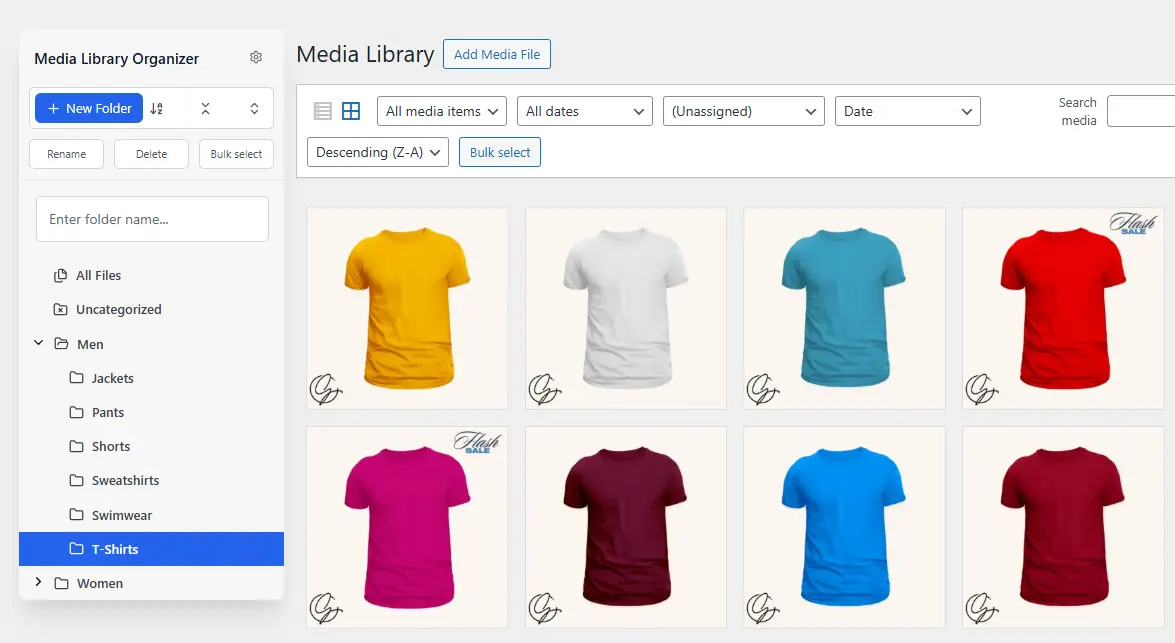
Media Library Organizer - Efficient organization of media files
Media Library Organizer by Optimole offers effective management of images, videos and files in WordPress. It supports unlimited categories, which simplifies organization. The plugin is highly rated by users who manage large media libraries.
"This plugin is necessary to organize the WP library."
Features - Comprehensive toolkit for media management
- Media Categorization - Unlimited categories for images and videos.
- Tree View - Intuitive sidebar with drag-and-drop.
- Bulk Categorization - Mass categorization via tree view.
- Automatic Categorization - (Pro) Automatic image categorization.
- Dynamic Galleries - (Pro) Extension of the shortcode.
- Support & Documentation - (Pro) Access to email support and detailed documentation.
- Import/Export - Backup and transfer of categories.
"Has good potential, unfortunately the Pro with the really good add-ons is much too expensive."
Technical Details - Requirements and compatibility
Developed with the WordPress Taxonomy API, seamless integration and extensible features. It supports import/export including JSON and XML and is compatible up to WordPress version 5.0. Minimum PHP is 5.6. The current plugin version is 2.0.4.
"A solid plugin, however PHP and WP versions should be checked regularly to ensure the best compatibility."
Quality and Support - User-friendliness and help offerings
Seamless WordPress integration ensures an optimized user experience. The categorization feature stands out. The Pro version offers better support via email, while the free version is supported through WordPress forums. Criticisms mention the lack of an uninstall function and infrequent updates as weaknesses.
Conclusion - Review of the Media Library Organizer by Optimole
The Media Library Organizer impresses with robust media management functionality. While the Pro version offers extended options, the price is debated. Overall it remains a reliable tool for large media libraries, despite some criticisms.
Show more
Detailed plugin information
Plugin slug: media-library-organizer
Plugin name: Media Library Organizer
Plugin title: Media Library Organizer – WordPress Media Library Folders & File Manager
Plugin Keywords: #export media library #folders #media categories #media library folders #organize media library
Plugin Version: 2.0.4
Last update: 2026-03
Release Date: 2017-08-14
Required WP version: 5.0
Required PHP Version: 5.6
Tested with WP version: 6.9.4
Active Installations: 20 000+
Average rating: 4.7
Number of reviews: 140
Number of support requests: 7 (in the last 2 months)
Number of Resolved Support Requests: 7 (in the last 2 months)
Plugin author: Themeisle
Developer Homepage: https://wpmedialibrary.com
WP Developer Profile Page: https://profiles.wordpress.org/themeisle/
Support URL in the WordPress Plugin Directory: https://wordpress.org/support/plugin/media-library-organizer/
Developer Support URL: https://wordpress.org/support/plugin/media-library-organizer/#fallback-commercial-support-url
WP Plugin Directory: https://wordpress.org/plugins/media-library-organizer/
0.0
/ 10
#export media library #folders #media categories #media library folders #organize media library
Number #

Real Media Library: Media Library Folder & File Manager - Efficient organization for WordPress media
Real Media Library Lite by devowl.io offers improved media file management in WordPress. With over 100 000+ active installations since 2020-02-26, it helps users organize their media library efficiently.
"The plugin helps to get a better overview of all media uploads."
Features - Organization and customization of the media library - Extensive features for optimal media organization
- Create unlimited main folders - Efficient organization without limiting the number of folders.
- Full file and folder manager - Create, rename, move, and delete folders.
- Drag & Drop - Easily move files between folders.
- Filters in the media dialog - Search media using folder filters in the WP upload dialog.
- Create galleries from folders - Create folder galleries directly in the Gutenberg editor.
- Create subfolders (Pro) - Enhanced organization with subfolders.
"It has everything I need to keep my large collection easily accessible and tidy."
Technical details - Features and API integrations - Developer tools and compatibility
The plugin provides APIs and customization options for developers, supported by detailed documentation. Integration with React and PHP APIs enables seamless customizations. Requires PHP 7.4.0 and WordPress 5.9. Tested up to WP version 6.9.4. Currently version 4.22.67, updated in 2026-02.
"This plugin is one of the few that has very detailed API documentation."
Quality and support - Efficient organization and help - Usability and fast support
The plugin stands out for intuitive use and efficiency in media organization. Drag & Drop and folder management simplify handling. Criticisms include potential high resource usage and occasional bugs. Support is generally described as fast and helpful; documentation improvements are desirable.
"The developers respond quickly and try to solve issues."
Conclusion - Summary of pros and cons - Weighing benefits and potential
Real Media Library Lite by devowl.io provides a robust solution for media management in WordPress. The free version includes essential features like folder creation and Drag & Drop, while the Pro version offers advanced organization. Despite occasional resource strain, support is mostly positive. Potential security concerns and documentation improvements should be considered.
Show more
Detailed plugin information
Plugin slug: real-media-library-lite
Plugin name: Real Media Library Lite
Plugin title: Real Media Library: Media Library Folder & File Manager
Plugin keywords: #file manager #media folder #media library folder #media library folders #WordPress media library folders
Plugin version: 4.22.67
Last update: 2026-02
Release date: 2020-02-26
Required WP version: 5.9
Required PHP version: 7.4.0
Tested with WP version: 6.9.4
Active Installations: 100 000+
Average rating: 4.8
Number of reviews: 281
Number of support threads: 0 (in the last 2 months)
Number of resolved support requests: 0 (in the last 2 months)
Plugin author: devowl.io GmbH
Developer homepage: https://devowl.io/wordpress-real-media-library/
WP developer profile page: https://profiles.wordpress.org/devowl/
Support URL in the WordPress Plugin Directory: https://wordpress.org/support/plugin/real-media-library-lite/
Developer support URL: https://wordpress.org/support/plugin/real-media-library-lite/#fallback-commercial-support-url
WP Plugin Directory: https://wordpress.org/plugins/real-media-library-lite/
0.0
/ 10
#file manager #media folder #media library folder #media library folders #WordPress media library folders
Number #
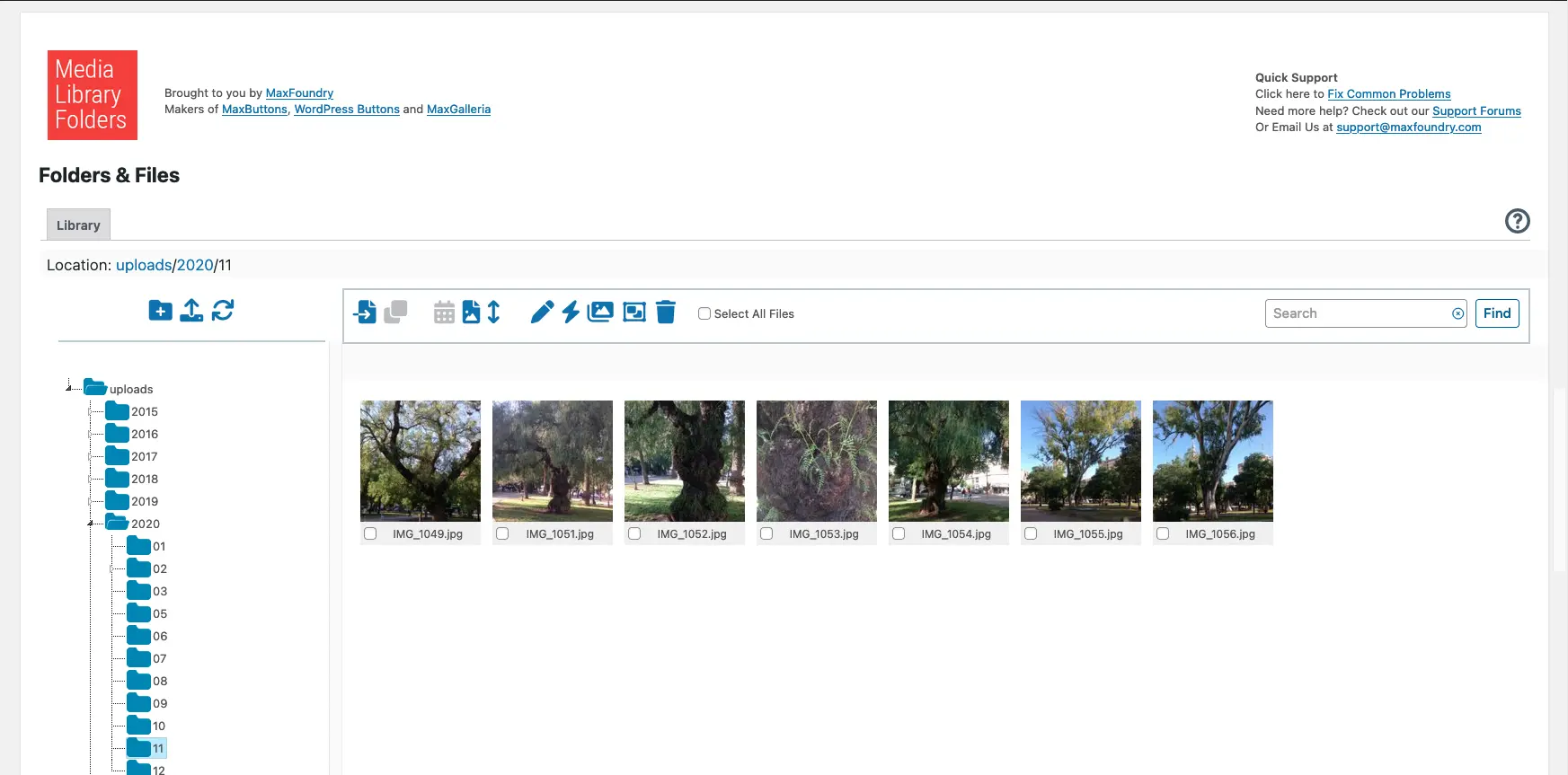
Media Library Plus - Plugin for improved media management
Media Library Plus is a WordPress plugin by Max Foundry with over 10 000+ active installations. It provides structured organization of the media library and is ideal for users with large amounts of media.
"This plugin made a huge difference! I had hundreds of photos and PDF files in my media library.",
Features - Comprehensive tools for optimization
This plugin offers numerous management features:
- Real Folders - Optimized media library organization.
- Drag-and-Drop Interface - Simplified file management.
- Block direct access - Protect sensitive files.
- Add images to the WooCommerce product gallery (Pro) - Special integration.
- Multisite support (Pro) - Functionality in multisite environments.
- Advanced media library (Pro) - Categorization and interchangeability.
- Image SEO - Set ALT and TITLE attributes.
"The advanced features of the Pro version are ideal for larger projects and provide a level of organization not possible with the base version.",
Technical details - Requirements and compatibility
The plugin changes how media files are handled in WordPress by using an actual filesystem structure and requires at least PHP version 7.4 and WordPress version 4.0. Tested up to version 6.9.4, FTP uploads are integrated seamlessly. The current plugin version is 8.3.7, with the last update in 2026-02.
Quality and support - Pros and cons
Effective use of folder structures improves media organization, but some report loading time issues and a complex user interface. Support receives mixed feedback, with quick response times for simple queries but occasionally insufficient help for more complex problems. Available via the WordPress forum and commercial support.
"Every time I had even the simplest questions, the support was patient and helpful.",
Conclusion - Beneficial for large media libraries
Media Library Plus by Max Foundry offers efficient media management in WordPress, praised for drag-and-drop functionality and folder structures. The Pro version is especially useful for larger projects. However, the free version is limited, and there is room for improvement in synchronization and the user interface.
Show more
Detailed plugin information
Plugin slug: media-library-plus
Plugin name: Media Library Plus
Plugin title: Media Library Folders
Plugin keywords: #media library folders #organize media library
Plugin version: 8.3.7
Last update: 2026-02
Release date: 2015-09-12
Required WP Version: 4.0
Required PHP version: 7.4
Tested with WP version: 6.9.4
Active Installations: 10 000+
Average Rating: 4.3
Number of reviews: 462
Number of support requests: 1 (in the last 2 months)
Number of resolved support requests: 0 (in the last 2 months)
Plugin author: maxfoundry
Developer homepage: https://maxgalleria.com
WP developer profile page: https://profiles.wordpress.org/maxfoundry/
Support URL in the WordPress Plugin Directory: https://wordpress.org/support/plugin/media-library-plus/
Developer support URL: https://wordpress.org/support/plugin/media-library-plus/#fallback-commercial-support-url
WP Plugin Directory: https://wordpress.org/plugins/media-library-plus/
0.0
/ 10
#media library folders #organize media library
Number #

Folders - Efficient media library management
Folders, developed by Premio, is a WordPress plugin for efficiently organizing media. With high user satisfaction and numerous active installs, it has established itself as a popular tool.
"Folders is a handy plugin that really helps organize the website."
Features - Comprehensive organization and management capabilities
- Unlimited folders - Create an unlimited number of folders for better organization.
- Drag-and-drop - Easily move content by dragging and dropping.
- Replace media - Replace files and changes are reflected automatically.
- Folder icon colors - Customize colors for better clarity.
- Dynamic folders - Automatic organization via filters (Pro).
- Unlimited subfolders - Create deep structures (Pro).
- User access management - Manage access for team members (Pro).
"The Pro version is fantastic - it enriches the media library and offers many useful features."
Technical details - Flexible and sustainable design
The plugin uses virtual folders based on metadata to enable efficient file organization. Developer-friendly via extensibility through the WordPress API and continuous compatibility with current WordPress versions.
"Folders is continuously up to date and secure, as it is regularly updated to remain compatible with the latest WordPress version."
Quality and support - User-friendly and helpful service
Recognized for improving content management with efficient features like dynamic folders. Support from Premio is praised, as requests are handled quickly and competently. High user satisfaction confirms the quality and supportive role of the plugin.
"I am grateful for the help I received from the Folders Pro Premio Helpdesk."
Conclusion - Versatile tool with great value
Folders is a powerful plugin for media organization, appreciated for its user-friendliness and versatile features. While the free version meets basic needs, the Pro version offers advanced options for more demanding requirements. The easy handling and high functional value make it a preferred solution, despite occasional intrusive Pro announcements.
Show more
Detailed plugin information
Plugin slug: folders
Plugin name: Folders
Plugin title: Folders – Unlimited Folders to Organize Media Library Folder, Pages, Posts, File Manager
Plugin Keywords: #folder #folders #media library #pages folders #replace media
Plugin Version: 3.1.6
Last update: 2026-03
Release Date: 2015-05-01
Required WP Version: 3.0.0
Required PHP version: 7.4
Tested with WP version: 6.9.4
Active Installations: 90 000+
Average Rating: 5.0
Number of reviews: 1 494
Number of support requests: 4 (in the last 2 months)
Number of resolved support requests: 4 (in the last 2 months)
Plugin author: Premio
Developer Homepage: https://wordpress.org/support/plugin/folders/#fallback-homepage
Developer profile page on WP: https://profiles.wordpress.org/premio/
Support URL in the WordPress Plugin Directory: https://wordpress.org/support/plugin/folders/
Developer Support URL: https://wordpress.org/support/plugin/folders/#fallback-commercial-support-url
WP Plugin Directory: https://wordpress.org/plugins/folders/
0.0
/ 10
#folder #folders #media library #pages folders #replace media
Number #
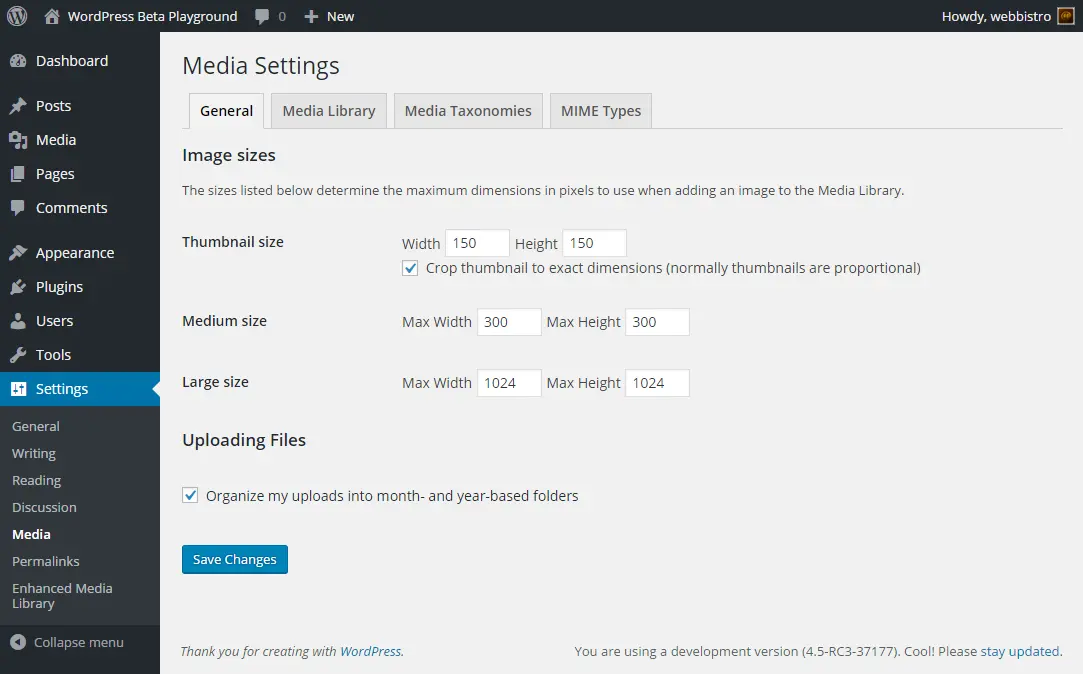
Enhanced Media Library - Efficient media management for WordPress
Enhanced Media Library by wpUXsolutions is a powerful plugin to enhance media management in WordPress, released on 2013-11-03 with over 70 000+ active installations. It offers intuitive use and organization for large media libraries and has a rating of 4.3 from 297 reviews.
"It allows seamless integration into the media management workflow and is simple and intuitive to use."
Features - Scope of plugin functionality
- Unlimited Categories & Tags - For detailed organization.
- MIME Type Management - Adds or removes file types.
- Drag’n’Drop reordering - efficient user interface.
- Multisite compatible - can be network-activated.
- Advanced search (Pro) - filters by typed characters.
- Auto-categorization (Pro) - automates media categorization.
"This plugin provides a way to organize media into 'folders' without actually moving the media or changing links."
Technical details - easy integration and lightweight
"Enhanced Media Library uses native WordPress hooks and supports the REST API without extra database tables, which improves performance. It is compatible with PHP from version 5.6 and WordPress from version 6.0."
Quality and support - strengths and challenges
The plugin scores with ease of use and drag'n'drop functionality, but performance issues and missing updates can impact the user experience. Support is sometimes fast but not always consistent.
"I submitted several requests and technical support was available within 24 hours."
Conclusion - effectiveness compared to the Pro version
"Enhanced Media Library offers simple media management and is suitable for large libraries. The Pro version extends it with useful features, while the base version can be limited. Regular updates would increase user satisfaction."
Show more
Detailed plugin information
Plugin slug: enhanced-media-library
Plugin name: Enhanced Media Library
Plugin title: Enhanced Media Library
Plugin keywords: #media categories #media folders #media library #media tags #mime-types
Plugin version: 2.9.4
Last updated: 2024-07
Release date: 2013-11-03
Required WP version: 6.0
Required PHP Version: 5.6
Tested with WP version: 6.5.8
Active Installations: 70 000+
Average Rating: 4.3
Number of reviews: 297
Number of support threads: 0 (in the last 2 months)
Number of resolved support requests: 0 (in the last 2 months)
Plugin author: webbistro
Developer homepage: https://wpUXsolutions.com/plugins/enhanced-media-library
WP developer profile page: https://profiles.wordpress.org/webbistro/
Support URL in the WordPress Plugin Directory: https://wordpress.org/support/plugin/enhanced-media-library/
Developer support URL: https://wordpress.org/support/plugin/enhanced-media-library/#fallback-commercial-support-url
WP Plugin Directory: https://wordpress.org/plugins/enhanced-media-library/
0.0
/ 10
#media categories #media folders #media library #media tags #mime-types
Number #
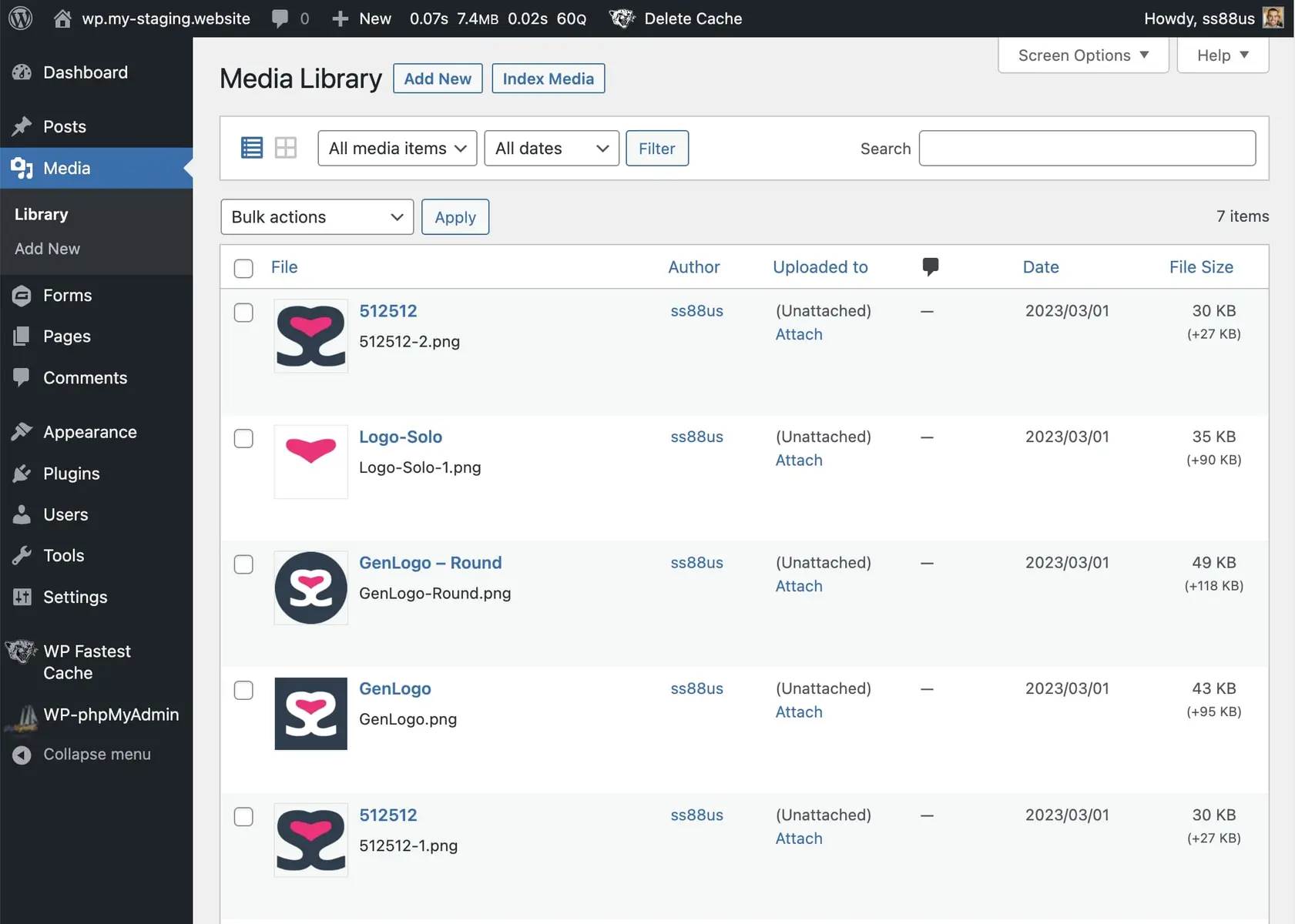
Media Library File Size - Efficient media management for WordPress
Media Library File Size, by SS88 LLC, enhances the WordPress media library with additional features. Over 5 000+ active installations confirm the popularity of the plugin released on 2023-03-09. Users can sort media by file size, simplifying storage management. Target users are site owners with extensive media content, e.g., photographers. With 4.5 out of 5 stars from 4 reviews, it performs well in the WordPress Plugin Directory.
“Helpful for identifying large media files that consume server storage.”
Features - Useful tools for the media library
- New column for file sizes - Shows files including variant sizes.
- Sort files by size - Simplifies file size sorting.
- View Variants - Modal for image variants with details.
- Index Media Button - Controls media indexing.
- Index media (Pro) - Re-index on changes.
Technical details - System requirements and performance
The plugin requires at least PHP 5.6 and WordPress 4.1. The current version is 1.7 and compatible up to WordPress 6.9.4. Technically efficient, it minimally impacts database processes.
“The default media manager in WordPress felt a bit lacking to me and I was glad to try some plugins.”
Quality and support - Performance and assistance
Works well for managing large media collections. Minor limitations in image size display. Support via the official support forum and optionally directly from SS88 LLC. General satisfaction, though there is room for improvement.
“Helpful for identifying large media files that consume server storage.”
Conclusion - Solid extension with room for improvement
Media Library File Size advantageously extends WordPress with file size insight and sorting options. Despite 4.5 stars, image size limits and sorting reliability are criticized. The free usage makes it attractive for limited budgets. Future updates could fix issues and expand functionality.
Show more
Detailed plugin information
Plugin slug: media-library-file-size
Plugin name: Media Library File Size
Plugin title: Media Library File Size
Plugin keywords: #file size #image size #library size #media library
Plugin version: 1.7
Last update: 2026-02
Release date: 2023-03-09
Required WP version: 4.1
Required PHP Version: 5.6
Tested with WP version: 6.9.4
Active installations: 5 000+
Average Rating: 4.5
Number of Reviews: 4
Number of support threads: 0 (in the last 2 months)
Number of resolved support requests: 0 (in the last 2 months)
Plugin author: Sully
Developer homepage: https://neoboffin.com/plugins/media-library-file-size?utm_source=wordpress&utm_medium=link&utm_campaign=mlfs
WP developer profile page: https://profiles.wordpress.org/ss88_uk/
Support URL in the WordPress Plugin Directory: https://wordpress.org/support/plugin/media-library-file-size/
Developer support URL: https://wordpress.org/support/plugin/media-library-file-size/#fallback-commercial-support-url
WP Plugin Directory: https://wordpress.org/plugins/media-library-file-size/
0.0
/ 10
#file size #image size #library size #media library
Number #
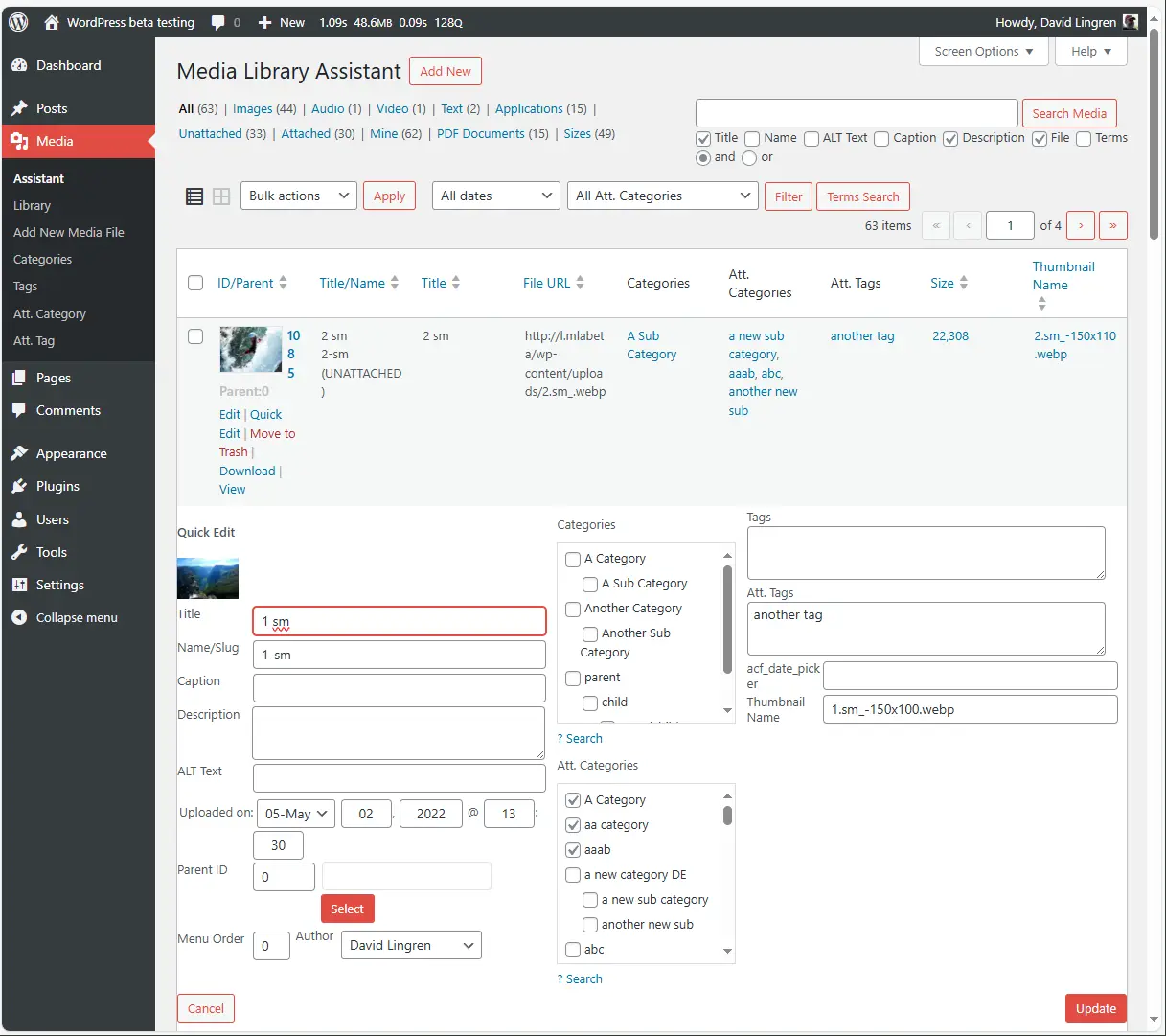
Media Library Assistant - Overview and Benefits
Media Library Assistant by David Lingren, published on 2012-08-13, offers advanced media management features for over 70 000+ websites. With flexibility and adaptability it stands out and has a rating of 4.8 out of 5 stars from 198 reviews.
“This plugin adds features to the media library that should have always been there, like the ability to sort files and assign categories.”
Features - Efficient management and flexibility
- Metadata support - IPTC, EXIF, XMP and PDF assignable
- [mla_gallery] and other shortcodes for galleries
- Compatible with WPML and Polylang
- Integration with plugins - Supports Photonic Gallery, Jetpack etc.
- Inline "Bulk Edit" and "Quick Edit"
- Advanced search - Search by name, ALT text, captions
- Hook and template customization (Pro) - Customizable via 28 hooks
“The plugin offers features that are missing in many paid plugins.”
Technical details - Requirements and customization options
Requires at least PHP version 7.4, WordPress version 4.7. Compatibility tested up to 5.8. Current version: 3.34. Memory usage and customizability via numerous shortcodes and hooks particularly valuable for developers.
“The plugin runs stably even on older servers and brings many long-awaited media management features.”
Quality and support - Usability and help
Media Library Assistant excels in versatility, with experienced users appreciating the customizability. Support from David Lingren is prompt and efficient; forum and commercial support are available. Despite high ratings it's challenging for beginners and needs better documentation.
“The support is also great, fast, with good understanding and direct communication.”
Conclusion - Strengths, Weaknesses and Community Reception
The Media Library Assistant is a comprehensive media management tool with essential features for large libraries, but it requires a learning curve. Despite potential performance issues on large installations and documentation that could be improved, it remains a valued option with high utility potential.
Show more
Detailed plugin information
Plugin slug: media-library-assistant
Plugin name: Media Library Assistant
Plugin title: Media Library Assistant
Plugin Keywords: #categories #images #media #media library #tags
Plugin version: 3.34
Last update: 2026-03
Release Date: 2012-08-13
Required WP version: 4.7
Required PHP version: 7.4
Tested with WP version: 6.9.4
Active Installations: 70 000+
Average rating: 4.8
Number of reviews: 198
Number of support requests: 9 (in the last 2 months)
Number of resolved support requests: 8 (in the last 2 months)
Plugin author: David Lingren
Developer Homepage: http://davidlingren.com/#two
WP Developer Profile Page: https://profiles.wordpress.org/dglingren/
Support URL in the WordPress Plugin Directory: https://wordpress.org/support/plugin/media-library-assistant/
Developer Support URL: https://wordpress.org/support/plugin/media-library-assistant/#fallback-commercial-support-url
WP Plugin Directory: https://wordpress.org/plugins/media-library-assistant/
0.0
/ 10
#categories #images #media #media library #tags
Number #
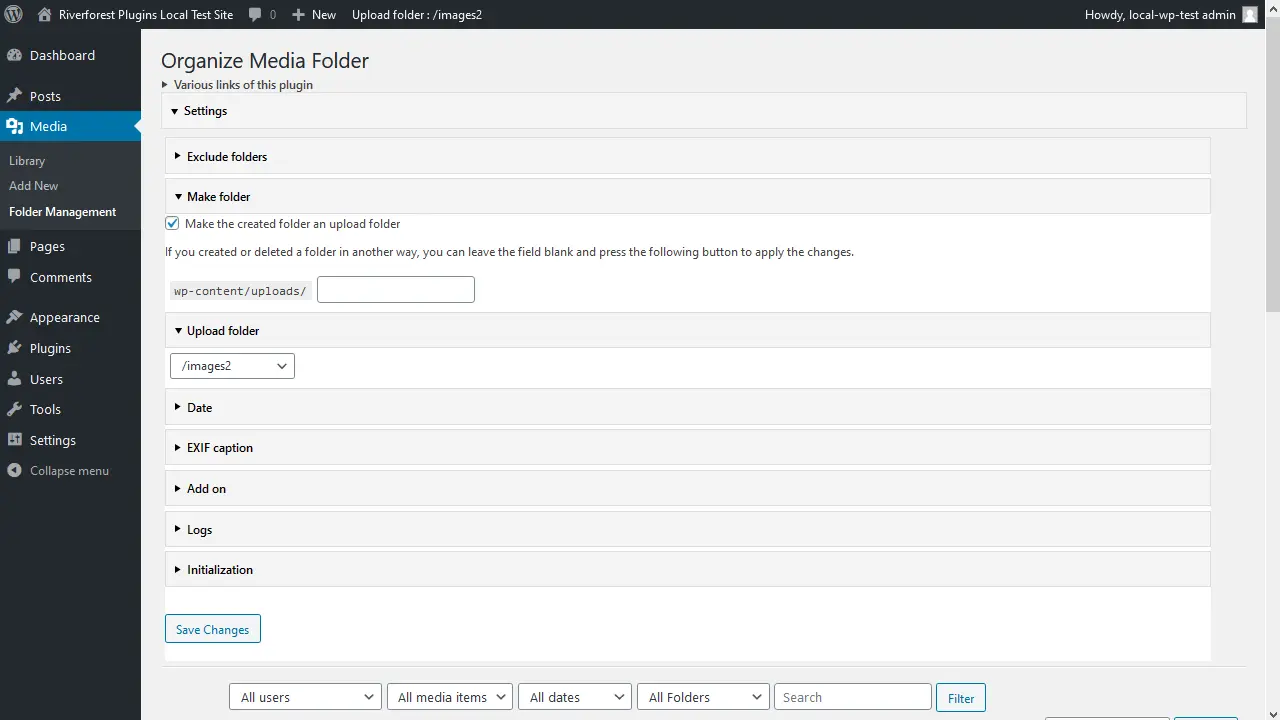
Organize Media Folder - Efficient Media Management
Organize Media Folder, created by Katsushi Kawamori, is a WordPress plugin to organize the media library into folders. With 2 000+ active installations and an average rating of 4.1 / 5 stars, it especially helps users with many media files.
"A very useful plugin! It fixes the terrible organization of the default media library by allowing directories to be created within the upload directory."
Features - Optimized media management with diverse functions
- Organize files into folders - Structures the media library.
- Create new folders - Improves overview.
- Filter by folders - Makes finding files easier.
- Replace URL in content - Adjusts URLs when changes occur.
- Direct upload into folders - Increases efficiency.
- Change physical file structure (Pro) - Improved management.
- Flexible upload scheduling (Pro) - Automation possible.
"A very handy plugin that finally allows changing the media structure physically instead of just virtually."
Technical details - Requirements and core components
The plugin requires at least PHP version 8.0 and WordPress version 4.7. Tested up to WordPress version 6.9.4. It makes physical changes to directories and operates filesystem-based, which may have effects depending on server configuration.
"The plugin works well with the specified WordPress version, but older PHP versions could cause issues."
Quality and support - Shared impressions of features and help
Organize Media Folder scores with useful functionality but encounters mixed reactions regarding user-friendliness and performance. Support is available via the plugin forum, however detailed support experiences are missing from the reviews.
"I posted my requests in the support forum and received helpful responses within a reasonable timeframe."
Conclusion - Needed solution with room for improvement
Organize Media Folder, by Katsushi Kawamori, extends WordPress in the area of media folder structure. Tech-savvy users benefit from deep filesystem interventions. However, the plugin could be optimized with less complexity and improved user guidance. Caution regarding security aspects and performance is advisable.
Show more
Detailed plugin information
Plugin slug: organize-media-folder
Plugin name: Organize Media Folder
Plugin title: Organize Media Folder
Plugin keywords: #admin #directories #folders #media #media library
Plugin version: 1.36
Last Updated: 2025-11
Release date: 2020-12-25
Required WP version: 4.7
Required PHP version: 8.0
Tested with WP version: 6.9.4
Active installations: 2 000+
Average rating: 4.1
Number of ratings: 15
Number of support threads: 0 (in the last 2 months)
Number of resolved support requests: 0 (in the last 2 months)
Plugin author: Katsushi Kawamori
Developer homepage: https://wordpress.org/plugins/organize-media-folder/
WP developer profile page: https://profiles.wordpress.org/katsushi-kawamori/
Support URL in the WordPress Plugin Directory: https://wordpress.org/support/plugin/organize-media-folder/
Developer support URL: https://wordpress.org/support/plugin/organize-media-folder/#fallback-commercial-support-url
WP Plugin Directory: https://wordpress.org/plugins/organize-media-folder/
0.0
/ 10
#admin #directories #folders #media #media library
Number #
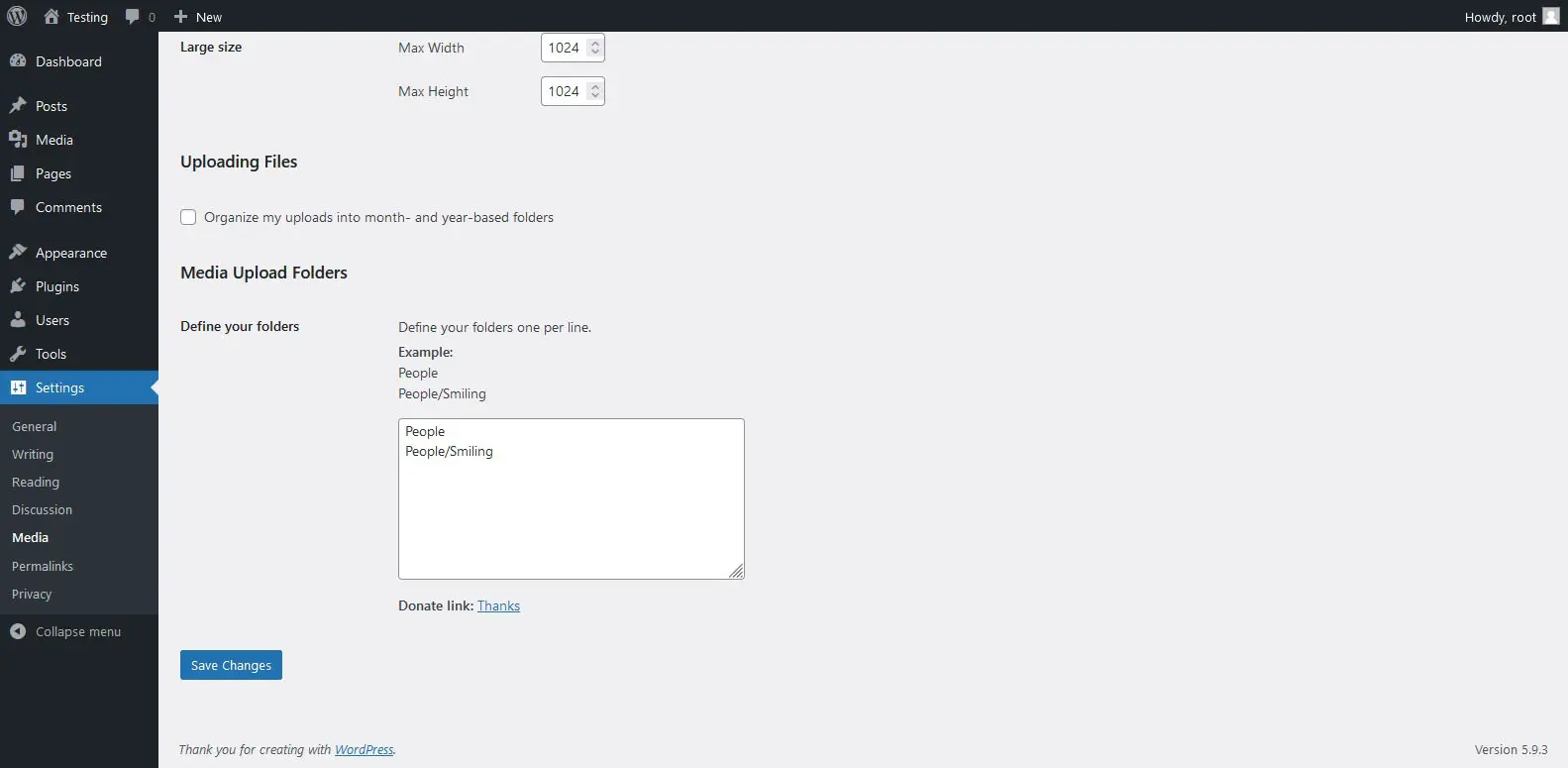
Media Folders Lite - Popular plugin for media organization
Media Folders Lite is a WordPress plugin by jbulies, with 200+ active installations. It lets you customize the upload path for attachments and filter files by folders, greatly simplifying media management.
“Simple and straightforward. Plugins like this are great!”
Features - Extensive media management
- Create real folders for attachments - Organizes attachments into specific folders.
- Choose the folder when uploading - Select folder at file upload for better organization.
- Filter attachments by folders - Makes management and search easier.
- No new database tables - Compatibility stays intact.
- Save in year/month folders - Default option for structure.
- Reduces filename conflicts - Improves management.
“This is how the media library should be. Period.”
Technical details - Requirements and compatibility
Requires PHP 7.4+ and WordPress 5.0+. The plugin is tested up to WordPress version 6.5.8. Current version: 1.0.2, last update in 2024-05.
Quality and support - User feedback and assistance
Users appreciate the simple media management and creation of real folders but criticize performance issues with large numbers of files. The support offers options via the official WP Plugin Directory and on the vendor website.
“The support responds quickly to requests, which is very helpful.”
Conclusion - Strengths and weaknesses
The Media Folders Lite plugin improves media organization in WordPress and offers useful features like real folders. However, there are challenges with file migration and performance with many files. An average rating of 5.0 stars reflects mixed user feedback.
Show more
Detailed plugin information
Plugin slug: media-folders-lite
Plugin name: Media Folders Lite
Plugin title: Media Folders Lite
Plugin keywords: #directories #directory #folders #media #upload
Plugin version: 1.0.2
Last update: 2024-05
Release date: 2022-04-28
Required WP version: 5.0
Required PHP version: 7.4
Tested with WP version: 6.5.8
Active installations: 200+
Average Rating: 5.0
Number of Ratings: 2
Number of support threads: 0 (in the last 2 months)
Number of resolved support requests: 0 (in the last 2 months)
Plugin author: jbulies
Developer homepage: https://wordpress.org/support/plugin/media-folders-lite/#fallback-homepage
WP developer profile page: https://profiles.wordpress.org/jbulies/
Support URL in the WordPress Plugin Directory: https://wordpress.org/support/plugin/media-folders-lite/
Developer support URL: https://wordpress.org/support/plugin/media-folders-lite/#fallback-commercial-support-url
WP Plugin Directory: https://wordpress.org/plugins/media-folders-lite/
0.0
/ 10
#directories #directory #folders #media #upload
Number #
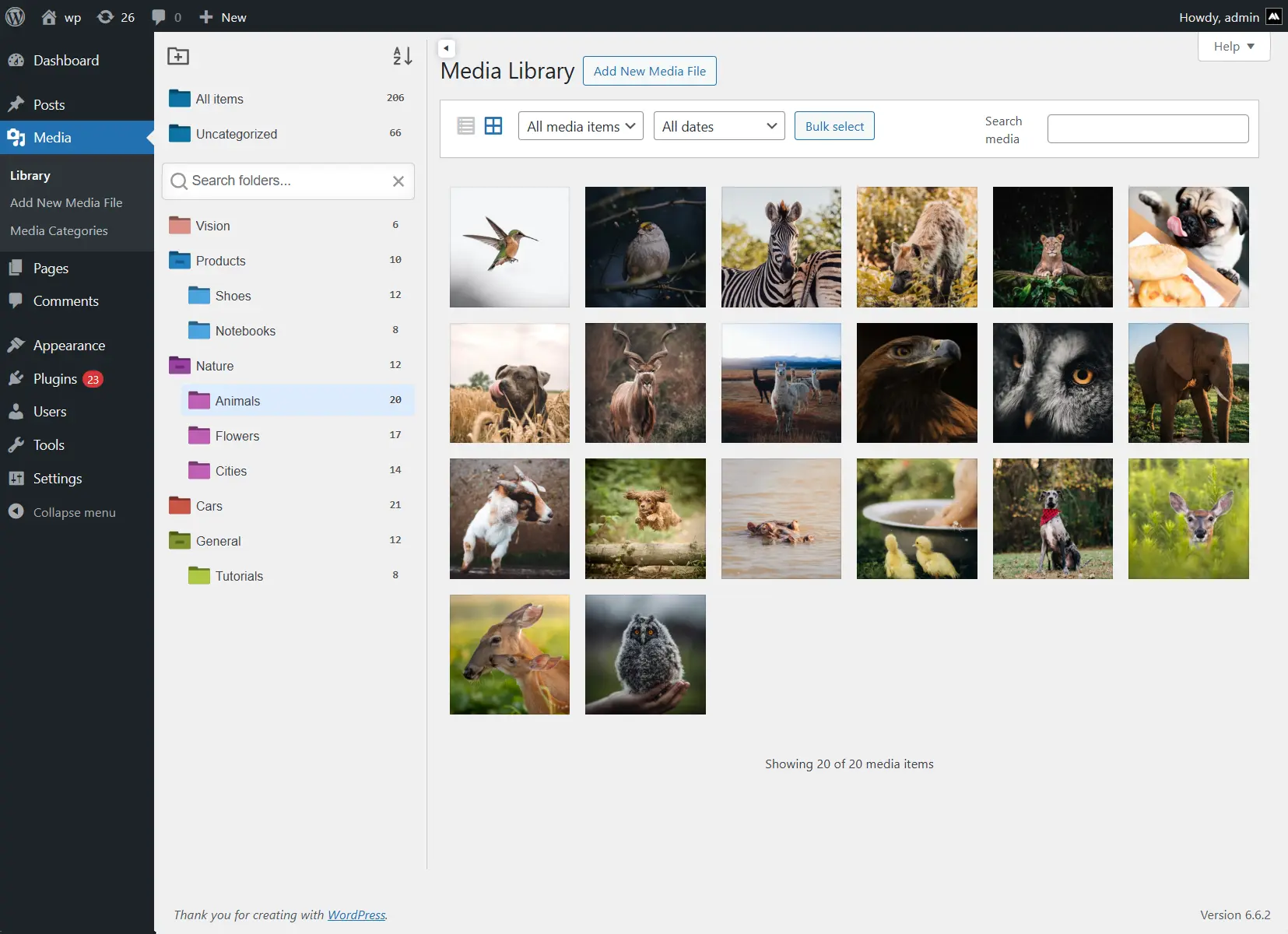
iFolders - Powerful media organizer
iFolders, developed by Avirtum, is a WordPress plugin for seamless organization of media libraries, posts and pages in a folder-based structure. With 300+ active installations and a 4.6 rating it is very popular among WordPress users. It offers intuitive drag & drop management and significantly extends WordPress' default capabilities.
"This plugin delivers exactly what it promises, no frills."
Features - Effective management functions
- Unlimited folders - Organize content with unlimited (sub)folders.
- Drag & Drop - Easily move content.
- Bulk operations - Edit multiple items at once.
- ZIP export - Download folders as ZIP files.
- Custom sorting - Organize by name, date, etc.
- Replace media - Replace images without changing the URL (Pro)
- WooCommerce support - Organize products and orders (Pro)
"Works exactly as it should, even in the free version."
Technical details - Requirements and structure
<iFolders improves content management with a flexible folder structure and drag & drop. Minimum requirements are PHP 7.4 and WordPress 4.6. The current version 2.9.1 is compatible with older WordPress versions.
Quality and Support - Usability and Help
The plugin stands out for quality and reliable support. Positive user reviews highlight seamless WordPress integration. A support forum is available for support requests, and quick developer responses are praised.
"The developer jumped in right away and fixed the issue.",
Conclusion - Summary of strengths
iFolders offers an efficient solution for content management in WordPress. Usability, extensive features, and reliable support lead to high user satisfaction. Future updates are potentially promising.
Show more
Detailed plugin information
Plugin slug: ifolders
Plugin name: Ifolders
Plugin title: iFolders – Ultimate Folder Organizer for Media Library, Pages, Posts and Users
Plugin Keywords: #file manager #media folder #media library #media library categories #media library folders
Plugin Version: 2.9.1
Last Update: 2025-12
Release Date: 2022-08-25
Required WP version: 4.6
Required PHP version: 7.4
Tested with WP version: 6.9.4
Active Installations: 300+
Average rating: 4.6
Number of Reviews: 11
Number of support threads: 0 (in the last 2 months)
Number of resolved support requests: 0 (in the last 2 months)
Plugin author: Avirtum
Developer Homepage: https://1.envato.market/getifolders
WP developer profile page: https://profiles.wordpress.org/avirtum/
Support URL in the WordPress Plugin Directory: https://wordpress.org/support/plugin/ifolders/
Developer Support URL: https://wordpress.org/support/plugin/ifolders/#fallback-commercial-support-url
WP Plugin Directory: https://wordpress.org/plugins/ifolders/
0.0
/ 10
#file manager #media folder #media library #media library categories #media library folders
Compared with:
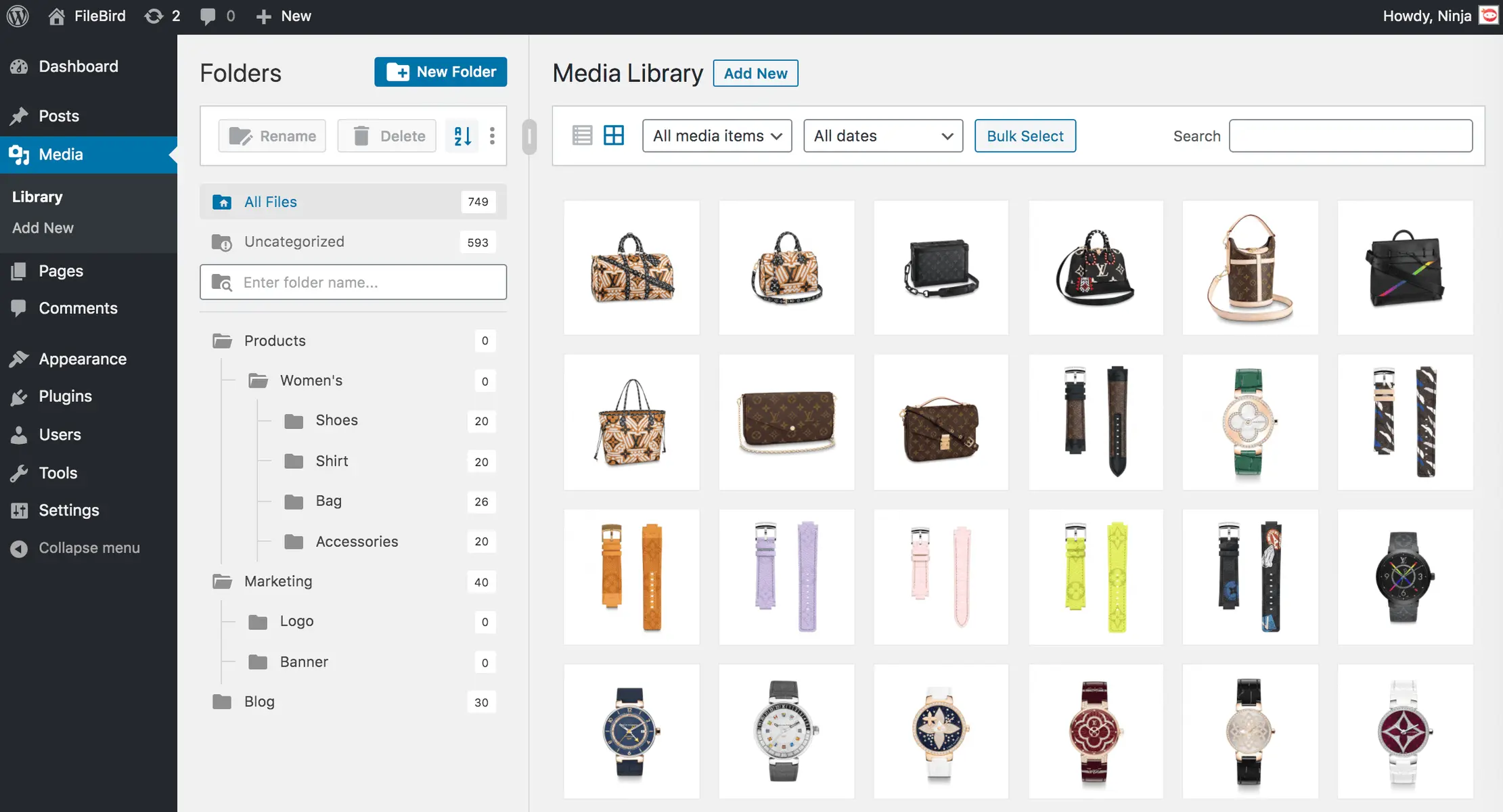
Filebird - Efficient organization of the WordPress media library
Filebird, developed by Ninja Team, is active on over 200 000+ websites. With its drag-and-drop organizer and virtual folders, it simplifies media organization. It’s appreciated by WordPress admins for its ease of use and has a rating of 4.7 stars based on 1 108.
“An absolute must for organizing the media library - easy to set up and effective.”
Features - Extensive file management tools
- Unlimited main folders and subfolders - Free organization with no folder limits.
- Virtual folders - Does not affect media links.
- Drag & Drop - Simplifies file and folder management.
- Search function - Easily find media.
- Folder tree themes - Customizable appearance (Pro).
- Download media folders - Export to ZIP file (Pro).
- Smart start folders - Quick access to frequently used folders (Pro).
"The Pro version offers exactly the features I need for efficient management of my content.",
Technical details - Developer-specific insights
With the use of shortcodes and APIs, Filebird offers customization and integration. It improves loading times by lazy-loading files per folder. Minimum requirements: PHP 7.4, WordPress 3.0. Tested up to 6.9.4, continuously updated.
"The continuous updates and support are remarkable.",
Quality and support - High performance and assistance
Filebird impresses with intelligent load optimization and strong drag-and-drop features. Users praise the intuitive user experience. Support is fast and helpful, reachable via the support forum or directly from the Ninja Team.
Conclusion - Effective tool with room for improvement
Filebird provides a well-thought-out solution for media management of large collections. The Pro version significantly expands functionality. Continuous updates reflect commitment to improvement, although the update policy is occasionally criticized. It remains a strong plugin for more efficient media management.
Show more
Detailed plugin information
Plugin slug: filebird
Plugin name: Filebird
Plugin title: FileBird – WordPress Media Library Folders & File Manager
Plugin keywords: #file manager #media #media folders #WordPress media library folders #wp media folders
Plugin version: 6.5.2
Last Update: 2026-01
Release date: 2018-07-02
Required WP version: 3.0
Required PHP version: 7.4
Tested with WP version: 6.9.4
Active installations: 200 000+
Average rating: 4.7
Number of reviews: 1 108
Number of support requests: 9 (in the last 2 months)
Number of resolved support requests: 8 (in the last 2 months)
Plugin author: Ninja Team
Developer homepage: https://ninjateam.org/wordpress-media-library-folders/
Profile page of the WP developer: https://profiles.wordpress.org/ninjateam/
Support URL in the WordPress Plugin Directory: https://wordpress.org/support/plugin/filebird/
Support URL of the developer: https://wordpress.org/support/plugin/filebird/#fallback-commercial-support-url
WP Plugin Directory: https://wordpress.org/plugins/filebird/
#file manager #media #media folders #WordPress media library folders #wp media folders
Was the comparison to Filebird helpful?
All about FileBird – WordPress Media Library Folders & File Manager
Filebird - WordPress Media Library Folders & File Manager
Filebird - Organize the media library efficiently
Filebird, a plugin developed by Ninja Team, was released on 2018-07-02 and is now in use on over 200 000+ websites. Its main goal is to simplify the organization of the WordPress media library by offering virtual folders and flexible sorting options. This allows users to efficiently categorize media files and quickly access needed content. A standout feature of Filebird is the drag-and-drop organizer, which provides an intuitive and user-friendly way to organize files without affecting permalinks. The plugin’s target audience is primarily administrators of WordPress sites with extensive media assets. With an average rating of 4.7 out of 5 stars, based on 1 108, Filebird has earned great trust within the WordPress community. The following section takes a look at the plugin’s specific features.
“This plugin is a great help in organizing the media library.”
Features - Extensive organization tools for the media library
Filebird offers a variety of features that greatly simplify managing media files in WordPress. Besides the drag-and-drop organizer, the plugin shines with the ability to create virtual folders. These do not affect links to media files, allowing stress-free organization of large file collections. It also offers advanced search functions and the option to export the entire media folder structure, further speeding up the workflow. This combination of intuitive handling and practical functions sets Filebird apart from many other media management tools.
“An absolute must for organizing the media library - easy to set up and effective.”
Free Features - Useful tools in the free version
- Unlimited main folders and subfolders - Allows organizing files without limiting the number of folders.
- Virtual folders - Efficiently categorize media uploads without changing existing links.
- Drag & Drop - Easy management of files and folders by dragging and dropping.
- Search function - Enables targeted finding of files and folders within the media library.
- Export folder structure - Export the WP media folder structure with one click.
Pro Features - Advanced functions for professionals
- Folder tree themes - Allows customizing the appearance in styles like Dropbox or Windows 11.
- Download media folders - Exports complete folders including subfolders into a ZIP file.
- Smart start folder - Starts with a selected or last-opened folder.
- Change file location - Provides the ability to assign files to a different folder.
- Sorting options - Expands possibilities for arranging files and folders.
- User-based folder view - Users can create individual categories without affecting others’ structures.
- Custom folder color - Set colors for better visibility.
- Categorize pages and posts - Manage WordPress content in folders.
"The Pro version offers exactly the features I need for efficient management of my content.",
License & value - Free version versus Pro upgrade
Filebird is available in a free and a paid Pro version. The free version already offers useful basic features, especially for users seeking improved control over their media library. The Pro version’s value for money is praised because it provides additional features, such as downloading complete media folders or advanced sorting options not available in the free version. Users appreciate investing in the Pro version because the extended features enable even more effective media management.
“Although the free version is extensive, the Pro version offers many additional features that are worth the investment.”
Technical details - Insights for developers and tech enthusiasts
Filebird stands out through a number of technical features that may be of particular interest to developers. The plugin uses a shortcode- and API-based framework to ensure maximum customizability and integration. The use of virtual folders allows organizing files without affecting URLs or data structures. Internally, the media library with Filebird loads only the files of the currently required folder, which significantly reduces load times and uses server resources more efficiently. The plugin’s REST API offers extension possibilities that allow deeper integration with other WordPress themes and plugins, while the hooks and filters make customization at the code level easier. The intelligent structure for drag-and-drop experiences in the backend is another highlight for developers interested in user-friendly UI components.
System Requirements - Important numbers and compatibilities
To install and run Filebird, certain system requirements are necessary to ensure smooth operation. The plugin requires at least PHP version 7.4 or higher and WordPress version 3.0. Compatibility has been tested up to the latest WordPress version 6.9.4, contributing to stable operation on modern platforms. Filebird is available in plugin version 6.5.2, and the last update was in 2026-01. This ongoing maintenance underscores the reliability and support of the development team.
“The continuous updates and support are remarkable. The plugin is always up to date and runs smoothly.”
Quality - Performance and usability are the focus
Filebird has earned a recognized reputation for quality and performance in the WordPress ecosystem. The plugin impresses with its intelligent loading system, where only one folder is loaded at a time to optimize media library load times. It is also resource-efficient and allows efficient management of media files. In the backend, Filebird shines with fast and intuitive organization via drag-and-drop, enabling quick structuring of media files. Powerful search and sorting functions also contribute to increased productivity. Users particularly praise the well-thought-out user experience, which allows easy and seamless integration into existing WordPress installations.
“This plugin shows that the developers put a lot of thought into the functionalities and the user experience.”
Support - Fast and helpful assistance
Support for Filebird receives predominantly positive feedback, especially due to its fast response times and efficient problem solving. Several user reports highlight that the developers provide dedicated and helpful support for both free and paid users. Contact options are available via the official support forum or directly with the developer.
“The support team was reachable within minutes and effectively helped restore my file organization over several days.”
Despite the positive reviews, there are occasional reports of misunderstandings or technical problems that can cloud the support experience. One review mentions alleged incorrect assumptions by the support team that led to wrong conclusions. Nevertheless, most experiences indicate that the support team is able to resolve arising issues quickly and efficiently.
Rating - A closer look at user experiences
The WordPress plugin Filebird receives a largely positive response with an average rating of 4.7 out of 5 stars from over 1 108 users. This high rating reflects the satisfaction of many users who appreciate the plugin as a useful tool for organizing their media library in WordPress.
Reviews often highlight the efficient structuring of the media library and the intuitive user interface. Users particularly praise the drag-and-drop functionality and the ability to bring clear order to extensive media collections.
“This plugin is a great help in organizing the media library.”
However, there are some critical voices that complain about certain bugs or missing features. Some users express a desire for additional features in the free version and criticize that certain functions, such as folder management, are only accessible in the paid Pro version.
“There are some bugs and missing features.”
Despite the criticisms, the general consensus remains that Filebird is a valuable plugin that significantly improves efficiency in media management, as confirmed by satisfied users.
“An absolute must for organizing the media library - easy to set up and effective.”
Criticism - Issues and suggestions for improvement
Filebird, despite its popularity, has not been without criticism. Users report various bugs and functionality issues. Some users complain that the Filebird gallery block does not force the inclusion of the block CSS file, which leads to display issues when using block-editor themes. This can cause CSS for block editing themes to not display correctly unless a regular gallery block is added. There are also reports of irregular plugin behavior after updates, which sometimes results in complete loss of functionality on affected sites.
Another common problem is the disappearance of subfolders within the Filebird library, which impairs usability. Additionally, the accessibility of newly created folders in certain editing views is criticized, as they are not shown as a reference point in every context.
The update policy is also sometimes viewed negatively. Users state that updates are only available via platforms like CodeCanyon/Envato, which restricts access, especially when purchases were made via special arrangements such as government contracts. Some users see this as an unnecessary complication.
“The process is quite slow. The app also has some issues, like creating a folder, which can easily cause the new folder to be accidentally placed in a previous folder.”
Conclusion - A well-thought-out solution with room for improvement
Filebird offers a versatile solution for efficient organization of media files in WordPress and is primarily aimed at website owners with extensive media collections. The intuitive drag-and-drop functionality and the ability to create virtual folders make it a valuable everyday tool. The extensive Pro version further expands functionality and offers special features for professional user needs. Positive ratings and feedback underscore the user-friendliness and the support from the developer Ninja Team.
However, there is potential for improvement regarding occasional bugs and the update policy. Providing updates can be cumbersome for some users, which can hinder access. Despite these criticisms, Filebird remains one of the powerful plugins in its field and contributes significantly to more efficient media management. Continuous maintenance and support speak to the developers’ ongoing commitment to ironing out existing weaknesses and adapting the plugin further to users’ needs.
Show more
Detailed plugin information
Plugin slug: filebird
Plugin name: Filebird
Plugin title: FileBird – WordPress Media Library Folders & File Manager
Plugin keywords: #file manager #media #media folders #WordPress media library folders #wp media folders
Plugin version: 6.5.2
Last Update: 2026-01
Release date: 2018-07-02
Required WP version: 3.0
Required PHP version: 7.4
Tested with WP version: 6.9.4
Active installations: 200 000+
Average rating: 4.7
Number of reviews: 1 108
Number of support requests: 9 (in the last 2 months)
Number of resolved support requests: 8 (in the last 2 months)
Plugin author: Ninja Team
Developer homepage: https://ninjateam.org/wordpress-media-library-folders/
Profile page of the WP developer: https://profiles.wordpress.org/ninjateam/
Support URL in the WordPress Plugin Directory: https://wordpress.org/support/plugin/filebird/
Support URL of the developer: https://wordpress.org/support/plugin/filebird/#fallback-commercial-support-url
WP Plugin Directory: https://wordpress.org/plugins/filebird/
Before switching to the alternative
If you have problems with the plugin "FileBird – WordPress Media Library Folders & File Manager", it might be useful to check the requirements for WordPress and the server before switching to a plugin alternative.
The current plugin version 6.5.2 from 2026-01 requires at least WordPress version 3.0 and was tested with WordPress 6.9.4. The server should preferably be an Apache server running at least PHP version 7.4.
WordPress offers a support forum for the Filebird plugin. In the past two months, 9 questions were posted and 8 of them were answered by Ninja Team, which reflects the support activity.
Further troubleshooting information might be provided by the Filebird website and its support page.
Filebird has been developed by Ninja Team since 2018-07-02 and runs on a total of 200 000+ active WordPress installations. About 1108 users have rated the plugin an average of 4.7 stars. However, some users are looking for an alternative with different features.
The alternative plugins can be found in the official WordPress Plugin Directory with the following tags and can be downloaded for free: #file manager #media #media folders #WordPress media library folders #wp media folders
The comparison above contrasts and evaluates the key features of these plugin alternatives.
Decision criteria of the plugin ranking
- Usability:
The plugin should be easy to install, configure and use. - Functionality:
The plugin should perform the promised functions reliably and efficiently. - Performance:
It should not negatively affect the website's loading times and should be resource-efficient. - Security:
The plugin must receive regular updates to ensure long-term secure operation. - Reviews:
Positive feedback from many users is a good indicator of quality and reliability. - Support:
Good customer support and comprehensive documentation are crucial to resolving problems quickly. - Documentation:
Comprehensive and understandable documentation makes setup and use easier. - Value for money:
The plugin should either be free or offer a fair price-performance ratio. - Adaptability:
The plugin should be flexible enough to allow for individual requirements and customizations. - Compatibility:
The plugin should be compatible with various WordPress versions, themes, and other plugins.
