
WordPress Alt Text Generator: Automatically create alt texts with AI
You open the WordPress media library and find a long row of empty alt text fields. For five images you can still do it by hand. For 500 it becomes a task you happily postpone to next week.
neo Alt is a WordPress alt text generator for single images and entire media libraries. The plugin recognizes the visible image content, reads the context of the pages where the image is used, and creates a suggestion from that. It can also generate image titles. You review the texts in WordPress, change them if needed, and only save afterwards.
For image SEO this context is useful. Google Search Central describes alt text, page content and computer vision as combined signals for understanding an image. The text must fit the image and the page.
Automatically create WordPress alt texts: the short solution
- Download neo Alt, install the ZIP file in WordPress and activate it.
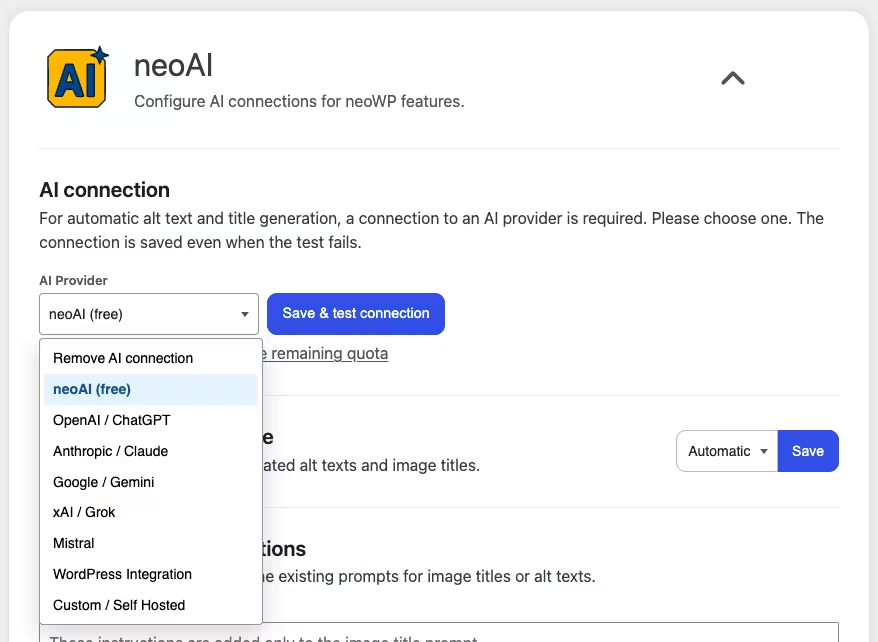
- Under Settings > neo WP > neoAI select the free provider or connect your own AI provider.
- Tools > neo Alt open and filter for images with empty alt text.
- Choose the Alt text only, mode and start the generation.
- Read the suggestions, correct them if needed and save them in bulk.
For a single image the small AI button right at the WordPress alt text field is enough. The large neoAlt overview pays off once multiple files are affected.
WordPress distributes image data across several places. In the media library there are title, caption, description and alt text. In the block editor you can additionally set an alt text only for the currently used image block. The value from the media library serves as a default, a later change in the block applies only to that post or page.
What neo Alt does differently as an AI alt text plugin
Many AI alt text generators see an image and describe what is depicted. neo Alt supplements this visual impression with WordPress data:
- the current image title and existing alt text,
- the visible text of the pages with this image,
- the position of the image within the page content,
- for image titles up to ten temporally adjacent media titles.
A second click requests a different wording without returning the previously rejected text. For a series of similar images you can also add your own prompt instruction, for example Focus on the material and color of the product.
neo Alt writes alt texts and image titles for you using AI. File names can also be edited from the same overview via neo Rename, if the plugin is installed.
Generate alt text directly in the WordPress media library
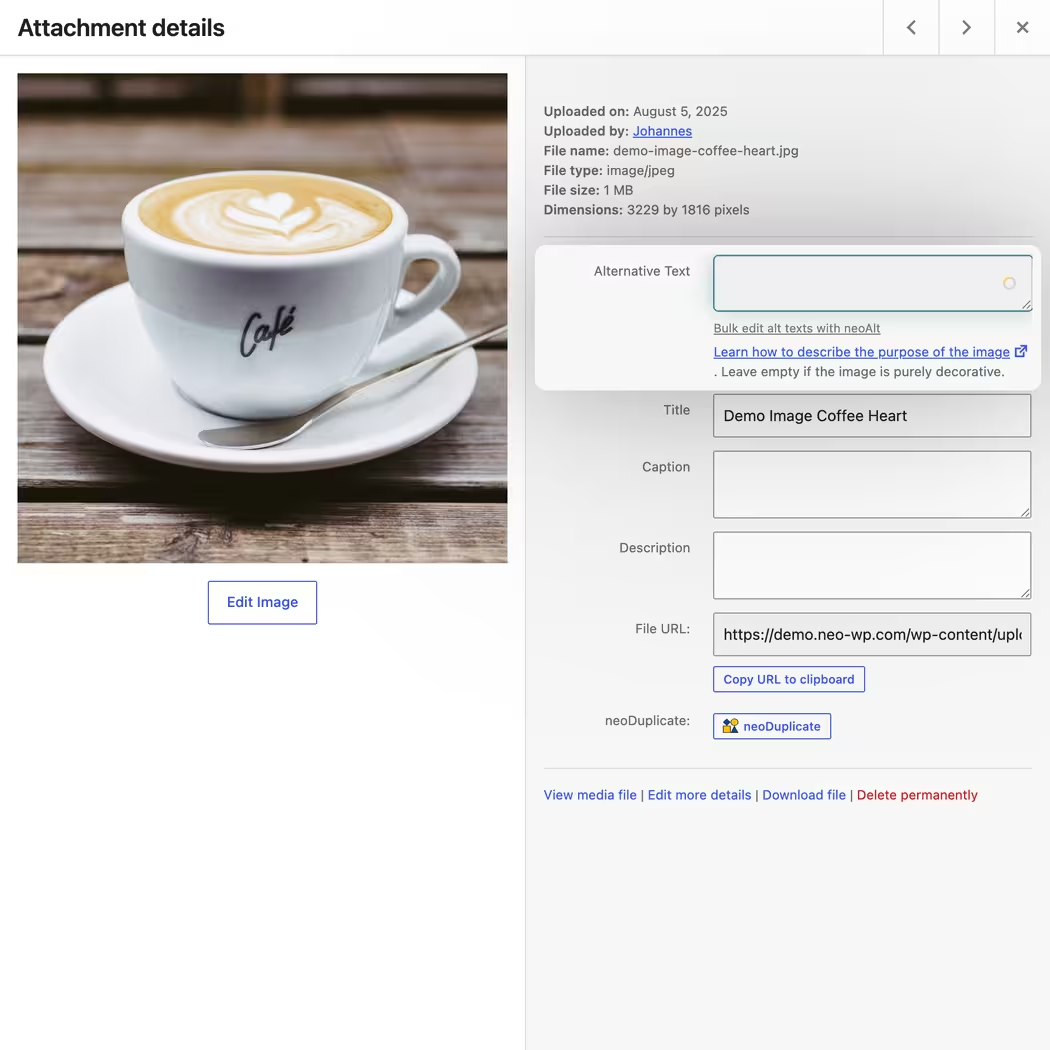
In the normal WordPress media modal, neo Alt adds a subtle AI button to the field for alternative text. You stay where you are editing the image. On click the plugin reads the original URL and the current media title as well as the page context, requests a suggestion from the AI and inserts it into the field.
You can read the text first and then save the regular WordPress dialog. A link under the field leads to the neoAlt overview if you notice while editing that many more images are affected.
The same integration is available on the standalone attachment edit page. PDFs, videos or ZIP files can still receive manual media titles; the AI image analysis is intended for actual image files.
Create alt text in the Gutenberg editor
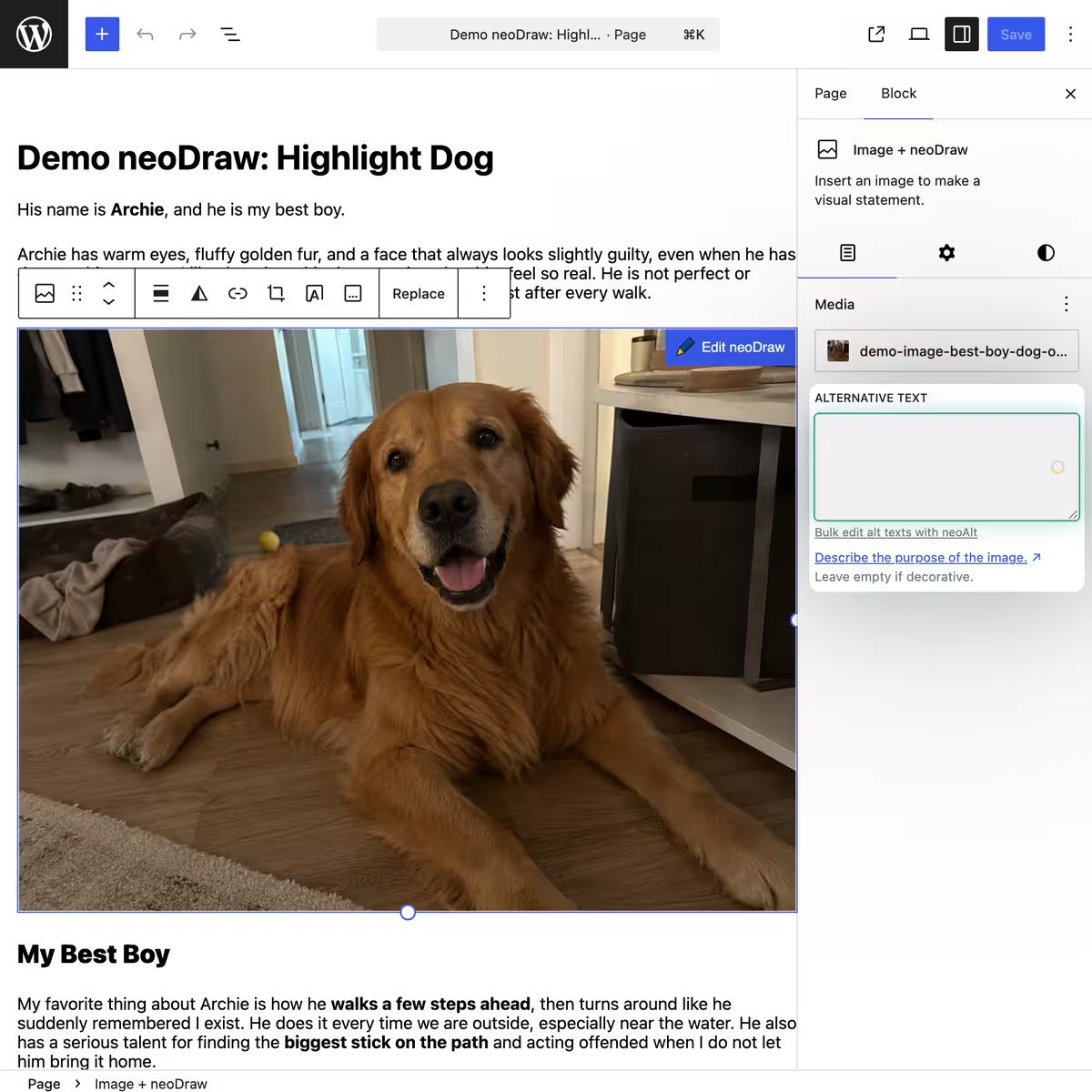
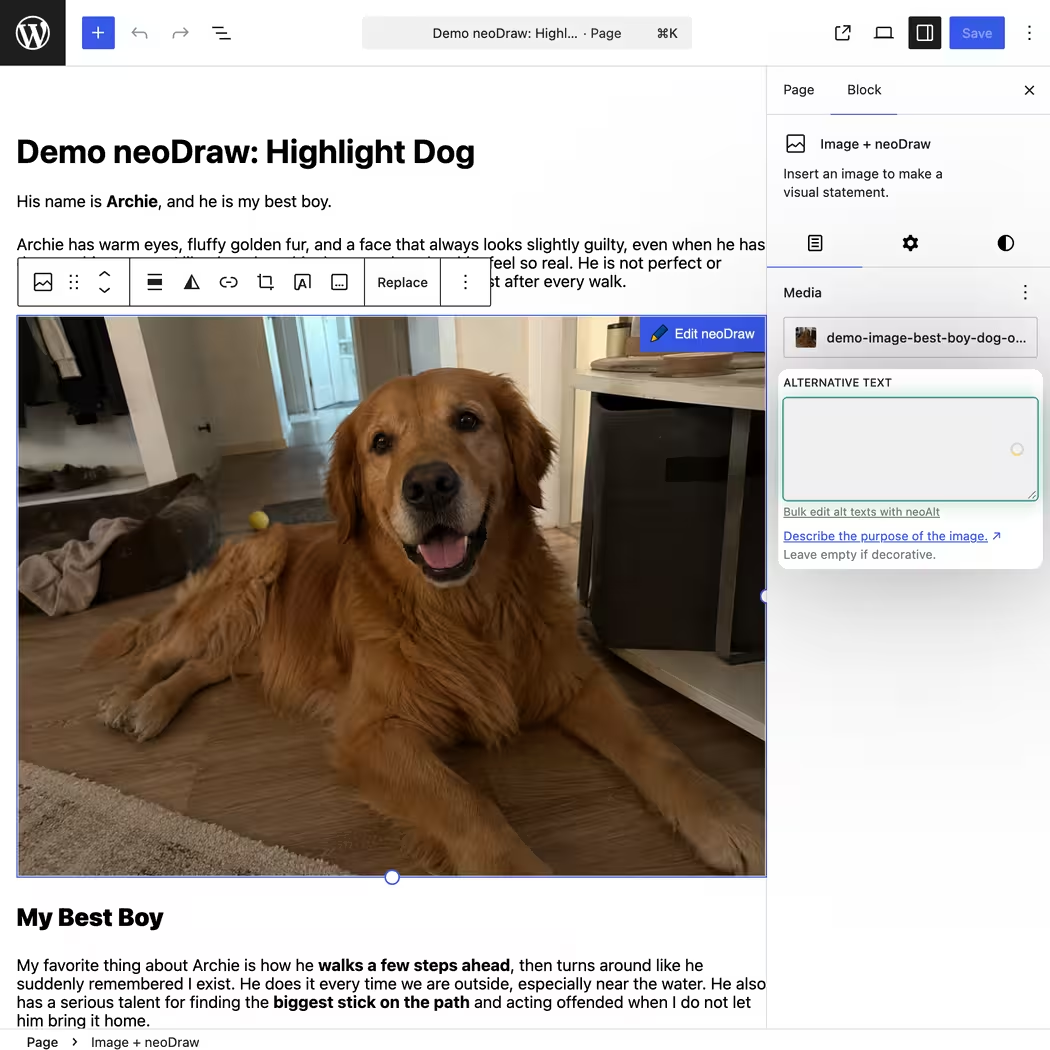
neo Alt augments the alt text fields of Gutenberg blocks Image, Cover and Media and Text. The button sits directly on the textarea in the block sidebar. It uses the original file from the media library, the saved title and the page content as context.
Here an important WordPress difference comes into play: the text in the block can differ from the attachment default. That makes sense if the same image conveys something different on a product page than in a general blog post. For a common standard you edit the attachment in the neoAlt table. For a specific use you adapt the image block in Gutenberg.
Bulk Alt Text Generator for an existing WordPress media library
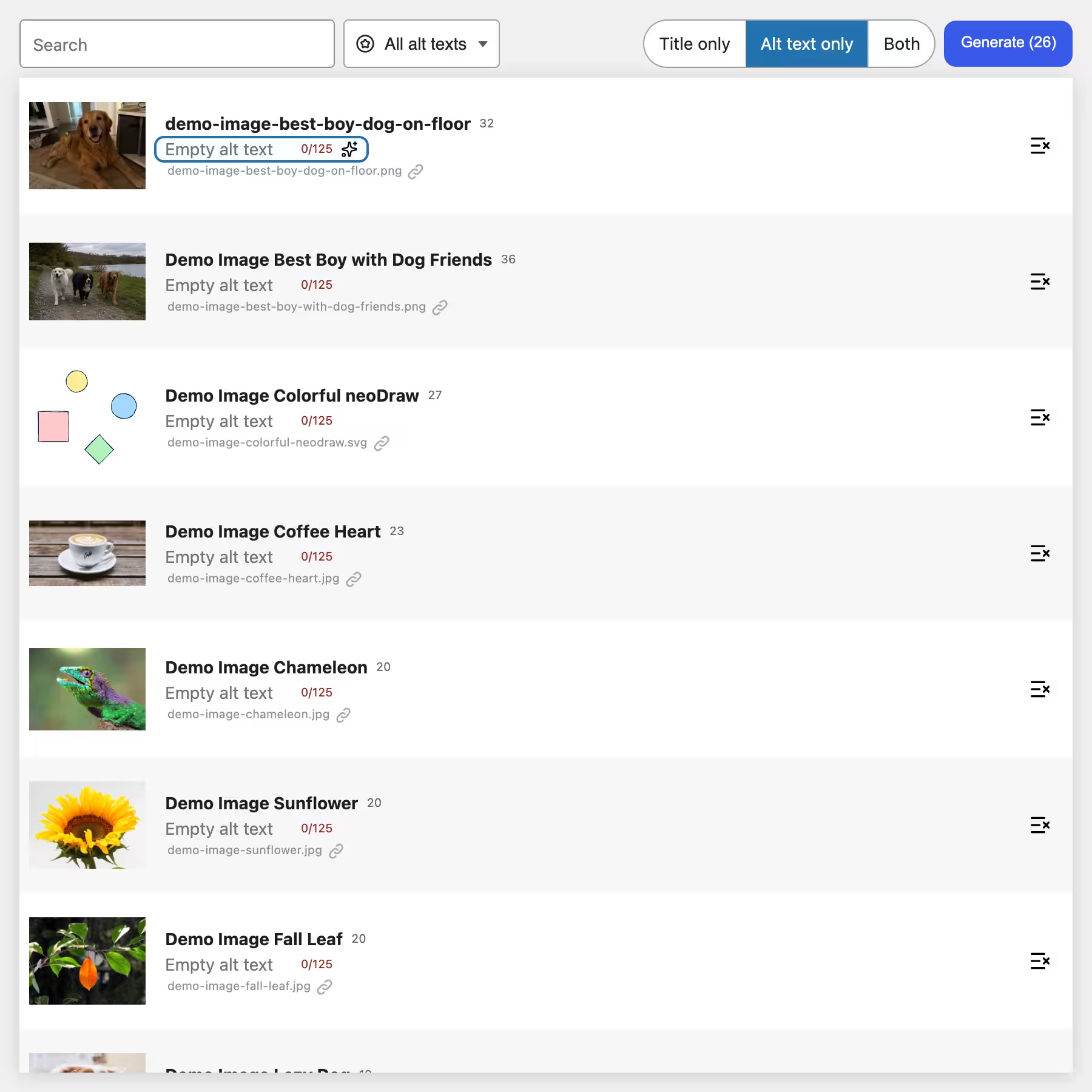
The real time saver is in the neoAlt overview. It loads the WordPress media into a continuous table. This keeps the interface clear even with a large library.
Before starting choose Title only, Alt text only, or Both fit. The number on the generate button shows how many filtered images will be included. Individual rows can be excluded. neo Alt processes up to four images in parallel and shows progress as a count. Cancelling stops the queue after the currently running requests; suggestions already generated remain for review.
If you Save all select, the reviewed drafts are applied together.
Find only images without alt text
The filter Images with empty alt texts hides videos, PDFs, and already filled images. This way you can edit an older media library step by step instead of starting over on each run.
In addition, neo Alt searches Alt title and filename. A space connects terms as an AND search, a vertical bar | serves as OR and an asterisk * as a wildcard. For example, you can first search for produkt* show only empty alt texts and then generate exactly those results.
Sorting is by upload date, modified date, title, or URL.
Generate image title and alt text together using AI
Alt text and image title have different purposes. The alt text describes the image in its page context. The media title mainly helps with management in WordPress and can provide additional context to the AI.
In mode Both neo Alt first generates the title and then the alt text. For the title it considers neighboring media entries so an image series can be named similarly without using the same suggestion multiple times. The subsequent alt text already receives the new title as context.
A character counter accompanies both fields. For alt texts neo Alt marks the recommended range of 80 to 125 characters. The generation requests several shorter variants and adopts the longest suitable version with at most 125 characters.
Page context instead of a generic image description
A photo of a coffee cup can stand for a cafe on the homepage, show a specific cup set in a shop, or document finished milk foam in a tutorial. The pixels remain the same. The meaningful text changes with the use.
neo Alt therefore searches the WordPress database for pages that reference the image. From the publicly reachable HTML it removes navigation, footer, popups, and other page parts that usually add nothing to the image description. The location of the matching image is marked in the remaining text. This excerpt ends up in the prompt together with the image, title, and existing alt text.
Set up WordPress Alt Text Generator
Setup takes only a few minutes. For the first images the free neoAI provider is sufficient. If you already have an API key or run a self-hosted model, you can choose that route immediately.
1. Download and install neo Alt
Download neo Alt via one of the download buttons on this page. Open in WordPress Plugins > Add New > Upload Plugin, select the ZIP file and activate the plugin. neo Alt then appears under Tools.
2. Choose an AI provider
Open Settings > neo WP > neoAI. Select neoAI (free), when you want to start without your own API key. On a regular publicly accessible domain neo Alt shows the prompt, the example image and a privacy notice before the first transmission. Image, prompt and found page context are sent to OpenAI in the USA via neoAI with this provider.
With your own provider the requests go to the interface you configured. Save the connection and run the offered test.
3. Filter images without alt text
Open Tools > neo Alt. Choose in the filter Images with empty alt texts. If needed, limit the set by title or filename and exclude individual images from the bulk run via the symbol at the right edge of the row.
4. Set generation mode and prompt
Select Alt text only, if the existing media titles are already understandable. For unedited uploads often Both fit. After clicking Generate you can enter an additional prompt instruction. Leave the field empty if no common guideline is needed for the current selection.
5. Review and save suggestions
Read the generated texts alongside the images. Pay special attention to proper names, product variants, numbers and text that appears in the motif. Correct unclear wording directly in the table. Then save individual fields or accept all reviewed changes together.
Which AI providers neo Alt supports
neo Alt is not tied to a single AI provider. The following connections are available in settings:
- neoAI: free allowance without your own API key on a publicly accessible domain,
- OpenAI: connection via the Responses API with your own key,
- Anthropic, Google Gemini, xAI and Mistral: direct provider connections with your own key,
- WordPress AI Integration: use of a compatible provider registered in WordPress,
- Custom or Self Hosted: OpenAI-compatible chat completions interface, for example a local Ollama endpoint.
The selected model must be able to process images. neo Alt displays the captured token usage in the settings. The free provider also shows the remaining image quota.
Create WordPress alt text manually or with a plugin
Maintain alt text manually in WordPress
For very few images you do not need a plugin. Open the media library, select the image and write the text into the alt text field. In the Gutenberg editor you can also change the value for an individual image block. This method costs nothing and gives you full control.
However, for a larger media library there is no useful worklist. WordPress does not show empty alt texts as their own filter and does not offer batch generation. The manual route is therefore good for new single images but bad for hundreds of older uploads.
Copy image title or filename as alt text
Some plugins copy the media title or filename into the alt text field. That works technically but often only describes IMG_4821, product-final-new or an internal project name. The page context is missing.
Google recommends short, descriptive filenames and useful alt text in the context of the page. Keyword stuffing can be perceived as spam. A copy tool is therefore only useful if the source titles are already editorially maintained. neo Alt additionally looks at the image and its uses.
Other AI alt text plugins for WordPress
The market offers several approaches. AutoAlt.ai connects WordPress with its own cloud account and offers generation on upload as well as bulk tools. Bilder Alt also works with an external service and a credit model. AI Alt Text Builder provides languages, models and custom prompts depending on the edition.
Check four points when comparing: Are existing images processed in bulk, can you edit suggestions before saving, is page context included and do you need a fixed customer account with the provider? Credits and plan limits change. The linked plugin pages show the current status.
neo Alt relies on a verifiable WordPress table and a free provider choice. The free neoAI access is the entry point; your own API key or a self-hosted interface remains possible.
Alt text for image SEO without keyword stuffing
A good alt text names the subject as it is needed for the surrounding content. It does not have to start with the main keyword nor contain every conceivable search term. For a product photo, product type, color and visible variant can be useful. Invisible properties do not belong in it.
neo Alt uses keywords from the image and page content but limits the generated version to at most 125 characters. Read the sentence out loud anyway. If it sounds like a list of search terms, shorten it. If it describes the subject with a few clear words, it is closer to what Google recommends in its image SEO documentation.
Alt text alone does not guarantee ranking. Google also names page quality, surrounding text, descriptive filenames, crawlable image URLs and fast delivery. neo Alt takes care of the text. For filenames and image files there are separate tools with neo Rename and neo Optimize.
Frequently asked questions about the WordPress alt text generator
What is a WordPress alt text generator?
A WordPress alt text generator analyzes images and creates text suggestions for the alt text field of the media library or an image block. neo Alt can also generate image titles and bulk-edit existing images.
Can neo Alt create missing alt texts in bulk?
Yes. Filter images with empty alt text and start bulk generation for the results. Individual images can be excluded beforehand.
Does neo Alt work without your own API key?
Yes. On a regular publicly accessible WordPress site you can use the free neoAI quota. Alternatively you connect your own AI provider.
Which AI providers does neo Alt support?
neo Alt supports neoAI, OpenAI, Anthropic, Google Gemini, xAI, Mistral, the WordPress AI Integration and OpenAI-compatible self-hosted providers.
Does neo Alt automatically overwrite existing alt texts?
No. In the neoAlt overview generated texts initially remain suggestions. You can read them, edit them, discard them or explicitly save them.
Can neo Alt also generate WordPress image captions?
Yes. Choose image captions only, alt texts only or both text types. Existing texts serve as context for the AI.
Does alt text help with image SEO?
Google uses alt text together with computer vision and the page content to understand an image's subject. Write for the specific subject and avoid keyword lists.
Does neo Alt work with Gutenberg and WooCommerce?
neo Alt integrates the AI button into WordPress media fields and supported Gutenberg image blocks. WooCommerce images can be edited via the media library and the neoAlt overview if they are stored as WordPress attachments.
Conclusion: Maintain alt texts in WordPress faster
For single images the WordPress field remains completely sufficient. For an older or regularly growing media library a bulk alt text generator saves many repetitive clicks. neo Alt combines mass editing with page context and a draft mode. This lets you automate the writing work without giving up control over the saved texts.
Download neo Alt first filter a small group of empty alt texts and check the results on the actual page content. If the direction fits work through the remaining inventory in clearly defined passes.
Download neo Alt and edit missing alt texts
Install the WordPress Alt Text Generator open Tools > neo Alt and start with the images whose alt text is still empty today. The suggestions remain editable until you save them yourself.

