


neo Library - The new Image Media Library
Bring order to your media library with the advanced image manager!
By neo WP Team
(0.0)
1+ active installations
Last updated: 2026-01
✓ Tested with WordPress 6.9

Bring your neoDraw illustrations to life and wow your website visitors! In just a few clicks you can quickly and easily create SVG path stroke animations.
With neo Animate, your website becomes a unique attention magnet and stays memorable.
👑 Pro: Get full control over your animation with a frame editor and adjustable hover and scroll triggers for playback.


Make an impression with animated line-path effects!


... What I especially liked was the integration of scroll and hover animations, which give my website that extra something.


... In the frontend the animation plays smoothly and draws attention. Incredible that something like this works directly in WordPress.
... A very intuitive and powerful drawing tool. The whole design looks very coherent and well thought out.


... The plugin is super-fast and perfectly integrated into WordPress. Editing the drawings is possible directly in the page builder.


... You can draw anything easily: logos, icons, tables, decorations, ... You can also draw and paint over existing images.
... neo Universe is the only media plugin I need. Everything is already included: Renamer, Replacer, Optimizer, image editing and more.
... Because all plugins come from the same developer team, smooth cooperation of all plugins is guaranteed.
... What is very well solved in neo Optimize is that all images and the entire content folder remain untouched.
... I especially like the image quality setting with direct preview of the compressed image. The neoTeam did a great job.
... Just like neo Rename, neo Replace also performs its tasks in the database cleanly and reliably. Simply brilliant.
We look forward to your feedback!

AVERAGE RATING
(based on 1 review)
Bring your neoDraw drawings to life and impress your website visitors! In a few clicks you can quickly and easily create SVG path stroke animations. With neo Animate your website becomes a unique eye-catcher and stays in memory.
👑 Pro: Get full control over your animation with a frame editor and adjustable hover and scroll triggers for playback.
Try neo Animate directly in the browser without having to install it.
Get the ultimate bundle!
Feedback on neo Animate from WP pros that drives us daily:
🎁 Help us make neo Animate even better! Your opinion matters. We appreciate your valuable feedback. ➔ Send us feedback
We're constantly working on new features. Do you have wishes or suggestions? Then let us know!
We learned from the best to develop the SVG Animation Plugin. If you're looking for an alternative to neo Animate, it's worth checking out the following plugins:
The SVG Animation Plugin offers maximum compatibility:
The SVG Animation Plugin keeps your data secure and your website fast:
We continuously develop the SVG Animation Plugin. If you have questions or problems we're here for you - in the WordPress forum or for Pro users on our website.
neo Animate - Click. Click. Wow! - by neo WP
Technology knows no borders. We’re proud that our software is used worldwide. animation • motion • effect • Animation • Bewegung • Effekt • animation • mouvement • effet • animación • movimiento • efecto • animazione • movimento • effetto • animatie • beweging • effect • uhuishaji • mwendo • athari • 动画 • 运动 • 效果 • アニメーション • 動き • 効果 • एनीमेशन • गति • प्रभाव
Find out what the Pro version of neo Animate offers to unlock the full potential of your media. ➔ What the Pro version can do
/wp-content/plugins/ of your WordPress installation.The neo Animate plugin has been tested with: Bricks, Elementor, Divi, Beaver, Oxygen, Breakdance, Gutenberg, WP Fastest Cache, LiteSpeed Cache, WP Rocket, W3 Total Cache, WP Super Cache, WP-Optimize, Autoptimize, Breeze, Cache Enabler
The neo Animate plugin is provided free of charge under the GPLv2 and without warranty. Use is at your own risk; liability for damages is excluded. Users outside Germany are responsible for complying with local regulations. This plugin may process personal data to the extent necessary for, for example, licensing, updates, and secure operation.
You can find details in the complete privacy policy.
Which features are included in the plugin?
The main features of the SVG Animation plugin are:
How can I transfer drawings created with neo Draw to another website?
Drawings created with neo Draw can be downloaded like normal images as a SVG or PNG file and uploaded to another WordPress instance. For SVG upload to work, it must either be enabled manually or the neo Library must be used for the upload. The drawings can still be edited with neo Draw after the upload because the drawing data is embedded in both the SVG and PNG formats.
Can I export neoDraw drawings as PNG files?
Yes, drawings created with neo Draw can be downloaded as PNG files via the neo Library. All drawing data is embedded as metadata directly into the PNG file. Despite the pixel-based format, this preserves the complete restoration of the original SVG - including all editable drawing elements. If such a PNG file is later re-uploaded with the neo Library, it will automatically be converted back into an SVG file editable with neo Draw.
In what format are neoDraw drawings saved?
Drawings created with neo Draw are stored in the WordPress media library as vector graphics in SVG format - just like regular images. On the file system, these SVG files sit alongside the other images in the WordPress media library. That means all drawings created with neo Draw can still be used after uninstalling the plugin.
All editor drawing data, including embedded images and animations from neo Animate & neo Motion, is stored directly inside the SVG file. This keeps the drawing fully editable even after downloading and re-uploading - for example on another WordPress instance. In the frontend, the SVG files are treated like normal images.
For maximum performance the neo Optimize plugin automatically removes the editor data when serving SVG files and converts embedded raster graphics into the efficient WebP format.
What happens to my drawings and animations without Pro?
If you no longer use a Pro license, your existing drawings and animations remain fully intact and continue to work in the frontend.
The Pro features inside the drawings (e.g. advanced animation settings) can no longer be edited without a license. Viewing and exporting are still possible, because your drawings are saved as regular SVG files.
If you switch back to neoPro later, all Pro features become available again immediately without restrictions.
What is the neo Universe?
The neo Universe is more than just a collection of plugins. It is your complete toolbox for all media challenges in WordPress. It currently includes ten specialized plugins: neo Library, neo Rename, neo Replace, neo Duplicate, neo Optimize, neo Lazy, neo Draw, neo Animate, neo Motion and neo Manager. They work seamlessly together, are perfectly coordinated and cover all areas around media management, SEO and performance. Whether renaming images, replacing files, optimizing SEO, enabling lazy load or drawing and animating content. The neo Universe makes your media workflow noticeably simpler and more efficient. And the best part: the neo Universe keeps expanding. New tools and features make your WordPress daily routine even better.
Why is only one folder shown when downloading?
If you use Safari, your Mac may automatically unzip the ZIP file. Instead of the ZIP file you then only get the unzipped folder. You cannot upload this directly to WordPress.
Solution: Open the Safari Preferences and disable the option ”Open safe files after downloading”. After that the ZIP file will remain as you need it.
The video titled ”How to disable Safari auto extract for ZIP files when downloading WordPress plugins” on YouTube shows you the exact details.
I have more questions. Can you help me?
Sure! You can ask us your questions anytime via our support page. We will reply shortly.
I already had the chance to create some animations during the beta. It’s child's play. There are numerous ways to control and modify the animations, especially the playback in the frontend. I particularly liked the integration of scroll and hover animations, which give my website that extra touch. For example, I created an illustration that builds up step by step when you scroll to that section. That gives my site additional expressiveness.
As part of the beta tester team, I was able to test neo Animate extensively in various WordPress environments. neo Animate is not comparable to complex animation tools. I tried it with one of my neoDraw drawings: you just have to choose what should be animated and when, and it looks great right away! The editor is really brilliant. In the frontend the animation plays smoothly and attracts attention. It's incredible that something like this works directly in WordPress. Thanks for these new possibilities!

The WordPress plugin neo Animate by neo WP was released on 2026-01-01 and is part of the new neoWP plugin series. The plugin leverages modern web development capabilities, reflected in its performance and intuitive design. Reviews indicate that since its release the plugin has delighted users with well-chosen and cleverly implemented features. Particularly noteworthy is the solid coding. A look into the source code confirms that an experienced software development company is behind the plugin.
“The plugins in the neo package are very well coordinated and solve all common problems with images in WordPress.”
“Great what can be done with neo Rename. The Pro version takes it even further.”
The plugin neo Animate is available for free in the current version 1.0.0 for download. It requires at least WordPress version 6.2 and PHP version 8.0 or higher. The plugin was tested by the beta tester group up to the current version 6.9. The developers published the last update in 2026-01. Continuous updating and expansion of the plugin reflects the commitment to further development.
“It's convenient to get all media plugins from a single developer. The complete neo universe runs performantly, reliably and stably.”
Support for neo Animate receives predominantly positive feedback, especially due to fast response times and effective problem solving. Many users report that the developers provide dedicated and helpful support for both the free and Pro versions. The neo WP team can be reached directly via the developer page by chat, email and contact form. Additionally, the official support forum is available for further assistance.
“The developers respond quickly, personally and are very helpful.”
The plugin neo Animate lives up to its slogan “Make an impression with animated line-path effects!” in every respect. Even the free version offers the entire neo plugin series as a comprehensive solution for typical media management requirements in WordPress. If you already use neo Animate, it’s worth taking a look at the other plugins from neo WP.
Plugin slug: neo-animate
Plugin name: neoAnimate
Plugin title: neo Animate - Beeindruckender Animations-Editor für neoDraw
Plugin keywords: #animation #animate #effect #svg #gif
Plugin version: 1.0.0
Last Update: 2026-01
Release Date: 2026-01-01
Required WP Version: 6.2
Required PHP version: 8.0
Tested with WP version: 6.9
Active Installations: 1+
Average Rating: 5.0
Number of Ratings: 1
Number of support threads: 0 (in the last 2 months)
Number of resolved support requests: 0 (in the last 2 months)
Plugin author: neo WP
Developer Homepage: https://neo-wp.com/
WP Developer Profile Page: https://profiles.wordpress.org/neoplugins/
Support URL in the WordPress Plugin Directory: https://neo-wp.com/support/
Developer Support URL: https://neo-wp.com/support/
WP Plugin Directory: https://neo-wp.com/plugin/neo-animate/?ref=wporg-info
#animation #animate #effect #svg #gif

The Animated Text Block plugin from bPlugins enables text animation in the Gutenberg editor of WordPress and offers user-friendliness with extensive customization options. With 4 000+ active installations it is highly rated. Below are the features:
“Simply great, it deserves more than 5 stars.”
„The settings panels are clear enough to make adjustments easily accessible.“
Seamless integration into the Gutenberg editor; no shortcodes required; modular code for developer customization; uses modern JavaScript libraries; compatible with PHP version 7.1+ and WordPress version 6.5+, tested up to 6.9.4.
„It would be great to have a preview animation button.“
With an average rating of 4.8 out of 5, the plugin is very popular. Users praise the ease of use and support via the official support forum and by email: support@bplugins.com. Requests for improvement include the preview animation button and custom CSS.
The Animated Text Block plugin offers a flexible solution for text animation on WordPress sites. Despite minor suggestions for improvement, it is highly appreciated for ease of use and creative possibilities at no extra cost. A valuable addition for designers and developers implementing dynamic websites.
Plugin slug: animated-text-block
Plugin name: Animated Text Block
Plugin title: Animated Text Block – Add Typing and Looping Text Effects
Plugin Keywords: #animated text #animation text block #text animation #text block
Plugin version: 1.2.4
Last update: 2026-03
Release Date: 2021-12-21
Required WP version: 6.5
Required PHP version: 7.1
Tested with WP version: 6.9.4
Active Installations: 4 000+
Average rating: 4.8
Number of Ratings: 5
Number of support threads: 0 (in the last 2 months)
Number of resolved support requests: 0 (in the last 2 months)
Plugin author: bPlugins
Developer Homepage: https://wordpress.org/support/plugin/animated-text-block/#fallback-homepage
WP Developer Profile Page: https://profiles.wordpress.org/bplugins/
Support URL in the WordPress Plugin Directory: https://wordpress.org/support/plugin/animated-text-block/
Developer Support URL: https://wordpress.org/support/plugin/animated-text-block/#fallback-commercial-support-url
WP Plugin Directory: https://wordpress.org/plugins/animated-text-block/
#animated text #animation text block #text animation #text block
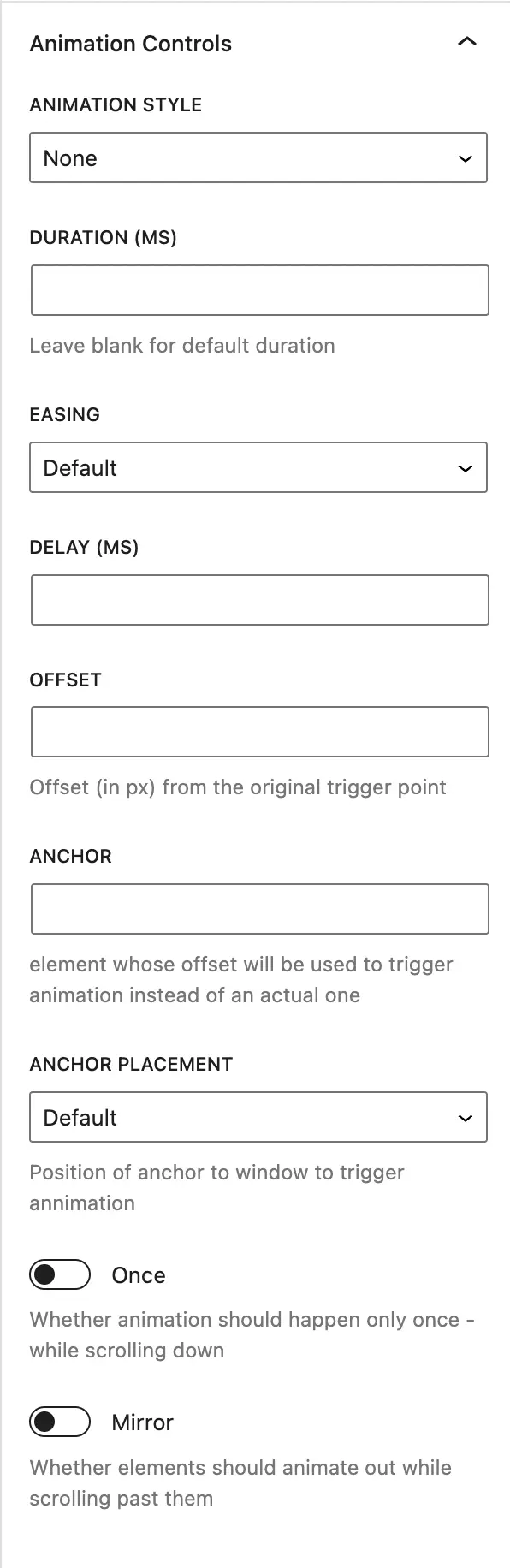
Ani Mate Animation Extension is a WordPress plugin by Brent Patroch, with over 100+ installations, that easily integrates animations into Gutenberg blocks.
“The product helped me increase my productivity.”
“The customization options are excellent and enable a tailored experience.”
The plugin uses the Animate on Scroll library with simple backend integration and provides shortcodes and hooks for flexible customizations. At least PHP Version 7.4, compatible with WordPress versions up to 5.0, last updated 2026-02.
“The requirements were perfectly matched and seamlessly integrated into my setup.”
Efficient integration of the AOS library into Gutenberg. The backend speed is impressive, but resource demands on older devices can be problematic. Support is provided via the support forum; commercial contact possible.
“Unfortunately, I couldn't find any further information or feedback about support.”
Ani Mate Animation Extension offers customizable animations for Gutenberg. Despite powerful features, support and data security are insufficiently documented. With Brent Patroch as the developer, the limited experience shows potential for improvements.
Plugin slug: ani-mate-animation-extension
Plugin name: Ani Mate Animation Extension
Plugin title: Ani-Mate Gutenberg Animation Extension
Plugin keywords: #animation #aos #blocks #gutenberg
Plugin-Version: 1.1.0
Last update: 2026-02
Release Date: 2023-05-24
Required WP version: 5.0
Required PHP version: 7.4
Tested with WP version: 6.9.4
Active installations: 100+
Average Rating: 5.0
Number of Ratings: 1
Number of support threads: 0 (in the last 2 months)
Number of resolved support requests: 0 (in the last 2 months)
Plugin author: tweakitguy
Developer Homepage: https://wordpress.org/support/plugin/ani-mate-animation-extension/#fallback-homepage
WP Developer Profile Page: https://profiles.wordpress.org/tweakitguy/
Support URL in the WordPress Plugin Directory: https://wordpress.org/support/plugin/ani-mate-animation-extension/
Developer Support URL: https://wordpress.org/support/plugin/ani-mate-animation-extension/#fallback-commercial-support-url
WP Plugin Directory: https://wordpress.org/plugins/ani-mate-animation-extension/
#animation #aos #blocks #gutenberg
Everything you need for WordPress media.


The WordPress plugin neo Animate by neo WP was released on 2026-01-01 and is part of the new neoWP plugin series. The plugin leverages modern web development capabilities, reflected in its performance and intuitive design. Reviews indicate that since its release the plugin has delighted users with well-chosen and cleverly implemented features. Particularly noteworthy is the solid coding. A look into the source code confirms that an experienced software development company is behind the plugin.
“The plugins in the neo package are very well coordinated and solve all common problems with images in WordPress.”
“Great what can be done with neo Rename. The Pro version takes it even further.”
The plugin neo Animate is available for free in the current version 1.0.0 for download. It requires at least WordPress version 6.2 and PHP version 8.0 or higher. The plugin was tested by the beta tester group up to the current version 6.9. The developers published the last update in 2026-01. Continuous updating and expansion of the plugin reflects the commitment to further development.
“It's convenient to get all media plugins from a single developer. The complete neo universe runs performantly, reliably and stably.”
Support for neo Animate receives predominantly positive feedback, especially due to fast response times and effective problem solving. Many users report that the developers provide dedicated and helpful support for both the free and Pro versions. The neo WP team can be reached directly via the developer page by chat, email and contact form. Additionally, the official support forum is available for further assistance.
“The developers respond quickly, personally and are very helpful.”
The plugin neo Animate lives up to its slogan “Make an impression with animated line-path effects!” in every respect. Even the free version offers the entire neo plugin series as a comprehensive solution for typical media management requirements in WordPress. If you already use neo Animate, it’s worth taking a look at the other plugins from neo WP.
Plugin slug: neo-animate
Plugin name: neoAnimate
Plugin title: neo Animate - Beeindruckender Animations-Editor für neoDraw
Plugin keywords: #animation #animate #effect #svg #gif
Plugin version: 1.0.0
Last Update: 2026-01
Release Date: 2026-01-01
Required WP Version: 6.2
Required PHP version: 8.0
Tested with WP version: 6.9
Active Installations: 1+
Average Rating: 5.0
Number of Ratings: 1
Number of support threads: 0 (in the last 2 months)
Number of resolved support requests: 0 (in the last 2 months)
Plugin author: neo WP
Developer Homepage: https://neo-wp.com/
WP Developer Profile Page: https://profiles.wordpress.org/neoplugins/
Support URL in the WordPress Plugin Directory: https://neo-wp.com/support/
Developer Support URL: https://neo-wp.com/support/
WP Plugin Directory: https://neo-wp.com/plugin/neo-animate/?ref=wporg-info
#animation #animate #effect #svg #gif
The Animated Text Block plugin from bPlugins enables text animation in the Gutenberg editor of WordPress and offers user-friendliness with extensive customization options. With 4 000+ active installations it is highly rated. Below are the features:
“Simply great, it deserves more than 5 stars.”
„The settings panels are clear enough to make adjustments easily accessible.“
Seamless integration into the Gutenberg editor; no shortcodes required; modular code for developer customization; uses modern JavaScript libraries; compatible with PHP version 7.1+ and WordPress version 6.5+, tested up to 6.9.4.
„It would be great to have a preview animation button.“
With an average rating of 4.8 out of 5, the plugin is very popular. Users praise the ease of use and support via the official support forum and by email: support@bplugins.com. Requests for improvement include the preview animation button and custom CSS.
The Animated Text Block plugin offers a flexible solution for text animation on WordPress sites. Despite minor suggestions for improvement, it is highly appreciated for ease of use and creative possibilities at no extra cost. A valuable addition for designers and developers implementing dynamic websites.
Plugin slug: animated-text-block
Plugin name: Animated Text Block
Plugin title: Animated Text Block – Add Typing and Looping Text Effects
Plugin Keywords: #animated text #animation text block #text animation #text block
Plugin version: 1.2.4
Last update: 2026-03
Release Date: 2021-12-21
Required WP version: 6.5
Required PHP version: 7.1
Tested with WP version: 6.9.4
Active Installations: 4 000+
Average rating: 4.8
Number of Ratings: 5
Number of support threads: 0 (in the last 2 months)
Number of resolved support requests: 0 (in the last 2 months)
Plugin author: bPlugins
Developer Homepage: https://wordpress.org/support/plugin/animated-text-block/#fallback-homepage
WP Developer Profile Page: https://profiles.wordpress.org/bplugins/
Support URL in the WordPress Plugin Directory: https://wordpress.org/support/plugin/animated-text-block/
Developer Support URL: https://wordpress.org/support/plugin/animated-text-block/#fallback-commercial-support-url
WP Plugin Directory: https://wordpress.org/plugins/animated-text-block/
#animated text #animation text block #text animation #text block
Ani Mate Animation Extension is a WordPress plugin by Brent Patroch, with over 100+ installations, that easily integrates animations into Gutenberg blocks.
“The product helped me increase my productivity.”
“The customization options are excellent and enable a tailored experience.”
The plugin uses the Animate on Scroll library with simple backend integration and provides shortcodes and hooks for flexible customizations. At least PHP Version 7.4, compatible with WordPress versions up to 5.0, last updated 2026-02.
“The requirements were perfectly matched and seamlessly integrated into my setup.”
Efficient integration of the AOS library into Gutenberg. The backend speed is impressive, but resource demands on older devices can be problematic. Support is provided via the support forum; commercial contact possible.
“Unfortunately, I couldn't find any further information or feedback about support.”
Ani Mate Animation Extension offers customizable animations for Gutenberg. Despite powerful features, support and data security are insufficiently documented. With Brent Patroch as the developer, the limited experience shows potential for improvements.
Plugin slug: ani-mate-animation-extension
Plugin name: Ani Mate Animation Extension
Plugin title: Ani-Mate Gutenberg Animation Extension
Plugin keywords: #animation #aos #blocks #gutenberg
Plugin-Version: 1.1.0
Last update: 2026-02
Release Date: 2023-05-24
Required WP version: 5.0
Required PHP version: 7.4
Tested with WP version: 6.9.4
Active installations: 100+
Average Rating: 5.0
Number of Ratings: 1
Number of support threads: 0 (in the last 2 months)
Number of resolved support requests: 0 (in the last 2 months)
Plugin author: tweakitguy
Developer Homepage: https://wordpress.org/support/plugin/ani-mate-animation-extension/#fallback-homepage
WP Developer Profile Page: https://profiles.wordpress.org/tweakitguy/
Support URL in the WordPress Plugin Directory: https://wordpress.org/support/plugin/ani-mate-animation-extension/
Developer Support URL: https://wordpress.org/support/plugin/ani-mate-animation-extension/#fallback-commercial-support-url
WP Plugin Directory: https://wordpress.org/plugins/ani-mate-animation-extension/
#animation #aos #blocks #gutenberg
... What I especially liked was the integration of scroll and hover animations, which give my website that extra something.
... In the frontend the animation plays smoothly and draws attention. Incredible that something like this works directly in WordPress.
... A very intuitive and powerful drawing tool. The whole design looks very coherent and well thought out.
Drawings created with neo Draw can be downloaded like normal images as a SVG or PNG file and uploaded to another WordPress instance. For SVG upload to work, it must either be enabled manually or the neo Library must be used for the upload. The drawings can still be edited with neo Draw after the upload because the drawing data is embedded in both the SVG and PNG formats.
Yes, drawings created with neo Draw can be downloaded as PNG files via the neo Library. All drawing data is embedded as metadata directly into the PNG file. Despite the pixel-based format, this preserves the complete restoration of the original SVG - including all editable drawing elements. If such a PNG file is later re-uploaded with the neo Library, it will automatically be converted back into an SVG file editable with neo Draw.
Drawings created with neo Draw are stored in the WordPress media library as vector graphics in SVG format - just like regular images. On the file system, these SVG files sit alongside the other images in the WordPress media library. That means all drawings created with neo Draw can still be used after uninstalling the plugin.
All editor drawing data, including embedded images and animations from neo Animate & neo Motion, is stored directly inside the SVG file. This keeps the drawing fully editable even after downloading and re-uploading - for example on another WordPress instance. In the frontend, the SVG files are treated like normal images.
For maximum performance the neo Optimize plugin automatically removes the editor data when serving SVG files and converts embedded raster graphics into the efficient WebP format.
If you no longer use a Pro license, your existing drawings and animations remain fully intact and continue to work in the frontend.
The Pro features inside the drawings (e.g. advanced animation settings) can no longer be edited without a license. Viewing and exporting are still possible, because your drawings are saved as regular SVG files.
If you switch back to neoPro later, all Pro features become available again immediately without restrictions.
You get an entire universe of specialized media plugins for modern media management in WordPress. Included are perfectly coordinated tools for renaming, replacing, optimizing, drawing, animating and managing media. Each plugin is designed to improve your SEO ranking, boost your site performance and save you valuable time when creating content.
With the Pro version you get all features in a single plugin. One ZIP file, one settings page, one update and full control. In the neo Manager you activate exactly the features you need.
Behind neo WP is a dedicated team of experienced web developers. With great attention to detail and a high standard of code quality we continuously develop the neoUniverse further.
With the Free version you get all neoPlugins with their basic features. On the download page you can download the plugins individually or install them directly with the neo Manager. After installation the neoPlugins appear as separate entries in the WordPress backend and must be managed and updated separately. You receive support via the public WordPress forum.
With the Pro version you get all neoPlugins including all Pro features in a single ZIP file. You only upload this one file and then find all features as one plugin entry in your dashboard. Via the integrated neo Manager you toggle exactly the modules you need. All Pro features marked with the crown icon 👑 are available to you immediately. These include, for example, displaying all posts that use a specific image, bulk actions in neoRenamer, an advanced animation editor for drawings and much more. Thanks to automatic security and feature updates you always stay up to date. Newly released media plugins and tools will be added in the future at no extra cost. With the Pro version you also enjoy prioritized premium support directly from the development team.
So if you want to save time, stay flexible and use all pro features immediately, the Pro version is the right choice for you.
All neoPlugins are regularly updated, hosted on German servers and fully comply with European data protection regulations (GDPR). In addition, all updates are intensively tested by experienced WordPress professionals before release.
Yes! You can test all neoPlugins directly in the online sandbox without installation. You also have the option to test all neo Pro features on your own WordPress site free for 14 days. You can activate this trial period in the WordPress backend under the neoWP settings. That way you can take your time to find out if neo WP is right for you.
We are often asked: Why pink and green? What’s up with the colors? Why can I still see the plugin when I close my eyes? We wanted to stand out. If you want to give your optic a break: in the Pro version you automatically get a calmer color scheme in dark blue and gold. Many users fell in love with the neon colors. Therefore there is a switch for the color scheme in the Pro settings.
Yes! The neo WP team welcomes feedback, ideas and suggestions. Everything that ends up in our wishbox will be discussed by the team. We respond to every piece of feedback.

Experience the neo universe and its possibilities in the playground yourself.
Or get a license today and take your website to the next level!

