
Password correct. Please wait...
Disable chat with .custom-disable-chat
WP Plugin Comparisonby neo-wp.com


WP Plugin Enable Media Replace
Comparison & Alternatives
The 2 best alternatives for the WordPress plugin Enable Media Replace by ShortPixel
WordPress Plugin Top List
Comparison & Ranking
Number #

neo Replace - Easy replacement via Drag & Drop
The WordPress plugin neo Replace by neo WP was released on 2026-01-01 and is part of the new neoWP plugin series. The plugin leverages modern web development capabilities, reflected in its performance and intuitive design. Reviews indicate that since its release the plugin has delighted users with well-chosen and cleverly implemented features. Particularly noteworthy is the solid programming. A look at the source code confirms that a company with experienced software developers is behind the plugin.
“The plugins in the neo package are very well coordinated and solve all common problems with images in WordPress.”
Features - Powerful tools cleverly implemented
- Quickly replace your media
- Supports every format incl. images, videos, audio files and PDF documents
- Direct integration into the media library
- Easy file replacement via drag-and-drop
- Automatically regenerates thumbnails
- Preserves file attributes
- Reliable replacing across the entire website
- Show list of posts that use the image - before replacing (Pro)
“Great what can be done with neo Rename. The Pro version takes it even further.”
Technical details - modern implementation with high compatibility
The plugin neo Replace is available free of charge in the current version 1.0.0 for download. It requires at least WordPress version 6.2 and PHP version 8.0 or higher. The plugin has been tested by the beta tester circle up to the current version 6.9. The developers released the last update in 2026-01. The continuous updating and expansion of the plugin reflects the commitment to further development.
“It's convenient to get all media plugins from a single developer. The complete neo universe runs performantly, reliably and stably.”
Quality and support - fast and helpful assistance
Support for neo Replace receives predominantly positive feedback, especially thanks to quick response times and effective problem solving. Many users report that the developers provide engaged and helpful support for both the free and Pro versions. The neo WP team is directly reachable via the developers' page by chat, email and contact form. Additionally, the official support forum is available for further assistance.
“The developers respond quickly, personally and are very helpful.”
Conclusion - very high-quality WordPress plugin package
The plugin neo Replace fully lives up to its slogan “Easy replacing via Drag & Drop!”. Even in the free version, the entire neo plugin series offers a comprehensive solution for typical media management requirements in WordPress. For everyone already using neo Replace, it's worth taking a look at the other plugins from neo WP.
Show more
Detailed plugin information
Plugin slug: neo-replace
Plugin name: neoReplace
Plugin title: neo Replace - Einfaches Ersetzen durch Drag & Drop
Plugin keywords: #replace #replacer #swap #image #media
Plugin version: 1.0.0
Last Update: 2026-01
Release Date: 2026-01-01
Required WP Version: 6.2
Required PHP version: 8.0
Tested with WP version: 6.9
Active Installations: 1+
Average Rating: 5.0
Number of Ratings: 1
Number of support threads: 0 (in the last 2 months)
Number of resolved support requests: 0 (in the last 2 months)
Plugin author: neo WP
Developer Homepage: https://neo-wp.com/
WP Developer Profile Page: https://profiles.wordpress.org/neoplugins/
Support URL in the WordPress Plugin Directory: https://neo-wp.com/support/
Developer Support URL: https://neo-wp.com/support/
WP Plugin Directory: https://neo-wp.com/plugin/neo-replace/
0.0
/ 10
#replace #replacer #swap #image #media
Number #
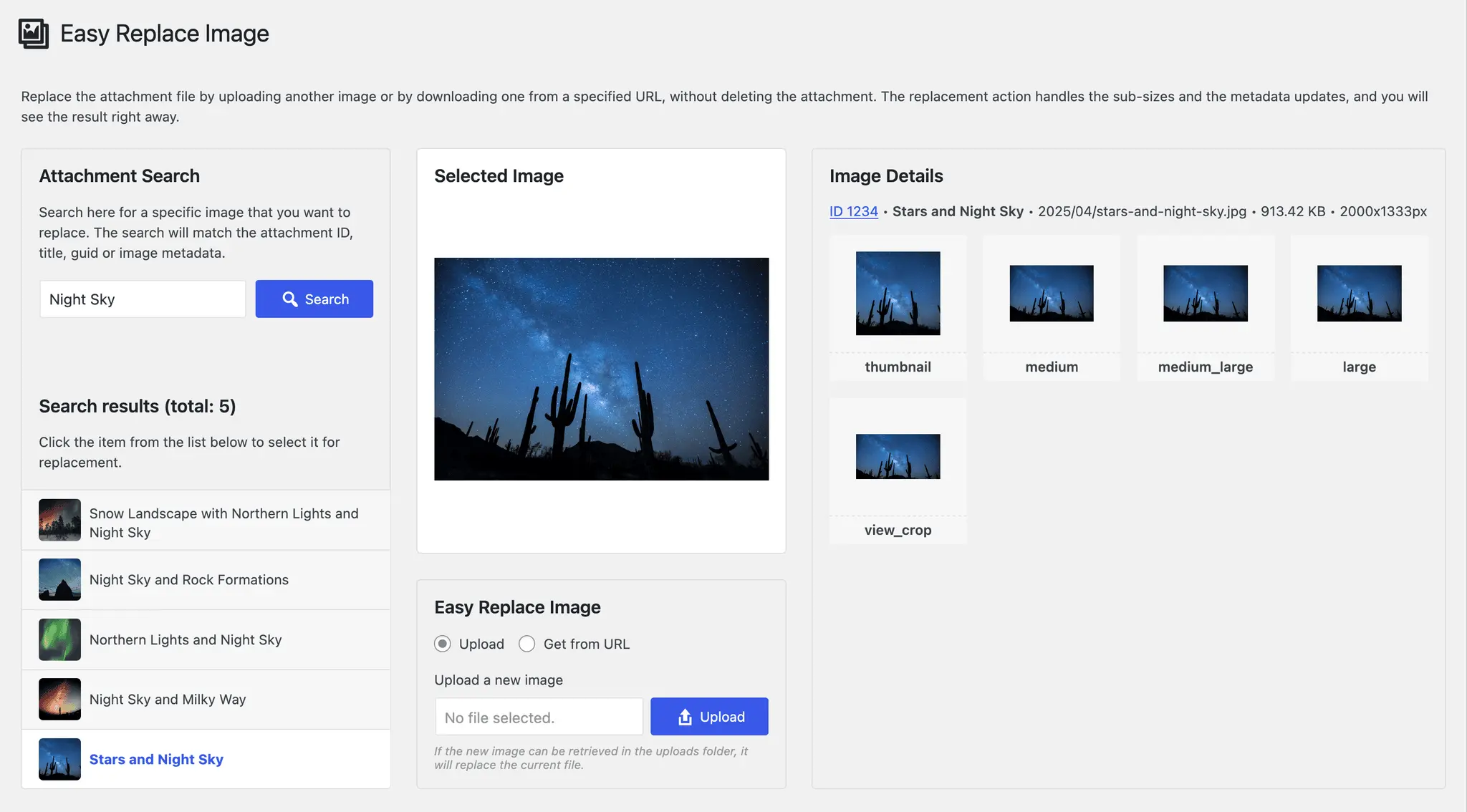
Easy Replace Image
Introduction - Effective image management with Easy Replace Image
Easy Replace Image is a WordPress plugin by Iulia Cazan, contributing flexible image management with over 500+ active installations. It allows replacing images without affecting existing files and automatically updates sizes and metadata.
"Finally a plugin that makes it easy to replace an image and have it automatically update elsewhere..."
Features - Comprehensive functions for optimal image management
- Replace attachment files: Upload images or replace from a URL.
- Automatic image size generation: Efficiently creates required image sizes.
- Metadata update: Attachment metadata is updated.
- Immediate display: Changes visible instantly.
- Bulk replace: Replace multiple images at once (Pro).
- REST API support: Seamless integration for developers.
- Compatibility: Works perfectly with the latest WordPress version.
"This little plugin is a real gem! Small, simple and effective."
Technical details - Requirements and integration
Easy Replace Image integrates seamlessly with the WP media library system. It requires at least PHP version 7.4 and WP version 5.2 and enables image replacement via the WordPress REST API. Currently at version 3.5.3, tested up to WP version 6.9.1.
Quality and Support - Efficiency and user assistance
Easy Replace Image impresses with reliability and user-friendliness, but support reviews are missing. Support is provided via the official support page or directly via this URL. Criticisms include cache issues and lack of SVG support.
"Quick to install, but support isn’t particularly present."
Conclusion - A solid tool with room for improvement
The plugin Easy Replace Image by Iulia Cazan offers efficient image management, ease of use, and high compatibility. Improvements could include SVG support and cache management. It remains a recommendable tool for efficient image management.
Show more
Detailed plugin information
Plugin slug: easy-replace-image
Plugin name: Easy Replace Image
Plugin title: Easy Replace Image
Plugin keywords: #change attachment file #download image #image refresh #repair broken image #replace image
Plugin version: 3.5.3
Last Update: 2026-01
Release date: 2017-07-19
Required WP version: 5.2
Required PHP version: 7.4
Tested with WP version: 6.9.1
Active Installations: 500+
Average rating: 4.9
Number of reviews: 9
Number of support threads: 0 (in the last 2 months)
Number of resolved support requests: 0 (in the last 2 months)
Plugin author: Iulia Cazan
Developer homepage: https://iuliacazan.ro/easy-replace-image/
WP developer profile: https://profiles.wordpress.org/iulia-cazan/
Support URL in the WordPress Plugin Directory: https://wordpress.org/support/plugin/easy-replace-image/
Developer’s support URL: https://wordpress.org/support/plugin/easy-replace-image/#fallback-commercial-support-url
WP Plugin Directory: https://wordpress.org/plugins/easy-replace-image/
0.0
/ 10
#change attachment file #download image #image refresh #repair broken image #replace image
Compared with:

Enable Media Replace - Efficient media management
Enable Media Replace by ShortPixel is a popular WordPress plugin for smooth replacement of media files. With over 600 000+ active installations it is indispensable for webmasters who frequently update content and has a high 4.4 star rating.
"This plugin has made my work so much easier."
Features - Advanced functions for media replacement
- Replace file - swap media files directly without deletion.
- Replace file with new filename - update all links when replacing the file.
- Background removal (Beta) - image editing via the ShortPixel API (Pro).
- Show file modification time - shortcode to document freshness.
"This plugin provides functionality that really should be part of the WordPress core."
Technical details - compatibility and function
Requires at least PHP 5.6, compatible with WordPress from version 4.9.7 and tested up to version 6.9.1. Offers customization options and uses the ShortPixel API for advanced edits. Current version: 4.1.7, last updated in 2025-12.
"This plugin is easy to deploy and keeps up with WordPress requirements."
Quality and Support - Reliability with mixed support
Users appreciate the plugin’s efficiency and resource savings. While stability and compatibility are mostly praised, feedback on support is mixed. Official channels offer varying levels of assistance, but the community remains generally positive.
"Works seamlessly and error-free."
Conclusion - A well-thought-out, but not perfect solution
Enable Media Replace is a powerful plugin for quickly replacing media files in WordPress, but there is room for improvement, especially regarding storage formats and multilingual support. Despite occasional issues, it remains a favorite for many who want efficient media management.
Show more
Detailed plugin information
Plugin slug: enable-media-replace
Plugin name: Enable Media Replace
Plugin title: Enable Media Replace
Plugin-Keywords: #change media #remove background #replace #replace image #replace jpg
Plugin-Version: 4.1.7
Last Update: 2025-12
Release date: 2009-06-01
Required WP-Version: 4.9.7
Required PHP Version: 5.6
Tested with WP version: 6.9.1
Active installations: 600 000+
Average rating: 4.4
Number of reviews: 300
Number of support requests: 5 (in the last 2 months)
Number of resolved support requests: 1 (in the last 2 months)
Plugin author: ShortPixel
Developer homepage: https://shortpixel.com
WP developer profile page: https://profiles.wordpress.org/shortpixel/
Support URL in the WordPress Plugin Directory: https://wordpress.org/support/plugin/enable-media-replace/
Developer support URL: https://wordpress.org/support/plugin/enable-media-replace/#fallback-commercial-support-url
WP Plugin Directory: https://wordpress.org/plugins/enable-media-replace/
#change media #remove background #replace #replace image #replace jpg
Was the comparison to Enable Media Replace helpful?
All about Enable Media Replace
Enable Media Replace
Enable Media Replace is a popular WordPress plugin developed by ShortPixel to make replacing media files in the WordPress media library more efficient. Since its release on 2009-06-01, the plugin has grown into an indispensable tool for webmasters who regularly update content without going through the cumbersome process of deleting and re-uploading files, now with over 600 000+ active installations. Enable Media Replace’s standout feature is its ability to seamlessly replace files, saving time and streamlining workflows-something many other media management tools lack. Notably, there’s a new beta background-removal feature aimed at integration with e-commerce solutions. The plugin’s target audience is primarily operators of larger WordPress-based sites. With an average rating of 4.4 out of 5 stars from 300 reviews in the official WordPress Plugin Directory, Enable Media Replace enjoys largely positive feedback. The following section takes a closer look at the plugin’s features.
"This plugin has made my work so much easier."
Features - Comprehensive media management capabilities
Enable Media Replace offers a variety of helpful features that go beyond simple media replacement. Another notable feature is the ability to display file modification data. This functionality allows you to show a file’s modification date with a shortcode, which can be especially useful for managing and documenting content. This feature increases the plugin’s flexibility and user-friendliness and is popular among users who value structured media management.
"This plugin provides functionality that really should be part of the WordPress core."
Free Features - Capabilities of the free version
- Replace file - Allows replacing an uploaded file in the media area without deleting and re-uploading the file.
- Replace file with new filename - Replaces the old file with the new filename and updates all links that point to the old file.
- Background removal (Beta) - Removes image backgrounds by sending images to the ShortPixel API. Provides a preview of the edited image.
- Show file modification time - A shortcode that displays a file’s modification date, e.g.
[file_modified id=XX format=XXXX].
License - Free and effective for the masses
Enable Media Replace is offered for free, making it attractive to a broad user base. Its simple interface and time-saving features make it a recommended plugin, especially for larger WordPress sites. The free access to powerful features, including the beta background-removal option, is appreciated by many users. This open licensing approach keeps the plugin accessible to many users, although there is occasional criticism about dashboard advertising.
"This plugin works great for free!"
Technical details - Insight into the plugin’s operation
The Enable Media Replace plugin provides a seamless way to replace media files without extensive administrative effort by interacting with the file system in a structured manner. The core functionality is based on either keeping the filename or using a new filename and automatically updating all existing links. For developers, the plugin offers robust customization options via numerous hooks: filters to disable certain features like background removal or the notification system can be implemented in the functions.php of the theme with ease. A special hook also allows shortening the wait time before redirecting to the media edit screen. Additionally, the innovative beta feature that uses the ShortPixel API for background processing is provided free of charge, making it especially attractive to developers interested in optimizing e-commerce solutions.
System requirements - Requirements and compatibility checks
The Enable Media Replace plugin requires at least PHP version 5.6 or higher and is compatible with WordPress starting from version 4.9.7. It has been tested up to WordPress version 6.9.1, ensuring basic compatibility with current installations. The current plugin version is 4.1.7 and the last update was in 2025-12. These technical parameters provide broad applicability and stability on most WordPress-compliant systems.
"This plugin is easy to deploy and keeps up with WordPress requirements."
Quality - Efficient and reliable media management
The quality of the Enable Media Replace plugin is defined by its reliability and efficiency. Many users have noted that it works seamlessly and does exactly what it promises. The plugin is lightweight and consumes minimal resources, which barely affects the overall performance of a WordPress installation. The ability to replace media without deleting first saves time and is particularly beneficial for sites with a high media ratio. Reliable preview functions allow accurate assessment before changes go live, minimizing errors and unintended changes. Criticisms are occasionally aimed at compatibility with newer WordPress versions and intrusive dashboard ads. Nevertheless, the plugin receives mostly positive feedback because it significantly eases workflows and handles outdated media files efficiently.
"Works seamlessly and error-free."
Support - Support from developers and community
Support for the Enable Media Replace plugin is a double-edged sword. Users often praise the plugin developers for being responsive and willing to address requests and issues. Nevertheless, consistency is lacking in some areas, and the support experience can vary. Some users report quick problem resolution and reliable communication, while others criticize long wait times and insufficient responses.
Several channels are available for contacting support. Options include the official support area on WordPress.org, direct email contacts via ShortPixel, and social media such as Twitter, Facebook, and LinkedIn. Requests submitted through official platforms may be prioritized by the developers.
"Support is either very helpful or frustrating - depending on who you reach."
Rating - user opinions and feedback
The WordPress plugin Enable Media Replace has an average rating of 4.4 out of 5 stars, based on 300 reviews. Users especially value its practicality and the efficiency it brings to media management. Many praise the plugin for enabling media replacement easily and with little effort.
One user describes the plugin positively:
"This plugin has made my work so much easier."
Of course there are also some critical voices. Some users report occasional functionality issues:
"I really wish it would work because I need it badly. Unfortunately it almost never works."
Despite isolated criticism the overall sentiment remains positive. Another satisfied user notes:
"This plugin is a must if you work with WordPress."
This shows that Enable Media Replace is well received by most users, even though there are occasional challenges that do not satisfy all users equally.
Criticism - Issues and suggestions for improvement
There are critical voices about the Enable Media Replace plugin that point out various weaknesses. A frequently mentioned issue is insufficient functionality with certain file formats. Some users report problems where files are not correctly updated after replacement. In such cases the media library often still shows the old file. This can be especially problematic for websites that rely heavily on constant updates.
Another issue is lack of compatibility with multilingual plugins like WPML. Users repeatedly report that the promised support for WPML was not implemented, which can impair their efficiency when working with international websites.
There is also criticism regarding the user interface. Some users express the desire for extended options, such as a media rename feature. Additionally, the user experience is occasionally affected by the lack of visual feedback or previews.
Some users have raised security concerns, although no specific vulnerabilities are officially documented. Nonetheless, there is often a request for improved installation instructions to avoid potential mishaps.
"Although this plugin is good in theory, it often has issues that make it unusable."
Conclusion - a thoughtful but not perfect solution for media management
The WordPress plugin Enable Media Replace by ShortPixel provides an effective and efficient way to replace media files in the WordPress media library. It is frequently praised for its ease of use and seamless integration, as it minimizes time and complexity. The free license allows broad access, making it a popular choice among many WordPress users.
Nevertheless, there is room for improvement, especially regarding compatibility with certain file formats and multilingual plugins. The occasionally reported functionality and user experience issues should be addressed by the developer to improve overall efficiency. Despite these challenges, Enable Media Replace remains a valuable aid for many users in their daily workflow when it comes to updating media files quickly and easily.
Show more
Detailed plugin information
Plugin slug: enable-media-replace
Plugin name: Enable Media Replace
Plugin title: Enable Media Replace
Plugin-Keywords: #change media #remove background #replace #replace image #replace jpg
Plugin-Version: 4.1.7
Last Update: 2025-12
Release date: 2009-06-01
Required WP-Version: 4.9.7
Required PHP Version: 5.6
Tested with WP version: 6.9.1
Active installations: 600 000+
Average rating: 4.4
Number of reviews: 300
Number of support requests: 5 (in the last 2 months)
Number of resolved support requests: 1 (in the last 2 months)
Plugin author: ShortPixel
Developer homepage: https://shortpixel.com
WP developer profile page: https://profiles.wordpress.org/shortpixel/
Support URL in the WordPress Plugin Directory: https://wordpress.org/support/plugin/enable-media-replace/
Developer support URL: https://wordpress.org/support/plugin/enable-media-replace/#fallback-commercial-support-url
WP Plugin Directory: https://wordpress.org/plugins/enable-media-replace/
Before switching to the alternative
If you have problems with the plugin "Enable Media Replace", it might be useful to check the WordPress and server requirements before switching to an alternative plugin.
The current plugin version 4.1.7 from 2025-12 requires at least WordPress version 4.9.7 and has been tested with WordPress 6.9.1. The server should preferably be an Apache server running at least PHP version 5.6.
WordPress offers a support forum for the Enable Media Replace plugin. In the past two months, 5 questions were asked there and 1 of them was answered by ShortPixel, indicating the level of support activity.
Further troubleshooting information might be available on the Enable Media Replace website and its support page.
Enable Media Replace has been developed by ShortPixel since 2009-06-01 and runs on a total of 600 000+ active WordPress installations. About 300 users have rated the plugin with an average of 4.4 stars. Nevertheless, some users are looking for an alternative with different features.
The alternative plugins can be found in the official WordPress Plugin Directory using the following keywords and can be downloaded for free: #change media #remove background #replace #replace image #replace jpg
The comparison above contrasts and evaluates the key features of these plugin alternatives.
Decision criteria of the plugin ranking
- Usability:
The plugin should be easy to install, configure and use. - Functionality:
The plugin should perform the promised functions reliably and efficiently. - Performance:
It should not negatively affect the website's loading times and should be resource-efficient. - Security:
The plugin must receive regular updates to ensure long-term secure operation. - Reviews:
Positive feedback from many users is a good indicator of quality and reliability. - Support:
Good customer support and comprehensive documentation are crucial to resolving problems quickly. - Documentation:
Comprehensive and understandable documentation makes setup and use easier. - Value for money:
The plugin should either be free or offer a fair price-performance ratio. - Adaptability:
The plugin should be flexible enough to allow for individual requirements and customizations. - Compatibility:
The plugin should be compatible with various WordPress versions, themes, and other plugins.
